How To install Qpdfview on ParrotOs 3.9
To Install Qpdfview on ParrotOs 3.9
The qpdfview is a tabbed document viewer. It uses poppler for PDF support, libspectre for PS support, CUPS for printing support and Qt toolkit for its interface. It includes features like scaling, rotating and fitting the document, configurable tool bard, SyncTeX support. It is so simple to install Qpdfview on ParrotOs 3.9, and this tutorial covers the method
Installing Qpdfview
First you need to add the necessary repository into your system. So run the following command to open the sources.list file.
┌─[root@linuxhelp]─[~]
└──╼ #vim /etc/apt/sources.list
Once the file is open, you need to add the following lines into it.
deb http://ftp.debian.org/debian/ stable main contrib non-free
deb http://ftp.de.debian.org/debian jessie main
Once it is done, you can update your system by making use of the following command.
┌─[root@linuxhelp]─[~]
└──╼ #apt-get update
Ign:1 http://ftp.debian.org/debian stable InRelease
Get:2 http://deb.parrotsec.org/parrot stable InRelease [14.6 kB]
Get:3 http://ftp.debian.org/debian stable Release [118 kB]
Get:4 http://ftp.debian.org/debian stable Release.gpg [2,434 B]
Get:5 http://deb.parrotsec.org/parrot stable/main amd64 Packages [16.4 MB]
Ign:6 http://ftp.de.debian.org/debian jessie InRelease
Get:7 http://ftp.de.debian.org/debian jessie Release [148 kB]
Get:8 http://ftp.de.debian.org/debian jessie Release.gpg [2,434 B]
Get:9 http://ftp.debian.org/debian stable/main amd64 Packages [7,123 kB]
Get:10 http://ftp.debian.org/debian stable/main Translation-en [5,393 kB]
Get:11 http://ftp.debian.org/debian stable/contrib amd64 Packages [50.9 kB]
Get:12 http://ftp.debian.org/debian stable/contrib Translation-en [45.9 kB]
Get:13 http://ftp.debian.org/debian stable/non-free amd64 Packages [78.0 kB]
Get:14 http://ftp.debian.org/debian stable/non-free Translation-en [79.2 kB]
Get:15 http://ftp.de.debian.org/debian jessie/main amd64 Packages [6,789 kB]
Get:16 http://ftp.de.debian.org/debian jessie/main Translation-en [4,583 kB]
Get:17 http://deb.parrotsec.org/parrot stable/contrib amd64 Packages [132 kB]
Get:18 http://deb.parrotsec.org/parrot stable/non-free amd64 Packages [190 kB]
Fetched 41.1 MB in 1min 15s (544 kB/s)
Reading package lists... Done
Install the application by executing the following command.
┌─[root@linuxhelp]─[~]
└──╼ #apt-get install qpdfview
Reading package lists... Done
Building dependency tree
Reading state information... Done
The following additional packages will be installed:
  libpoppler-qt5-1 libpoppler72 qpdfview-djvu-plugin qpdfview-ps-plugin
Recommended packages:
  qpdfview-translations
The following NEW packages will be installed:
  libpoppler-qt5-1 libpoppler72 qpdfview qpdfview-djvu-plugin
  qpdfview-ps-plugin
0 upgraded, 5 newly installed, 0 to remove and 1513 not upgraded.
Need to get 1,891 kB of archives.
After this operation, 5,401 kB of additional disk space will be used.
Do you want to continue? [Y/n] y
Get:3 http://ftp.debian.org/debian stable/main amd64 qpdfview amd64 0.4.14-1+b1 [340 kB]
.
.
.
.
Setting up qpdfview (0.4.14-1+b1) ...
Setting up qpdfview-ps-plugin (0.4.14-1+b1) ...
Setting up qpdfview-djvu-plugin (0.4.14-1+b1) ...
Processing triggers for libc-bin (2.24-17) ...
Processing triggers for menu (2.1.47+b1) ...
Configuring sandbox profiles....
Sandbox profiles updated!
Once it has been installed, you shall launch the application through your Application tab. Choose as follows Application => Office => Qpdfview.
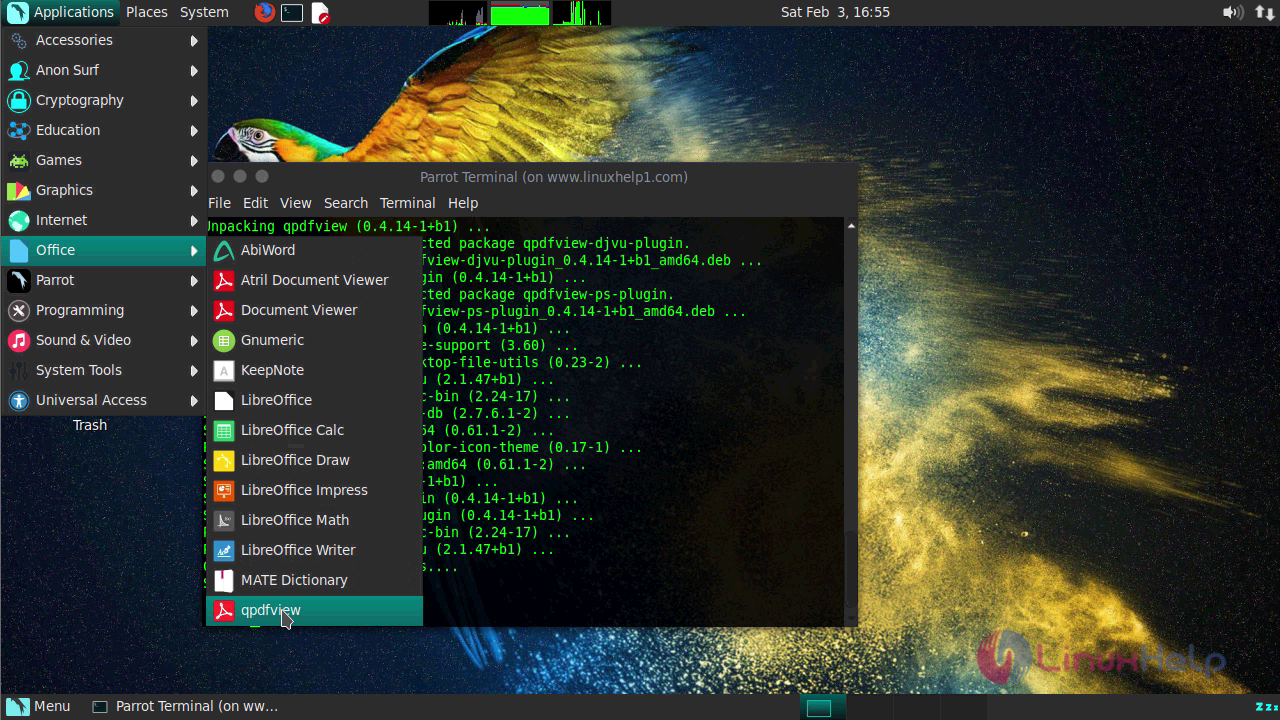
The application now appears on your screen.

With this, the installation of Qpdfview on ParrotOs 3.9 comes to an end.
Comments ( 0 )
No comments available