How to install Rapid Photo Downloader on Debian 8.3
How to install Rapid Photo Downloader on Debian 8.3
The Rapid Photo Downloader imports photos and videos from cameras, phones, memory cards and other devices at high speed. It can be configured to rename photos and videos with meaningful filename. It can also backup photos and videos as they are downloaded. This tutorial covers the installation procedure of Rapid Photo Downloader on Debian 8.3.
Installation procedure
To begin with the installation, use the nano command to open the sources.list configuration file.
root@linuxhelp:~# nano /etc/apt/sources.list
The sources.list file is opened. Now add thes lines at end of the file. Save and exit from the file.
deb http://ftp.debian.org/debian/ stable main contrib non-free
deb http://ftp.de.debian.org/debian jessie main
Next execute the apt-get update command to update the sources.list file in the target system.
root@linuxhelp:~# apt-get update
Get:1 http://ftp.debian.org jessie-updates InRelease [145 kB]
Ign http://ftp.de.debian.org jessie InRelease
Get:2 http://ftp.de.debian.org jessie Release.gpg [2,373 B]
Ign http://ftp.debian.org stable InRelease
Get:3 http://ftp.de.debian.org jessie Release [148 kB]
Get:4 http://ftp.debian.org jessie-updates/main Sources [15.5 kB]
Get:5 http://ftp.debian.org jessie-updates/contrib Sources [32 B]
Get:6 http://ftp.debian.org jessie-updates/main amd64 Packages/DiffIndex [7,900 B]
Get:7 http://ftp.debian.org jessie-updates/contrib amd64 Packages [32 B]
Get:8 http://ftp.debian.org jessie-updates/contrib Translation-en [14 B]
Get:9 http://ftp.debian.org jessie-updates/main Translation-en/DiffIndex [2,704 B]
Get:10 http://ftp.debian.org stable Release.gpg [2,373 B]
Get:11 http://ftp.debian.org jessie-updates/main amd64 2017-03-14-2025.02.pdiff [526 B]
Get:12 http://ftp.debian.org jessie-updates/main amd64 2017-04-15-2027.16.pdiff [528 B]
.
.
Fetched 23.5 MB in 7min 27s (52.5 kB/s)
Reading package lists... Done
Install the Rapid photo Downloder package by executing the following command.
root@linuxhelp:~# apt-get install rapid-photo-downloader
Reading package lists... Done
Building dependency tree
Reading state information... Done
The following extra packages will be installed:
  exiftran exiv2 ffmpegthumbnailer javascript-common libarchive-zip-perl libboost-python1.55.0
  libffmpegthumbnailer4 libimage-exiftool-perl libjs-jquery libjs-sphinxdoc libjs-underscore
  libsqlite0 python-glade2 python-hachoir-core python-hachoir-metadata python-hachoir-parser
  python-kaa-base python-kaa-metadata python-pyexiv2 python-pyexiv2-doc python-sqlite
Suggested packages:
  apache2 lighttpd httpd python-gtk2-doc python-hachoir-urwid python-qt4 python-sqlite-dbg
The following NEW packages will be installed:
  exiftran exiv2 ffmpegthumbnailer javascript-common libarchive-zip-perl libboost-python1.55.0
  libffmpegthumbnailer4 libimage-exiftool-perl libjs-jquery libjs-sphinxdoc libjs-underscore
  libsqlite0 python-glade2 python-hachoir-core python-hachoir-metadata python-hachoir-parser
  python-kaa-base python-kaa-metadata python-pyexiv2 python-pyexiv2-doc python-sqlite
  rapid-photo-downloader
.
.
Setting up rapid-photo-downloader (0.4.10-2) ...
Processing triggers for libc-bin (2.19-18+deb8u2) ...
Once the package is installed, click on the Activities window and type the Rapid photo downloader package name in the search bar. Click on the icon to run the application. 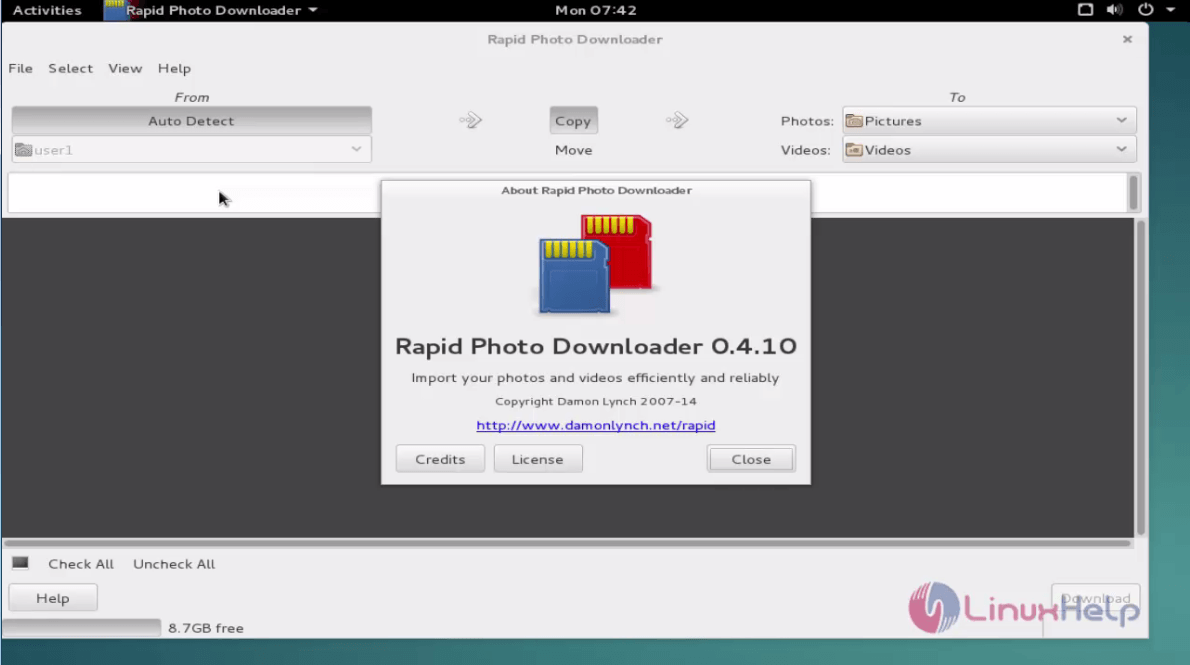
Wasn' t that an easy installation procedure? The Rapid Photo Downloader also downloads from the backs up to multiple devices simultaneosly.
Comments ( 0 )
No comments available