• Categories
    Category
    {{ postCtrl.tags }}
    • {{ category.tag_type }}

      • {{tag.tag_name}}
      • View more
  • Categories
    Category
    {{ postCtrl.tags }}
    • {{ category.tag_type }}

      • {{tag.tag_name}}
      • View more
  • News
  • Tutorials
  • Forums
  • Tags
  • Users
Tutorial News Comments FAQ Related Articles

A view of Linux Directory Structure.

{{postValue.id}}

A view of Linux Directory Structure

Introduction:

Linux file system has a hierarchal file structure that contains a root directory and its subdirectories. All different directories can be accessed from the root directory. A partition normally has one file system, but it may have more than one file system.

Linux directory structure:
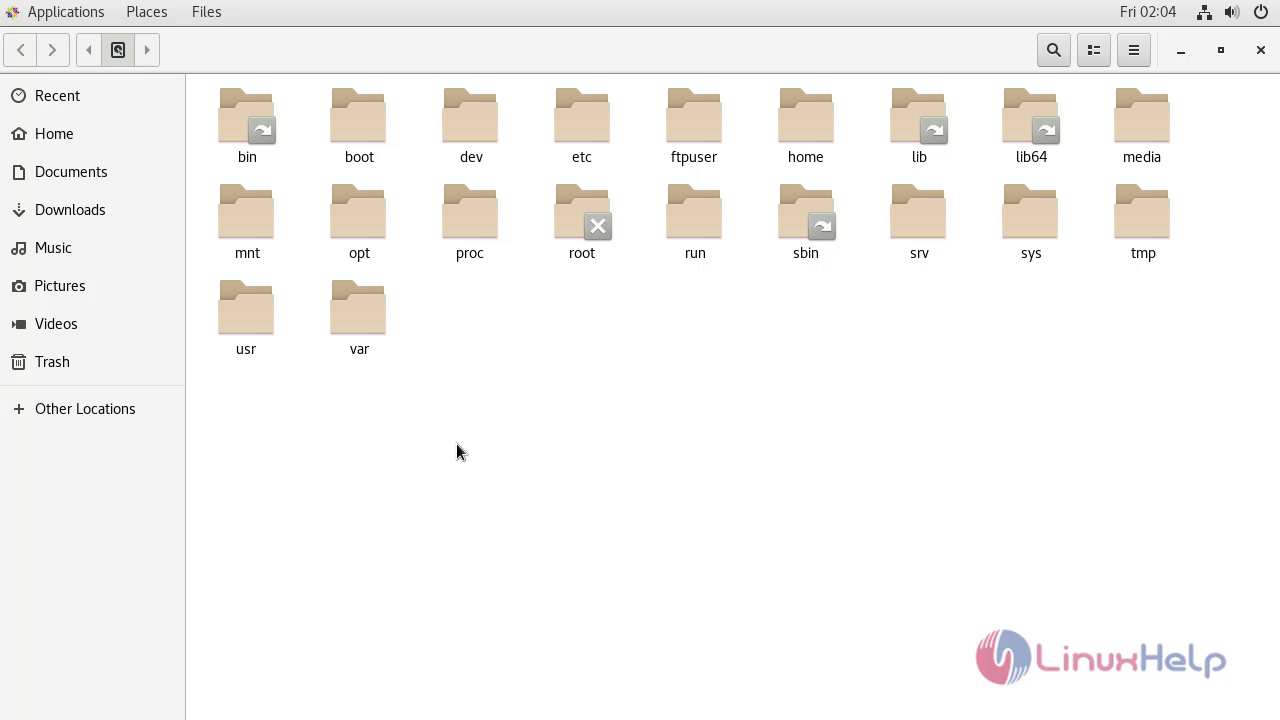
snap1

With this method explanation of Linux directory structure comes to an end.

Tags:
kishore
Author: 

Comments ( 0 )

No comments available

Add a comment
{{postCtrl.cmtErrMsg}}

Frequently asked questions ( 5 )

Q

How can I see folder structure in Linux?

A

Basic Navigation. As mentioned above, the Linux Directory structure refers to the folder of the hard drive where Linux was installed. Start by running the ls (list storage) command and press Enter. This command will show you a list of folders in your current working directory.

Q

How do directories work in Linux?

A

When you log in to Linux, you're placed in a special directory known as your home directory. Generally, each user has a distinct home directory, where the user creates personal files. This makes it simple for the user to find files previously created because they're kept separate from the files of other users.

Q

What are directories in Linux?

A

A directory is a file the sole job of which is to store the file names and the related information. All the files, whether ordinary, special, or directory, are contained in directories. Unix uses a hierarchical structure for organizing files and directories. This structure is often referred to as a directory tree.

Q

What is a file and directory in Linux?

A

Linux stores data and programs in files. These are organized in directories. In a simple way, a directory is just a file that contains other files (or directories). The part of the hard disk where you are authorized to save data is called your home directory.

Q

What is a two-level directory structure?

A

In two-level directory systems, we can create a separate directory for each user. There is one master directory that contains separate directories dedicated to each user. For each user, there is a different directory present at the second level, containing a group of user's files.

Back To Top!
Rank
User
Points

Top Contributers

userNamenaveelansari
135850

Top Contributers

userNameayanbhatti
92510

Top Contributers

userNamehamzaahmed
32150

Top Contributers

1
userNamelinuxhelp
31040

Top Contributers

userNamemuhammadali
24500
Can you help Jayce ?
What are the types of table used in IPtables

What are the various types of table used in IPtables and how to use that for my server security?

Networking
  • Routing
  • trunk
  • Netmask
  • Packet Capture
  • domain
  • HTTP Proxy
Server Setup
  • NFS
  • KVM
  • Memory
  • Sendmail
  • WebDAV
  • LXC
Shell Commands
  • Cloud commander
  • Command line archive tools
  • last command
  • Shell
  • terminal
  • Throttle
Desktop Application
  • Linux app
  • Pithos
  • Retrospect
  • Scribe
  • TortoiseHg
  • 4Images
Monitoring Tool
  • Monit
  • Apache Server Monitoring
  • EtherApe 
  • Arpwatch Tool
  • Auditd
  • Barman
Web Application
  • Nutch
  • Amazon VPC
  • FarmWarDeployer
  • Rukovoditel
  • Mirror site
  • Chef
Contact Us | Terms of Use| Privacy Policy| Disclaimer
© 2025 LinuxHelp.com All rights reserved. Linux™ is the registered trademark of Linus Torvalds. This site is not affiliated with linus torvalds in any way.