How Install R on CentOS 7
To install R/R Studio on CentOS 7
R is a free programming language which is an implementation of S programming language on which it is compatible. R programming language is mostly used for statistics and data science by the data miners. In this tutorial we are going to see about the technique to install R programming language on CentOS 7
Installing R Studio
Before installing the R language, you need to install the epel-repository which is essential for the installation of R.
[root@linuxhelp1 ~]# yum install epel-release -y
Loaded plugins: fastestmirror, langpacks
base                                                                                                                 | 3.6 kB  00:00:00
extras                                                                                                               | 3.4 kB  00:00:00
updates                                                                                                              | 3.4 kB  00:00:00
Determining fastest mirrors
 * base: mirror.fibergrid.in
 * extras: mirror.fibergrid.in
 * updates: mirror.fibergrid.in
Resolving Dependencies
-->  Running transaction check
--->  Package epel-release.noarch 0:7-6 will be installed
-->  Finished Dependency Resolution
.
.
.
Installing:
 epel-release                          noarch                          7-6                            extras                           14 k

Transaction Summary
============================================================================================================================================
Install  1 Package

Total download size: 14 k
Installed size: 24 k
Downloading packages:
epel-release-7-6.noarch.rpm                                                                                          |  14 kB  00:00:00
Running transaction check
Running transaction test
Transaction test succeeded
Running transaction
  Installing : epel-release-7-6.noarch                                                                                                  1/1
  Verifying  : epel-release-7-6.noarch                                                                                                  1/1

Installed:
  epel-release.noarch 0:7-6

Complete!
The R package is ready to be installed now. Use the following command to install it.
[root@linuxhelp1 ~]# yum install R -y
Loading mirror speeds from cached hostfile
 * base: mirror.fibergrid.in
 * epel: kartolo.sby.datautama.net.id
 * extras: mirror.fibergrid.in
 * updates: mirror.fibergrid.in
Resolving Dependencies
-->  Running transaction check
--->  Package R.x86_64 0:3.3.1-2.el7 will be installed
-->  Processing Dependency: libRmath-devel = 3.3.1-2.el7 for package: R-3.3.1-2.el7.x86_64
-->  Processing Dependency: R-java = 3.3.1-2.el7 for package: R-3.3.1-2.el7.x86_64
-->  Processing Dependency: R-devel = 3.3.1-2.el7 for package: R-3.3.1-2.el7.x86_64
-->  Running transaction check
--->  Package R-devel.x86_64 0:3.3.1-2.el7 will be installed
-->  Processing Dependency: R-java-devel = 3.3.1-2.el7 for package: R-devel-3.3.1-2.el7.x86_64
-->  Processing Dependency: R-core-devel = 3.3.1-2.el7 for package: R-devel-3.3.1-2.el7.x86_64
--->  Package R-java.x86_64 0:3.3.1-2.el7 will be installed
-->  Processing Dependency: R-core = 3.3.1-2.el7 for package: R-java-3.3.1-2.el7.x86_64
--->  Package libRmath-devel.x86_64 0:3.3.1-2.el7 will be installed
-->  Processing Dependency: libRmath = 3.3.1-2.el7 for package: libRmath-devel-3.3.1-2.el7.x86_64
-->  Running transaction check
--->  Package R-core.x86_64 0:3.3.1-2.el7 will be installed
-->  Processing Dependency: tex(latex) for package: R-core-3.3.1-2.el7.x86_64
-->  Processing Dependency: tex(dvips) for package: R-core-3.3.1-2.el7.x86_64
-->  Processing Dependency: redhat-rpm-config for package: R-core-3.3.1-2.el7.x86_64
-->  Processing Dependency: libgfortran.so.3(GFORTRAN_1.0)(64bit) for package: R-core-3.3.1-2.el7.x86_64
-->  Processing Dependency: libtre.so.5()(64bit) for package: R-core-3.3.1-2.el7.x86_64
-->  Processing Dependency: libtk8.5.so()(64bit) for package: R-core-3.3.1-2.el7.x86_64
-->  Processing Dependency: libtcl8.5.so()(64bit) for package: R-core-3.3.1-2.el7.x86_64
-->  Processing Dependency: libquadmath.so.0()(64bit) for package: R-core-3.3.1-2.el7.x86_64
-->  Processing Dependency: libgfortran.so.3()(64bit) for package: R-core-3.3.1-2.el7.x86_64
--->  Package R-core-devel.x86_64 0:3.3.1-2.el7 will be installed
.
.
.
texlive-tetex-bin.noarch 2:svn27344.0-38.20130427_r30134.el7
  texlive-tex.noarch 2:svn26689.3.1415926-38.el7
  texlive-tex-bin.x86_64 2:svn26912.0-38.20130427_r30134.el7
  texlive-tex-gyre.noarch 2:svn18651.2.004-38.el7
  texlive-tex-gyre-math.noarch 2:svn29045.0-38.el7
  texlive-texconfig.noarch 2:svn29349.0-38.el7
  texlive-texconfig-bin.noarch 2:svn27344.0-38.20130427_r30134.el7
  texlive-texlive.infra.noarch 2:svn28217.0-38.el7
  texlive-texlive.infra-bin.x86_64 2:svn22566.0-38.20130427_r30134.el7
  texlive-textcase.noarch 2:svn15878.0-38.el7
  texlive-thumbpdf.noarch 2:svn26689.3.15-38.el7
  texlive-thumbpdf-bin.noarch 2:svn6898.0-38.20130427_r30134.el7
  texlive-times.noarch 2:svn28614.0-38.el7
  texlive-tipa.noarch 2:svn29349.1.3-38.el7
  texlive-tools.noarch 2:svn26263.0-38.el7
  texlive-txfonts.noarch 2:svn15878.0-38.el7
  texlive-type1cm.noarch 2:svn21820.0-38.el7
  texlive-typehtml.noarch 2:svn17134.0-38.el7
  texlive-ucs.noarch 2:svn27549.2.1-38.el7
  texlive-underscore.noarch 2:svn18261.0-38.el7
  texlive-unicode-math.noarch 2:svn29413.0.7d-38.el7
  texlive-url.noarch 2:svn16864.3.2-38.el7
  texlive-utopia.noarch 2:svn15878.0-38.el7
  texlive-varwidth.noarch 2:svn24104.0.92-38.el7
  texlive-wasy.noarch 2:svn15878.0-38.el7
  texlive-wasysym.noarch 2:svn15878.2.0-38.el7
  texlive-xcolor.noarch 2:svn15878.2.11-38.el7
  texlive-xdvi.noarch 2:svn26689.22.85-38.el7
  texlive-xdvi-bin.x86_64 2:svn26509.0-38.20130427_r30134.el7
  texlive-xkeyval.noarch 2:svn27995.2.6a-38.el7
  texlive-xunicode.noarch 2:svn23897.0.981-38.el7
  texlive-zapfchan.noarch 2:svn28614.0-38.el7
  texlive-zapfding.noarch 2:svn28614.0-38.el7
  tk.x86_64 1:8.5.13-6.el7
  tk-devel.x86_64 1:8.5.13-6.el7
  tre.x86_64 0:0.8.0-18.20140228gitc2f5d13.el7
  tre-common.noarch 0:0.8.0-18.20140228gitc2f5d13.el7
  tre-devel.x86_64 0:0.8.0-18.20140228gitc2f5d13.el7
  xorg-x11-proto-devel.noarch 0:7.7-12.el7
  xz-devel.x86_64 0:5.1.2-12alpha.el7
  zlib-devel.x86_64 0:1.2.7-15.el7
  zziplib.x86_64 0:0.13.62-5.el7

Complete!
The installation is not complete yet. It is required to install the server IDE - rstudio-server. Use the following command to download it from the site.
[root@linuxhelp1 ~]# wget  https://download2.rstudio.org/rstudio-server-rhel-1.0.44-x86_64.rpm
--2016-11-26 07:13:45--  https://download2.rstudio.org/rstudio-server-rhel-1.0.44-x86_64.rpm
Resolving download2.rstudio.org (download2.rstudio.org)... 52.222.135.245, 52.222.135.254, 52.222.135.109, ...
Connecting to download2.rstudio.org (download2.rstudio.org)|52.222.135.245|:443... connected.
HTTP request sent, awaiting response... 200 OK
Length: 41364624 (39M) [application/x-redhat-package-manager]
Saving to: ‘ rstudio-server-rhel-1.0.44-x86_64.rpm’

100%[==================================================================================================> ] 41,364,624   270KB/s   in 2m 32s

2016-11-26 07:16:18 (265 KB/s) - ‘ rstudio-server-rhel-1.0.44-x86_64.rpm’  saved [41364624/41364624]
Once you have downloaded the server, install it with the help of following command.
[root@linuxhelp1 ~]# yum install --nogpgcheck rstudio-server-rhel-1.0.44-x86_64.rpm
Loaded plugins: fastestmirror, langpacks
Examining rstudio-server-rhel-1.0.44-x86_64.rpm: rstudio-server-1.0.44-1.x86_64
Marking rstudio-server-rhel-1.0.44-x86_64.rpm to be installed
Resolving Dependencies
-->  Running transaction check
--->  Package rstudio-server.x86_64 0:1.0.44-1 will be installed
-->  Finished Dependency Resolution

Dependencies Resolved

============================================================================================================================================
 Package                        Arch                   Version                     Repository                                          Size
============================================================================================================================================
Installing:
 rstudio-server                 x86_64                 1.0.44-1                    /rstudio-server-rhel-1.0.44-x86_64                 310 M
.
.
.
Verifying  : rstudio-server-1.0.44-1.x86_64                                                                                           1/1

Installed:
  rstudio-server.x86_64 0:1.0.44-1

Complete!
The service starts immediately. Lets check if it is running properly by triggering the following command.
[root@linuxhelp1 ~]# systemctl status rstudio-server.service
 rstudio-server.service - RStudio Server
   Loaded: loaded (/etc/systemd/system/rstudio-server.service  enabled  vendor preset: disabled)
   Active: active (running) since Sat 2016-11-26 07:17:55 IST  41s ago
  Process: 4267 ExecStart=/usr/lib/rstudio-server/bin/rserver (code=exited, status=0/SUCCESS)
 Main PID: 4268 (rserver)
   CGroup: /system.slice/rstudio-server.service
           ??4268 /usr/lib/rstudio-server/bin/rserver

Nov 26 07:17:53 linuxhelp1 systemd[1]: Starting RStudio Server...
Nov 26 07:17:55 linuxhelp1 systemd[1]: Started RStudio Server.
RStudio service is running well. Lets connect to the server. Use the IP address of your server and port 8787 lilke http://youriporhostname:8787/
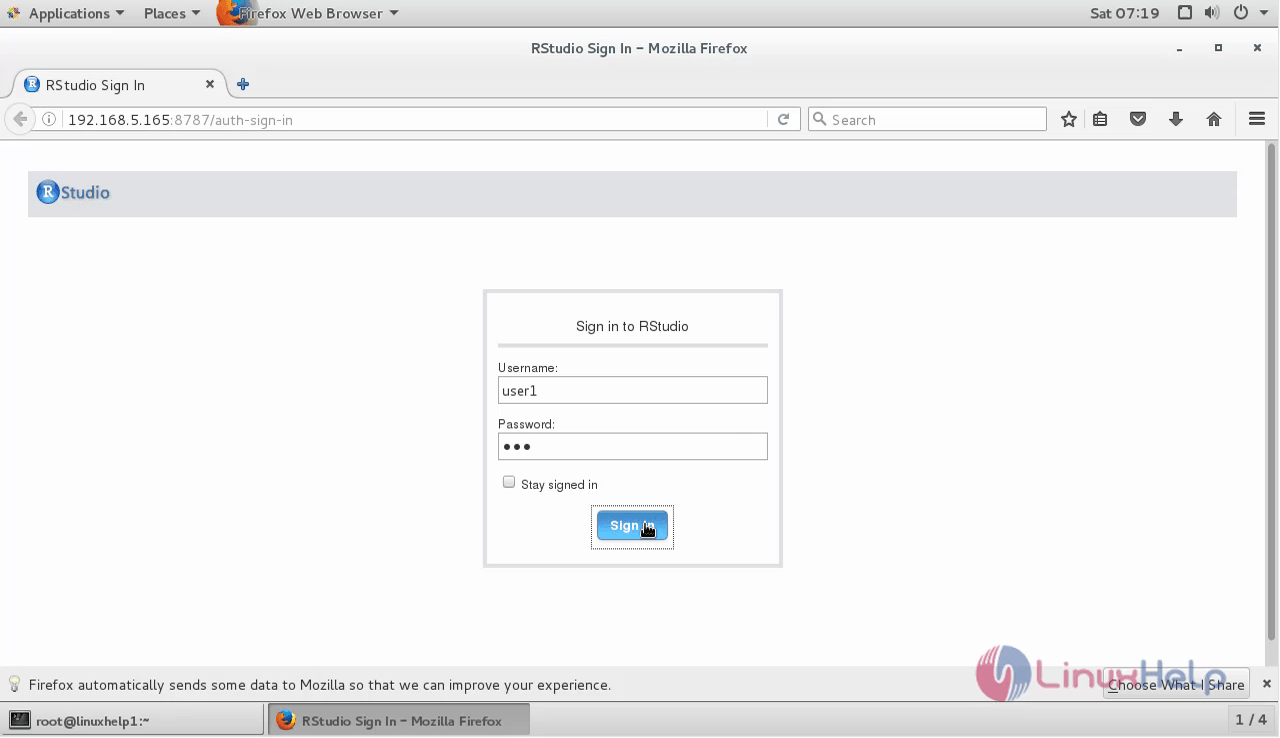
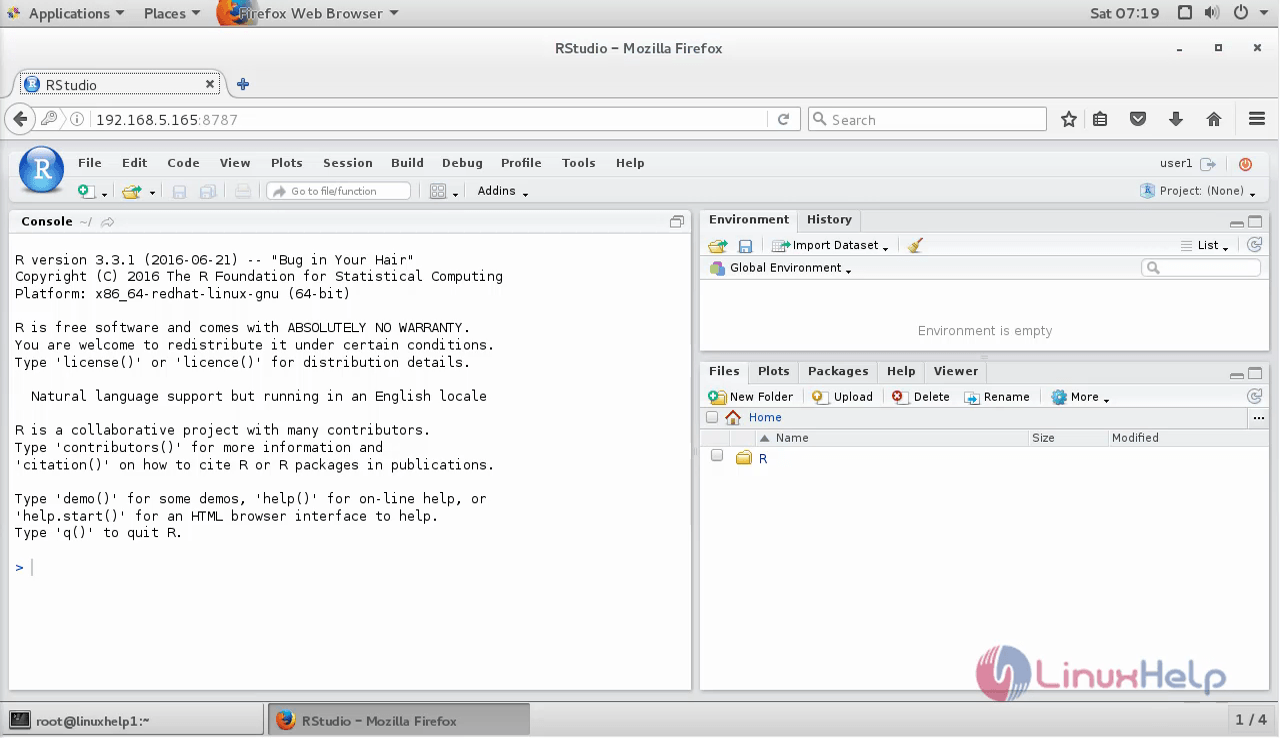
Log in with your non-root Linux user that you have created. After logging in, you would get to IDE as the following image.
Adding packages from CRAN
On above picture we see the R prompt where you can type commands. This commands will execute as non-root user. When you want to add new packages from CRAN (Comprehensive R Archive Network) you generally need to use root user. That way you will have packages usable for all users, while when adding as non-root, you will be able to use it only as that user. You can add packages as root outside of IDE, type sudo -i R on your server bash shell logged in as user. As we are going to add packages that are not entirely written in R, we need to add build tools first.
[root@linuxhelp1 ~]# yum groupinstall " Development Tools"
Loaded plugins: fastestmirror, langpacks
There is no installed groups file.
Maybe run: yum groups mark convert (see man yum)
Loading mirror speeds from cached hostfile
 * base: mirror.fibergrid.in
 * epel: epel.mirror.angkasa.id
 * extras: mirror.fibergrid.in
 * updates: mirror.fibergrid.in
Resolving Dependencies
-->  Running transaction check
--->  Package autoconf.noarch 0:2.69-11.el7 will be installed
-->  Processing Dependency: m4 > = 1.4.14 for package: autoconf-2.69-11.el7.noarch
--->  Package automake.noarch 0:1.13.4-3.el7 will be installed
-->  Processing Dependency: perl(Thread::Queue) for package: automake-1.13.4-3.el7.noarch
-->  Processing Dependency: perl(TAP::Parser) for package: automake-1.13.4-3.el7.noarch
--->  Package bison.x86_64 0:2.7-4.el7 will be installed
--->  Package byacc.x86_64 0:1.9.20130304-3.el7 will be installed
--->  Package cscope.x86_64 0:15.8-7.el7 will be installed
--->  Package ctags.x86_64 0:5.8-13.el7 will be installed
--->  Package diffstat.x86_64 0:1.57-4.el7 will be installed
--->  Package doxygen.x86_64 1:1.8.5-3.el7 will be installed
.
.
.
Dependency Installed:
  apr.x86_64 0:1.4.8-3.el7                  apr-util.x86_64 0:1.5.2-6.el7                 gettext-common-devel.noarch 0:0.18.2.1-4.el7
  gettext-devel.x86_64 0:0.18.2.1-4.el7     kernel-devel.x86_64 0:3.10.0-327.36.3.el7     m4.x86_64 0:1.4.16-10.el7
  mokutil.x86_64 0:0.9-2.el7                perl-Error.noarch 1:0.17020-2.el7             perl-Git.noarch 0:1.8.3.1-6.el7_2.1
  perl-TermReadKey.x86_64 0:2.30-20.el7     perl-Test-Harness.noarch 0:3.28-3.el7         perl-Thread-Queue.noarch 0:3.02-2.el7
  perl-XML-Parser.x86_64 0:2.41-10.el7      subversion-libs.x86_64 0:1.7.14-10.el7        systemtap-client.x86_64 0:2.8-10.el7
  systemtap-devel.x86_64 0:2.8-10.el7

Complete!
Log into the R prompt as follows.
[root@linuxhelp1 ~]# sudo -i R

R version 3.3.1 (2016-06-21) -- " Bug in Your Hair"
Copyright (C) 2016 The R Foundation for Statistical Computing
Platform: x86_64-redhat-linux-gnu (64-bit)

R is free software and comes with ABSOLUTELY NO WARRANTY.
You are welcome to redistribute it under certain conditions.
Type ' license()'  or ' licence()'  for distribution details.

  Natural language support but running in an English locale

R is a collaborative project with many contributors.
Type ' contributors()'  for more information and
' citation()'  on how to cite R or R packages in publications.

Type ' demo()'  for some demos, ' help()'  for on-line help, or
' help.start()'  for an HTML browser interface to help.
Type ' q()'  to quit R.

>

And there type the following to install package we need:

install.packages(" quantmod" )
Installing package into ‘ /usr/lib64/R/library’
(as ‘ lib’  is unspecified)
--- Please select a CRAN mirror for use in this session ---
also installing the dependencies ‘ xts’ , ‘ zoo’ , ‘ TTR’

trying URL ' https://ftp.iitm.ac.in/cran/src/contrib/xts_0.9-7.tar.gz'
Content type ' unknown'  length 470815 bytes (459 KB)
==================================================
downloaded 459 KB

trying URL ' https://ftp.iitm.ac.in/cran/src/contrib/zoo_1.7-13.tar.gz'
Content type ' unknown'  length 842068 bytes (822 KB)
==================================================
downloaded 822 KB
A HTTPS CRAN mirror prompt appears which has the list of geographical location from where to fetch the package. Choose which is closest to you.
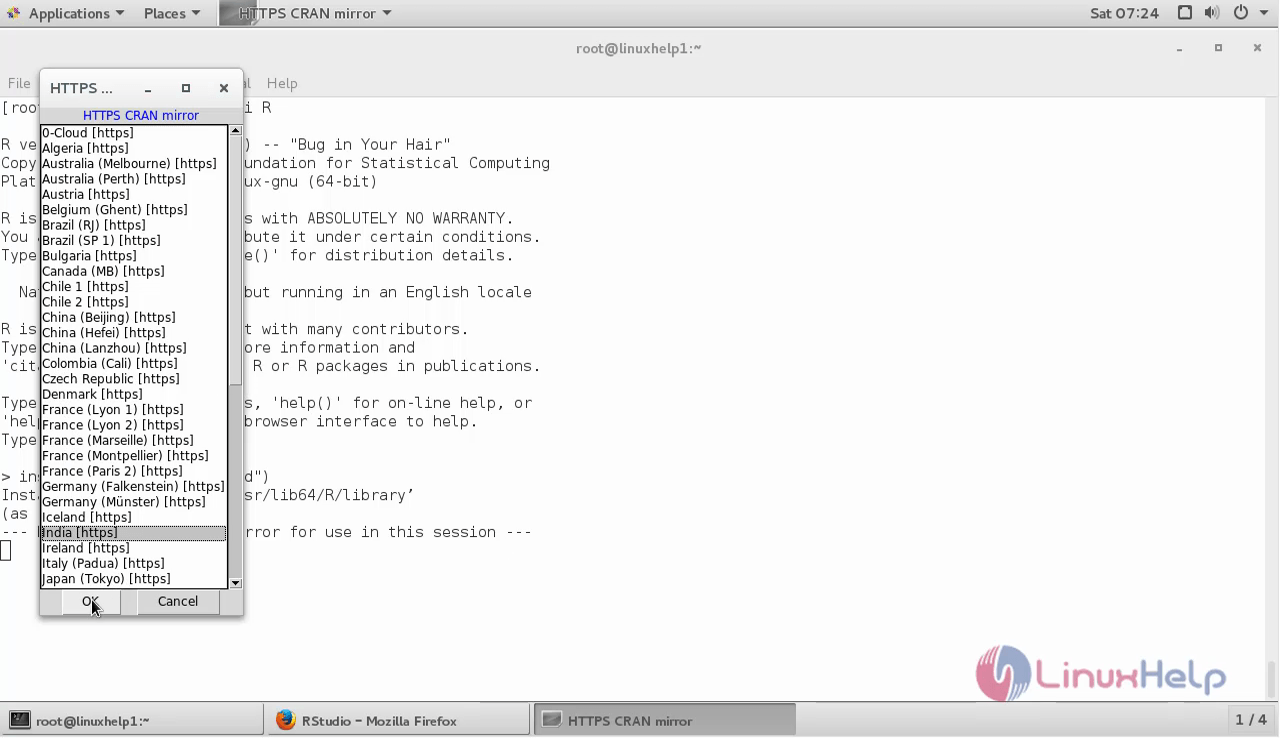
After package is fetched, it will compile it and we can move to next package we need.
>  install.packages(' txtplot' )
Installing package into ‘ /usr/lib64/R/library’
(as ‘ lib’  is unspecified)
trying URL ' https://ftp.iitm.ac.in/cran/src/contrib/txtplot_1.0-3.tar.gz'
Content type ' unknown'  length 6152 bytes
==================================================
downloaded 6152 bytes

* installing *source* package ‘ txtplot’  ...
** package ‘ txtplot’  successfully unpacked and MD5 sums checked
** R
** preparing package for lazy loading
** help
*** installing help indices
  converting help for package ‘ txtplot’
    finding HTML links ... done
    txtboxplot                              html
    txtplot                                 html
Making the Statistical graph in R-Studio
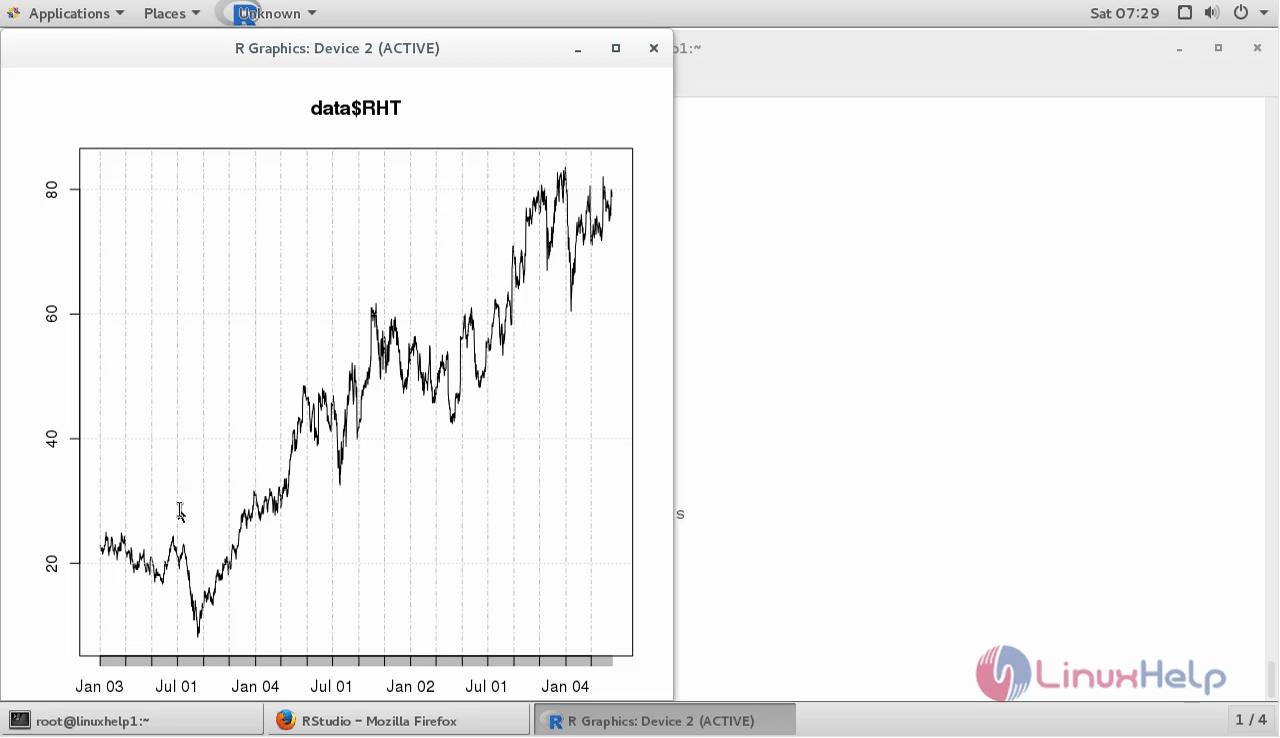
Let us make a statistical graph using R-Studio. Here we are going to make a graph of Hat stock. So, load the library you are going to use as follows.
library(' quantmod' )
Loading required package: xts
Loading required package: zoo

Attaching package: ‘ zoo’

The following objects are masked from ‘ package:base’ :

    as.Date, as.Date.numeric

Loading required package: TTR
Version 0.4-0 included new data defaults. See ?getSymbols.

Add environment variable
>  data < - new.env()

And plot data

getSymbols(' RHT' ,data)
    As of 0.4-0, ‘ getSymbols’  uses env=parent.frame() and
 auto.assign=TRUE by default.

 This  behavior  will be  phased out in 0.5-0  when the call  will
 default to use auto.assign=FALSE. getOption(" getSymbols.env" ) and
 getOptions(" getSymbols.auto.assign" ) are now checked for alternate defaults

 This message is shown once per session and may be disabled by setting
 options(" getSymbols.warning4.0" =FALSE). See ?getSymbols for more details.
[1] " RHT"
>
>  plot(data$RHT)
Warning message:
In plot.xts(data$RHT) : only the univariate series will be plotted
The graph looks as follows.
Comments ( 1 )