• Categories
    Category
    {{ postCtrl.tags }}
    • {{ category.tag_type }}

      • {{tag.tag_name}}
      • View more
  • Categories
    Category
    {{ postCtrl.tags }}
    • {{ category.tag_type }}

      • {{tag.tag_name}}
      • View more
  • News
  • Tutorials
  • Forums
  • Tags
  • Users
Tutorial News Comments FAQ Related Articles

How to Add Users to Group in GitLab-CE 12.0.3

{{postValue.id}}

How to Create and Add User Into a Particular group In Gitlab-CE 12.0.3

**GitLab is a free git repository management application based on Ruby on Rails. It offers .deb package which contains GitLab Community Edition and all its dependencies such as Ruby, PostgreSQL, Redis, Nginx, etc compiled in it. This tutorial explains the method to add the users into a particular group In Gitlab-CE 12.0.3 **

**Open your Browser and Enter the Gitlab Server IP ** Snap (1)

User creation

After Successful Login of Administrators Account, Click on Admin’s Area to create a user Snap (2) Snap (3) Create the User with the required details as shown below Snap (4) Snap (5) Snap (6) Snap (7)

Set a password

After the successful creation Of user,Edit the user profile to set a password and save the profile Snap (8) Snap (9)

Navigate to Admin’s Area to verify the created user in the latest users list Snap (10)

Addition of user into the Particular Group

Click on Groups then Your groups to choose the group Snap (11)

Click On the group that you would want to add as shown below Snap (12)

Click on Members to add the user into the following group Snap (13)

Add the user with its appropriate role and add to group and user has been successfully added to the group as follows Snap (14) Snap (15)

Block, Delete and Delete With Contributions of user

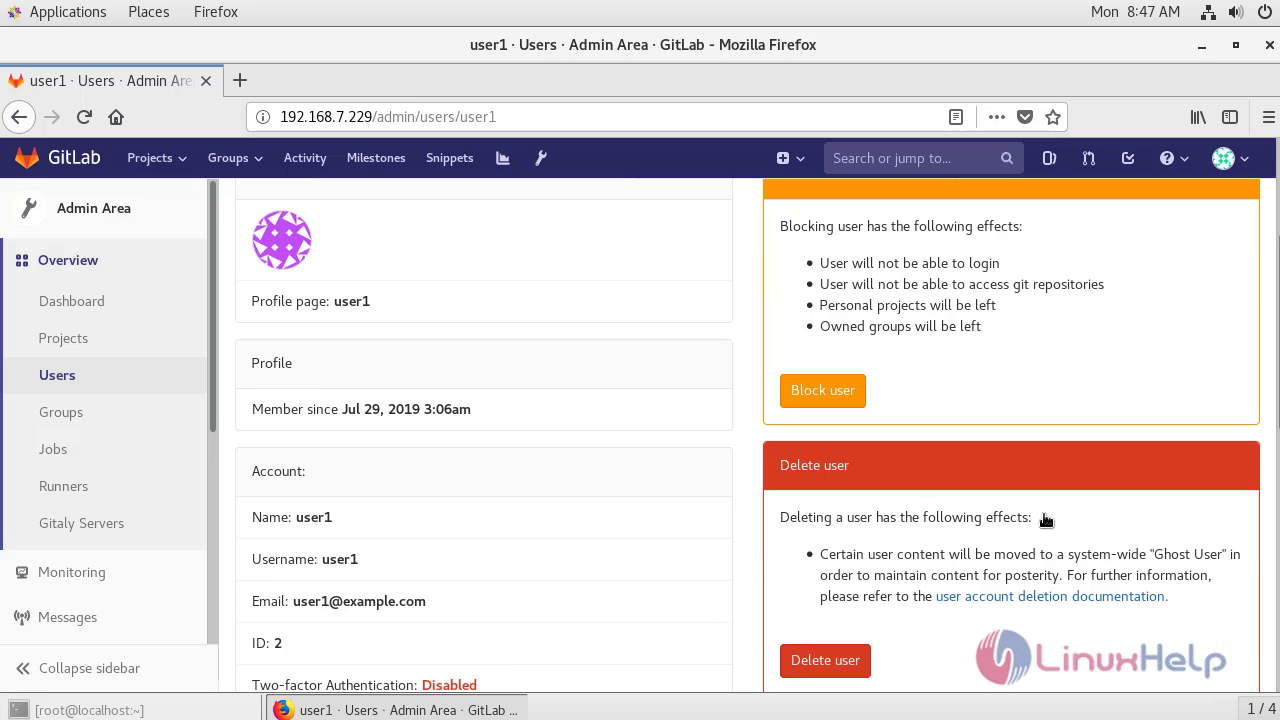
Click On Admin’s Area.choose the user1 profile Snap (16) Snap (17)

Click On Appropriate options either by clicking on the block delete and delete with the contribution of user Snap (18) Snap (19)
With this,The method to create a user and add the created user into a particular group comes to end.

Tags:
isaiah
Author: 

Comments ( 0 )

No comments available

Add a comment
{{postCtrl.cmtErrMsg}}

Frequently asked questions ( 5 )

Q

What is Gitlab-CI in gitlab?

A

Gitlab-CI allows the user to add a gitlab-ci yml variables that are set in the build environment which are saved in the repository of gitlab

Q

What are artifacts in Gitlab?

A

Artifacts is a list of files and directories which are attached to a job after it finishes which is enabled by default in all gitlab Installation

Q

What is Gitlab Continuous Integration?

A

Continuous integration in gitlab works to integrate code from your team in a shared repository

Q

What is CD In Gitlab?

A

Continuous Delivery delivers CI validated code to your application

Q

Does CI in gitlab reduce bugs?

A

Continuous Integration reduce bugs in Gitlab

Back To Top!
Rank
User
Points

Top Contributers

userNamenaveelansari
135850

Top Contributers

userNameayanbhatti
92510

Top Contributers

userNamehamzaahmed
32150

Top Contributers

1
userNamelinuxhelp
31040

Top Contributers

userNamemuhammadali
24500
Can you help Lucas ?
Various options in Top command

Am using Top command only to view the load average, what are the various options in Top command..??

Networking
  • Routing
  • trunk
  • Netmask
  • Packet Capture
  • domain
  • HTTP Proxy
Server Setup
  • NFS
  • KVM
  • Memory
  • Sendmail
  • WebDAV
  • LXC
Shell Commands
  • Cloud commander
  • Command line archive tools
  • last command
  • Shell
  • terminal
  • Throttle
Desktop Application
  • Linux app
  • Pithos
  • Retrospect
  • Scribe
  • TortoiseHg
  • 4Images
Monitoring Tool
  • Monit
  • Apache Server Monitoring
  • EtherApe 
  • Arpwatch Tool
  • Auditd
  • Barman
Web Application
  • Nutch
  • Amazon VPC
  • FarmWarDeployer
  • Rukovoditel
  • Mirror site
  • Chef
Contact Us | Terms of Use| Privacy Policy| Disclaimer
© 2025 LinuxHelp.com All rights reserved. Linux™ is the registered trademark of Linus Torvalds. This site is not affiliated with linus torvalds in any way.