• Categories
    Category
    {{ postCtrl.tags }}
    • {{ category.tag_type }}

      • {{tag.tag_name}}
      • View more
  • Categories
    Category
    {{ postCtrl.tags }}
    • {{ category.tag_type }}

      • {{tag.tag_name}}
      • View more
  • News
  • Tutorials
  • Forums
  • Tags
  • Users
Tutorial News Comments FAQ Related Articles

How to Configure Amazon Polly on AWS

{{postValue.id}}

To Configure the Amazon Polly on AWS

Introduction:

Amazon Polly is a service that converts text into lifelike speech, enable us to create applications that talk and build fully new levels of speech-enabled products. Polly's Text-to-Speech (TTS) service uses high-level deep learning technologies to synthesize natural-sounding human speech. With dozens of simulated voices beyond a broad set of languages, we can develop speech-enabled applications that work in various different countries. They provide 5 million characters free per month for 12 months. In this tutorial, we will cover about to configure Amazon Polly on AWS.

Procedure:

Switch your AWS console and login your account snap1

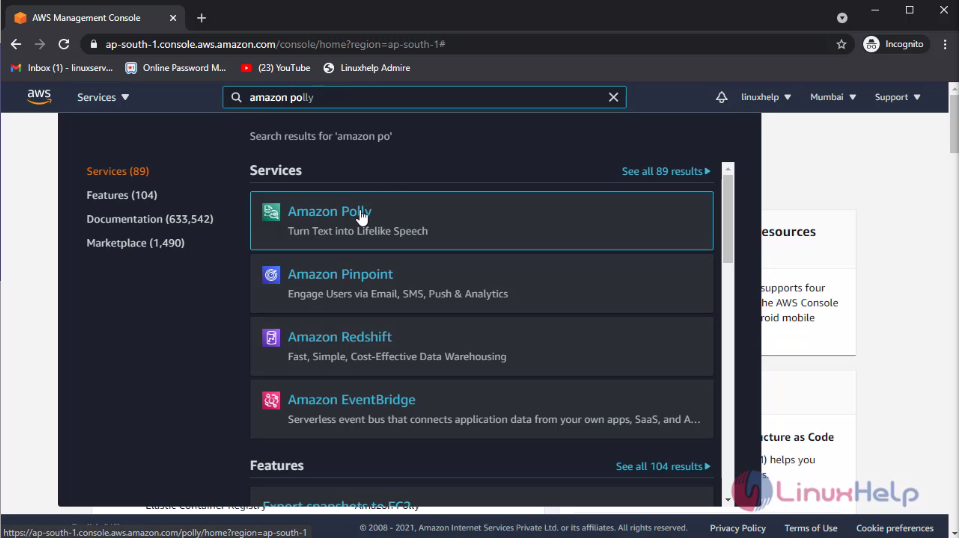
Then click services and search Amazon Polly and click it snap2
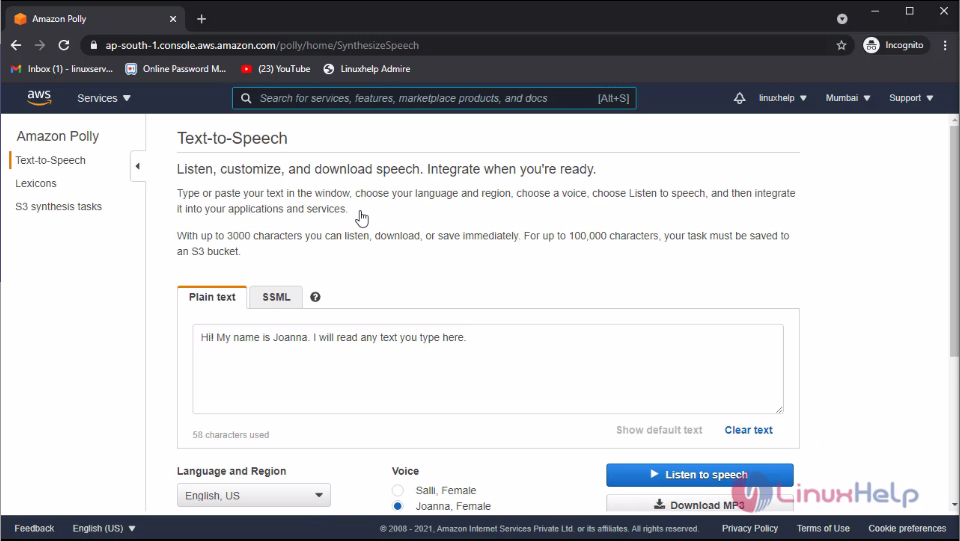
This is the dashboard of the Amazon Polly. Here you can see the Text to Speech tab. snap3
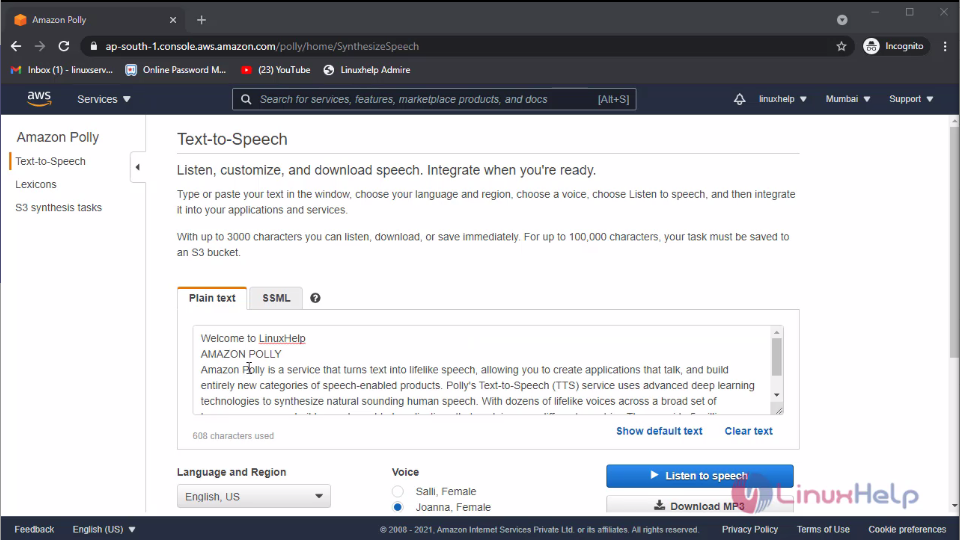
In this tab you can convert your content to the speech. For that type your content or paste your content on the plain text field snap4
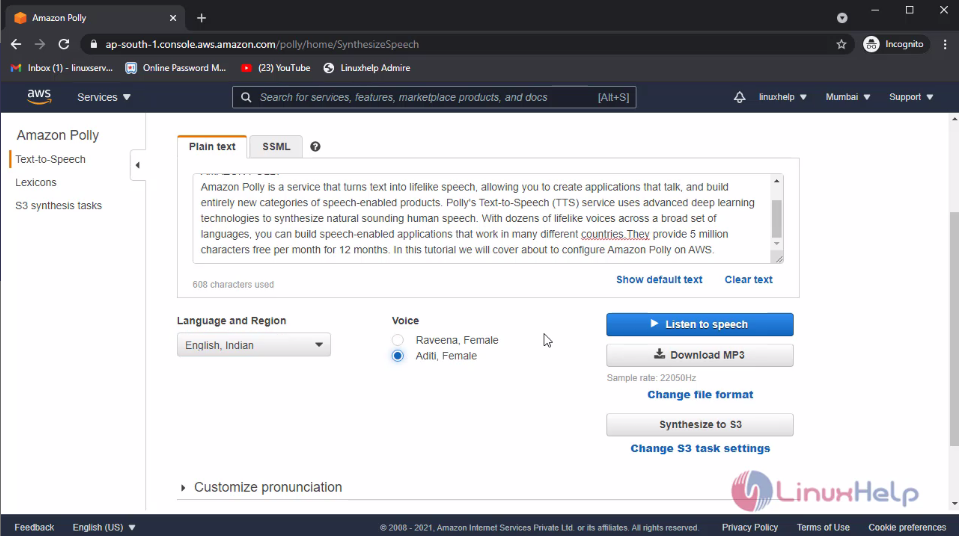
Then you can select your language, region and select voice. Then click listen to speech snap5
There is also another option is available for the text to speech that is SSML. It is helps you to define the break time between the words and sentences. For the click SSML. Then paste are type your content and define the break time as follows. Then click listen to speech snap6
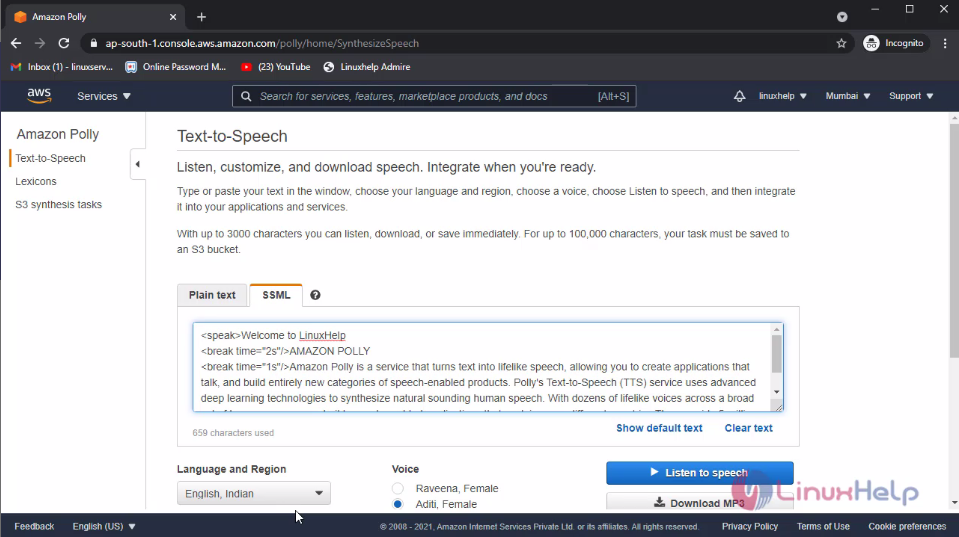
On the left side of the window, you can see lexicons and S# synthesis tasks. The lexicons is used to customize your words and phrases and upload to the lexicon files snap7

The S3 synthesis is used to store the audio conversion files to this S3 bucket.

With this method to create and configure the Amazon Polly on AWS is come to an end.

Tags:
elijah
Author: 

Comments ( 0 )

No comments available

Add a comment
{{postCtrl.cmtErrMsg}}

Frequently asked questions ( 5 )

Q

What is Amazon Polly?

A

Amazon Polly is a service that turns text into lifelike speech. Amazon Polly enables existing applications to speak as a first-class feature and creates the opportunity for entirely new categories of speech-enabled products, from mobile apps and cars to devices and appliances.

Q

Why should I use Amazon Polly?

A

You can use Amazon Polly to power your application with high-quality spoken output. This cost-effective service has very low response times, and is available for virtually any use case, with no restrictions on storing and reusing generated speech.

Q

What features are available?

A

You can control various aspects of speech such as pronunciation, volume, pitch, speech rate, etc. using standardized Speech Synthesis Markup Language (SSML). You can synthesize speech for certain Neural voices using the Newscaster style, to make them sound like a TV or radio newscaster. You can detect when specific words or sentences in the text are being spoken to the user based on the metadata included in the audio stream.

Q

How do I get started with Amazon Polly?

A

Simply log in to your AWS account and navigate to the Amazon Polly console (which is a part of the AWS Console). You can then use the console to type in any text and listen to the generated speech or save it as an audio file.

Q

Which programming languages are supported?

A

Amazon Polly supports all the programming languages included in the AWS SDK (Java, Node.js, .NET, PHP, Python, Ruby, Go, and C++) and AWS Mobile SDK (iOS/Android). Amazon Polly also supports an HTTP API so you can implement your own access layer.

Back To Top!
Rank
User
Points

Top Contributers

userNamenaveelansari
135850

Top Contributers

userNameayanbhatti
92510

Top Contributers

userNamehamzaahmed
32150

Top Contributers

1
userNamelinuxhelp
31040

Top Contributers

userNamemuhammadali
24500
Can you help Elijah ?
Remote Desktop Connection Has Stopped Working

When accessing my remote machine server using remote desktop on a windows machine I am getting this error

forum (1)

Networking
  • Routing
  • trunk
  • Netmask
  • Packet Capture
  • domain
  • HTTP Proxy
Server Setup
  • NFS
  • KVM
  • Memory
  • Sendmail
  • WebDAV
  • LXC
Shell Commands
  • Cloud commander
  • Command line archive tools
  • last command
  • Shell
  • terminal
  • Throttle
Desktop Application
  • Linux app
  • Pithos
  • Retrospect
  • Scribe
  • TortoiseHg
  • 4Images
Monitoring Tool
  • Monit
  • Apache Server Monitoring
  • EtherApe 
  • Arpwatch Tool
  • Auditd
  • Barman
Web Application
  • Nutch
  • Amazon VPC
  • FarmWarDeployer
  • Rukovoditel
  • Mirror site
  • Chef
Contact Us | Terms of Use| Privacy Policy| Disclaimer
© 2025 LinuxHelp.com All rights reserved. Linux™ is the registered trademark of Linus Torvalds. This site is not affiliated with linus torvalds in any way.