How to configure network on CentOS 7
To configure network on CentOS 7
Generally after installing CentOS 7 , the network cannot be connected in that machine. These troubleshooting methods helps to setup network on centos 7 in both GUI and Command mode.
To Setup network
To identify ethernet cards in your machine,you can use any of the three commands below
nmcli d (or) ifconfig (or) ip a,Here we are using “ nmcli d”
Type " nmcli d" in your terminal
Output
[root@linuxhelp ~]$ nmcli  d
DEVICE          TYPE          STATE             CONNECTION
eno16777736     ethernet      disconnected          --
lo               loopback unmanaged             --
To setup network in GUI mode
Type “ nmtui” to open Network manager and then edit a connection
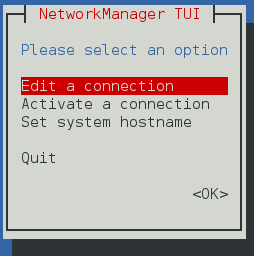
Available network interface will be displayed
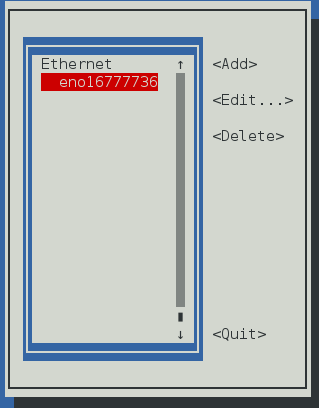
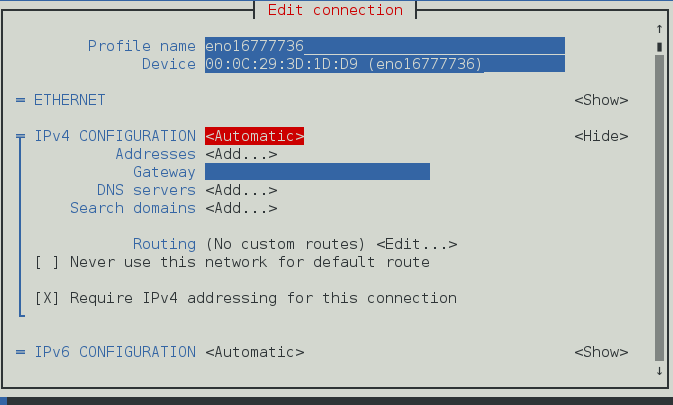
To configure DHCP
1. Move the highlighter to the IPv4 CONFIGURATION and press enter
2. Choose “ Automatic” from the list
3. Choose Automatic Connect check box.
4. Press OK and quit Network manager.
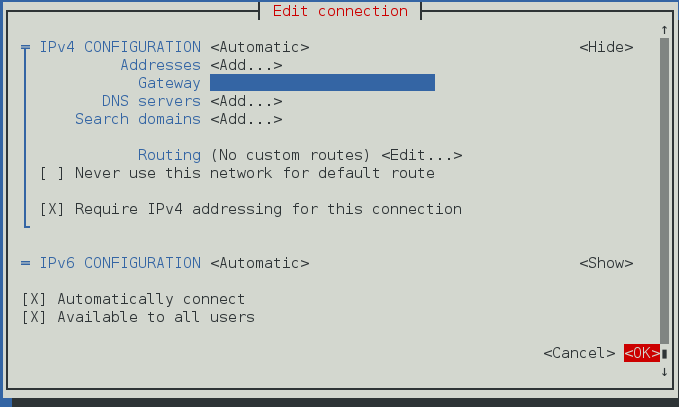
To Restart network service
[root@linuxhelp ~]# systemctl restart network
The server gets the IP address from DHCP server
Static configuration For Manual IP address
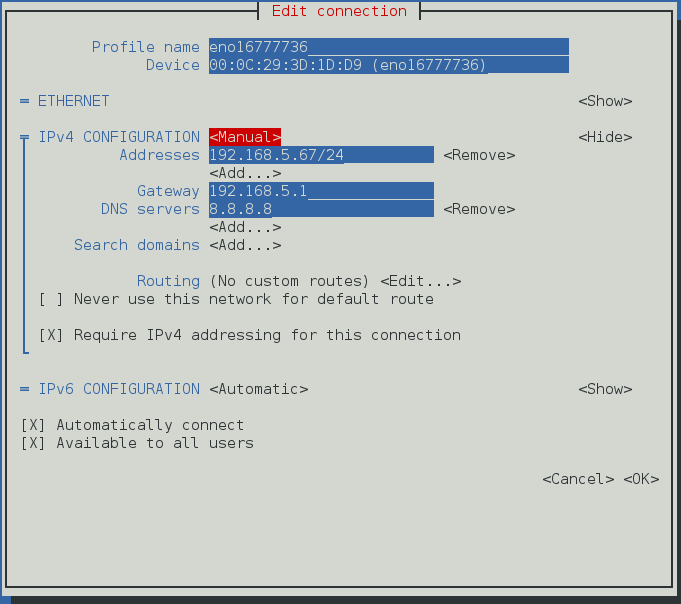
1. Choose “ Manual” in IPv4 CONFIGURATION.
2. Add IP Address with Subnet , Gateway and DNS server ( Refer below image ).
3. Choose Automatic Connect check box.
4. Press OK and quit Network manager.
To restart network service
[root@linuxhelp ~]# systemctl restart network
In Command mode
In command line interface mode network can be set by editing the configuration file in the following path.
[root@linuxhelp ~]$ vim /etc/sysconfig/network-scripts/ifcfg-eno16777736
TYPE=Ethernet
BOOTPROTO=none
DEFROUTE=yes
IPV4_FAILURE_FATAL=no
IPV6INIT=yes
IPV6_AUTOCONF=yes
IPV6_DEFROUTE=yes
IPV6_FAILURE_FATAL=no
NAME=eno16777736
UUID=1edfad82-a530-4b13-8839-e985423c22b7
ONBOOT=no
HWADDR=00:0C:29:3D:1D:D9
PEERDNS=yes
PEERROUTES=yes
IPV6_PEERDNS=yes
IPV6_PEERROUTES=yes
For DHCP configuration
Edit only the below mentioned two configuration
BOOTPROTO,ONBOOT
and replace it with
BOOTPROTO=dhcp
ONBOOT=yes
Now restart the network service through command line
[root@linuxhelp ~]# systemctl restart network
For Static Configuration
Edit the below configuration and also add some more configurations
BOOTPROTO=none
ONBOOT=no
replace with
BOOTPROTO=static
ONBOOT=yes
Now restart the network service through command line
[root@linuxhelp ~]# systemctl restart network
Now you can check ip using ip a command
[root@linuxhelp Desktop]# ip a
1: lo: < LOOPBACK,UP,LOWER_UP>  mtu 65536 qdisc noqueue state UNKNOWN
    link/loopback 00:00:00:00:00:00 brd 00:00:00:00:00:00
    inet 127.0.0.1/8 scope host lo
       valid_lft forever preferred_lft forever
    inet6 ::1/128 scope host
       valid_lft forever preferred_lft forever
2: eno16777736: < BROADCAST,MULTICAST,UP,LOWER_UP>  mtu 1500 qdisc pfifo_fast state UP qlen 1000
    link/ether 00:0c:29:3d:1d:d9 brd ff:ff:ff:ff:ff:ff
    inet 192.168.5.67/24 brd 192.168.5.255 scope global eno16777736
       valid_lft forever preferred_lft forever
    inet6 fe80::20c:29ff:fe3d:1dd9/64 scope link
       valid_lft forever preferred_lft forever
If you just want to edit the hostname, edit the hostname file in the following path
[root@linuxhelp Desktop]# vim /etc/hostname
Comments ( 0 )
No comments available