• Categories
    Category
    {{ postCtrl.tags }}
    • {{ category.tag_type }}

      • {{tag.tag_name}}
      • View more
  • Categories
    Category
    {{ postCtrl.tags }}
    • {{ category.tag_type }}

      • {{tag.tag_name}}
      • View more
  • News
  • Tutorials
  • Forums
  • Tags
  • Users
Tutorial News Comments FAQ Related Articles

How to configure WebUI in Supervisor

{{postValue.id}}

To configure WebUI in Supervisor

Supervisor is a client/server process control system that allows its users to monitor and control a number of processes on Linux and other UNIX-like operating systems. Supervisor will manage your process to live all time. It is so simple to install Supervisor, and this article covers the method to configure WebUI for Supervisor on CentOS7.

The installation and configuration of daemon for supervisor on CentOS is already covered, if you have missed it click here.

Configuring WebUI

First, begin the process by opening the .conf file of the Supervisor.

[root@linuxhelp ~ ]# vim /etc/supervisord.conf

And in that file, you need to edit the following lines

.
.
[inet_http_server]
port=192.168.7.211:9001
username=user
password=123
.
.
And add following program to monitor 
[program:test]
command=/bin/cat
[program:test1]
command=/bin/vim

Once it is done, you need to restart supervisord by making use of the following command.

[root@linuxhelp ~ ]# systemctl restart supervisord


And then, if you want to check if the program is monitor by supervisor give following command

[root@linuxhelp ~ ]# supervisorctl 
test                             RUNNING   pid 4029, uptime 0:00:07
test1                            RUNNING   pid 4030, uptime 0:00:07
supervisor>  exit


You shall now go to your browser and give http://< serverip> :9001 as URL. Once the login page appears give the username and password and then click OK.
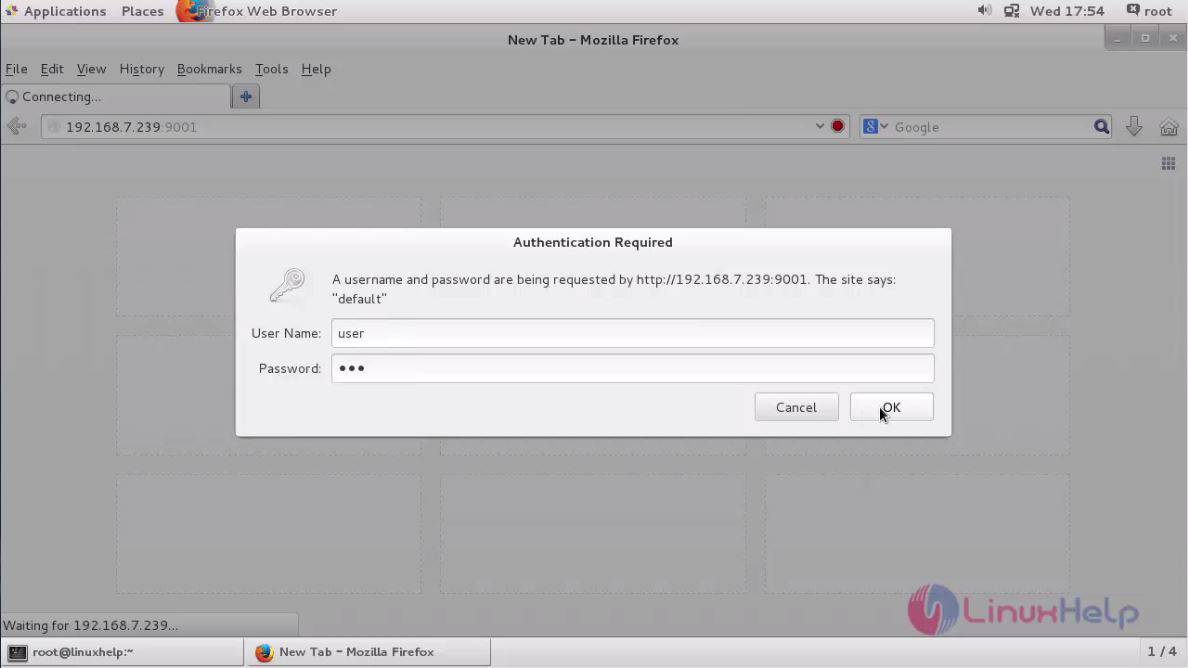
URL

Supervisor is now open in your browser.
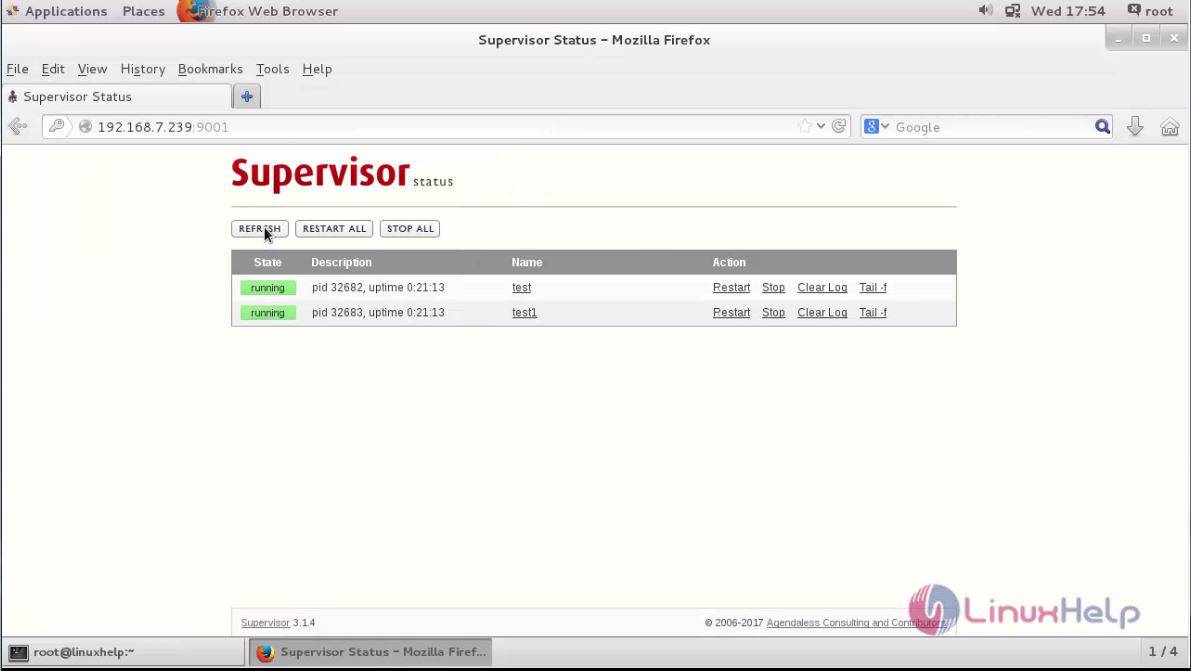
Supervisor


With this, the method to configure WebUI on Supervisor comes to an end.

Tags:
liam
Author: 

Comments ( 0 )

No comments available

Add a comment
{{postCtrl.cmtErrMsg}}

Frequently asked questions ( 5 )

Q

How to configure daemon service for supervisor?

A

You can follow this link to configure the supervisor service:
https://www.linuxhelp.com/how-to-install-and-configure-daemon-for-supervisor-on-centos7/

Q

what is supervisor and what for it is used?

A

Supervisor is a client/server process control system that allows its users to monitor
and control a number of processes on Linux and other UNIX-like operating systems.

Q

Where have you configured username and password?

A

under this file
"/etc/supervisord.conf"

Q

How to restart supervisor service?

A

The below command to restart the service:
# systemctl restart supervisor

Q

How can I check the program for monitor by the supervisor?

A

Run the following command:
# supervisorctl

Back To Top!
Rank
User
Points

Top Contributers

userNamenaveelansari
135850

Top Contributers

userNameayanbhatti
92510

Top Contributers

userNamehamzaahmed
32150

Top Contributers

1
userNamelinuxhelp
31040

Top Contributers

userNamemuhammadali
24500
Can you help keel johnston ?
Unhide the folders on windows Explorer

Give any solutions to unhide folder using command prompt?

forum3

Networking
  • Routing
  • trunk
  • Netmask
  • Packet Capture
  • domain
  • HTTP Proxy
Server Setup
  • NFS
  • KVM
  • Memory
  • Sendmail
  • WebDAV
  • LXC
Shell Commands
  • Cloud commander
  • Command line archive tools
  • last command
  • Shell
  • terminal
  • Throttle
Desktop Application
  • Linux app
  • Pithos
  • Retrospect
  • Scribe
  • TortoiseHg
  • 4Images
Monitoring Tool
  • Monit
  • Apache Server Monitoring
  • EtherApe 
  • Arpwatch Tool
  • Auditd
  • Barman
Web Application
  • Nutch
  • Amazon VPC
  • FarmWarDeployer
  • Rukovoditel
  • Mirror site
  • Chef
Contact Us | Terms of Use| Privacy Policy| Disclaimer
© 2025 LinuxHelp.com All rights reserved. Linux™ is the registered trademark of Linus Torvalds. This site is not affiliated with linus torvalds in any way.