• Categories
    Category
    {{ postCtrl.tags }}
    • {{ category.tag_type }}

      • {{tag.tag_name}}
      • View more
  • Categories
    Category
    {{ postCtrl.tags }}
    • {{ category.tag_type }}

      • {{tag.tag_name}}
      • View more
  • News
  • Tutorials
  • Forums
  • Tags
  • Users
Tutorial News Comments FAQ Related Articles

How To Create A Contract Module In Suite CRM

{{postValue.id}}

Create A Contract Module In Suite CRM

This tutorial explains the method to create to contract module in suitecrm.

Process

Enter into the contract module snap1 Create a new contract snap2 Enter the contract tile and start date and end date of contract snap3 Add the account module to contract snap4 Add the contact module related to the account module snap5
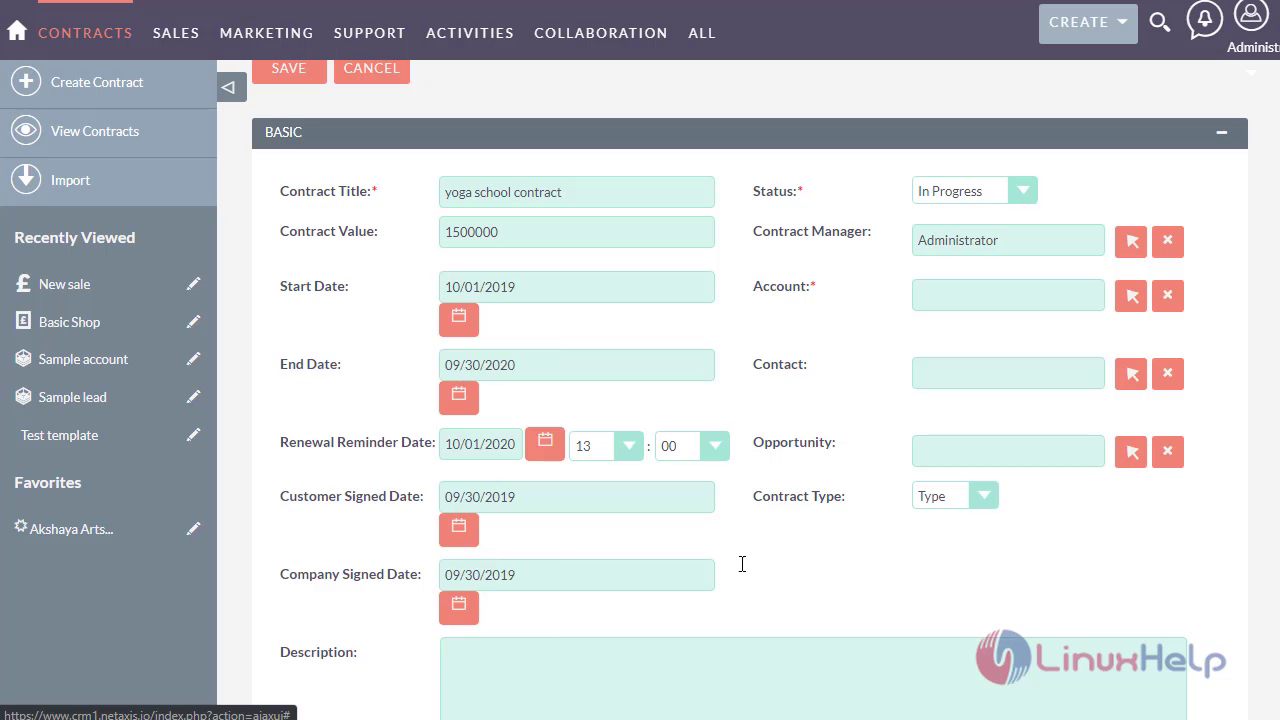
Enter the description of the contract snap6 Now enter the total value of contract and save snap7 The contract has been created successfully snap8 Enter into account module snap9 Enter into the select the account module for contract to verify snap10

Now you can see the contract module displays in the account module snap11 This is the method to create a contract module snap12

This is the method to Create A Contract Module In SuiteCRM and the tutorial ends here

Tags:
grayson
Author: 

Comments ( 0 )

No comments available

Add a comment
{{postCtrl.cmtErrMsg}}

Frequently asked questions ( 5 )

Q

What are the use of contract module in Suite crm?

A

Contracts module consists of individual business arrangements your organization has with vendors, customers, or association. There are various ways you can create contracts in Suite such as via the Contracts module, importing contracts, duplication, etc. Once the contract record is created, you can view and edit information pertaining to the contract via the Contracts detail view.Each contract record may then relate to other suite records such as opportunities, documents, quotes, and many others.

Q

What is the use of Suite CRM?

A

SuiteCRM is a free and open-source customer relationship management (CRM) solution that gives users highly actionable insights on which to base critical business decisions, actions, and strategies.

Q

What are the modules that available in suite crm?

A

Accounts module
Bugs module
Calendar module
Calls module
etc..

Q

What are the features of the Location module in Suite CRM?

A

The Locations module is used to capture the venue/site information where events are held.

Q

What are the features of Contacts module in Suite CRM?

A

Contact is an individual who is typically associated with an Account and Opportunity. This module allows you to manage all contacts.

Back To Top!
Rank
User
Points

Top Contributers

userNamenaveelansari
135850

Top Contributers

userNameayanbhatti
92510

Top Contributers

userNamehamzaahmed
32150

Top Contributers

1
userNamelinuxhelp
31040

Top Contributers

userNamemuhammadali
24500
Can you help Lucas ?
Various options in Top command

Am using Top command only to view the load average, what are the various options in Top command..??

Networking
  • Routing
  • trunk
  • Netmask
  • Packet Capture
  • domain
  • HTTP Proxy
Server Setup
  • NFS
  • KVM
  • Memory
  • Sendmail
  • WebDAV
  • LXC
Shell Commands
  • Cloud commander
  • Command line archive tools
  • last command
  • Shell
  • terminal
  • Throttle
Desktop Application
  • Linux app
  • Pithos
  • Retrospect
  • Scribe
  • TortoiseHg
  • 4Images
Monitoring Tool
  • Monit
  • Apache Server Monitoring
  • EtherApe 
  • Arpwatch Tool
  • Auditd
  • Barman
Web Application
  • Nutch
  • Amazon VPC
  • FarmWarDeployer
  • Rukovoditel
  • Mirror site
  • Chef
Contact Us | Terms of Use| Privacy Policy| Disclaimer
© 2025 LinuxHelp.com All rights reserved. Linux™ is the registered trademark of Linus Torvalds. This site is not affiliated with linus torvalds in any way.