How to Create Angular Application using Angular CLI on CentOS 7.6
Creation of Angular Application Using Angular CLI
Dependencies:
gcc-c++ make git
Pre-requisites:
**Node.js **
Nodejs latest version Download command :
curl -sL https://rpm.nodesource.com/setup_12.x | sudo -E bash –
Installation procedure:
Install the below mentioned dependencies that’re required for the installation of nodejs
[root@linuxhelp ~]# yum install gcc-c++ make git -y
Loaded plugins: fastestmirror, langpacks
Loading mirror speeds from cached hostfile
 * base: centos.excellmedia.net
 * extras: centos.excellmedia.net
 * updates: mirror.nbrc.ac.in
Package 1:make-3.82-23.el7.x86_64 already installed and latest version
Resolving Dependencies
--> Running transaction check
---> Package gcc-c++.x86_64 0:4.8.5-36.el7_6.2 will be installed
--> Processing Dependency: libstdc++-devel = 4.8.5-36.el7_6.2 for package: gcc-c++-4.8.5-36.el7_6.2.x86_64
.
.
.
.
.
.
Installed:
  gcc-c++.x86_64 0:4.8.5-36.el7_6.2                        git.x86_64 0:1.8.3.1-20.el7

Dependency Installed:
  cpp.x86_64 0:4.8.5-36.el7_6.2                           gcc.x86_64 0:4.8.5-36.el7_6.2
  libstdc++-devel.x86_64 0:4.8.5-36.el7_6.2               perl-Error.noarch 1:0.17020-2.el7
  perl-Git.noarch 0:1.8.3.1-20.el7                        perl-TermReadKey.x86_64 0:2.30-20.el7

Dependency Updated:
  libgcc.x86_64 0:4.8.5-36.el7_6.2  libgomp.x86_64 0:4.8.5-36.el7_6.2  libstdc++.x86_64 0:4.8.5-36.el7_6.2

Complete!
Download the latest version of Node package manager by executing the following command
[root@linuxhelp ~]# curl -sL https://rpm.nodesource.com/setup_12.x | sudo -E bash -
## Installing the NodeSource Node.js 12.x repo...

## Inspecting system...

+ rpm -q --whatprovides redhat-release || rpm -q --whatprovides centos-release || rpm -q --whatprovides cloudlinux-release || rpm -q --whatprovides sl-release
+ uname -m

## Confirming "el7-x86_64" is supported...

+ curl -sLf -o /dev/null 'https://rpm.nodesource.com/pub_12.x/el/7/x86_64/nodesource-release-el7-1.noarch.rpm'

## Downloading release setup RPM...

+ mktemp
+ curl -sL -o '/tmp/tmp.aC8Yd0M2cH' 'https://rpm.nodesource.com/pub_12.x/el/7/x86_64/nodesource-release-el7-1.noarch.rpm'

## Installing release setup RPM...

+ rpm -i --nosignature --force '/tmp/tmp.aC8Yd0M2cH'

## Cleaning up...

+ rm -f '/tmp/tmp.aC8Yd0M2cH'

## Checking for existing installations...

+ rpm -qa 'node|npm' | grep -v nodesource

## Run `sudo yum install -y nodejs` to install Node.js 12.x and npm.
## You may also need development tools to build native addons:
     sudo yum install gcc-c++ make
## To install the Yarn package manager, run:
     curl -sL https://dl.yarnpkg.com/rpm/yarn.repo | sudo tee /etc/yum.repos.d/yarn.repo
     sudo yum install yarn
Install the nodejs after the successful download of latest node package version:
[root@linuxhelp ~]# yum install nodejs
Loaded plugins: fastestmirror, langpacks
* base: centos.excellmedia.net
 * extras: centos.excellmedia.net
 * updates: mirror.nbrc.ac.in
Resolving Dependencies
--> Running transaction check
---> Package nodejs.x86_64 2:12.6.0-1nodesource will be installed
--> Finished Dependency Resolution
.
.
.
.
.
Installed:
  nodejs.x86_64 2:12.6.0-1nodesource

Complete!
Verify the version of nodejs as follows
[root@linuxhelp ~]# node --version
v12.6.0
Verify the version of node package manager by executing the following command
[root@linuxhelp ~]# npm --version
6.9.0
Install the Angular CLI 8.1.1 using npm as follows:
[root@linuxhelp ~]# npm install -g @angular/cli
/usr/bin/ng -> /usr/lib/node_modules/@angular/cli/bin/ng

> @angular/cli@8.1.1 postinstall /usr/lib/node_modules/@angular/cli
> node ./bin/postinstall/script.js

? Would you like to share anonymous usage data with the Angular Team at Google under
Google’s Privacy Policy at https://policies.google.com/privacy? For more details and
how to change this setting, see http://angular.io/analytics. No
+ @angular/cli@8.1.1
added 239 packages from 185 contributors in 27.16s
**Verify the version of angular CLI **
[root@linuxhelp ~]# ng --version

     _                      _                 ____ _     ___
    / \   _ __   __ _ _   _| | __ _ _ __     / ___| |   |_ _|
   / △ \ | '_ \ / _` | | | | |/ _` | '__|   | |   | |    | |
  / ___ \| | | | (_| | |_| | | (_| | |      | |___| |___ | |
 /_/   \_\_| |_|\__, |\__,_|_|\__,_|_|       \____|_____|___|
                |___/


Angular CLI: 8.1.1
Node: 12.6.0
OS: linux x64
Angular:
...
Create an Angular application named trail-angular
[root@linuxhelp ~]# ng new trail-angular
? Would you like to add Angular routing? No
? Which stylesheet format would you like to use? Less   [ http://lesscss.org
            ]
CREATE trail-angular/README.md (1029 bytes)
CREATE trail-angular/.editorconfig (246 bytes)
.
.
.

? Would you like to share anonymous usage data with the Angular Team at Google under
Google’s Privacy Policy at https://policies.google.com/privacy? For more details and
how to change this setting, see http://angular.io/analytics. No
npm WARN optional SKIPPING OPTIONAL DEPENDENCY: fsevents@1.2.9 (node_modules/webpack-dev-server/node_modules/fsevents):
.
.
.
.
added 1078 packages from 1047 contributors and audited 17110 packages in 167.036s
found 0 vulnerabilities

Successfully initialized git.
List the content to check the new directory named with the created application name
[root@linuxhelp ~]# ls -la
total 60
dr-xr-x---. 19 root root 4096 Jul 16 14:14 .
dr-xr-xr-x. 17 root root  244 Dec 21  2018 ..
-rw-------.  1 root root 2097 Dec  9  2017 anaconda-ks.cfg
-rw-r--r--   1 root root   57 Jul 16 14:14 .angular-config.json
-rw-------.  1 root root  659 Apr  1 09:16 .bash_history
-rw-r--r--.  1 root root  129 Dec 29  2013 .tcshrc
drwxr-xr-x.  2 root root    6 Dec 12  2017 Templates
drwxr-xr-x   6 root root  313 Jul 16 14:14 trail-angular
drwxr-xr-x.  2 root root    6 Dec 12  2017 Videos
-rw-------   1 root root 2522 Jul 16 14:03 .viminfo
Navigate to the application directory
[root@linuxhelp ~]# cd trail-angular/
Run the application using ng command as follows:
[root@linuxhelp trail-angular]# ng serve
 10% building 3/3 modules 0 activeℹ 「wds」: Project is running at http://localhost:4200/webpack-dev-server/
ℹ 「wds」: webpack output is served from /
ℹ 「wds」: 404s will fallback to //index.html

chunk {main} main.js, main.js.map (main) 9.86 kB [initial] [rendered]
chunk {polyfills} polyfills.js, polyfills.js.map (polyfills) 251 kB [initial] [rendered]
chunk {runtime} runtime.js, runtime.js.map (runtime) 6.09 kB [entry] [rendered]
chunk {styles} styles.js, styles.js.map (styles) 16.4 kB [initial] [rendered]
chunk {vendor} vendor.js, vendor.js.map (vendor) 3.8 MB [initial] [rendered]
Date: 2019-07-16T08:45:12.970Z - Hash: a307a8a7a2b2d07467bc - Time: 18961ms
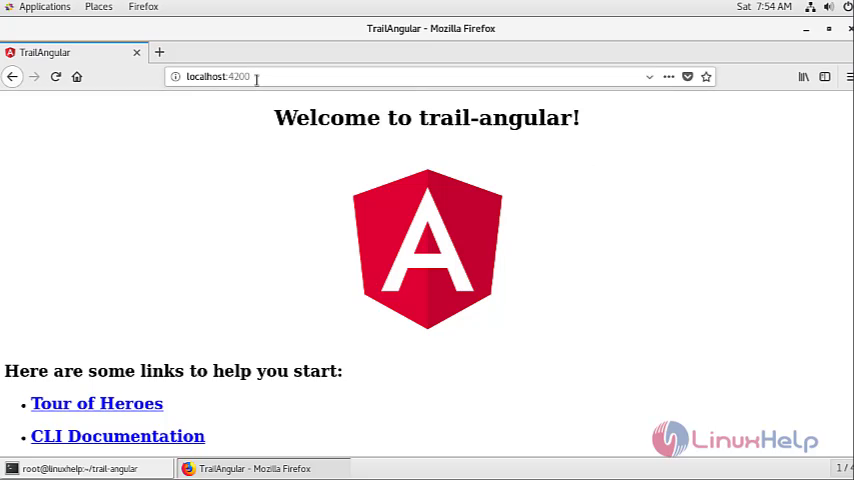
** Angular Live Development Server is listening on localhost:4200, open your browser on http://localhost:4200/ ** ℹ 「wdm」: Compiled successfully.
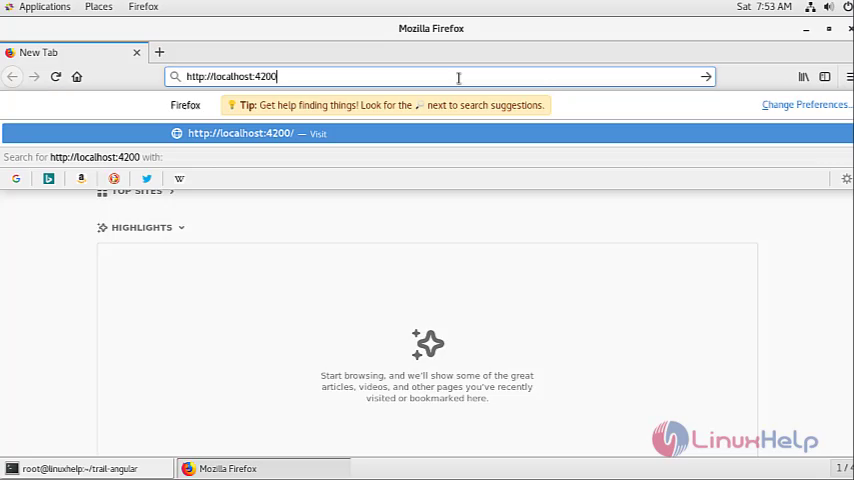
Open your browser and enter the interface that you’ve got in the URL as shown below
Get back to the terminal to change the port number and IP of an application.
[root@linuxhelp trail-angular]# ng serve --host 192.168.7.229 --port 8925
WARNING: This is a simple server for use in testing or debugging Angular applications
locally. It hasn't been reviewed for security issues.

Binding this server to an open connection can result in compromising your application or
computer. Using a different host than the one passed to the "--host" flag might result in
websocket connection issues. You might need to use "--disableHostCheck" if that's the
case.
 10% building 3/3 modules 0 activeℹ 「wds」: Project is running at http://192.168.7.229:8925/webpack-dev-server/
ℹ 「wds」: webpack output is served from /
ℹ 「wds」: 404s will fallback to //index.html

chunk {main} main.js, main.js.map (main) 9.86 kB [initial] [rendered]
chunk {polyfills} polyfills.js, polyfills.js.map (polyfills) 251 kB [initial] [rendered]
chunk {runtime} runtime.js, runtime.js.map (runtime) 6.09 kB [entry] [rendered]
chunk {styles} styles.js, styles.js.map (styles) 16.4 kB [initial] [rendered]
chunk {vendor} vendor.js, vendor.js.map (vendor) 3.8 MB [initial] [rendered]
Date: 2019-07-16T09:46:54.907Z - Hash: a307a8a7a2b2d07467bc - Time: 21233ms
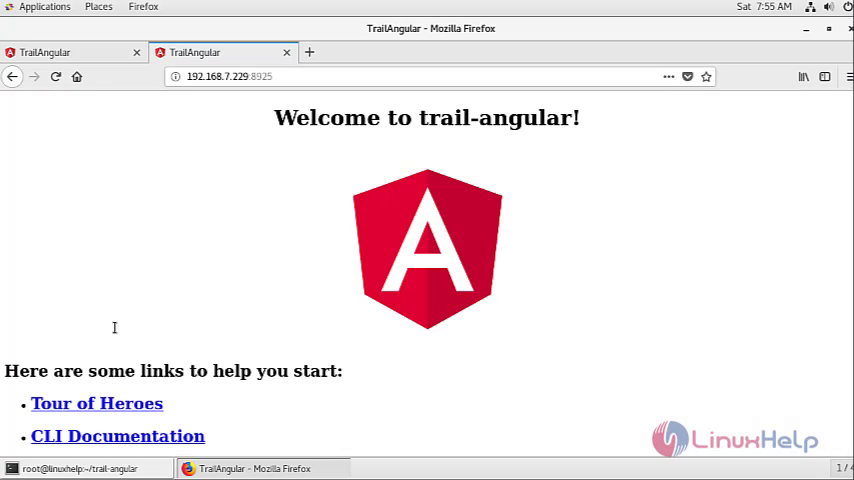
** Angular Live Development Server is listening on 192.168.7.229:8925, open your browser on http://192.168.7.229:8925/ **
ℹ 「wdm」: Compiled successfully.
Open your browser and enter the new interface in the URL as shown below
With this, Creation of Angular Application using Angular CLI ON CentOS 7.6 Comes to end.
Comments ( 0 )
No comments available