How to implement multiple virtual hosts on Ubuntu 21.04
- 00:30 lsb_release -a
- 00:36 sudo -s
- 00:49 apt install apache2
- 01:00 cp /etc/apache2/sites-available/000-default.conf /etc/apache2/sites-available/example1.com.conf
- 01:31 cp /etc/apache2/sites-available/000-default.conf /etc/apache2/sites-available/example2.com.conf
- 02:02 vi /etc/apache2/sites-available/example1.com.conf
- 02:55 vi /etc/apache2/sites-available/example2.com.conf
- 03:26 mkdir /var/www/html/example1
- 03:46 mkdir /var/www/html/example2
- 04:00 vi /var/www/html/example1/index.html
- 05:48 a2ensite example2.com.conf
- 06:00 systemctl restart apache2
- 06:07 vi /etc/hosts
To Implement Multiple Virtual Hosts on Ubuntu 21.04
Introduction
In Apache, virtual hosting is the concept of hosting multiple sites within a single server, there are two types of virtual hosting, IP address hosting and domain hosting, so we can host either IP addresses or domain names.
Installation Procedure:
Check the OS version
linuxhelp@linuxhelp:~$ lsb_release -a
Changing as root user
linuxhelp@linuxhelp:~$ sudo -s
Changing the directory to root
root@linuxhelp:/home/linuxhelp# cd /
Installing apache web server
root@linuxhelp:/# apt install apache2
Reading package lists... Done
Building dependency tree... Done
Reading state information... Done
The following additional packages will be installed:
  apache2-bin apache2-data apache2-utils libapr1 libaprutil1 libaprutil1-dbd-sqlite3 libaprutil1-ldap
Suggested packages:
  apache2-doc apache2-suexec-pristine | apache2-suexec-custom
The following NEW packages will be installed:
  apache2 apache2-bin apache2-data apache2-utils libapr1 libaprutil1 libaprutil1-dbd-sqlite3 libaprutil1-ldap
0 upgraded, 8 newly installed, 0 to remove and 254 not upgraded.
Need to get 1,739 kB of archives.
After this operation, 7,550 kB of additional disk space will be used.
Copying the default virtual host .conf file example1.com virtual host
root@linuxhelp:/# cp /etc/apache2/sites-available/000-default.conf /etc/apache2/sites-available/example1.com.conf
Copying the default virtual host .conf file example2.com virtual host
root@linuxhelp:/# cp /etc/apache2/sites-available/000-default.conf /etc/apache2/sites-available/example2.com.conf
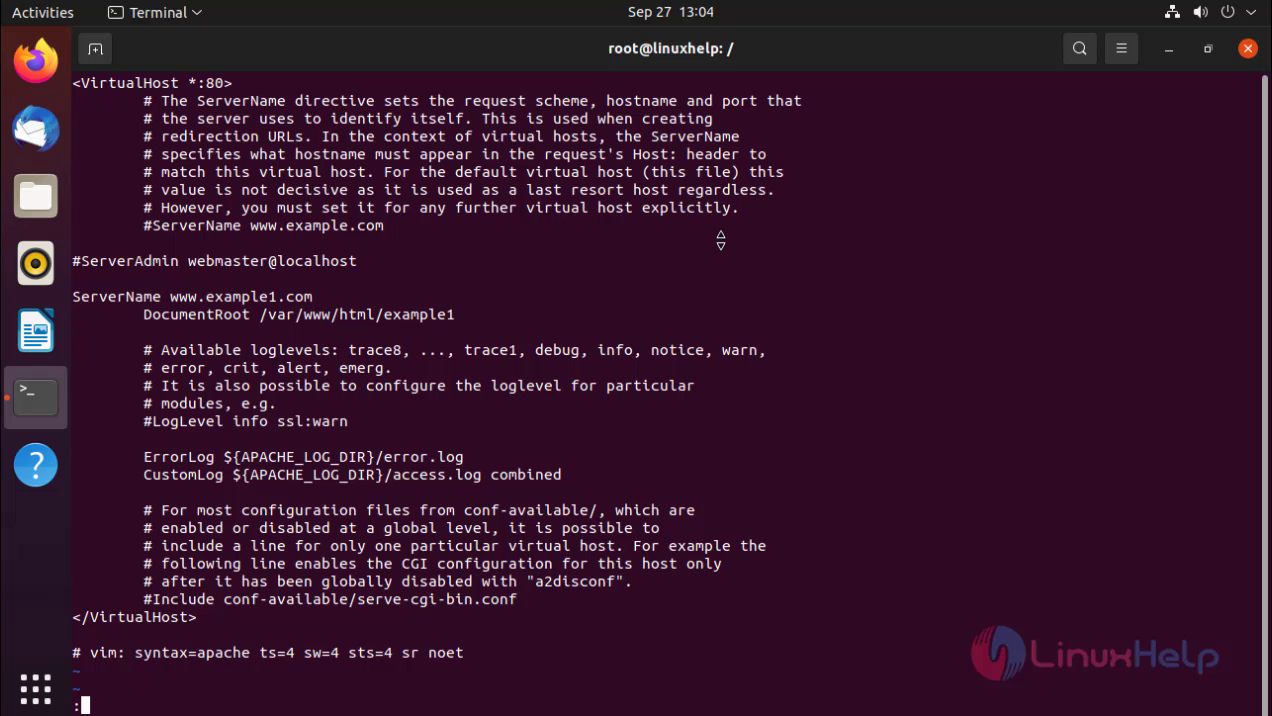
Configure the virtual host for example1.com
root@linuxhelp:/# vi /etc/apache2/sites-available/example1.com.conf
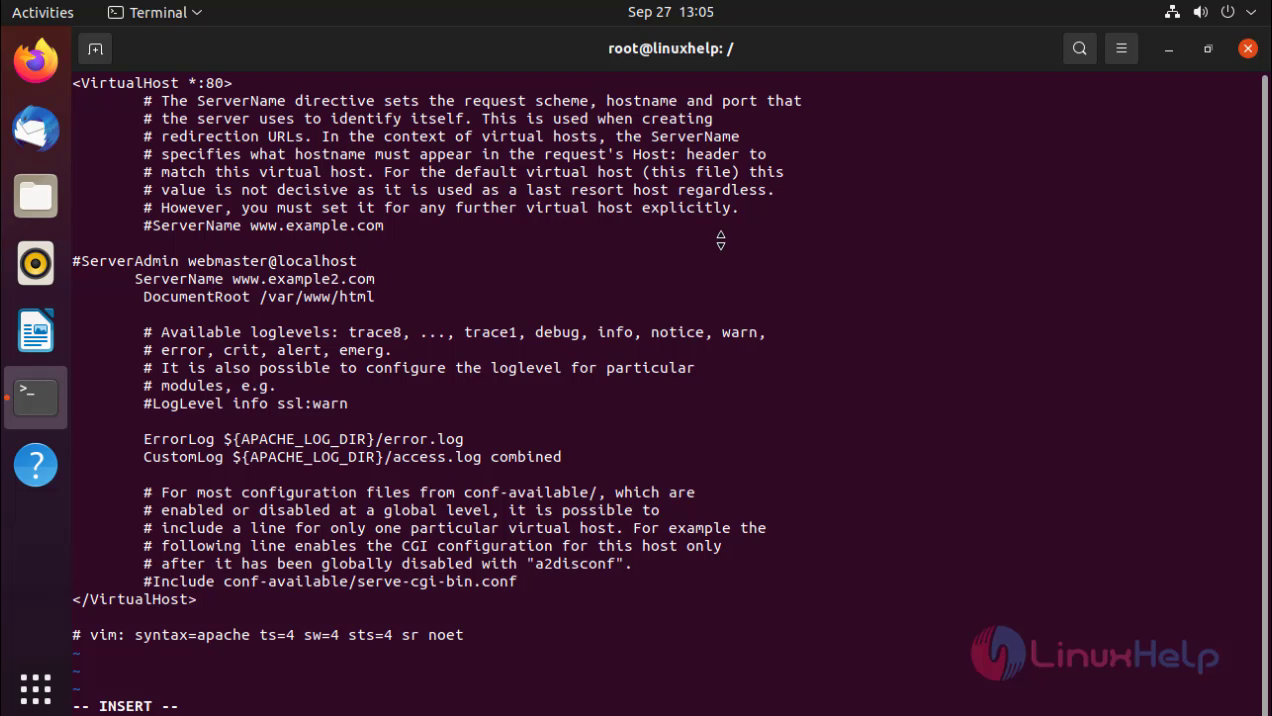
 Configure the virtual host for example2.com
root@linuxhelp:/# vi /etc/apache2/sites-available/example2.com.conf
Making document Root directory as example1
root@linuxhelp:/# mkdir /var/www/html/example1
Making document Root directory as example2
root@linuxhelp:/# mkdir /var/www/html/example2
Making the index.html file for example1.com
root@linuxhelp:/# vi /var/www/html/example1/index.html

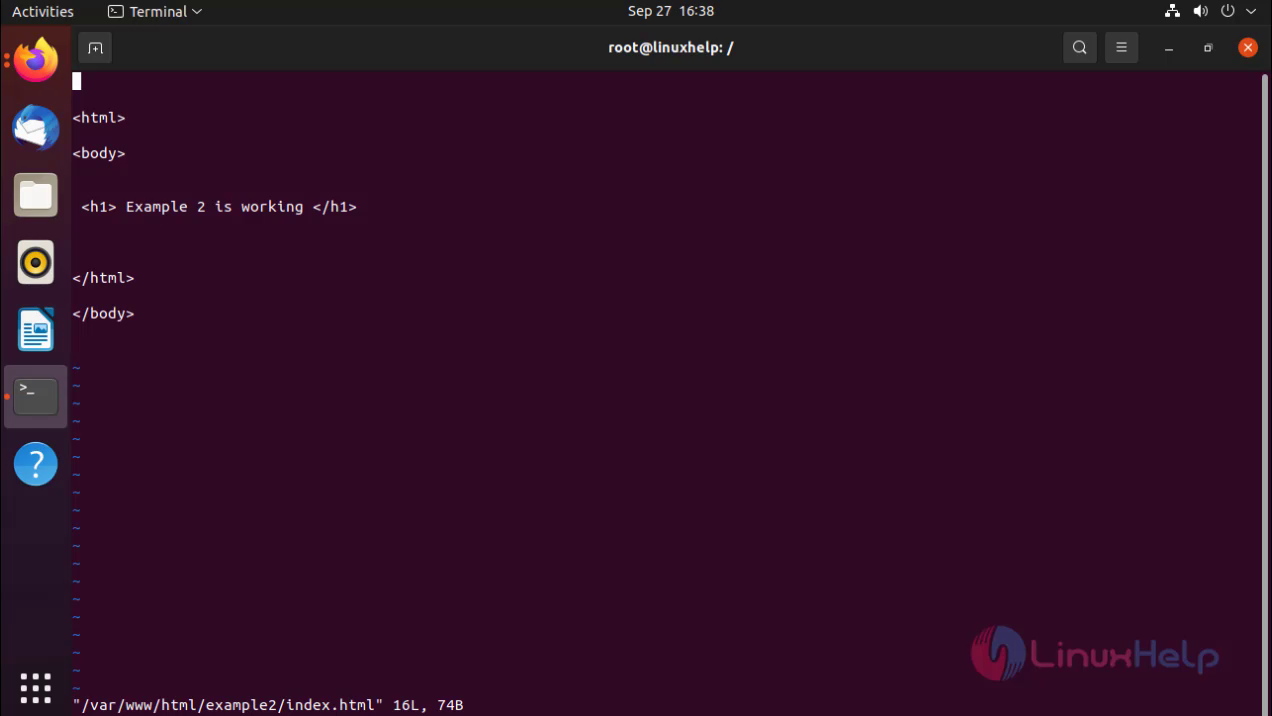
Making the index.html file for example1.com
root@linuxhelp:/# vi /var/www/html/example2/index.html
Enabling virtual host site example1.com.
root@linuxhelp:/# a2ensite example1.com.conf
Enabling site example1.com.
To activate the new configuration, you need to run:
  systemctl reload apache2
Enabling virtual host site example2.com.
root@linuxhelp:/# a2ensite example2.com.conf
Enabling site example2.com.
To activate the new configuration, you need to run:
  systemctl reload apache2
Restart the apache server
root@linuxhelp:/# systemctl restart apache2
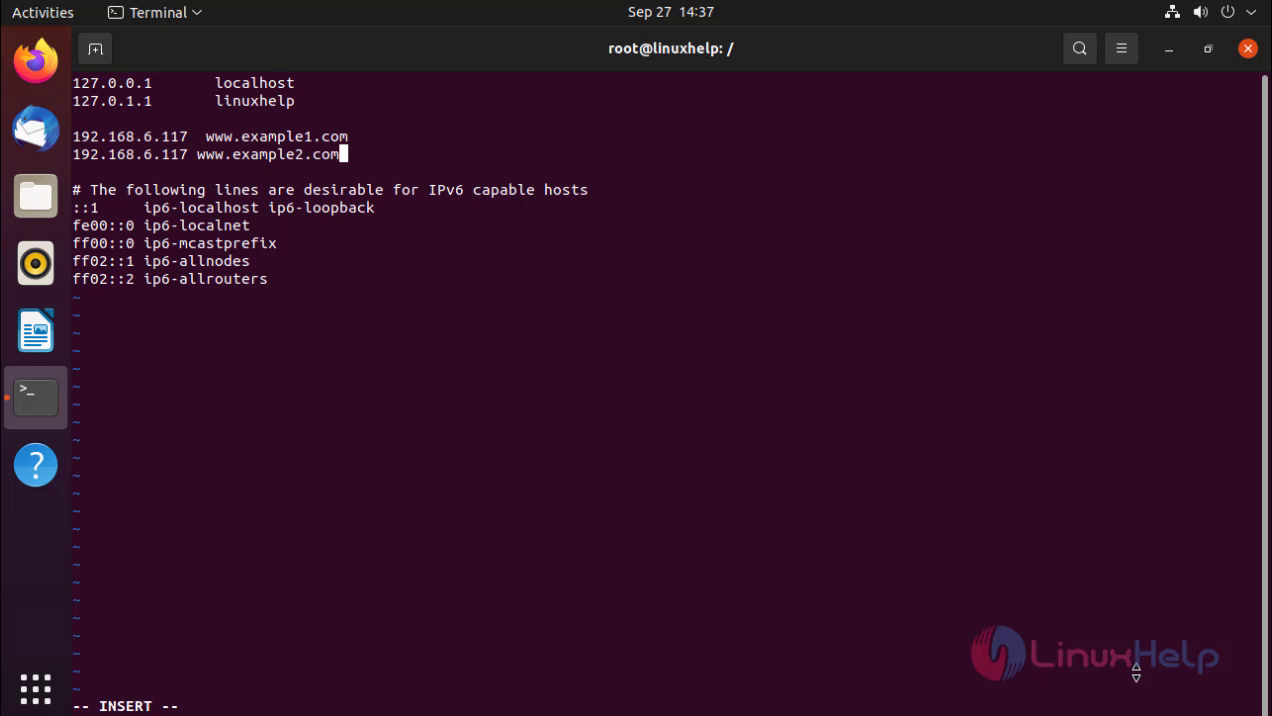
Put host entries for virtual hosts
root@linuxhelp:/# vi /etc/hosts
Ping the www.example1.com

Ping the www.example1.com

With this the implement of multiple virtual hosts comes to an end.
Comments ( 0 )
No comments available