How to install and configure GpEasy CMS on Fedora 34
- 00:40 cat /etc/os-release
- 00:54 wget https://sourceforge.net/projects/gpeasy/files/latest/download
- 01:08 mkdir -p /var/www/gp
- 01:15 unzip download -d /var/www/gp
- 01:27 chown -R apache:apache /var/www/gp/GpEasy
- 01:36 chmod -R 775 /var/www/gp/GpEasy
- 01:42 vim /etc/httpd/conf.d/gp.conf
- 01:54 vim /etc/hosts
- 02:09 systemctl restart httpd
To Install And Configure GpEasy CMS On Fedora 34.
Introduction:
GpEasy is a complete Content Management System (CMS) that lets users create rich and flexible web sites with simple and easy to use interface. The embedded design of the admin interface allows users to instantly see changes in one browser window. This tutorial covers the installation of gpEasy CMS On Fedora 34.
Installation Procedure:
Step 1: To check the os version.
[root@linuxhelp ~]# cat /etc/os-release
NAME=Fedora
VERSION="34 (Workstation Edition)"
ID=fedora
VERSION_ID=34
VERSION_CODENAME=""
PLATFORM_ID="platform:f34"
PRETTY_NAME="Fedora 34 (Workstation Edition)"
ANSI_COLOR="0;38;2;60;110;180"
LOGO=fedora-logo-icon
CPE_NAME="cpe:/o:fedoraproject:fedora:34"
HOME_URL="https://fedoraproject.org/"
REDHAT_SUPPORT_PRODUCT="Fedora"
REDHAT_SUPPORT_PRODUCT_VERSION=34
PRIVACY_POLICY_URL="https://fedoraproject.org/wiki/Legal:PrivacyPolicy"
VARIANT="Workstation Edition"
VARIANT_ID=workstation
Step 2: To Install the GpEasy cms package by using Wget command.
[root@linuxhelp ~]# wget https://sourceforge.net/projects/gpeasy/files/latest/download
--2021-11-30 02:44:28--  https://sourceforge.net/projects/gpeasy/files/latest/download
Resolving sourceforge.net (sourceforge.net)... 204.68.111.105
Connecting to sourceforge.net (sourceforge.net)|204.68.111.105|:443... connected.
HTTP request sent, awaiting response... 302 Found
Location: https://downloads.sourceforge.net/project/gpeasy/gpeasy/4.4/gpEasy_4.4.zip?ts=gAAAAABhpUK13bsrzH31m0CkcIZPpyV4GijpsvtXZe3fH_rajzjzs1wRWROntR86085EL8DhqoPfqzox_dunfrzfN7Nx3yCqqg%3D%3D&use_mirror=master&r= [following]
--2021-11-30 02:44:29--  https://downloads.sourceforge.net/project/gpeasy/gpeasy/4.4/gpEasy_4.4.zip?ts=gAAAAABhpUK13bsrzH31m0CkcIZPpyV4GijpsvtXZe3fH_rajzjzs1wRWROntR86085EL8DhqoPfqzox_dunfrzfN7Nx3yCqqg%3D%3D&use_mirror=master&r=
Resolving downloads.sourceforge.net (downloads.sourceforge.net)... 204.68.111.105
Connecting to downloads.sourceforge.net (downloads.sourceforge.net)|204.68.111.105|:443... connected.
HTTP request sent, awaiting response... 302 Found
Location: https://master.dl.sourceforge.net/project/gpeasy/gpeasy/4.4/gpEasy_4.4.zip?viasf=1 [following]
--2021-11-30 02:44:30--  https://master.dl.sourceforge.net/project/gpeasy/gpeasy/4.4/gpEasy_4.4.zip?viasf=1
Resolving master.dl.sourceforge.net (master.dl.sourceforge.net)... 216.105.38.12
Connecting to master.dl.sourceforge.net (master.dl.sourceforge.net)|216.105.38.12|:443... connected.
HTTP request sent, awaiting response... 200 OK
Length: 2838827 (2.7M) [application/octet-stream]
Saving to: ‘download’

download                            100%[================================================================>]   2.71M  1.91MB/s    in 1.4s

2021-11-30 02:44:33 (1.91 MB/s) - ‘download’ saved [2838827/2838827]
Step 3: To create the new directory.
[root@linuxhelp ~]# mkdir -p /var/www/gp
Step 4: Unzip the downloaded package.
[root@linuxhelp ~]# unzip download -d /var/www/gp
Archive:  download
   creating: /var/www/gp/gpEasy/
 extracting: /var/www/gp/gpEasy/robots.txt
  inflating: /var/www/gp/gpEasy/Addon.ini
  inflating: /var/www/gp/gpEasy/README.md
  inflating: /var/www/gp/gpEasy/.htaccess
  inflating: /var/www/gp/gpEasy/gpconfig.php
  inflating: /var/www/gp/gpEasy/index.php
   creating: /var/www/gp/gpEasy/themes/
  inflating: /var/www/gp/gpEasy/themes/index.html
   creating: /var/www/gp/gpEasy/themes/Bootstrap/
   creating: /var/www/gp/gpEasy/themes/Bootstrap/6_Sticky_Footer/
  inflating: /var/www/gp/gpEasy/themes/Bootstrap/6_Sticky_Footer/template.php
  inflating: /var/www/gp/gpEasy/themes/Bootstrap/6_Sticky_Footer/style.css
   creating: /var/www/gp/gpEasy/themes/Bootstrap/2_Basic_Marketing/
  inflating: /var/www/gp/gpEasy/themes/Bootstrap/2_Basic_Marketing/template.php
  inflating: /var/www/gp/gpEasy/themes/Bootstrap/2_Basic_Marketing/style.css
  inflating: /var/www/gp/gpEasy/themes/Bootstrap/drop_down_menu.php
   creating: /var/www/gp/gpEasy/themes/Bootstrap/5_Justified_Nav/
  inflating: /var/www/gp/gpEasy/themes/Bootstrap/5_Justified_Nav/template.php
  inflating: /var/www/gp/gpEasy/themes/Bootstrap/5_Justified_Nav/style.css
  inflating: /var/www/gp/gpEasy/themes/Bootstrap/Addon.ini
  inflating: /var/www/gp/gpEasy/themes/Bootstrap/template.php
creating: /var/www/gp/gpEasy/addons/Multi Site/
  inflating: /var/www/gp/gpEasy/addons/Multi Site/SetupSite.php
  inflating: /var/www/gp/gpEasy/addons/Multi Site/Install_Check.php
  inflating: /var/www/gp/gpEasy/addons/Multi Site/Addon.ini
  inflating: /var/www/gp/gpEasy/addons/Multi Site/Install.php
  inflating: /var/www/gp/gpEasy/addons/Multi Site/multi_site.css
Step 5: Give the owner and group name to this directory.
[root@linuxhelp ~]# chown -R apache:apache /var/www/gp
Step 6: Give the permission to this directory.
[root@linuxhelp ~]# chmod -R 775 /var/www/gp
Step 7: To open the configuration and make this configuration.
[root@linuxhelp ~]# vim /etc/httpd/conf.d/gp.conf
<virtualhost *:80>
servername www.linuxhelp1.com
documentroot /var/www/gp/GpEasy
<directory /var/www/gp/GpEasy>
allowoverride all
allow from all
</directory>
</virtualhost>
Step 8: open the hosts file and enter ip address and domain name.
[root@linuxhelp ~]# vim /etc/hosts
127.0.0.1 linuxhelp.com
Step 9: To Restart the httpd service.
[root@linuxhelp ~]# systemctl restart httpd
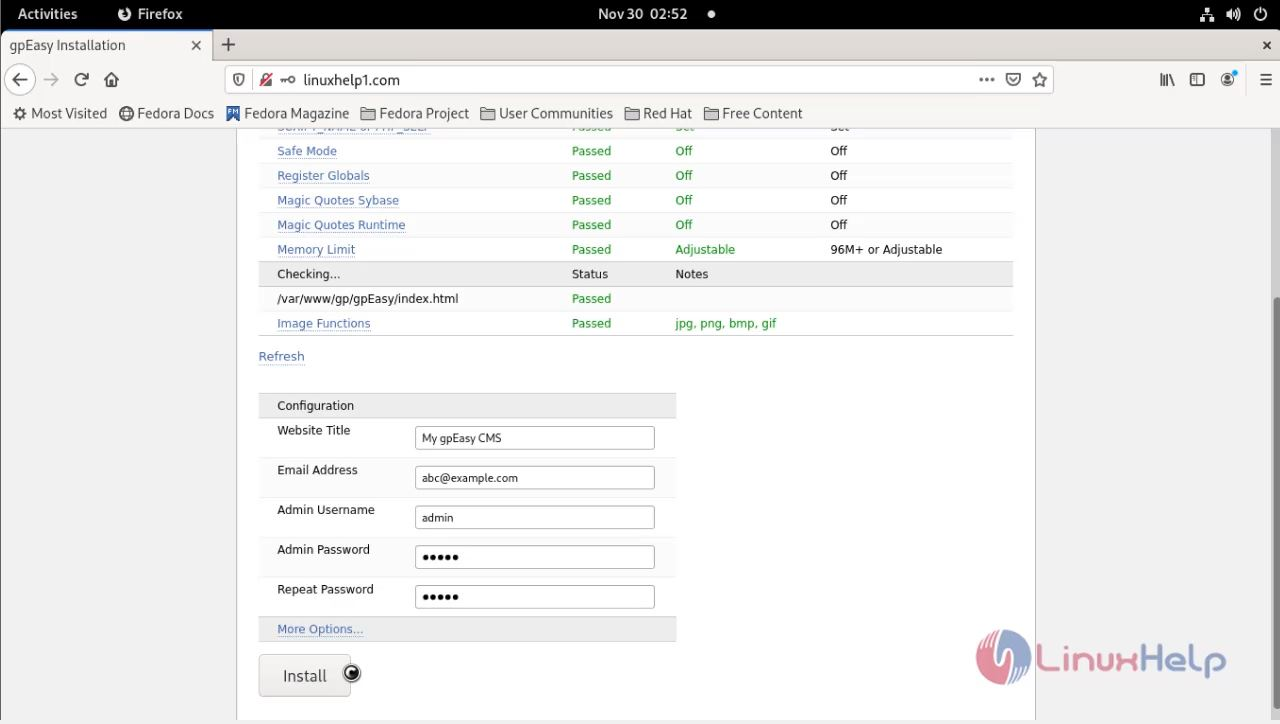
Step 10: Then go to the browser and search your domain or ip address there.


Conclusion:
We have reached the end of this article. In this guide, we have walked you through the steps required to Install And Configure GpEasy CMS On Fedora 34. Your feedback is much welcome.
Comments ( 0 )
No comments available