How to install and configure Nginx on Debian 11.3
- 00:35 lsb_release -a
- 00:47 apt install nginx
- 01:15 systemctl start nginx
- 01:26 systemctl enable nginx
- 01:40 systemctl status nginx
- 01:59 mkdir /var/www/test1.com
- 02:18 vi /var/www/test1.com/index.html
- 03:28 chown -R www-data. /var/www/test1.com/
- 03:51 vi /etc/nginx/sites-available/test1.com
- 04:28 ln -s /etc/nginx/sites-available/test1.com /etc/nginx/sites-enabled/test1.com
- 05:00 vi /etc/hosts
- 05:33 systemctl restart nginx
To Install and Configure Nginx on Debian 11.3
Introduction:
For web servers, Nginx is a free and open-source application for Linux that works as a reverse proxy server, directing web traffic to specific servers. Nginx can be used independently as a web server.
Installation Procedure:
Step 1: Check the OS version by using the below command
[root@linuxhelp: ~#] lsb_release -a
No LSB modules are available.
Distributor ID:	Debian
Description:	Debian GNU/Linux 11 (bullseye)
Release:	11
Codename:	bullseye
Step 2: Install the Nginx by using the below command
[root@linuxhelp: ~#] apt install nginx
Reading package lists... Done
Building dependency tree... Done
Reading state information... Done
The following additional packages will be installed:
  geoip-database libgeoip1 libnginx-mod-http-geoip libnginx-mod-http-image-filter libnginx-mod-http-xslt-filter libnginx-mod-mail libnginx-mod-stream libnginx-mod-stream-geoip nginx-common nginx-core
Suggested packages:
  geoip-bin fcgiwrap nginx-doc
The following NEW packages will be installed:
  geoip-database libgeoip1 libnginx-mod-http-geoip libnginx-mod-http-image-filter libnginx-mod-http-xslt-filter libnginx-mod-mail libnginx-mod-stream libnginx-mod-stream-geoip nginx nginx-common nginx-core
0 upgraded, 11 newly installed, 0 to remove and 0 not upgraded.
Need to get 4,541 kB of archives.
After this operation, 13.4 MB of additional disk space will be used.

Do you want to continue? [Y/n] y
Get:1 http://deb.debian.org/debian bullseye/main amd64 geoip-database all 20191224-3 [3,032 kB]
Get:2 http://deb.debian.org/debian bullseye/main amd64 libgeoip1 amd64 1.6.12-7 [92.5 kB]
Get:3 http://deb.debian.org/debian bullseye/main amd64 nginx-common all 1.18.0-6.1+deb11u2 [126 kB]
Get:4 http://deb.debian.org/debian bullseye/main amd64 libnginx-mod-http-geoip amd64 1.18.0-6.1+deb11u2 [98.4 kB]

Upgrading binary: nginx.
Setting up nginx (1.18.0-6.1+deb11u2) ...
Processing triggers for man-db (2.9.4-2) ...
Processing triggers for libc-bin (2.31-13+deb11u3) ...
Step 3: Next start and enable the Nginx service by using the below command.
[root@linuxhelp: ~#] systemctl start nginx
[root@linuxhelp: ~#] systemctl enable nginx
Synchronizing state of nginx.service with SysV service script with /lib/systemd/systemd-sysv-install.
Executing: /lib/systemd/systemd-sysv-install enable nginx
Step 4: Check the status from Nginx service by using the below command.
[root@linuxhelp: ~#] systemctl status nginx
● nginx.service - A high performance web server and a reverse proxy server
     Loaded: loaded (/lib/systemd/system/nginx.service; enabled; vendor preset: enabled)

     Active: active (running) since Mon 2022-10-31 00:22:41 IST; 36s ago
       Docs: man:nginx(8)
   Main PID: 4254 (nginx)
      Tasks: 2 (limit: 3450)
     Memory: 3.0M
        CPU: 17ms
     CGroup: /system.slice/nginx.service
             ├─4254 nginx: master process /usr/sbin/nginx -g daemon on; master_process on;
             └─4257 nginx: worker process

Oct 31 00:22:41 linuxhelp systemd[1]: Starting A high performance web server and a reverse proxy server...
Step 5: Make the Document Root Directory by using the below command.
[root@linuxhelp: ~#] mkdir /var/www/test1.com
Step 6: Create the index.html in Document Root Directory by using the below command.
[root@linuxhelp: ~#] vi /var/www/test1.com/index.html
<!DOCTYPE html>
<html>
<body>
<h1>Welcome to linuxhelp</h1>
</body>
</html>
Step 7: Give Ownership to the directory by using the below command
[root@linuxhelp: ~#] chown -R www-data. /var/www/test1.com/
Step 8: Create Server Block in the following location by using the below command.
[root@linuxhelp: ~#] vi /etc/nginx/sites-available/test1.com
server {
listen 80;
listen [::]:80;
root /var/www/test1.com;
index index.html index.htm index.nginx-debian.html;
server_name test1.com www.test1.com;
location /
    { try_files $uri $uri/ =404;

  }
}
Step 9: Create symbolic links to enable the site by using the below command.
[root@linuxhelp: ~#] ln -s /etc/nginx/sites-available/test1.com /etc/nginx/sites-enabled/test1.com
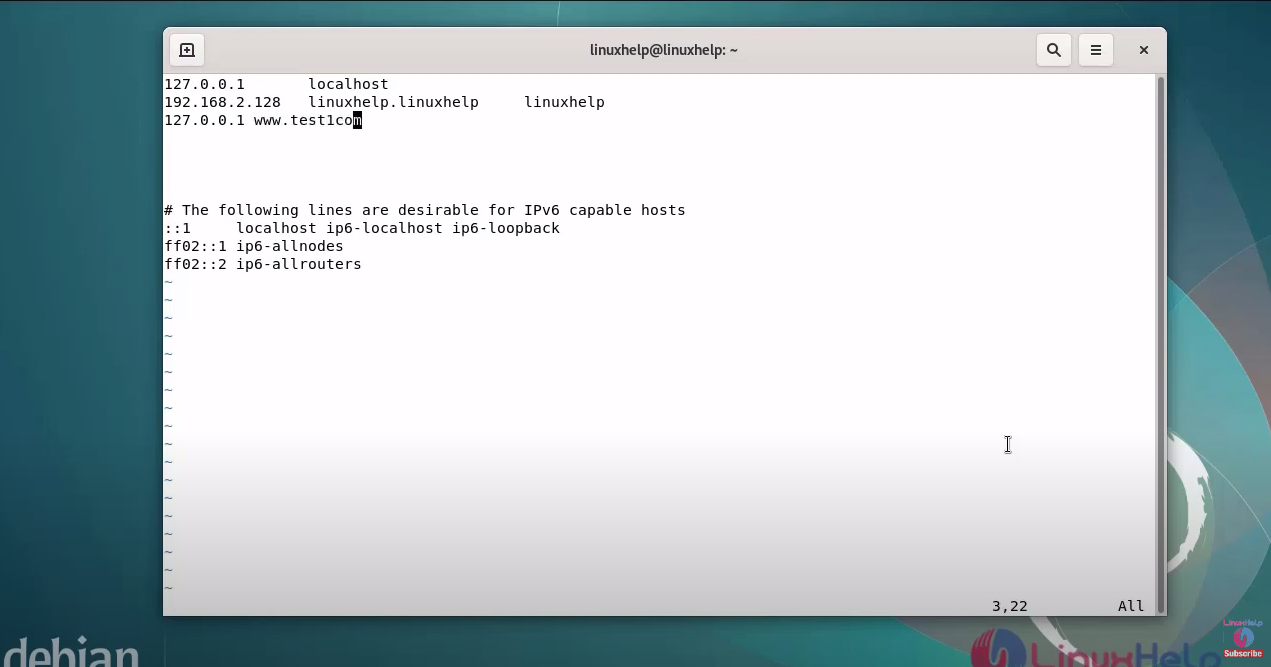
Step 10: Editing Host Entry for test1.com by using the below command.
[root@linuxhelp: ~#] vi /etc/hosts
Step 11: Restart the Nginx by using the below command.
[root@linuxhelp: ~#] systemctl restart nginx
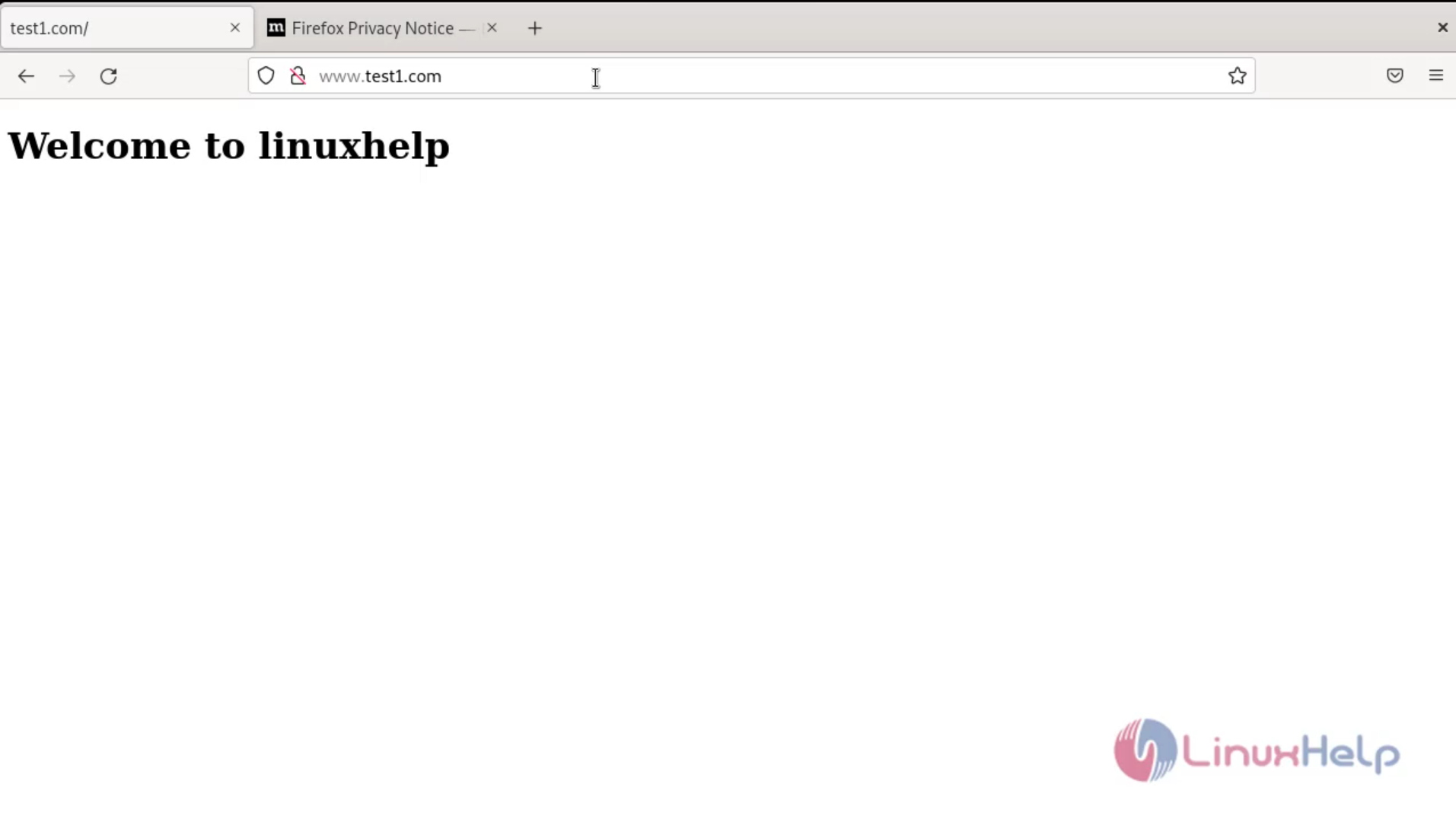
Step 12: Finally go to the browser and browse Ping by server block’s domain name in web browser as shown in the below image.
Conclusion:
We have reached the end of this article. In this guide, we have walked you through the steps required to install and configure nginx on Debian 11.3. Your feedback is much welcome
Comments ( 0 )
No comments available