How to Install and Configure Nginx on Oracle Linux 8.6
- 00:38 cat /etc/os-release
- 00:55 dnf install nginx
- 01:15 systemctl enable nginx
- 01:20 systemctl start nginx
- 01:28 systemctl status nginx
- 01:41 systemctl stop firewalld
- 01:51 systemctl disable firewalld
- 02:00 setenforce 0
- 03:33 mkdir -p /var/www/test/html
- 03:46 chown -R nginx:nginx /var/www/test/html
- 04:08 vim /var/www/test/html/index.html
- 05:01 vim /etc/nginx/conf.d/test.conf
- 07:23 nginx -t
- 07:39 systemctl restart nginx
- 08:12 vi /etc/hosts
- 08:12 systemctl restart nginx
To Install And Configure Nginx On Oracle Linux 8.6
Introduction:
Nginx is one of the most popular web servers in the world and is responsible for hosting some of the largest and most popular sites on the internet. It is more resource-friendly than Apache in most cases and can be used as a web server or reverse proxy.
Installation Steps:
Step1: Install the OS version by using the below command
[root@linuxhelp linuxhelp]# cat /etc/os-release
NAME="Oracle Linux Server"
VERSION="8.6"
Step 2: Install the Nginx package by using the below command
[root@linuxhelp linuxhelp]# dnf install nginx
Last metadata expiration check: 1 day, 0:28:21 ago on Sat 02 Jul 2022 05:35:26 AM IST.
Dependencies resolved.
=======================================================================================
 Package        Arch   Version                                     Repository     Size
=======================================================================================
Installing:
 nginx          x86_64 1:1.14.1-9.0.1.module+el8.0.0+5347+9282027e ol8_appstream 569 k
Installing dependencies:
 nginx-all-modules
                noarch 1:1.14.1-9.0.1.module+el8.0.0+5347+9282027e ol8_appstream  24 k
 nginx-filesystem
                noarch 1:1.14.1-9.0.1.module+el8.0.0+5347+9282027e ol8_appstream  25 k
 nginx-mod-http-image-filter


                x86_64 1:1.14.1-9.0.1.module+el8.0.0+5347+9282027e ol8_appstream  35 k
 nginx-mod-http-perl
                x86_64 1:1.14.1-9.0.1.module+el8.0.0+5347+9282027e ol8_appstream  46 k
 nginx-mod-http-xslt-filter
                x86_64 1:1.14.1-9.0.1.module+el8.0.0+5347+9282027e ol8_appstream  34 k
 nginx-mod-mail x86_64 1:1.14.1-9.0.1.module+el8.0.0+5347+9282027e ol8_appstream  64 k
 nginx-mod-stream

Installed:
  nginx-1:1.14.1-9.0.1.module+el8.0.0+5347+9282027e.x86_64
  nginx-all-modules-1:1.14.1-9.0.1.module+el8.0.0+5347+9282027e.noarch
  nginx-filesystem-1:1.14.1-9.0.1.module+el8.0.0+5347+9282027e.noarch
  nginx-mod-http-image-filter-1:1.14.1-9.0.1.module+el8.0.0+5347+9282027e.x86_64
  nginx-mod-http-perl-1:1.14.1-9.0.1.module+el8.0.0+5347+9282027e.x86_64
  nginx-mod-http-xslt-filter-1:1.14.1-9.0.1.module+el8.0.0+5347+9282027e.x86_64
  nginx-mod-mail-1:1.14.1-9.0.1.module+el8.0.0+5347+9282027e.x86_64
  nginx-mod-stream-1:1.14.1-9.0.1.module+el8.0.0+5347+9282027e.x86_64
Complete!
Step 3: Enable, Start and Check the Status of Nginx by using the below command
[root@linuxhelp linuxhelp]# systemctl enable nginx
Created symlink /etc/systemd/system/multi-user.target.wants/nginx.service → /usr/lib/systemd/system/nginx.service.

[root@linuxhelp linuxhelp]# systemctl start nginx
[root@linuxhelp linuxhelp]# systemctl status nginx
● nginx.service - The nginx HTTP and reverse proxy server
   Loaded: loaded (/usr/lib/systemd/system/nginx.service; enabled; vendor preset: disable>
Active: active (running) since Sun 2022-07-03 06:04:18 IST; 9s ago
Step 4: Stop, disable firewall and SELinux by using the below command
[root@linuxhelp linuxhelp]# systemctl stop firewalld
[root@linuxhelp linuxhelp]# systemctl disable firewalld
[root@linuxhelp linuxhelp]# setenforce 0
Step5 : Making the Document Root Directory
[root@linuxhelp linuxhelp]# mkdir -p /var/www/test/html
Step 6: Give permission to the Document Root directory
[root@linuxhelp linuxhelp]# chown -R nginx:nginx /var/www/test/html
Step 7: Creating the index.html in Document Root Directory
[root@linuxhelp linuxhelp]# vim /var/www/test/html/index.html
[root@linuxhelp linuxhelp]# vim /etc/nginx/conf.d/test.conf

server {
        listen 80;
        listen 192.168.6.134:80;

        root /var/www/test/html;
        index index.html index.htm index.nginx-debian.html;

        server_name  www.linuxhelp1.com;

        location / {
                try_files $uri $uri/ =404;
        }
}

[root@linuxhelp linuxhelp]# nginx -t
nginx: the configuration file /etc/nginx/nginx.conf syntax is ok
nginx: configuration file /etc/nginx/nginx.conf test is successful
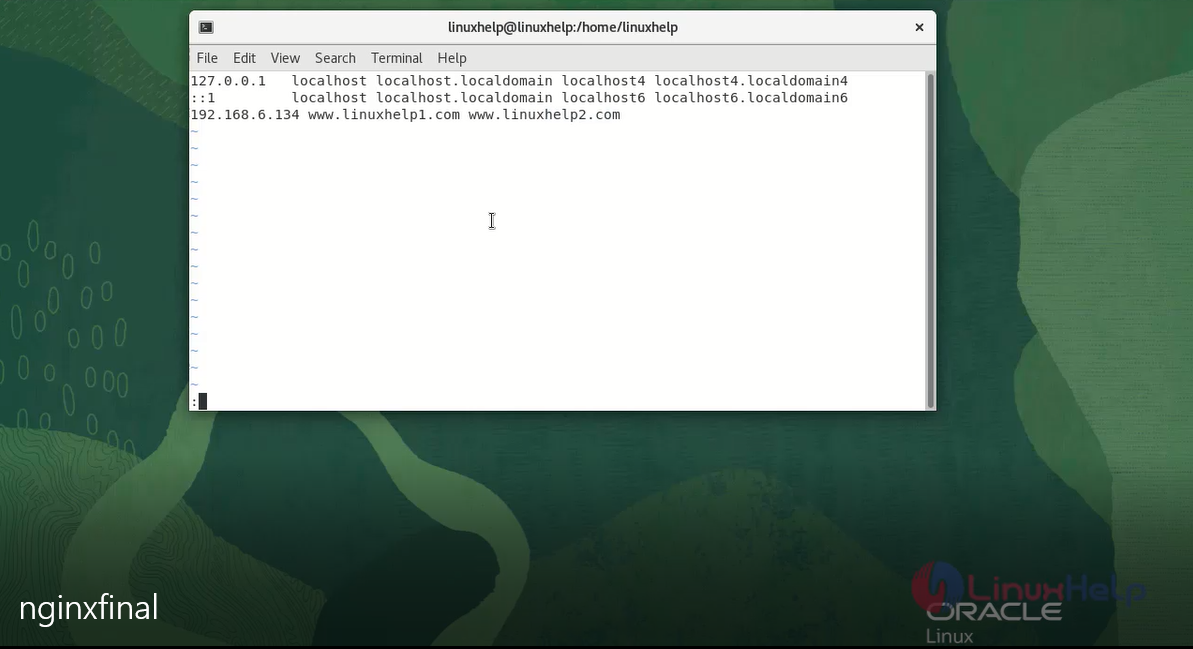
Step 8 : To add the host entry by the following Commands.
[root@linuxhelp linuxhelp]# vi /etc/hosts
step 9 : Restart the Nginx by using the following commands.
[root@linuxhelp linuxhelp]# systemctl restart nginx
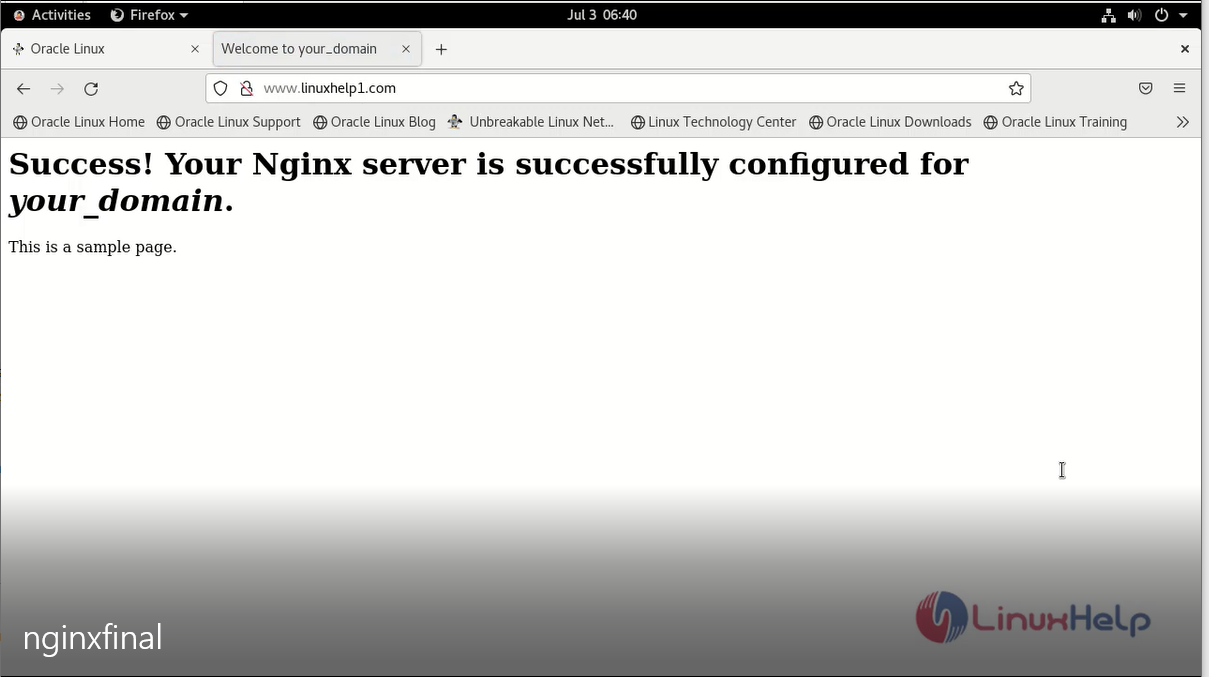
Step10 : Ping by server block’s domain name in web browser.
Conclusion:
We have reached the end of this article. In this guide, we have walked you through the steps required to Install Nginx on Oracle Linux 8.6. Your feedback is much welcome.
Comments ( 0 )
No comments available