• Categories
    Category
    {{ postCtrl.tags }}
    • {{ category.tag_type }}

      • {{tag.tag_name}}
      • View more
  • Categories
    Category
    {{ postCtrl.tags }}
    • {{ category.tag_type }}

      • {{tag.tag_name}}
      • View more
  • News
  • Tutorials
  • Forums
  • Tags
  • Users
Tutorial News Comments FAQ Related Articles

How to install and configure Squid proxy server on CentOS 7

  • 00:52 yum install squid -y
  • 02:01 vim blocklist.txt
  • 05:35 systemctl status squid
  • 05:49 systemctl start squid
  • 06:19 systemctl status squid
{{postValue.id}}

To Install and Configure Squid proxy server on Cent OS 7

Introduction

Squid Proxy server which is the widely used in unix like platforms. It is mainly used for to reduce the traffic and lower the bandwidth from server to client. A squid server which stores the mostly requesting data from the client and stores that data in the form of cache. Squid can also be used for security purpose.

Installing the squid service

[root@linuxhelp /]# yum install squid -y
Loaded plugins: fastestmirror, langpacks
Loading mirror speeds from cached hostfile
 * base: centos.excellmedia.net
 * extras: centos.excellmedia.net
 * updates: centos.excellmedia.net
Resolving Dependencies
--> Running transaction check
---> Package squid.x86_64 7:3.5.20-17.el7_9.6 will be installed
--> Processing Dependency: squid-migration-script for package: 7:squid-3.5.20-17.el7_9.6.x86_64
--> Running transaction check
---> Package squid-migration-script.x86_64 7:3.5.20-17.el7_9.6 will be installed
--> Finished Dependency Resolution
Installed:
  squid.x86_64 7:3.5.20-17.el7_9.6                                           

Dependency Installed:
  squid-migration-script.x86_64 7:3.5.20-17.el7_9.6                          
Complete!

Editing the configuration file Snap 1
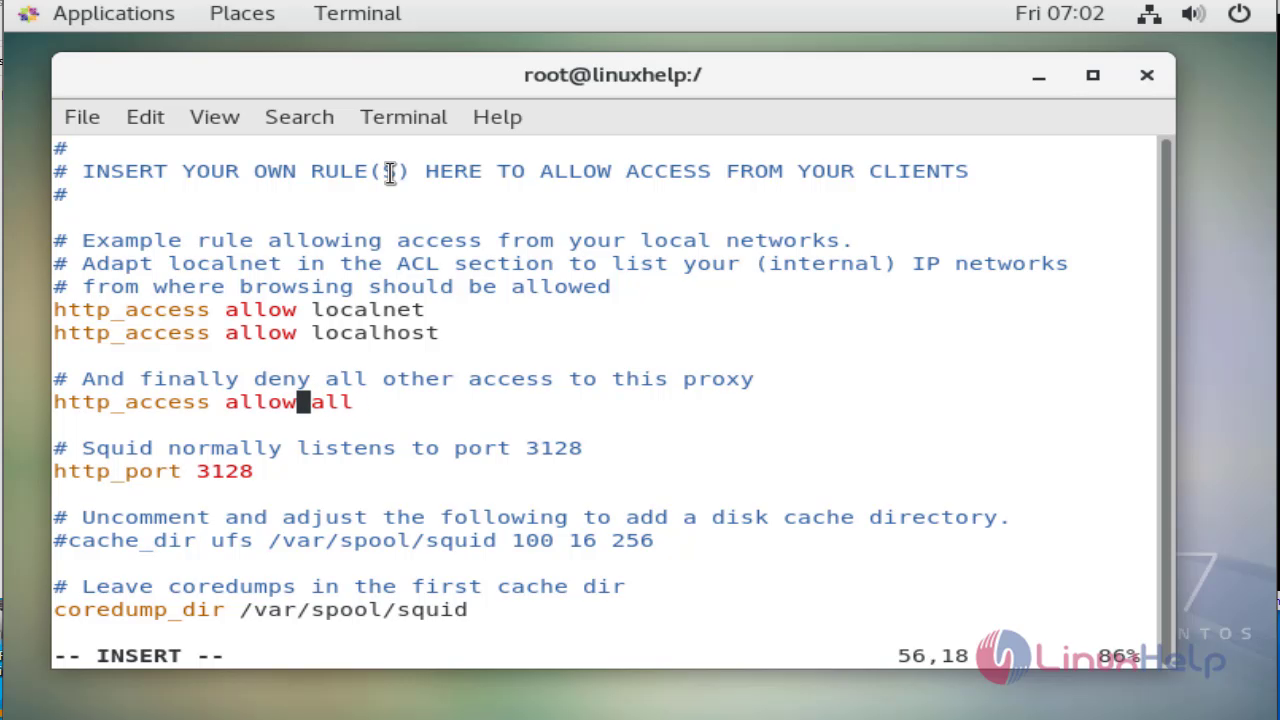
[root@linuxhelp /]# vim /etc/squid/squid.conf

Creating the block list Snap 2
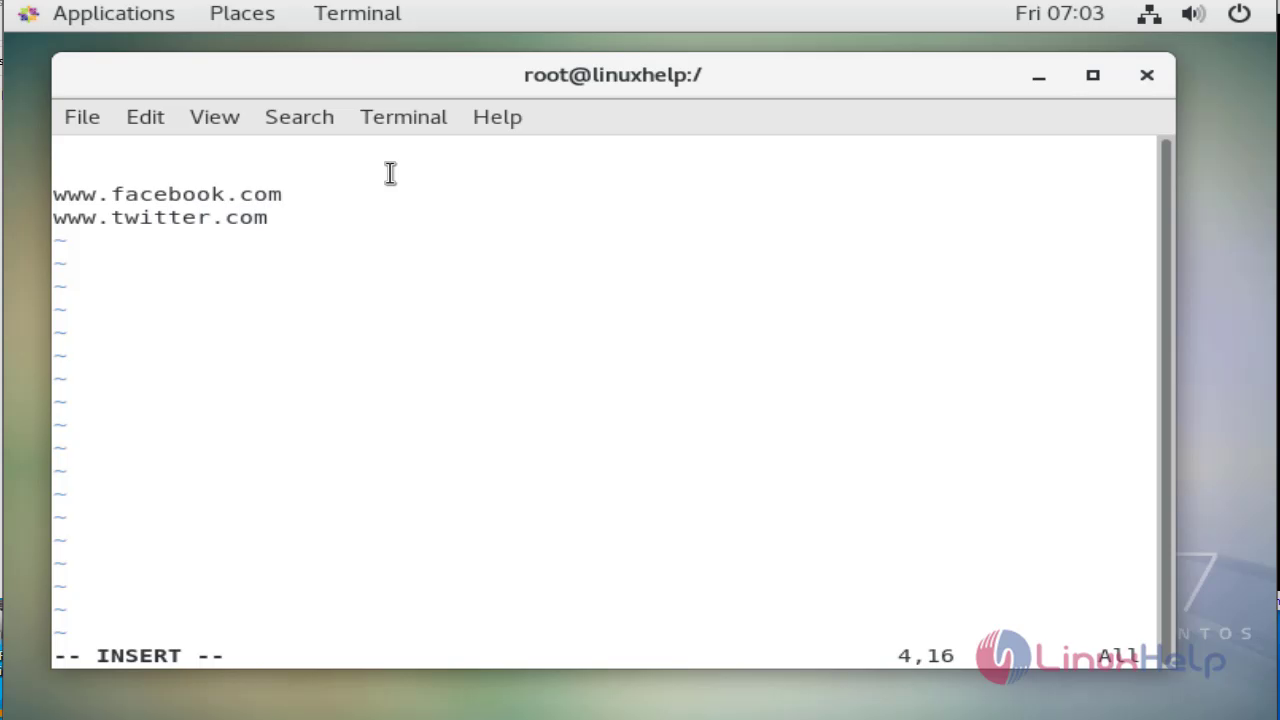
[root@linuxhelp /]# vim blocklist.txt

Again Editing the configuration file Snap 3
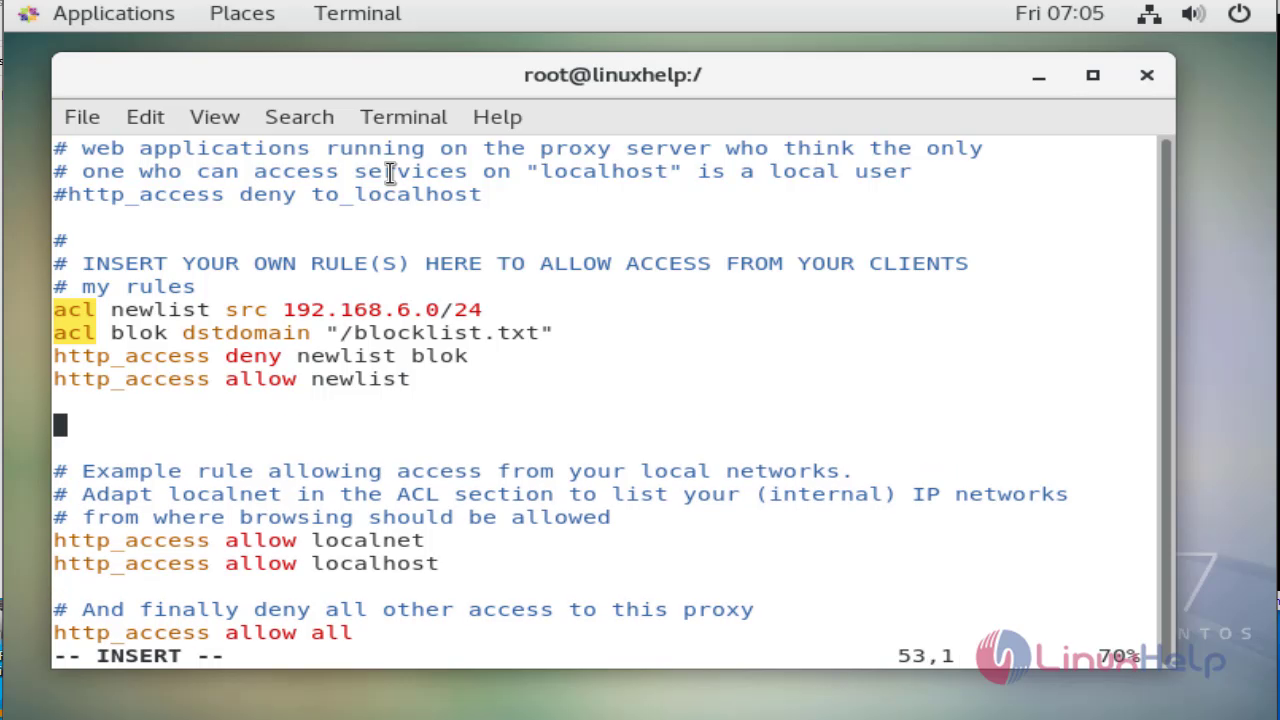
[root@linuxhelp /]# vim /etc/squid/squid.conf
To see the status of the squid service
[root@linuxhelp /]# systemctl status squid
● squid.service - Squid caching proxy
   Loaded: loaded (/usr/lib/systemd/system/squid.service; disabled; vendor preset: disabled)
   Active: inactive (dead)

Sep 03 06:56:19 linuxhelp.localdomain squid[9630]: Squid Parent: will star...
Sep 03 06:56:19 linuxhelp.localdomain squid[9630]: Squid Parent: (squid-1)...

To start the squid squid service

[root@linuxhelp /]# systemctl start squid

To Enable the squid service to start on boot

[root@linuxhelp /]# systemctl enable squid
Created symlink from /etc/systemd/system/multi-user.target.wants/squid.service to /usr/lib/systemd/system/squid.service.

Again see the status of the squid service

[root@linuxhelp /]# systemctl status squid
● squid.service - Squid caching proxy
   Loaded: loaded (/usr/lib/systemd/system/squid.service; enabled; vendor preset: disabled)
   Active: active (running) since Fri 2021-09-03 07:06:33 EDT; 22s ago
 Main PID: 9992 (squid)
   CGroup: /system.slice/squid.service
           ├─9992 /usr/sbin/squid -f /etc/squid/squid.conf
           ├─9995 (squid-1) -f /etc/squid/squid.conf
           └─9999 (logfile-daemon) /var/log/squid/access.log

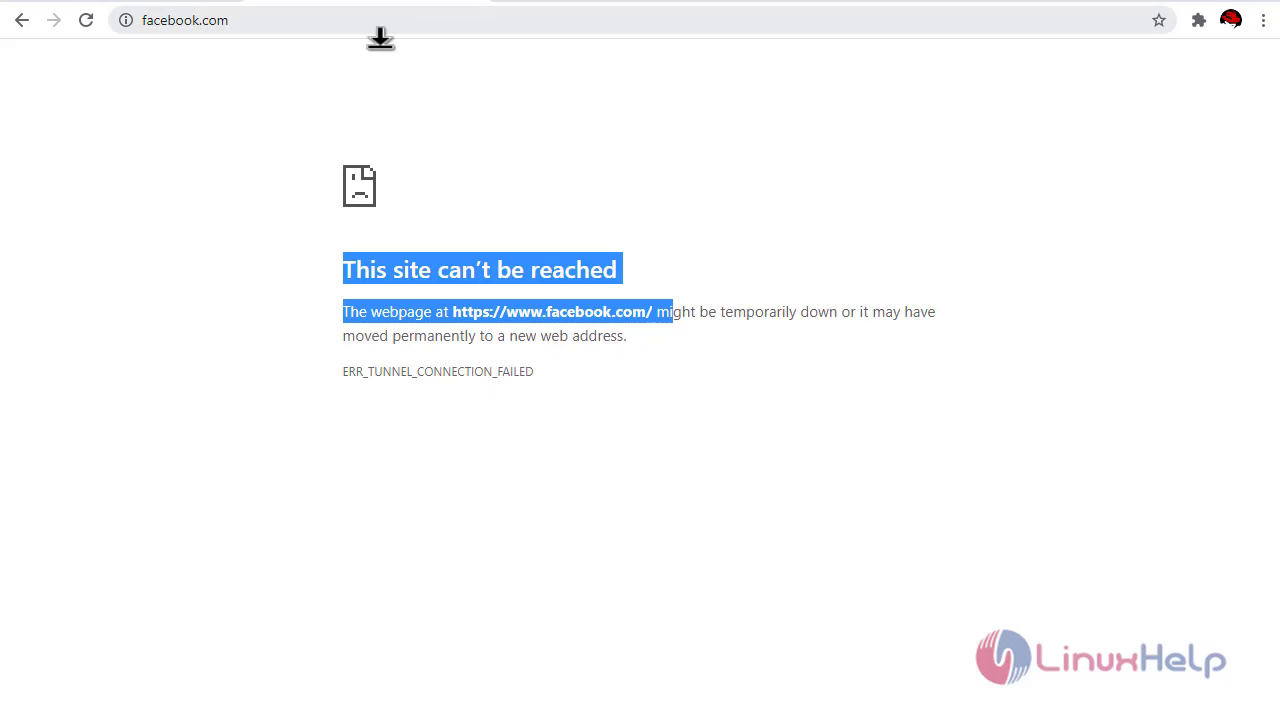
Checking the non blocked sites Snap 4!

Checking the blocklist site Snap 5

With this installation on squid proxy server on centos 7 comes to end

Tags:
hebrewgranger
Author: 

Comments ( 0 )

No comments available

Add a comment
{{postCtrl.cmtErrMsg}}

Frequently asked questions ( 5 )

Q

What is squid proxy server ?

A

Squid is a Unix-based proxy server that can do both caching and proxying.

It can cache any web content to the user or requestor that is from a closer data storage point

Q

What is Squid proxy port?

A

This is the port on which Squid listens for client requests.
The default port is 3128, but 8080 is also common

Q

What are protocols supported by the Squid proxy server?

A

Squid is not a generic proxy. It normally proxies only HTTP connections.
It supports the protocols FTP, Gopher, SSL, and WAIS,
but it does not support other Internet protocols,
such as the news protocol,
or video conferencing protocols.

Q

What is proxy and why it is used?

A

A proxy server provides a gateway between users and the internet. It is a server, referred to as an “intermediary” because it goes between end-users and the web pages they visit online

Q

What is the use of proxy?

A

Proxy servers act as a firewall and web filter, provide shared network connections, and cache data to speed up common requests

Back To Top!
Rank
User
Points

Top Contributers

userNamenaveelansari
135850

Top Contributers

userNameayanbhatti
92510

Top Contributers

userNamehamzaahmed
32150

Top Contributers

1
userNamelinuxhelp
31040

Top Contributers

userNamemuhammadali
24500
Can you help legeek ?
Installation of the call center module

hello

I wish to install a call center in virtual with issabel, I downloaded the latest version of it , but I don' t arrive to install the call center module in issabel. please help me

thanks!

Networking
  • Routing
  • trunk
  • Netmask
  • Packet Capture
  • domain
  • HTTP Proxy
Server Setup
  • NFS
  • KVM
  • Memory
  • Sendmail
  • WebDAV
  • LXC
Shell Commands
  • Cloud commander
  • Command line archive tools
  • last command
  • Shell
  • terminal
  • Throttle
Desktop Application
  • Linux app
  • Pithos
  • Retrospect
  • Scribe
  • TortoiseHg
  • 4Images
Monitoring Tool
  • Monit
  • Apache Server Monitoring
  • EtherApe 
  • Arpwatch Tool
  • Auditd
  • Barman
Web Application
  • Nutch
  • Amazon VPC
  • FarmWarDeployer
  • Rukovoditel
  • Mirror site
  • Chef
Contact Us | Terms of Use| Privacy Policy| Disclaimer
© 2025 LinuxHelp.com All rights reserved. Linux™ is the registered trademark of Linus Torvalds. This site is not affiliated with linus torvalds in any way.