How to install and use fswatch on opensuse15.1
- 00:24 cat /etc/os-release
- 00:40 zypper install gcc gcc-c++
- 01:14 cd /mnt
- 01:19 wget https://github.com/emcrisostomo/fswatch/releases/download/1.14.0/fswatch-1.14.0.tar.gz
- 01:30 tar -xzf fswatch-1.14.0.tar.gz
- 01:39 cd fswatch-1.14.0/
- 01:54 ./configure
- 02:09 make
- 02:24 make install
- 02:34 ldconfig /usr/bin/
- 02:38 ldconfig /usr/sbin/
- 03:12 fswatch -d /mnt
- 03:58 fswatch -r -d /mnt/
- 04:36 fswatch -r -d /mnt/ --timestamp
Installation and use of fswatch on opensuse15.1
Introduction
fswatch monitors the directories and files and reports the changes that happened in the files and directories.This video explains the method to install the fswatch and also monitors the directories and files
Prerequisites:
gcc, gcc-c++
Process:
To check the installed version of the operating system.
LinuxHelp:~ # cat /etc/os-release
NAME="openSUSE Leap"
VERSION="15.1 "
ID="opensuse-leap"
ID_LIKE="suse opensuse"
VERSION_ID="15.1"
PRETTY_NAME="openSUSE Leap 15.1"
ANSI_COLOR="0;32"
CPE_NAME="cpe:/o:opensuse:leap:15.1"
BUG_REPORT_URL="https://bugs.opensuse.org"
HOME_URL="https://www.opensuse.org/"
Install required compilers using below command.
LinuxHelp:~ # zypper install gcc gcc-c++
Retrieving repository 'Non-OSS Repository' metadata ................................................[done]
Building repository 'Non-OSS Repository' cache
…..
…..
The following 16 NEW packages are going to be installed:
  gcc gcc-c++ gcc7 gcc7-c++ glibc-devel libasan4 libatomic1 libcilkrts5 libitm1 liblsan0 libmpx2
  libmpxwrappers2 libstdc++6-devel-gcc7 libtsan0 libubsan0 linux-glibc-devel
16 new packages to install.
Overall download size: 38.3 MiB. Already cached: 0 B. After the operation, additional 144.1 MiB will be
.....................................[done]
(13/16) Installing: gcc7-7.4.0+r266845-lp151.1.35.x86_64 ...........................................[done]
(14/16) Installing: gcc7-c++-7.4.0+r266845-lp151.1.35.x86_64 .......................................[done]
(15/16) Installing: gcc-7-lp151.3.5.x86_64 .........................................................[done]
(16/16) Installing: gcc-c++-7-lp151.3.5.x86_64 .....................................................[done]
Change directory to download the fswatch in a specific location
LinuxHelp:~ # cd /mnt
Use the following command to download the fswatch
LinuxHelp:/mnt # wget https://github.com/emcrisostomo/fswatch/releases/download/1.14.0/fswatch-1.14.0.tar.gz
--2019-10-24 03:20:01--  https://github.com/emcrisostomo/fswatch/releases/download/1.14.0/fswatch-
….
…
HTTP request sent, awaiting response... 200 OK
Length: 832553 (813K) [application/octet-stream]
Saving to: ‘fswatch-1.14.0.tar.gz’
fswatch-1.14.0.tar.gz      100%[======================================>] 813.04K   459KB/s    in 1.8s
2019-10-24 03:20:05 (459 KB/s) - ‘fswatch-1.14.0.tar.gz’ saved [832553/832553]
Long listing the current directory
LinuxHelp:/mnt # ll
total 816
-rw-r--r-- 1 root root 832553 Dec  5  2018 fswatch-1.14.0.tar.gz
Extract the downloaded file
LinuxHelp:/mnt # tar -xzf fswatch-1.14.0.tar.gz
LinuxHelp:/mnt # ll
total 816
drwxr-xr-x 1  501   20    756 Dec  5  2018 fswatch-1.14.0
-rw-r--r-- 1 root root 832553 Dec  5  2018 fswatch-1.14.0.tar.gz
Change directory to extracted directory
LinuxHelp:/mnt # cd fswatch-1.14.0/
LinuxHelp:/mnt/fswatch-1.14.0 # ll
total 1164
-rw-r--r-- 1 501 20  93787 Dec  5  2018 ABOUT-NLS
-rw-r--r-- 1 501 20    147 Dec  5  2018 AUTHORS
-rw-r--r-- 1 501 20     98 Dec  5  2018 AUTHORS.libfswatch
-rw-r--r-- 1 501 20    895 Dec  5  2018 CONTRIBUTING.md
-rw-r--r-- 1 501 20  35147 Dec  5  2018 COPYING
-rw-r--r-- 1 501 20  58860 Dec  5  2018 ChangeLog
-rw-r--r-- 1 501 20  15756 Dec  5  2018 INSTALL
-rw-r--r-- 1 501 20   1968 Dec  5  2018 Makefile.am
-rw-r--r-- 1 501 20  34849 Dec  5  2018 Makefile.in
-rw-r--r-- 1 501 20   6710 Dec  5  2018 NEWS
-rw-r--r-- 1 501 20   5495 Dec  5  2018 NEWS.libfswatch
-rw-r--r-- 1 501 20  11859 Dec  5  2018 README
-rw-r--r-- 1 501 20    968 Dec  5  2018 README.bsd
-rw-r--r-- 1 501 20   2522 Dec  5  2018 README.codestyle
-rw-r--r-- 1 501 20   1957 Dec  5  2018 README.freebsd
-rw-r--r-- 1 501 20   3007 Dec  5  2018 README.gnu-build-system
-rw-r--r-- 1 501 20   2127 Dec  5  2018 README.illumos
-rw-r--r-- 1 501 20   1778 Dec  5  2018 README.libfswatch.md
-rw-r--r-- 1 501 20   2035 Dec  5  2018 README.linux
-rw-r--r-- 1 501 20  11859 Dec  5  2018 README.md
-rw-r--r-- 1 501 20   4741 Dec  5  2018 README.osx
-rw-r--r-- 1 501 20   3107 Dec  5  2018 README.smartos
-rw-r--r-- 1 501 20   2127 Dec  5  2018 README.solaris
-rw-r--r-- 1 501 20   2839 Dec  5  2018 README.windows
-rw-r--r-- 1 501 20  45826 Dec  5  2018 aclocal.m4
drwxr-xr-x 1 501 20    198 Oct 24 03:20 config
-rwxr-xr-x 1 501 20 768789 Dec  5  2018 configure
-rw-r--r-- 1 501 20  10332 Dec  5  2018 configure.ac
drwxr-xr-x 1 501 20     60 Oct 24 03:20 docker
drwxr-xr-x 1 501 20     56 Dec  5  2018 fswatch
drwxr-xr-x 1 501 20     56 Oct 24 03:20 libfswatch
-rw-r--r-- 1 501 20   7059 Dec  5  2018 libfswatch_config.h.in
drwxr-xr-x 1 501 20    940 Oct 24 03:20 m4
drwxr-xr-x 1 501 20     42 Oct 24 03:20 man
drwxr-xr-x 1 501 20    458 Oct 24 03:20 po
Run the configuration file.
LinuxHelp:/mnt/fswatch-1.14.0 # ./configure
configure: loading site script /usr/share/site/x86_64-unknown-linux-gnu
checking build system type... x86_64-pc-linux-gnu
checking host system type... x86_64-pc-linux-gnu
checking target system type... x86_64-pc-linux-gnu
checking for a BSD-compatible install... /usr/bin/install -c
checking whether build environment is sane... yes
…
….
After the successful verification process,built the utility using make command.
LinuxHelp:/mnt/fswatch-1.14.0 # make
make  all-recursive
make[1]: Entering directory '/mnt/fswatch-1.14.0'
Making all in libfswatch
make[2]: Entering directory '/mnt/fswatch-1.14.0/libfswatch'
Making all in src/libfswatch
make[3]: Entering directory '/mnt/fswatch-1.14.0/libfswatch/src/libfswatch'
  CXX      c/cevent.lo
  CXX      c/libfswatch.lo
  CXX      c/libfswatch_log.lo
  CXX      c++/libfswatch_exception.lo
  CXX      c++/event.lo
  ….
…….
Now install the utility as follows.
LinuxHelp:/mnt/fswatch-1.14.0 # make install
Making install in libfswatch
make[1]: Entering directory '/mnt/fswatch-1.14.0/libfswatch'
Making install in src/libfswatch
make[2]: Entering directory '/mnt/fswatch-1.14.0/libfswatch/src/libfswatch'
….
…
Now we have successfully installed the fswatch.Create a link to /usr/bin and /usr/sbin
LinuxHelp:/mnt/fswatch-1.14.0 # ldconfig /usr/bin/
LinuxHelp:/mnt/fswatch-1.14.0 # ldconfig /usr/sbin/
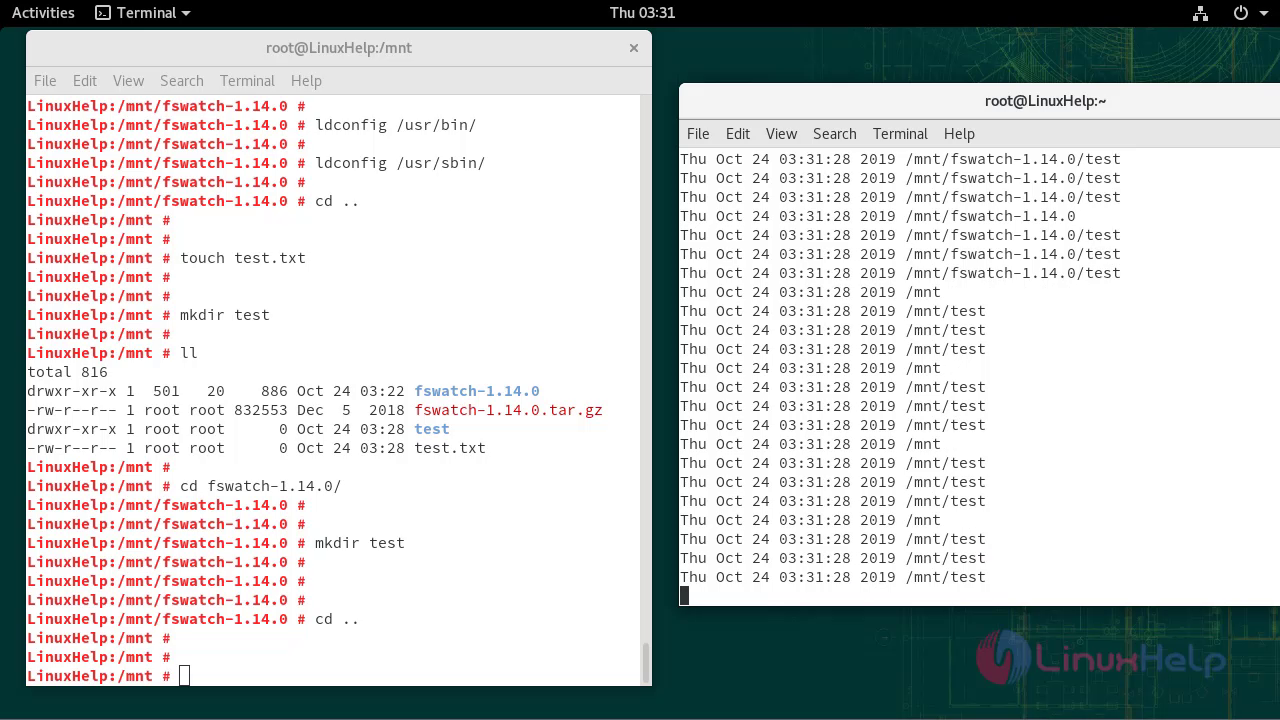
Open one more terminal, then check the fswatch simultaneously.
Command to monitor the specific directory.
LinuxHelp:~# fswatch -d /mnt/

Command to monitor the directory r4ecursively.
LinuxHelp:~# fswatch -r -d /mnt/ --timestamp

Command to monitor the specific directory with time.
LinuxHelp:~# fswatch –r -d /mnt/ --timestamp
With this, the method to install and use fswatch on OpenSUSE 15.1
Comments ( 0 )
No comments available