How to Install and Use Stardict-3.0.1 on Centos
- 00:31 cat /etc/centos-release
- 00:44 yum group install "Development Tools"
- 01:22 cd /mnt
- 01:24 wget http://mirror.centos.org/centos/7/os/x86_64/Packages/rarian-compat-0.8.1-11.el7.x86_64.rpm http://mirror.centos.org/centos/7/os/x86_64/Packages/glibc-2.17-292.el7.x86_64.rpm http://mir
- 01:48 yum localinstall * -y
- 02:10 wget http://springdale.math.ias.edu/data/puias/6/x86_64/os/Addons//stardict-3.0.1-22.puias6.x86_64.rpm
- 02:21 yum localinstall stardict-3.0.1-22.puias6.x86_64.rpm
- 03:16 cd /usr/share/stardict/dic
- 03:33 wget https://web.archive.org/web/20140917131745/http://abloz.com/huzheng/stardict-dic/dict.org/stardict-dictd_www.dict.org_wn-2.4.2.tar.bz2
- 03:55 tar -xvjf stardict-dictd_www.dict.org_wn-2.4.2.tar.bz2
{{postValue.id}}
How to Install and Use Stardict-3.0.1 on Centos
Installation Process:
To check the Installed version of OS
[root@localhost ~]# cat /etc/centos-release
CentOS Linux release 7.7.1908 (Core)
Run the below command to install Development tools
 [root@localhost ~]# yum group install "Development Tools"
Loaded plugins: fastestmirror, langpacks
There is no installed groups file.
Maybe run: yum groups mark convert (see man yum)
Determining fastest mirrors
 * base: mirror.vanehost.com
 * extras: mirror.vanehost.com
 * updates: mirror.vanehost.com
base                                                                                                 | 3.6 kB  00:00:00
extras                                                                                               | 2.9 kB  00:00:00
updates                                                                                              | 2.9 kB  00:00:00
(1/2): extras/7/x86_64/primary_db                                                                    | 153 kB  00:00:00
(2/2): updates/7/x86_64/primary_db                                                                   | 5.9 MB  00:00:09
….
….
Resolving Dependencies
--> Running transaction check
---> Package autoconf.noarch 0:2.69-11.el7 will be installed
--> Processing Dependency: m4 >= 1.4.14 for package: autoconf-2.69-11.el7.noarch
---> Package automake.noarch 0:1.13.4-3.el7 will be installed
--> Processing Dependency: perl(Thread::Queue) for package: automake-1.13.4-3.el7.noarch
--> Processing Dependency: perl(TAP::Parser) for package: automake-1.13.4-3.el7.noarch
---> Package bison.x86_64 0:3.0.4-2.el7 will be installed
---> Package byacc.x86_64 0:1.9.20130304-3.el7 will be installed
---> Package cscope.x86_64 0:15.8-10.el7 will be installed
---> Package ctags.x86_64 0:5.8-13.el7 will be installed
---> Package diffstat.x86_64 0:1.57-4.el7 will be installed
---> Package doxygen.x86_64 1:1.8.5-3.el7 will be installed
---> Package flex.x86_64 0:2.5.37-6.el7 will be installed
---> Package gcc.x86_64 0:4.8.5-39.el7 will be installed
……
Change Directory
[root@localhost ~]# cd /mnt
Download Required Packages’s RPM
 [root@localhost mnt]# wget http://mirror.centos.org/centos/7/os/x86_64/Packages/rarian-compat-0.8.1-11.el7.x86_64.rpm  http://mirror.centos.org/centos/7/os/x86_64/Packages/glibc-2.17-292.el7.x86_64.rpm  http://mirror.centos.org/centos/7/os/x86_64/Packages/libgcc-4.8.5-39.el7.i686.rpm  http://mirror.centos.org/centos/7/os/x86_64/Packages/nss-softokn-freebl-3.44.0-5.el7.x86_64.rpm  http://mirror.centos.org/centos/7/os/x86_64/Packages/libstdc++-4.8.5-39.el7.x86_64.rpm  http://mirror.centos.org/centos/7/os/x86_64/Packages/zlib-1.2.7-18.el7.x86_64.rpm
--2020-01-02 01:09:22--  http://mirror.centos.org/centos/7/os/x86_64/Packages/rarian-compat-0.8.1-11.el7.x86_64.rpm
Resolving mirror.centos.org (mirror.centos.org)... 160.116.15.18, 2607:ff28:8005:3:5054:ff:fe6b:2a18
Connecting to mirror.centos.org (mirror.centos.org)|160.116.15.18|:80... connected.
HTTP request sent, awaiting response... 200 OK
Length: 67336 (66K) [application/x-rpm]
Saving to: ‘rarian-compat-0.8.1-11.el7.x86_64.rpm’

100%[==================================================================================>] 67,336      --.-K/s   in 0.001s

2020-01-02 01:09:23 (108 MB/s) - ‘rarian-compat-0.8.1-11.el7.x86_64.rpm’ saved [67336/67336]

--2020-01-02 01:09:23--  http://mirror.centos.org/centos/7/os/x86_64/Packages/glibc-2.17-292.el7.x86_64.rpm
Reusing existing connection to mirror.centos.org:80.
HTTP request sent, awaiting response... 200 OK
Length: 3810256 (3.6M) [application/x-rpm]
Saving to: ‘glibc-2.17-292.el7.x86_64.rpm’
100%[==================================================================================>] 38,10,256   11.0MB/s   in 0.3s
2020-01-02 01:09:32 (11.0 MB/s) - ‘glibc-2.17-292.el7.x86_64.rpm’ saved [3810256/3810256]
--2020-01-02 01:09:32--  http://mirror.centos.org/centos/7/os/x86_64/Packages/libgcc-4.8.5-39.el7.i686.rpm
Reusing existing connection to mirror.centos.org:80.
HTTP request sent, awaiting response... 200 OK
Length: 112664 (110K) [application/x-rpm]
Saving to: ‘libgcc-4.8.5-39.el7.i686.rpm’
100%[==================================================================================>] 1,12,664    --.-K/s   in 0.009s
…
….
FINISHED --2020-01-02 01:09:35--
Total wall clock time: 13s
Downloaded: 6 files, 4.4M in 0.4s (11.1 MB/s)
Longlisting the current Directory
 [root@localhost mnt]# ls -la
total 4544
drwxr-xr-x.  3 root root    4096 Jan  2 01:09 .
dr-xr-xr-x. 18 root root    4096 Oct 22 16:35 ..
-rw-r--r--   1 root root 3810256 Aug 23 02:54 glibc-2.17-292.el7.x86_64.rpm
drwxr-xr-x.  2 root root    4096 Oct 22 17:13 hgfs
-rw-r--r--   1 root root  112664 Aug 23 03:20 libgcc-4.8.5-39.el7.i686.rpm
-rw-r--r--   1 root root  312504 Aug 23 03:03 libstdc++-4.8.5-39.el7.x86_64.rpm
-rw-r--r--   1 root root  229520 Aug 23 03:06 nss-softokn-freebl-3.44.0-5.el7.x86_64.rpm
-rw-r--r--   1 root root   67336 Jul  4  2014 rarian-compat-0.8.1-11.el7.x86_64.rpm
-rw-r--r--   1 root root   91960 Nov 12  2018 zlib-1.2.7-18.el7.x86_64.rpm
Install the Downloaded RPM packages
[root@localhost mnt]# yum localinstall * -y
Loaded plugins: fastestmirror, langpacks
Examining glibc-2.17-292.el7.x86_64.rpm: glibc-2.17-292.el7.x86_64
glibc-2.17-292.el7.x86_64.rpm: does not update installed package.
Skipping: hgfs, filename does not end in .rpm.
Examining libgcc-4.8.5-39.el7.i686.rpm: libgcc-4.8.5-39.el7.i686
Marking libgcc-4.8.5-39.el7.i686.rpm to be installed
Examining libstdc++-4.8.5-39.el7.x86_64.rpm: libstdc++-4.8.5-39.el7.x86_64
libstdc++-4.8.5-39.el7.x86_64.rpm: does not update installed package.
Examining nss-softokn-freebl-3.44.0-5.el7.x86_64.rpm: nss-softokn-freebl-3.44.0-5.el7.x86_64
nss-softokn-freebl-3.44.0-5.el7.x86_64.rpm: does not update installed package.
Examining rarian-compat-0.8.1-11.el7.x86_64.rpm: rarian-compat-0.8.1-11.el7.x86_64
Marking rarian-compat-0.8.1-11.el7.x86_64.rpm to be installed
Examining zlib-1.2.7-18.el7.x86_64.rpm: zlib-1.2.7-18.el7.x86_64
zlib-1.2.7-18.el7.x86_64.rpm: does not update installed package.
Resolving Dependencies
--> Running transaction check
---> Package libgcc.i686 0:4.8.5-39.el7 will be installed
---> Package rarian-compat.x86_64 0:0.8.1-11.el7 will be installed
--> Processing Dependency: rarian = 0.8.1-11.el7 for package: rarian-compat-0.8.1-11.el7.x86_64
….
….
 Verifying  : libgcc-4.8.5-39.el7.i686                                                                                 2/3
 Verifying  : rarian-0.8.1-11.el7.x86_64                                                                               3/3
Installed:
 libgcc.i686 0:4.8.5-39.el7                               rarian-compat.x86_64 0:0.8.1-11.el7
Dependency Installed:
 rarian.x86_64 0:0.8.1-11.el7

Complete!
Download the Latest version of Stardict rpm
[root@localhost mnt]# wget http://springdale.math.ias.edu/data/puias/6/x86_64/os/Addons//stardict-3.0.1-22.puias6.x86_64.rpm
--2020-01-02 01:12:47--  http://springdale.math.ias.edu/data/puias/6/x86_64/os/Addons//stardict-3.0.1-22.puias6.x86_64.rpm
Resolving springdale.math.ias.edu (springdale.math.ias.edu)... 192.16.204.192
Connecting to springdale.math.ias.edu (springdale.math.ias.edu)|192.16.204.192|:80... connected.
HTTP request sent, awaiting response... 200 OK
Length: 1262028 (1.2M) [application/x-rpm]
Saving to: ‘stardict-3.0.1-22.puias6.x86_64.rpm’
100%[==================================================================================>] 12,62,028   --.-K/s   in 0.1s
2020-01-02 01:12:50 (10.6 MB/s) - ‘stardict-3.0.1-22.puias6.x86_64.rpm’ saved [1262028/1262028]

Install the Downloaded Stardict
[root@localhost mnt]# yum localinstall stardict-3.0.1-22.puias6.x86_64.rpm
Loaded plugins: fastestmirror, langpacks
Examining stardict-3.0.1-22.puias6.x86_64.rpm: stardict-3.0.1-22.puias6.x86_64
Marking stardict-3.0.1-22.puias6.x86_64.rpm to be installed
Resolving Dependencies
--> Running transaction check
---> Package stardict.x86_64 0:3.0.1-22.puias6 will be installed
--> Processing Dependency: libbonobo >= 2.2.0 for package: stardict-3.0.1-22.puias6.x86_64
Loading mirror speeds from cached hostfile
* base: mirror.vanehost.com
* extras: mirror.vanehost.com
* updates: mirror.vanehost.com
--> Processing Dependency: libgnome >= 2.2.0 for package: stardict-3.0.1-22.puias6.x86_64
--> Processing Dependency: libgnomeui >= 2.2.0 for package: stardict-3.0.1-22.puias6.x86_64
--> Processing Dependency: libORBit-2.so.0()(64bit) for package: stardict-3.0.1-22.puias6.x86_64
--> Processing Dependency: libart_lgpl_2.so.2()(64bit) for package: stardict-3.0.1-22.puias6.x86_64
….
….
 libIDL.x86_64 0:0.8.14-8.el7           libart_lgpl.x86_64 0:2.3.21-10.el7      libbonobo.x86_64 0:2.32.1-7.el7
 libbonoboui.x86_64 0:2.24.5-7.el7      libgnome.x86_64 0:2.32.1-9.el7          libgnomecanvas.x86_64 0:2.30.3-8.el7
 libgnomeui.x86_64 0:2.24.5-8.el7
Complete!
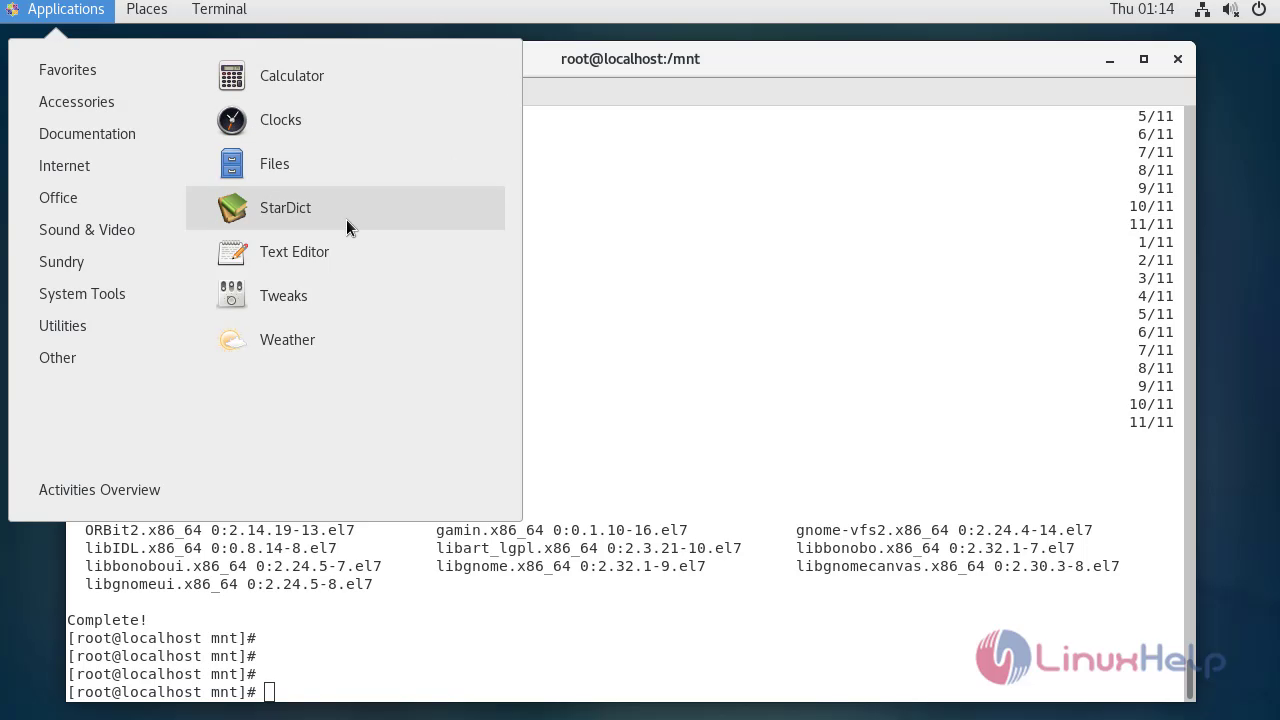
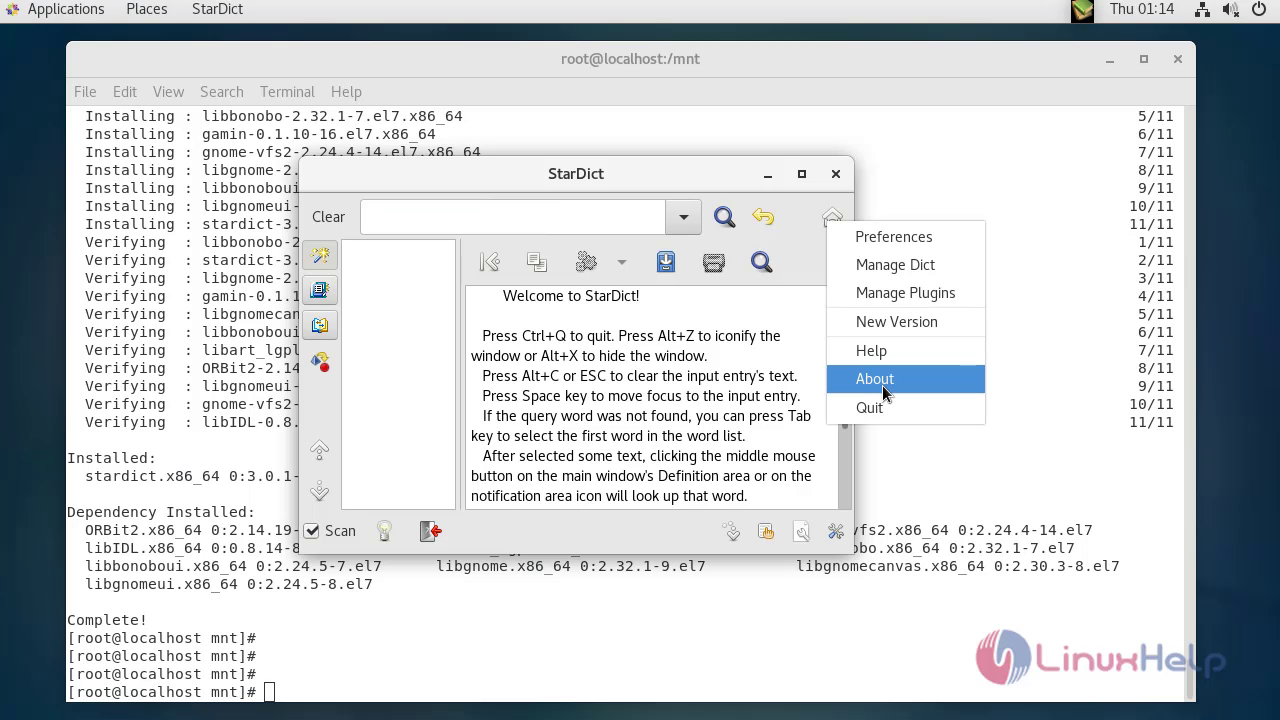
To check installed stardict
To add the offline dictionaries, change directory to default dictionary location of stardict
[root@localhost mnt]# cd /usr/share/stardict/dic
Download the Dictionary
[root@localhost dic]# wget https://web.archive.org/web/20140917131745/http://abloz.com/huzheng/stardict-dic/dict.org/stardict-dictd_www.dict.org_wn-2.4.2.tar.bz2
--2020-01-02 01:17:29--  https://web.archive.org/web/20140917131745/http://abloz.com/huzheng/stardict-dic/dict.org/stardict-dictd_www.dict.org_wn-2.4.2.tar.bz2
Resolving web.archive.org (web.archive.org)... 207.241.233.214
Connecting to web.archive.org (web.archive.org)|207.241.233.214|:443... connected.
HTTP request sent, awaiting response... 302 FOUND
….
….
Length: unspecified [application/x-bzip2]
Saving to: ‘stardict-dictd_www.dict.org_wn-2.4.2.tar.bz2’
   [                                                                  <=>              ] 1,06,82,037  405KB/s   in 25s
2020-01-02 01:17:59 (417 KB/s) - ‘stardict-dictd_www.dict.org_wn-2.4.2.tar.bz2’ saved [10682037]
Extract the Downloaded dictionary file
 [root@localhost dic]# tar -xvjf stardict-dictd_www.dict.org_wn-2.4.2.tar.bz2
stardict-dictd_www.dict.org_wn-2.4.2/
stardict-dictd_www.dict.org_wn-2.4.2/dictd_www.dict.org_wn.ifo
stardict-dictd_www.dict.org_wn-2.4.2/dictd_www.dict.org_wn.idx
stardict-dictd_www.dict.org_wn-2.4.2/dictd_www.dict.org_wn.dict.dz
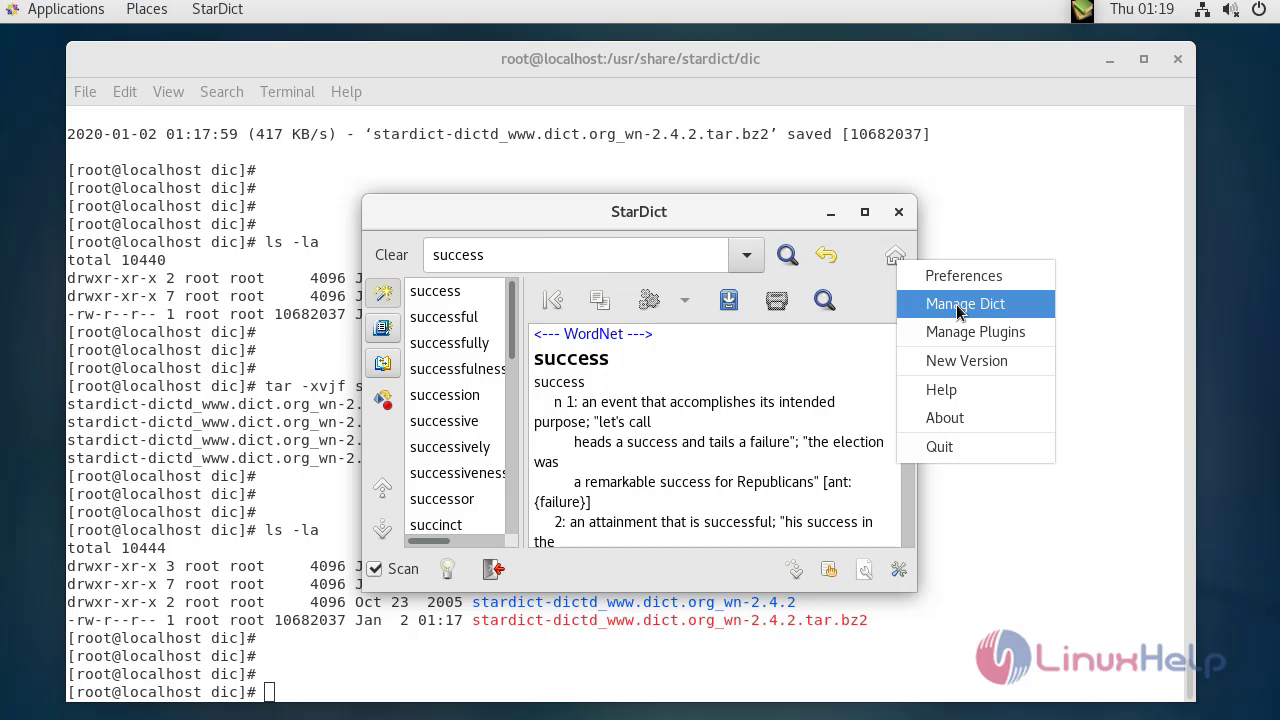
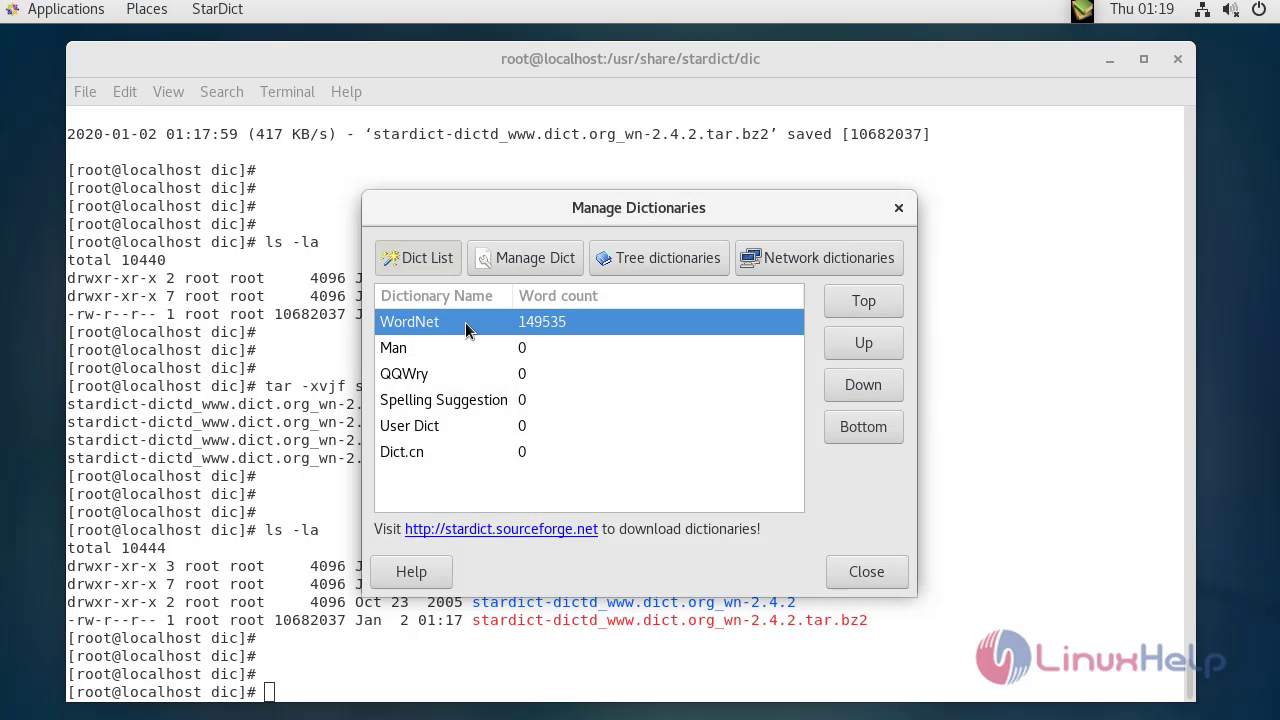
open stardict application then check the dictionary available or not in dictionary management
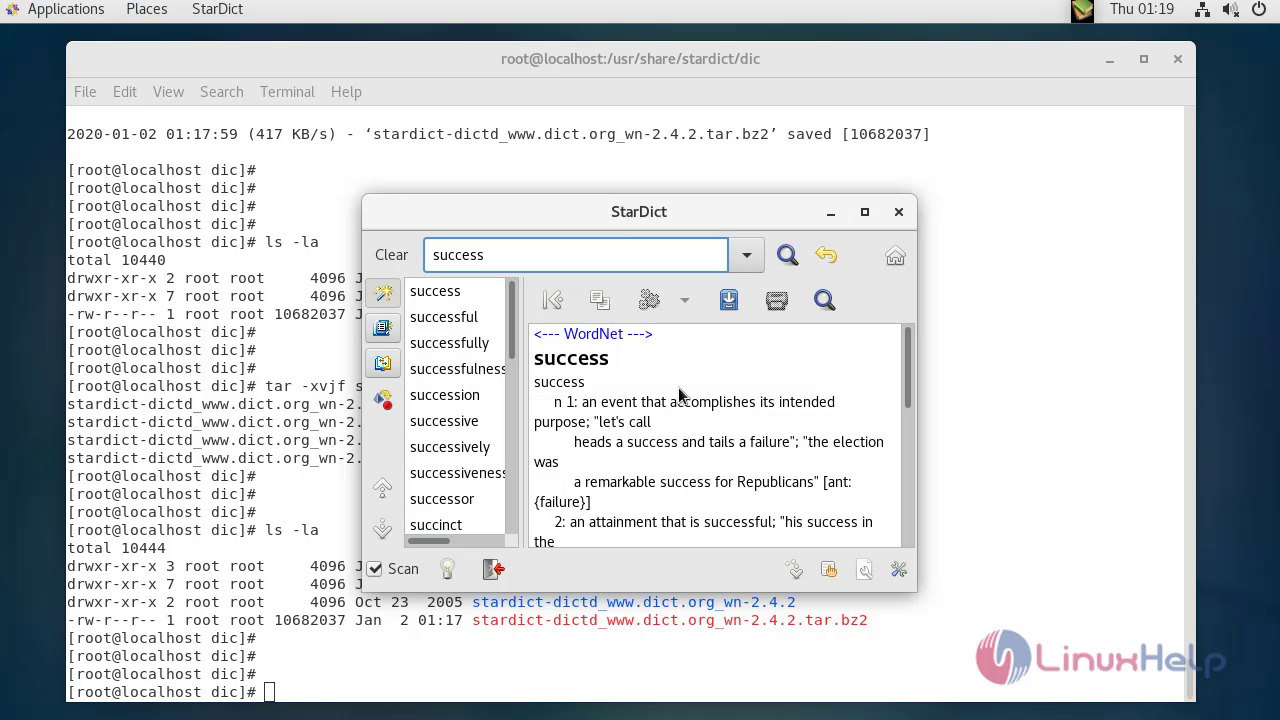
With this, the method to install stardict version 3.0.1 on centos comes to end
Comments ( 0 )
No comments available