How to Install Anydesk on Debian 11.3
To Install AnyDesk On Debian 11.3
Introduction:
AnyDesk is the world’s most convenient open-source remote desktop application to control all the programs, documents, and files from anywhere, without having to entrust your data to a cloud service.
Installation Process:
Step 1: Check the OS version by using the below command
root@linuxhelp:~# lsb_release -a
No LSB modules are available.
Distributor ID:	Debian
Description:	Debian GNU/Linux 11 (bullseye)
Release:	11
Codename:	bullseye
Step 2: Before Installation update the repository files by using the below command
root@linuxhelp:~# apt-get update
Get:1 https://download.docker.com/linux/debian bullseye InRelease [43.3 kB]
Get:2 http://security.debian.org/debian-security bullseye-security InRelease [48.4 kB]
Hit:3 http://deb.debian.org/debian bullseye InRelease
Get:4 http://deb.debian.org/debian bullseye-updates InRelease [44.1 kB]
Get:5 https://download.docker.com/linux/debian bullseye/stable amd64 Packages [11.8 kB]
Get:6 http://security.debian.org/debian-security bullseye-security/main Sources [151 kB]
Get:7 http://security.debian.org/debian-security bullseye-security/main amd64 Packages [180 kB]
Get:8 http://security.debian.org/debian-security bullseye-security/main Translation-en [113 kB]
Get:9 http://deb.debian.org/debian bullseye-updates/main Sources.diff/Index [9,483 B]
Get:10 http://deb.debian.org/debian bullseye-updates/main amd64 Packages.diff/Index [9,483 B]

Get:11 http://deb.debian.org/debian bullseye-updates/main Sources T-2022-08-18-2019.35-F-2022-08-18-2019.35.pdiff [390 B]
Get:11 http://deb.debian.org/debian bullseye-updates/main Sources T-2022-08-18-2019.35-F-2022-08-18-2019.35.pdiff [390 B]
Get:12 http://deb.debian.org/debian bullseye-updates/main amd64 Packages T-2022-08-18-2019.35-F-2022-08-18-2019.35.pdiff [284 B]
Get:12 http://deb.debian.org/debian bullseye-updates/main amd64 Packages T-2022-08-18-2019.35-F-2022-08-18-2019.35.pdiff [284 B]
Fetched 611 kB in 1s (653 kB/s)
Reading package lists... Done
Step 3: Next, add the repository key to trusted software providers list by using the below command
root@linuxhelp:~# wget -qO - https://keys.anydesk.com/repos/DEB-GPG-KEY | apt-key add -
Warning: apt-key is deprecated. Manage keyring files in trusted.gpg.d instead (see apt-key(8)).
OK
Step 4: Now, add the Anydesk official repository to the system by using the below command
root@linuxhelp:~# echo "deb http://deb.anydesk.com/ all main" > /etc/apt/sources.list.d/anydesk.list
Step 5: Update the repository files by using the below command
root@linuxhelp:~# apt-get update
Get:1 https://download.docker.com/linux/debian bullseye InRelease [43.3 kB]
Get:2 http://security.debian.org/debian-security bullseye-security InRelease [48.4 kB]
Hit:3 http://deb.debian.org/debian bullseye InRelease
Get:4 http://deb.debian.org/debian bullseye-updates InRelease [44.1 kB]
Get:5 https://download.docker.com/linux/debian bullseye/stable amd64 Packages [11.8 kB]
Get:6 http://security.debian.org/debian-security bullseye-security/main Sources [151 kB]
Get:7 http://security.debian.org/debian-security bullseye-security/main amd64 Packages [180 kB]
Get:8 http://security.debian.org/debian-security bullseye-security/main Translation-en [113 kB]
Get:9 http://deb.debian.org/debian bullseye-updates/main Sources.diff/Index [9,483 B]
Get:10 http://deb.debian.org/debian bullseye-updates/main amd64 Packages.diff/Index [9,483 B]
Get:11 http://deb.debian.org/debian bullseye-updates/main Sources T-2022-08-18-2019.35-F-2022-08-18-2019.35. pdiff [390 B]
Get:11 http://deb.debian.org/debian bullseye-updates/main Sources T-2022-08-18-2019.35-F-2022-08-18-2019.35. pdiff [390 B]
Get:12 http://deb.debian.org/debian bullseye-updates/main amd64 Packages T-2022-08-18-2019.35-F-2022-08-18-2019.35. pdiff [284 B]
Get:12 http://deb.debian.org/debian bullseye-updates/main amd64 Packages T-2022-08-18-2019.35-F-2022-08-18-2019.35. pdiff [284 B]
Fetched 611 kB in 1s (653 kB/s)
Reading package lists... Done
Step 6: Install the Anydesk by using the below command
root@linuxhelp: ~# apt install anydesk
Reading package lists... Done
Building dependency tree... Done
Reading state information... Done
The following additional packages will be installed:
  libgtkglext1 libpangox-1.0-0
The following NEW packages will be installed:
  anydesk libgtkglext1 libpangox-1.0-0
0 upgraded, 3 newly installed, 0 to remove and 165 not upgraded.
Need to get 6,340 kB of archives.
After this operation, 16.1 MB of additional disk space will be used.
Do you want to continue? [Y/n] y
Get:1 http://deb.debian.org/debian bullseye/main amd64 libpangox-1.0-0 amd64 0.0.2-5.1 [41.9 kB]
Setting up libpangox-1.0-0:amd64 (0.0.2-5.1) ...
Setting up libgtkglext1:amd64 (1.2.0-9) ...
Setting up anydesk (6.2.0) ...
/usr/sbin/policy-rc.d returned 101, not running 'enable anydesk'
/usr/sbin/policy-rc.d returned 101, not running 'start anydesk'
Processing triggers for hicolor-icon-theme (0.17-2) ...
Processing triggers for libc-bin (2.31-13+deb11u3) ...
Processing triggers for mailcap (3.69) ...
Processing triggers for desktop-file-utils (0.26-1) ...
Step 7: Open the Menu and search the Anydesk and open as shown in the below image
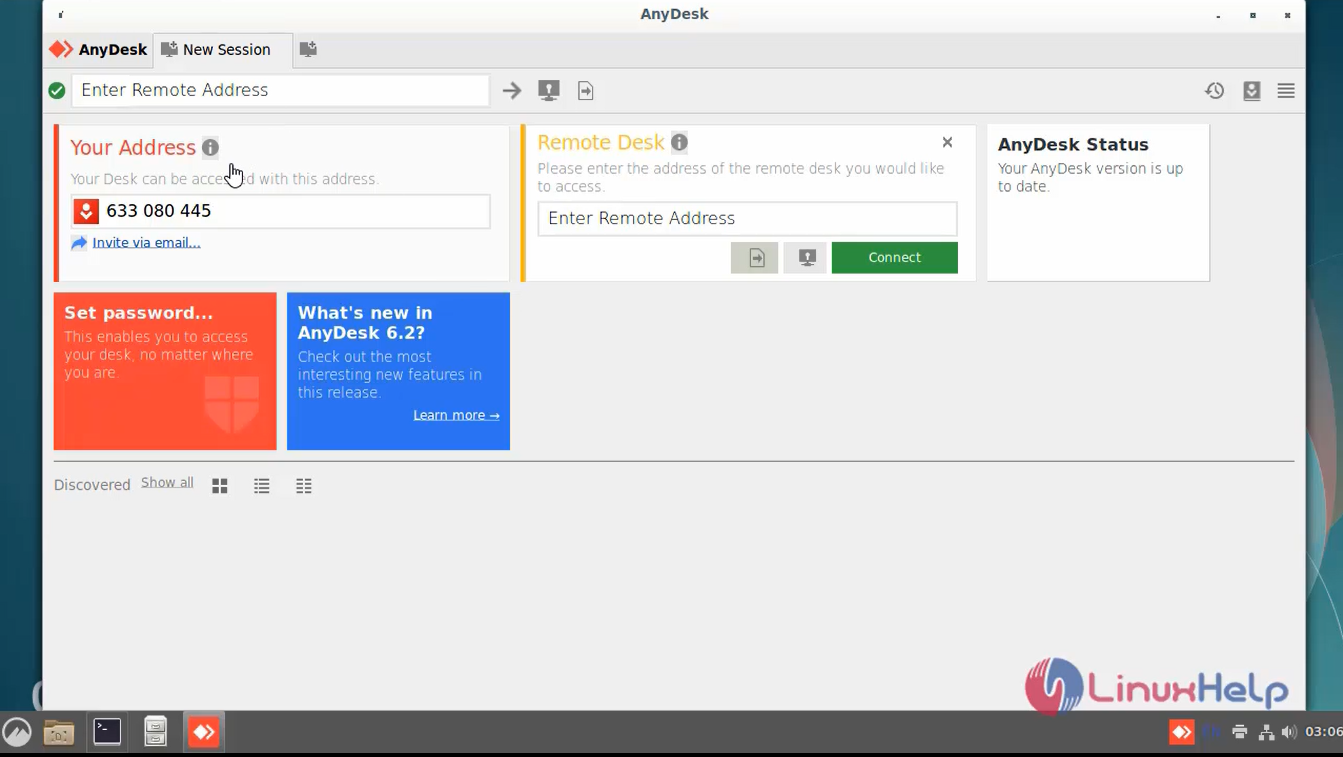
Step 8: Set a password for unattended access. This will set a fixed password on your system, which can be used anytime to connect.
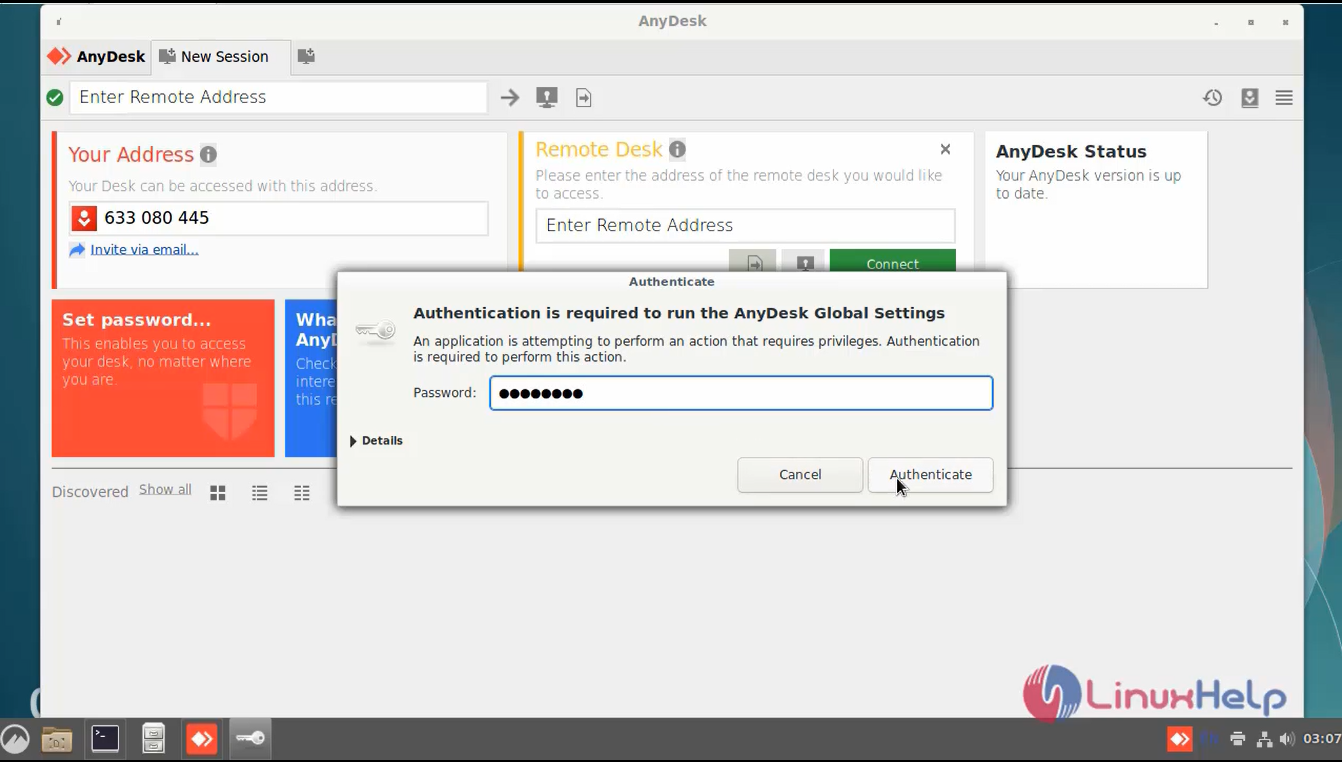
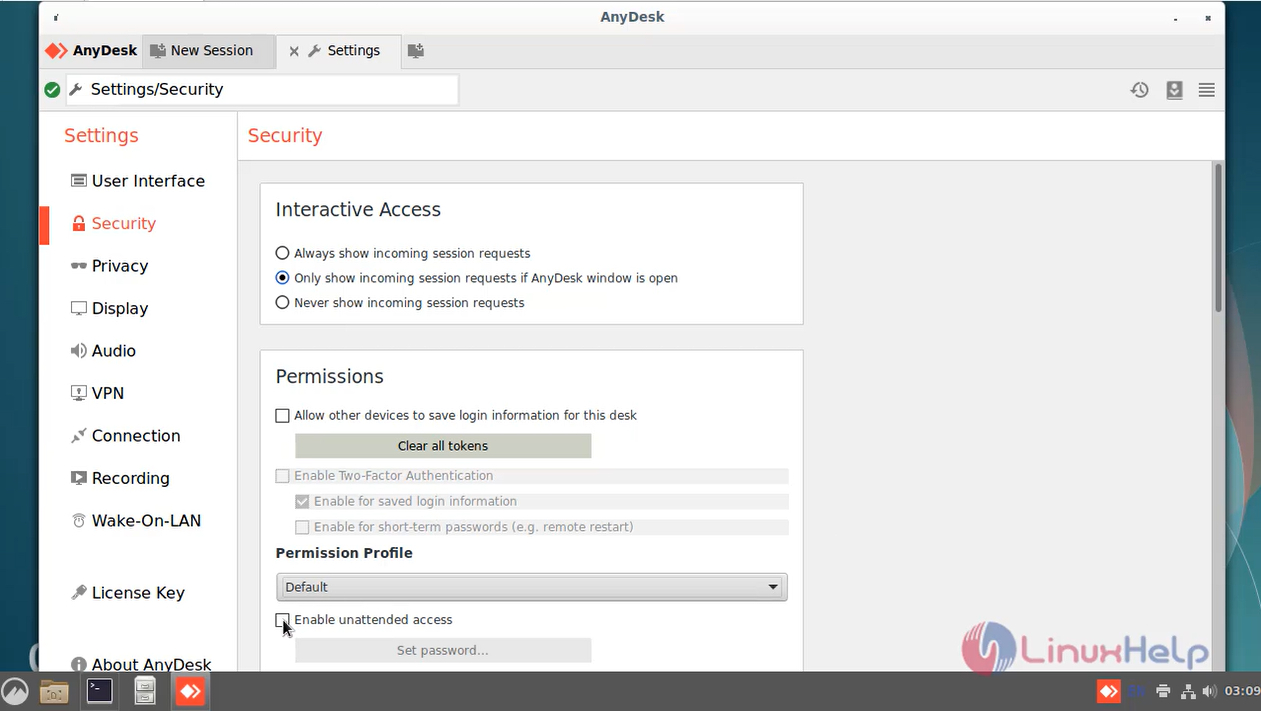
Step 9: Next, Check the Enable unattended access checkbox and set a secure password as shown in the below image.
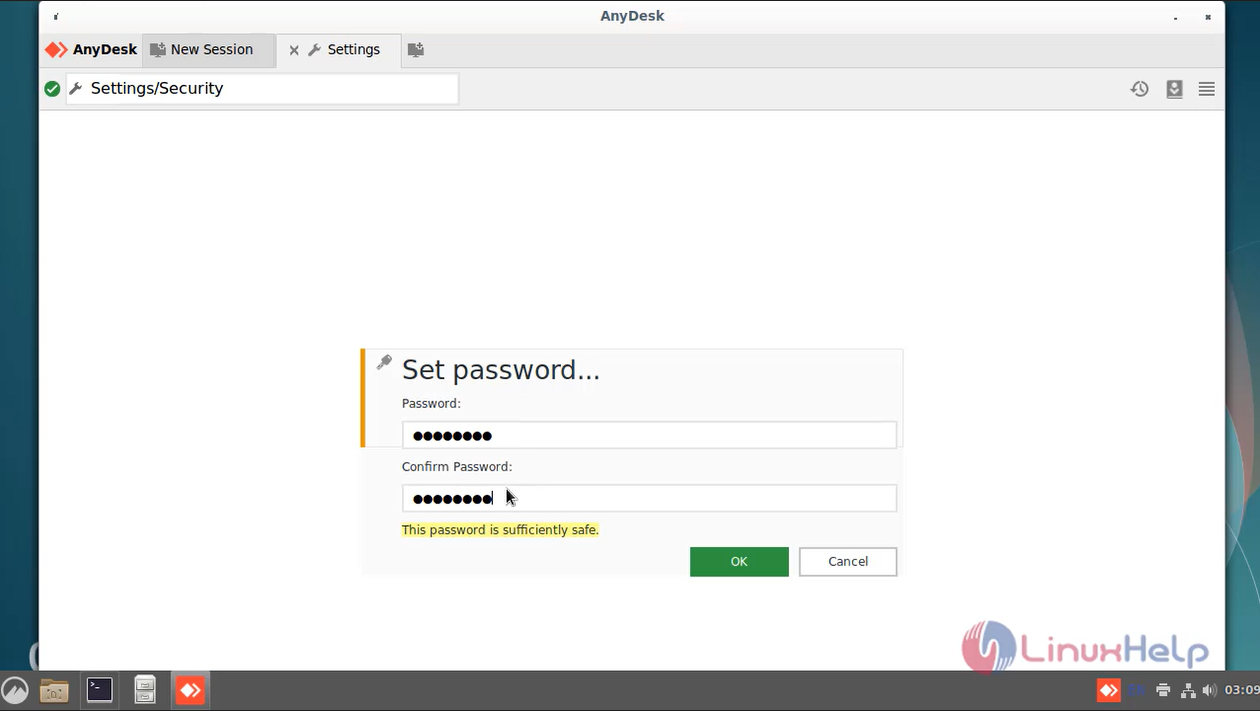
Step 10: Set the Password as shown in the below image.
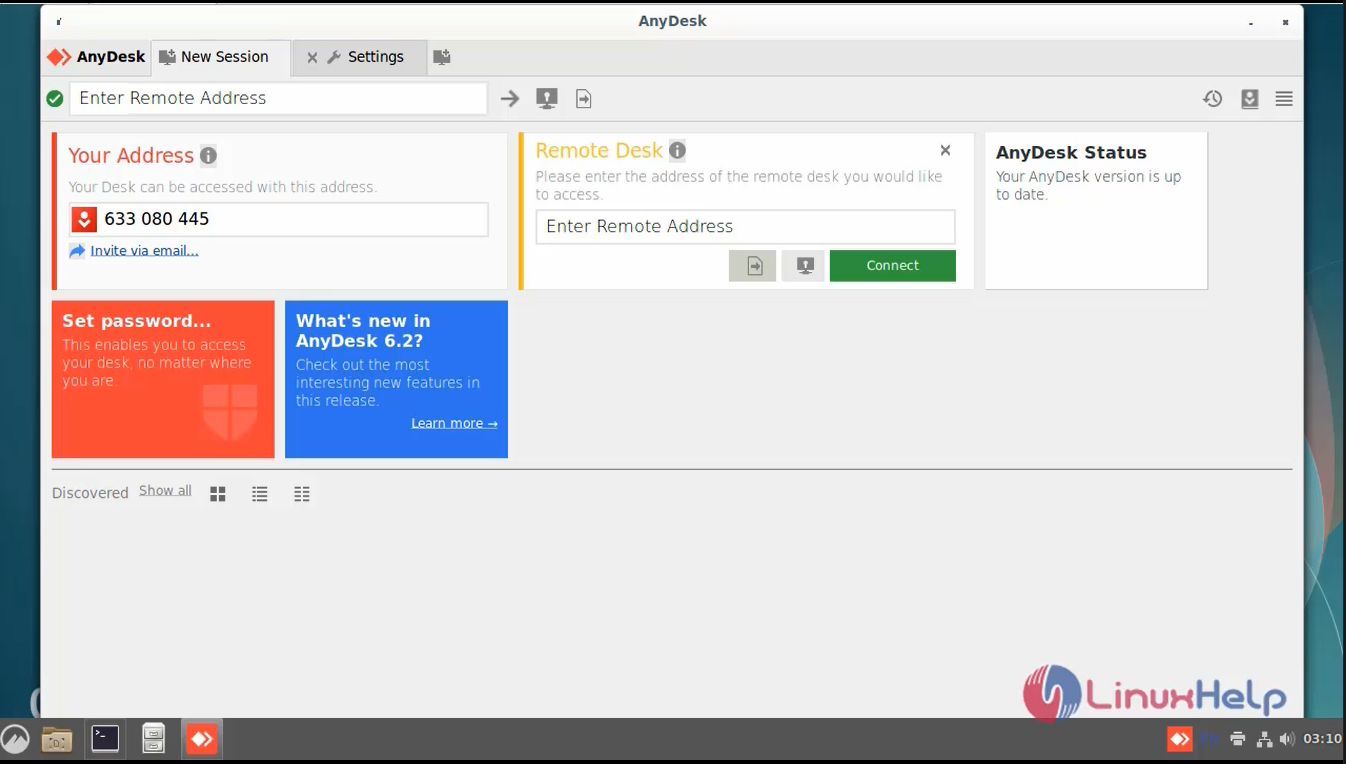
Step 11: Now you can access to the Desktop of the remote system over Anydesk.
Conclusion:
We have reached the end of this article. In this guide, we have walked you through the steps required to install any desk on Debian 11.3. Your feedback is much welcome.
Comments ( 0 )
No comments available