How to install Anydesk on Debian 12
To Install AnyDesk On Debian 12
Introduction:
AnyDesk is a remote desktop application distributed by AnyDesk Software GmbH. The proprietary software program provides platform-independent remote access to personal computers and other devices running the host application. It offers remote control, file transfer, and VPN functionality.
Procedure Steps:
Step 1: Check the OS version by using the below command.
root@linuxhelp:~# cat /etc/os-release
PRETTY_NAME="Debian GNU/Linux 12 (bookworm)"
NAME="Debian GNU/Linux"
VERSION_ID="12"
VERSION="12 (bookworm)"
VERSION_CODENAME=bookworm
ID=debian
HOME_URL="https://www.debian.org/"
SUPPORT_URL="https://www.debian.org/support"
BUG_REPORT_URL="https://bugs.debian.org/"
Step 2: Update system packages by using the below command.
root@linuxhelp:~# apt update
Hit:1 http://security.debian.org/debian-security bookworm-security InRelease
Hit:2 http://deb.debian.org/debian bookworm InRelease
Get:3 http://deb.debian.org/debian bookworm-updates InRelease [55.4 kB]
Get:4 http://deb.debian.org/debian bookworm-updates/non-free-firmware Sources [2,076 B]
Get:5 http://deb.debian.org/debian bookworm-updates/main Sources.diff/Index [10.6 kB]
Get:6 http://deb.debian.org/debian bookworm-updates/main amd64 Packages.diff/Index [10.6 kB]
Get:7 http://deb.debian.org/debian bookworm-updates/main Translation-en.diff/Index [10.6 kB]
Get:8 http://deb.debian.org/debian bookworm-updates/main Sources T-2024-04-23-2036.10-F-2024-04-23-2036.10.pdiff [831 B]
Get:8 http://deb.debian.org/debian bookworm-updates/main Sources T-2024-04-23-2036.10-F-2024-04-23-2036.10.pdiff [831 B]
Get:9 http://deb.debian.org/debian bookworm-updates/main amd64 Packages T-2024-04-23-2036.10-F-2024-04-23-2036.10.pdiff [1,595 B]
Get:9 http://deb.debian.org/debian bookworm-updates/main amd64 Packages T-2024-04-23-2036.10-F-2024-04-23-2036.10.pdiff [1,595 B]
Get:10 http://deb.debian.org/debian bookworm-updates/main Translation-en T-2024-04-23-2036.10-F-2024-04-23-2036.10.pdiff [2,563 B]
Get:10 http://deb.debian.org/debian bookworm-updates/main Translation-en T-2024-04-23-2036.10-F-2024-04-23-2036.10.pdiff [2,563 B]
Get:11 http://deb.debian.org/debian bookworm-updates/non-free-firmware amd64 Packages [616 B]
Get:12 http://deb.debian.org/debian bookworm-updates/non-free-firmware Translation-en [384 B]
Fetched 95.3 kB in 2s (55.7 kB/s)
Reading package lists... Done
Building dependency tree... Done
Reading state information... Done
61 packages can be upgraded. Run 'apt list --upgradable' to see them.
Step 3: Download the anydesk repository by using the below command.
root@linuxhelp:~# wget https://download.anydesk.com/linux/anydesk_6.3.2-1_amd64.deb
--2024-04-26 05:56:24--  https://download.anydesk.com/linux/anydesk_6.3.2-1_amd64.deb
Resolving download.anydesk.com (download.anydesk.com)... 188.40.104.135, 2a01:4f8:1c1c:204e::1
Connecting to download.anydesk.com (download.anydesk.com)|188.40.104.135|:443... connected.
HTTP request sent, awaiting response... 200 OK
Length: 7022112 (6.7M) [application/octet-stream]
Saving to: ‘anydesk_6.3.2-1_amd64.deb’

anydesk_6.3.2-1_amd 100%[===================>]   6.70M  3.04MB/s    in 2.2s

2024-04-26 05:56:27 (3.04 MB/s) - ‘anydesk_6.3.2-1_amd64.deb’ saved [7022112/7022112]
Step 4: Long list the files by using the below command.
root@linuxhelp:~# ll
total 42380
-rw-r--r--  1 root root  7022112 Apr 23 06:02  anydesk_6.3.2-1_amd64.deb
drwxrwxr-x 32 root root     4096 Sep 12  2023  asterisk-20.4.0
-rw-r--r--  1 root root 28187580 Jul 20  2023  asterisk-20-current.tar.gz
-rw-r--r--  1 root root  4981774 Mar 21  2019  avcodec-57.dll
-rw-r--r--  1 root root   353806 Mar 21  2019  avformat-57.dll
-rw-r--r--  1 root root   668686 Mar 21  2019  avutil-55.dll
-rw-r--r--  1 root root    14064 Jan 27 00:20  file
-rw-r--r--  1 root root     3244 Dec 16  2020  hangup.wav
-rw-r--r--  1 root root   519680 Oct 19  2018  lame_enc.dll
-rw-r--r--  1 root root    18613 Aug  2  2011  License.txt
-rwxr-xr-x  1 root root    34290 Jan 26 22:10  linux
-rw-r--r--  1 root root    34290 Jan 26 22:11  linux.1
drwxr-xr-x  2 root root     4096 Jan 26 22:14  linuxhelp
-rw-r--r--  1 root root       48 Oct 21  2013 'MicroSIP Website.url'
-rw-r--r--  1 root root     5652 Mar 23  2019  msgin.wav
-rw-r--r--  1 root root     1098 Mar 23  2019  msgout.wav
-rw-r--r--  1 root root     3244 Mar 23  2019  ringing2.wav
-rw-r--r--  1 root root    80044 Mar 23  2019  ringing.wav
-rw-r--r--  1 root root    48028 Mar 23  2019  ringtone.wav
-rw-r--r--  1 root root   865280 Mar 20  2019  SDL2.dll
-rw-r--r--  1 root root   506894 Mar 21  2019  swscale-4.dll
Step 5: Configure the anydesk repository by using the below command.
root@linuxhelp:~# dpkg -i anydesk_6.3.2-1_amd64.deb
Selecting previously unselected package anydesk.
(Reading database ... 196520 files and directories currently installed.)
Preparing to unpack anydesk_6.3.2-1_amd64.deb ...
Failed to stop anydesk.service: Unit anydesk.service not loaded.
Unpacking anydesk (6.3.2) ...
dpkg: dependency problems prevent configuration of anydesk:
 anydesk depends on libgtkglext1; however:
  Package libgtkglext1 is not installed.

dpkg: error processing package anydesk (--install):
 dependency problems - leaving unconfigured
Processing triggers for hicolor-icon-theme (0.17-2) ...
Processing triggers for gnome-menus (3.36.0-1.1) ...
Processing triggers for desktop-file-utils (0.26-1) ...
Processing triggers for mailcap (3.70+nmu1) ...
Errors were encountered while processing:
 anydesk
Step 6: Install Anydesk by using the below command.
root@linuxhelp:~# apt install -f
Reading package lists... Done
Building dependency tree... Done
Reading state information... Done
Correcting dependencies... Done
The following packages were automatically installed and are no longer required:
  libc-ares2 libgrpc++1.51 libgrpc29 libprotoc32 libre2-9
Use 'apt autoremove' to remove them.
The following additional packages will be installed:
  libgtkglext1
The following NEW packages will be installed:
  libgtkglext1
0 upgraded, 1 newly installed, 0 to remove and 61 not upgraded.
1 not fully installed or removed.
Need to get 96.2 kB of archives.
After this operation, 486 kB of additional disk space will be used.
Do you want to continue? [Y/n] y
Get:1 http://deb.debian.org/debian bookworm/main amd64 libgtkglext1 amd64 1.2.0-11 [96.2 kB]
Fetched 96.2 kB in 0s (498 kB/s)
Selecting previously unselected package libgtkglext1:amd64.
(Reading database ... 196538 files and directories currently installed.)
Preparing to unpack .../libgtkglext1_1.2.0-11_amd64.deb ...
Unpacking libgtkglext1:amd64 (1.2.0-11) ...
Setting up libgtkglext1:amd64 (1.2.0-11) ...
Setting up anydesk (6.3.2) ...
Created symlink /etc/systemd/system/multi-user.target.wants/anydesk.service → /e
tc/systemd/system/anydesk.service.
Processing triggers for libc-bin (2.36-9+deb12u3) ...
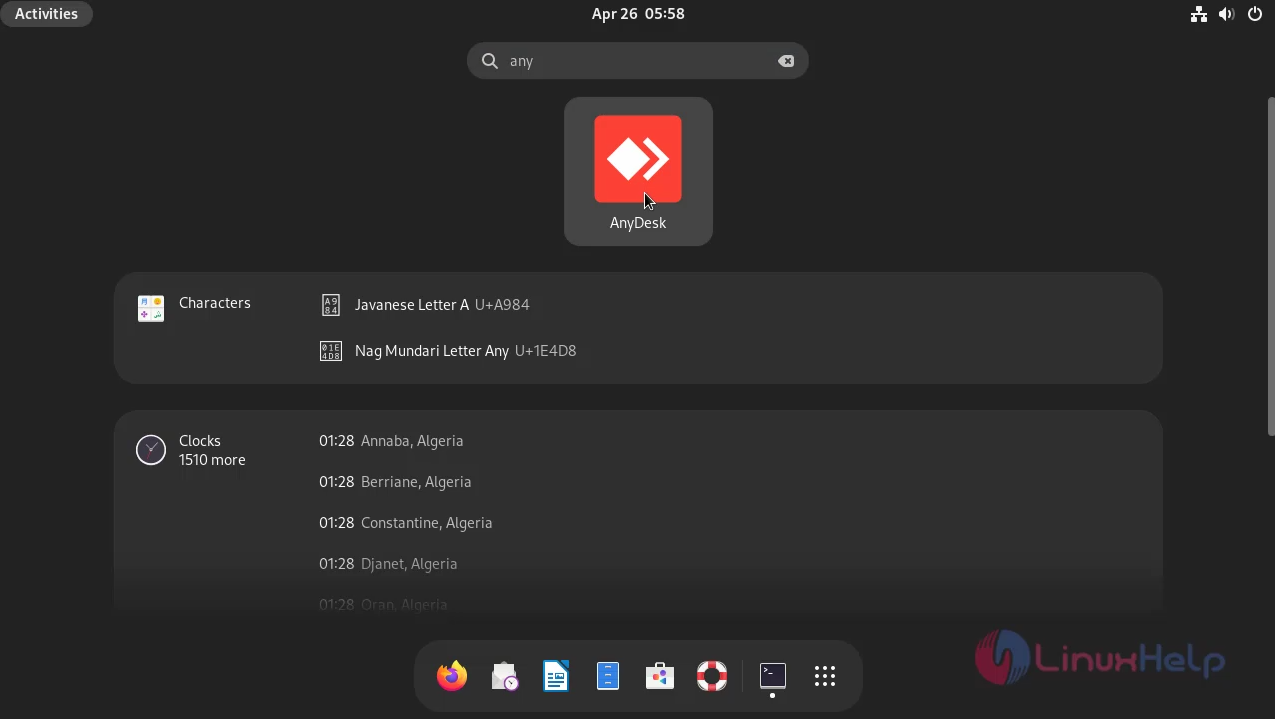
Step 7: Goto Activities and search any desk as shown in below image.
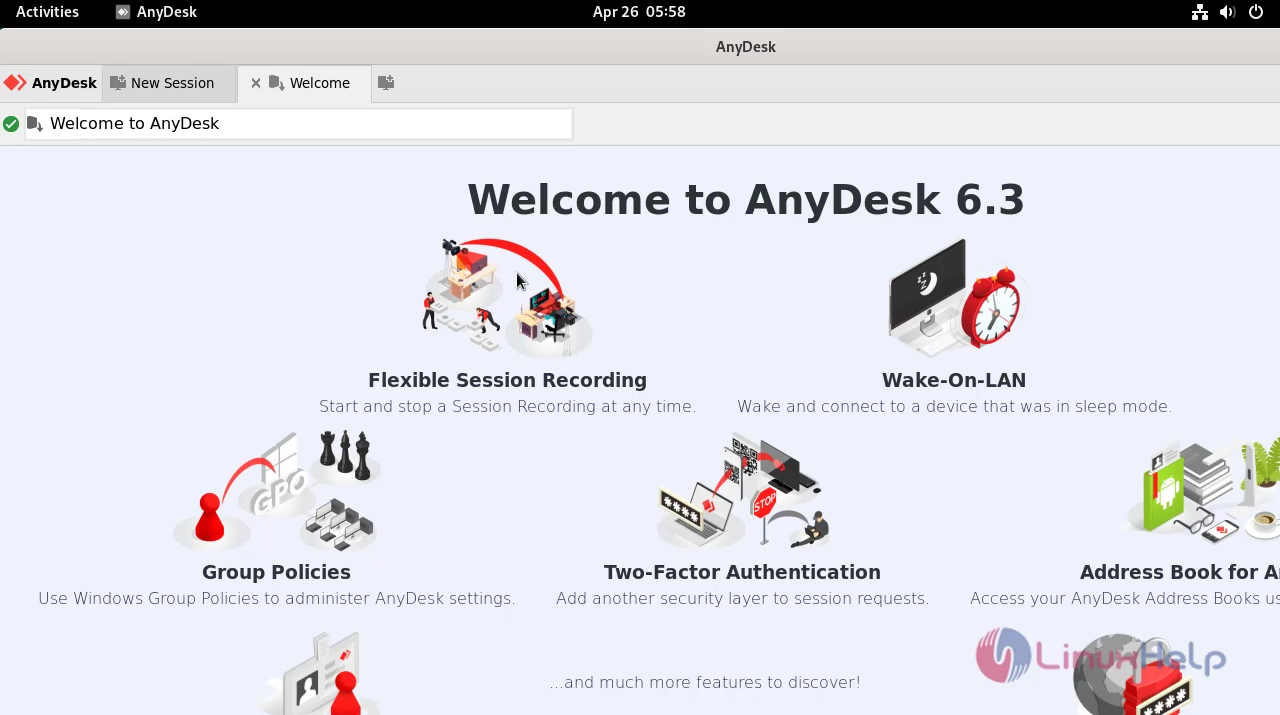
Step 8: This is the Anydesk Dashboard as shown in below image.
Conclusion:
We have reached the end of this article. In this guide, we have walked you through the steps required to install Anydesk on Debian 12. Your feedback is much welcome.
Comments ( 0 )
No comments available