How to Install Apache CouchDB on CentOS7
Apache CouchDB Installation on CentOS7
CouchDB is an open source project and NoSQL, document oriented database server. It stored data with JSON documents. It also provides web interface to access documents online.
Installation
First of all, use below command to install EPEL yum repository on your system.
[root@linuxhlep ~]# yum install epel-release.noarch -y
Loaded plugins: fastestmirror, langpacks
Determining fastest mirrors
 * base: centos.mirror.net.in
 * extras: centos.mirror.net.in
 * updates: centos.mirror.net.in
base                                                                     | 3.6 kB  00:00:00
extras                                                                   | 3.4 kB  00:00:00
updates                                                                  | 3.4 kB  00:00:00
updates/7/x86_64/primary_db                                              | 1.3 MB  00:00:03
Resolving Dependencies
--> Running transaction check
---> Package epel-release.noarch 0:7-11 will be installed
--> Finished Dependency Resolution

Dependencies Resolved
.
.
.
Running transaction check
Running transaction test
Transaction test succeeded
Running transaction
  Installing : epel-release-7-11.noarch                                                     1/1
  Verifying  : epel-release-7-11.noarch                                                     1/1

Installed:
  epel-release.noarch 0:7-11

Complete!
Now create yum repository for Apache Couchdb. Create a file /etc/yum.repos.d/apache-couchdb.repo file using the below content.
[root@linuxhlep ~]# vim /etc/yum.repos.d/apache-couchdb.repo
[bintray--apache-couchdb-rpm]
name=Apache-couchdb
baseurl=http://apache.bintray.com/couchdb-rpm/el$releasever/$basearch/
gpgcheck=0
repo_gpgcheck=0
enabled=1
Install CouchDB package using yum command line tool. It will also install many more dependencies on your system.
[root@linuxhlep ~]# yum install couchdb -y
Loaded plugins: fastestmirror, langpacks
Loading mirror speeds from cached hostfile
epel/x86_64/metalink                                                     | 8.5 kB  00:00:00
 * base: centos.mirror.net.in
 * epel: repos.del.extreme-ix.org
 * extras: centos.mirror.net.in
 * updates: centos.mirror.net.in
bintray--apache-couchdb-rpm                                              | 1.3 kB  00:00:00
epel                                                                     | 4.7 kB  00:00:00
(1/4): epel/x86_64/group_gz                                              |  88 kB  00:00:00
(2/4): bintray--apache-couchdb-rpm/7/x86_64/primary                      |  40 kB  00:00:01
(3/4): epel/x86_64/updateinfo                                            | 952 kB  00:00:06
(4/4): epel/x86_64/primary_db
.
.
.
  Verifying  : couchdb-2.3.0-1.el7.x86_64                                                   1/5
  Verifying  : python-urllib3-1.10.2-5.el7.noarch                                           2/5
  Verifying  : python-requests-2.6.0-1.el7_1.noarch                                         3/5
  Verifying  : 1:couch-js-1.8.5-21.el7.x86_64                                               4/5
  Verifying  : python-progressbar-2.3-4.el7.noarch                                          5/5

Installed:
  couchdb.x86_64 0:2.3.0-1.el7

Dependency Installed:
  couch-js.x86_64 1:1.8.5-21.el7                  python-progressbar.noarch 0:2.3-4.el7
  python-requests.noarch 0:2.6.0-1.el7_1          python-urllib3.noarch 0:1.10.2-5.el7

Complete!
Start and enable CouchDB service using following commands.
[root@linuxhlep ~]# systemctl start couchdb.service
[root@linuxhlep ~]# systemctl enable couchdb
Created symlink from /etc/systemd/system/multi-user.target.wants/couchdb.service to /usr/lib/systemd/system/couchdb.service.
By default, CouchDB runs on port 5984 and will be accessible to localhost only. To make it available on network system edit CouchDB config file /opt/couchdb/etc/local.ini and update following values.
[root@linuxhlep ~]# vim /opt/couchdb/etc/local.ini
[chttpd]
port = 5984
bind_address = 192.168.7.223
Restart the couchdb service
[root@linuxhlep ~]# systemctl restart couchdb.service
Now open the following URL using your http://192.168.7.223:5984/_utils/ in your web browser:
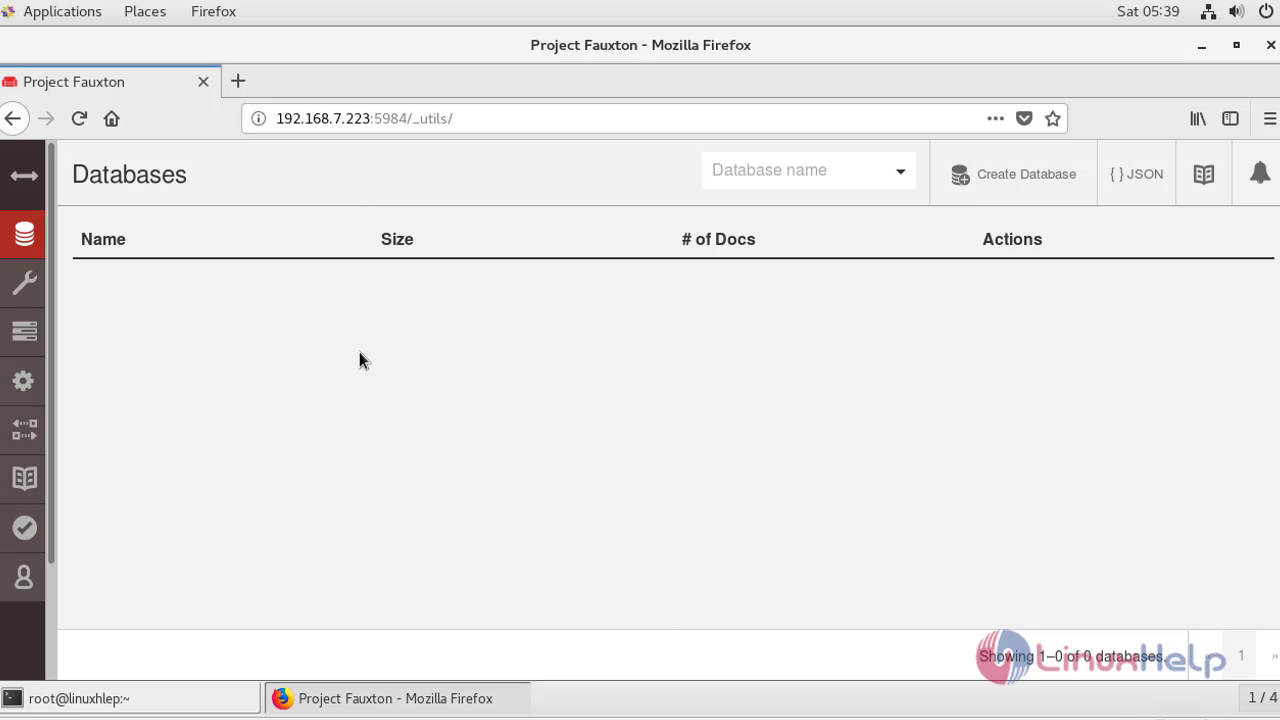 With this, the method to Install Apache CouchDB on CentOS7 comes to an end
Comments ( 0 )
No comments available