How to install Atom editor On CentOS 8.1
To Install Atom editor on CentOS 8.1
Introduction:
Atom is an open-source, multi-platform text editor which is developed as a modern and approachable tool, yet it is hackable to the core and lets us customize it to our demands. It is designed with an automatic interface and is arranged with a group of features for writing such as CSS, HTML, JavaScript, and other web programming languages. It can be also used for editing source code for OS X, Linux, and Windows. This tutorial will cover the installation of Atom on CentOS 8.1 Installation process: Before installation of atom editor install git and wget
[root@linuxhelp ~]# yum install wget git -y
Last metadata expiration check: 1:54:58 ago on Wednesday 23 December 2020 03:35:09 PM IST.
Package wget-1.19.5-10.el8.x86_64 is already installed.
Dependencies resolved.
Installing:
 git                               x86_64                  2.27.0-1.el8                     appstream                  164 k
Installing dependencies:
 git-core                          x86_64                  2.27.0-1.el8                     appstream                  5.7 M
 git-core-doc                      noarch                  2.27.0-1.el8                     appstream                  2.5 M
 perl-Error                        noarch                  1:0.17025-2.el8                  appstream                   46 k
 perl-Git                          noarch                  2.27.0-1.el8                     appstream                   77 k
 perl-TermReadKey                  x86_64                  2.37-7.el8                       appstream                   40 k
Install  6 Packages
Total download size: 8.5 M
Installed size: 45 M
Downloading Packages:
(1/6): git-2.27.0-1.el8.x86_64.rpm                                                           181 kB/s | 164 kB     00:00
(2/6): perl-Error-0.17025-2.el8.noarch.rpm                                                   171 kB/s |  46 kB     00:00
 (5/6): git-core-doc-2.27.0-1.el8.noarch.rpm                                                  468 kB/s | 2.5 MB     00:05
(6/6): git-core-2.27.0-1.el8.x86_64.rpm                                                      674 kB/s | 5.7 MB     00:08
-----------------------------------------------------------------------------------------------------------------------------
Total                                                                                        962 kB/s | 8.5 MB     00:09
Running transaction check
Transaction check succeeded.
Running transaction test
Transaction test succeeded.
Running transaction
  Preparing        :                                                                                                     1/1
  Installing       : git-core-2.27.0-1.el8.x86_64                                                                        1/6
  Installing       : git-core-doc-2.27.0-1.el8.noarch                                                                    2/6
  Installing       : perl-TermReadKey-2.37-7.el8.x86_64                                                                  3/6
  Verifying        : perl-Git-2.27.0-1.el8.noarch                                                                        5/6
  Verifying        : perl-TermReadKey-2.37-7.el8.x86_64                                                                  6/6
Installed products updated.
Installed:
  git-2.27.0-1.el8.x86_64                   git-core-2.27.0-1.el8.x86_64         git-core-doc-2.27.0-1.el8.noarch
  perl-Error-1:0.17025-2.el8.noarch         perl-Git-2.27.0-1.el8.noarch         perl-TermReadKey-2.37-7.el8.x86_64
Complete!
Now download atom editor latest package using following command
 [root@linuxhelp ~]# wget https://github.com/atom/atom/releases/download/v1.18.0/atom.x86_64.rpm
--2020-12-23 17:30:54--  https://github.com/atom/atom/releases/download/v1.18.0/atom.x86_64.rpm
Resolving github.com (github.com)... 13.234.210.38
Connecting to github.com (github.com)|13.234.210.38|:443... connected.
HTTP request sent, awaiting response... 302 Found
disposition=attachment%3B%20filename%3Datom.x86_64.rpm&response-content-type=application%2Foctet-stream [following]
--2020-12-23 17:30:55--  https://github-production-release-asset-2e65be.s3.amazonaws.com/3228505/4d70d04e-5120-11e7-93f3-d127c12ca4ed?X-Amz-Algorithm=AWS4-HMAC-SHA256&X-Amz-Credential=AKIAIWNJYAX4CSVEH53A%2F20201223%2Fus-east-1%2Fs3%2Faws4_request&X-Amz-Date=20201223T120055Z&X-Amz-Expires=300&X-Amz-Signature=8cbe5209509890aef5a197eeb9cff72158950bbf006e2bea98c9686076ef4d43&X-Amz-SignedHeaders=host&actor_id=0&key_id=0&repo_id=3228505&response-content-disposition=attachment%3B%20filename%3Datom.x86_64.rpm&response-content-type=application%2Foctet-stream
Resolving github-production-release-asset-2e65be.s3.amazonaws.com (github-production-release-asset-2e65be.s3.amazonaws.com)... 52.216.132.51
Connecting to github-production-release-asset-2e65be.s3.amazonaws.com (github-production-release-asset-2e65be.s3.amazonaws.com)|52.216.132.51|:443... connected.
HTTP request sent, awaiting response... 200 OK
Length: 128551353 (123M) [application/octet-stream]
Saving to: ‘atom.x86_64.rpm’
atom.x86_64.rpm                 100%[====================================================>] 122.60M   173KB/s    in 9m 34s

2020-12-23 17:40:31 (219 KB/s) - ‘atom.x86_64.rpm’ saved [128551353/128551353]
Now install locally using the following command
 [root@linuxhelp ~]# yum localinstall atom.x86_64.rpm -y
Last metadata expiration check: 2:23:31 ago on Wednesday 23 December 2020 03:35:09 PM IST.
Dependencies resolved.
Installing:
 atom                                    x86_64              1.18.0-0.1                      @commandline              123 M
Installing dependencies:
 esmtp                                   x86_64              1.2-15.el8                      epel                       57 k
 libXScrnSaver                           x86_64              1.2.3-1.el8                     appstream                  31 k
 libesmtp                                x86_64              1.0.6-18.el8                    epel                       70 k
 liblockfile                             x86_64              1.14-1.el8                      appstream                  32 k
 m4                                      x86_64              1.4.18-7.el8                    baseos                    223 k
 mailx                                   x86_64              12.5-29.el8                     baseos                    257 k
 make                                    x86_64              1:4.2.1-10.el8                  baseos                    498 k
 ncurses-compat-libs                     x86_64              6.1-7.20180224.el8              baseos                    331 k
 patch                                   x86_64              2.7.6-11.el8                    baseos                    138 k
 redhat-lsb-core                         x86_64              4.1-47.el8                      appstream                  46 k
 redhat-lsb-submod-security              x86_64              4.1-47.el8                      appstream                  22 k
 spax                                    x86_64              1.5.3-13.el8                    baseos                    217 k

Transaction Summary
Install  13 Packages
Total size: 124 M
Total download size: 1.9 M
Installed size: 419 M
Downloading Packages:
(1/12): redhat-lsb-core-4.1-47.el8.x86_64.rpm                                                 44 kB/s |  46 kB     00:01
(2/12): liblockfile-1.14-1.el8.x86_64.rpm
….
…..
…..
  Installing       : redhat-lsb-core-4.1-47.el8.x86_64                                                                 11/13
  Installing       : libXScrnSaver-1.2.3-1.el8.x86_64                                                                  12/13
  Installing       : atom-1.18.0-0.1.x86_64                                                                            13/13
  Running scriptlet: atom-1.18.0-0.1.x86_64                                                                            13/13
  Verifying        : libXScrnSaver-1.2.3-1.el8.x86_64                                                                   1/13
  Verifying        : liblockfile-1.14-1.el8.x86_64                                                                      2/13
  Verifying        : redhat-lsb-core-4.1-47.el8.x86_64                                                                  3/13
  Verifying        : redhat-lsb-submod-security-4.1-47.el8.x86_64                                                       4/13
  Verifying        : m4-1.4.18-7.el8.x86_64                                                                             5/13
  Verifying        : mailx-12.5-29.el8.x86_64                                                                           6/13
  Verifying        : make-1:4.2.1-10.el8.x86_64                                                                         7/13
  Verifying        : ncurses-compat-libs-6.1-7.20180224.el8.x86_64                                                      8/13
  Verifying        : patch-2.7.6-11.el8.x86_64                                                                          9/13
  Verifying        : spax-1.5.3-13.el8.x86_64                                                                          10/13
  Verifying        : esmtp-1.2-15.el8.x86_64                                                                           11/13
  Verifying        : libesmtp-1.0.6-18.el8.x86_64                                                                      12/13
  Verifying        : atom-1.18.0-0.1.x86_64                                                                            13/13
Installed products updated.

Installed:
  atom-1.18.0-0.1.x86_64            esmtp-1.2-15.el8.x86_64                libXScrnSaver-1.2.3-1.el8.x86_64
  libesmtp-1.0.6-18.el8.x86_64      liblockfile-1.14-1.el8.x86_64          m4-1.4.18-7.el8.x86_64
  mailx-12.5-29.el8.x86_64          make-1:4.2.1-10.el8.x86_64             ncurses-compat-libs-6.1-7.20180224.el8.x86_64
  patch-2.7.6-11.el8.x86_64         redhat-lsb-core-4.1-47.el8.x86_64      redhat-lsb-submod-security-4.1-47.el8.x86_64
  spax-1.5.3-13.el8.x86_64
Complete!
Open atom application
[root@linuxhelp ~]# atom
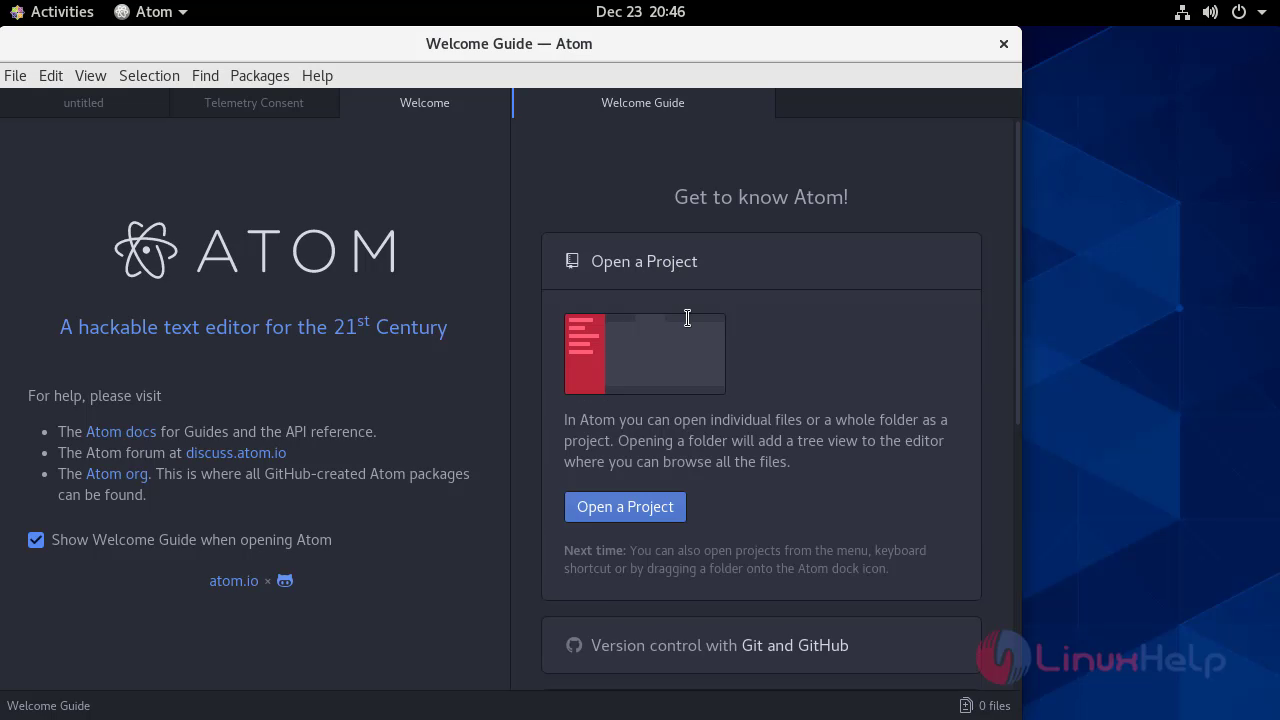
Now atom application will beon your screen

This is project setup page
 With this Installation of Atom editor comes to end.
Comments ( 0 )
No comments available