How to install Atunes on Linux Mint 17.3
How to install Atunes on Linux Mint 17.3
The aTunes is a free and open source audio player with MPlayer as its playback engine. aTunes supports MP3, Ogg Vorbis, FLAC and other formats. aTunes allows users to edit tags, organize music and rip audio CDs easily. It also supports the multi window view and every window element is shown in seperate window. This tutorial covers the installation procedure on Atunes on Linux Mint.
Features
- Tray icon to quick access.
- Notifications support.
- Equalizer with presets.
- Support for optional FAAC encoder.
- Full Drag-and-Drop support. Songs can be dragged from the navigator or from the OS file system
- Reads mp3, ogg, flac, wma, mp4, ra, rm tags
- Writes mp3, ogg, flac, wma, mp4 tags
- Reads and shows pictures included in ID3v2 tags
Installation procedure
To start with the installation procedure, add the atunes package into repository via ppa.
linuxhelp1 Desktop # add-apt-repository ppa:noobslab/apps
You are about to add the following PPA to your system:
More info: https://launchpad.net/~noobslab/+archive/ubuntu/apps
Press [ENTER] to continue or ctrl-c to cancel adding it
.
.
.
gpg: requesting key F59EAE4D from hkp server keyserver.ubuntu.com
gpg: key F59EAE4D: public key " Launchpad PPA for NoobsLab"  imported
gpg: Total number processed: 1
gpg:               imported: 1  (RSA: 1)
The repositories are added in the target system. Now update the machine using the apt-get update command.
linuxhelp1 Desktop # apt-get update
Ign http://archive.ubuntu.com trusty InRelease
Get:1 http://ppa.launchpad.net trusty InRelease [15.5 kB]
Ign http://archive.canonical.com trusty InRelease
Get:2 http://archive.ubuntu.com trusty-updates InRelease [65.9 kB]
Get:3 http://archive.canonical.com trusty Release.gpg [933 B]
.
.
.
Get:46 http://security.ubuntu.com trusty-security/multiverse Translation-en [2,201 B]
Get:47 http://security.ubuntu.com trusty-security/restricted Translation-en [3,505 B]
Get:48 http://security.ubuntu.com trusty-security/universe Translation-en [91.4 kB]
Fetched 6,502 kB in 25s (251 kB/s)
Reading package lists... Done
The system is updated with the required repositories. Now install the atunes package by executing the following command.
linuxhelp1 Desktop # apt-get install atunes
Reading package lists... Done
Building dependency tree
Reading state information... Done
Suggested packages:
  icedax lame faac
.
.
.
Processing triggers for desktop-file-utils (0.22-1ubuntu1) ...
Processing triggers for bamfdaemon (0.5.1+14.04.20140409-0ubuntu1) ...
Rebuilding /usr/share/applications/bamf-2.index...
Processing triggers for mime-support (3.54ubuntu1.1) ...
Now install the plugin package of mplayer to execute atunes music player in the system.
linuxhelp1 Desktop # apt-get install mplayer
Reading package lists... Done
Building dependency tree
Reading state information... Done
The following extra packages will be installed:
  libaudiofile1 libaudiofile1:i386 libesd0 libsvga1 libvdpau1
.
.
.
Setting up libsvga1:amd64 (1:1.4.3-33) ...
Setting up libvdpau1:amd64 (0.7-1ubuntu0.1) ...
Setting up mplayer (2:1.1+dfsg1-0ubuntu3) ...
Processing triggers for libc-bin (2.19-0ubuntu6.6) ...
The atunes is installed successfully. To launch the atunes from Linux Mint dashboard, type the package in the dashboard and run the application.
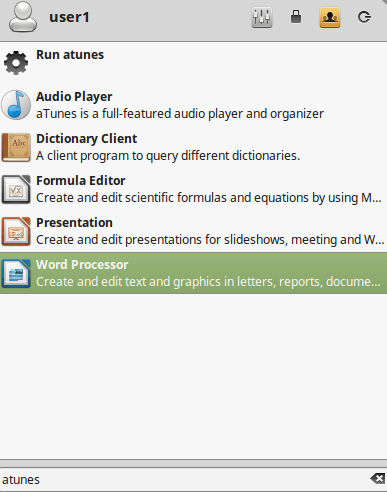
The application is running successfully. Now the user can listen to any favorite music or song with atunes.
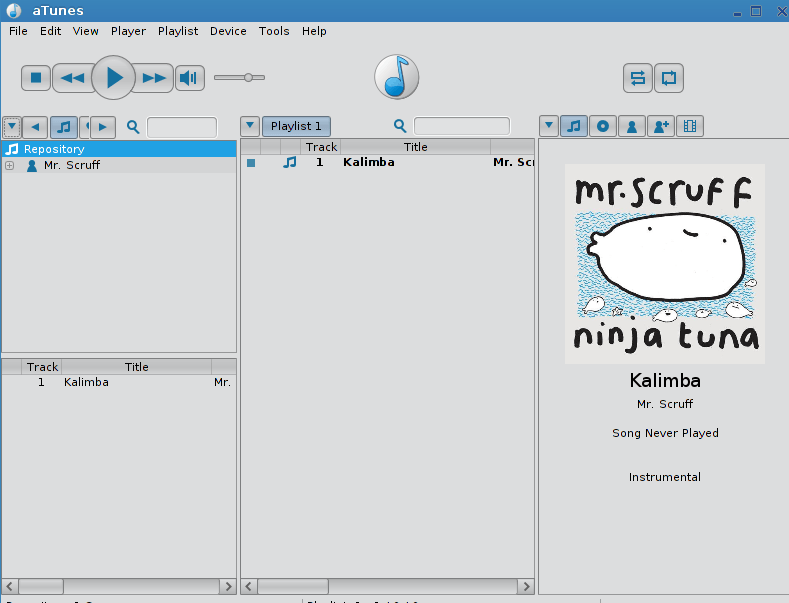
Wasn' t that an easy installation procedure? The atunes also supports the lyrics information of the song being played automatically.
Comments ( 0 )
No comments available