How to Install Bludit CMS in Ubuntu
To Install Bludit CMS in Ubuntu
Bludit is an open source and extensible file-based CMS application that stores post and pages by using the flat files. It allows the users to built a fully functional site or blog in an easy way. This article explains the installation of Bludit CMS tool in Ubuntu.
Installation of Bludit CMS
Run the following apt-get command to update the system packages.
root@linuxhelp:/home/user1# apt-get update
Hit http://in.archive.ubuntu.com wily InRelease
Get:1 http://security.ubuntu.com wily-security InRelease [65.9 kB]
Get:2 http://in.archive.ubuntu.com wily-updates InRelease [65.9 kB]
Get:3 http://security.ubuntu.com wily-security/main Sources [55.8 kB]
Hit http://in.archive.ubuntu.com wily-backports InRelease
Hit http://in.archive.ubuntu.com wily/main Sources
.
.
Hit http://in.archive.ubuntu.com wily-backports/main Translation-en
Hit http://in.archive.ubuntu.com wily-backports/multiverse Translation-en
Hit http://in.archive.ubuntu.com wily-backports/restricted Translation-en
Hit http://in.archive.ubuntu.com wily-backports/universe Translation-en
Fetched 1,893 kB in 24s (75.8 kB/s)
Reading package lists... Done
Install LAMP server and all required PHP modules.
root@linuxhelp:/home/user1# apt-get install php5-gd
Reading package lists... Done
Building dependency tree
Reading state information... Done
The following packages were automatically installed and are no longer required:
  libntdb1 python-ntdb
Use ' apt-get autoremove'  to remove them.
The following NEW packages will be installed:
  php5-gd
0 upgraded, 1 newly installed, 0 to remove and 6 not upgraded.
Need to get 29.0 kB of archives.
.
.
php5_invoke: Enable module gd for apache2 SAPI
Processing triggers for libapache2-mod-php5 (5.6.11+dfsg-1ubuntu3.4) ...
Now you need to download the latest stable version of Bludit.
root@linuxhelp:/home/user1# wget https://s3.amazonaws.com/bludit-s3/bludit-builds/bludit-1-5-2.zip
--2016-11-09 15:07:40--  https://s3.amazonaws.com/bludit-s3/bludit-builds/bludit-1-5-2.zip
Resolving s3.amazonaws.com (s3.amazonaws.com)... 54.231.121.82
Connecting to s3.amazonaws.com (s3.amazonaws.com)|54.231.121.82|:443... connected.
HTTP request sent, awaiting response... 200 OK
Length: 937609 (916K) [application/zip]
Saving to: ‘ bludit-1-5-2.zip’

bludit-1-5-2.zip          100%[======================================> ] 915.63K   101KB/s   in 22s

2016-11-09 15:08:04 (41.9 KB/s) - ‘ bludit-1-5-2.zip’  saved [937609/937609]
Use the following command to unzip the downloaded package.
root@linuxhelp:/home/user1# unzip bludit-1-5-2.zip
Archive:  bludit-1-5-2.zip
   creating: bludit/
  inflating: bludit/.htaccess
   creating: bludit/bl-content/
   creating: bludit/bl-kernel/
   creating: bludit/bl-kernel/abstract/
  inflating: bludit/bl-kernel/abstract/content.class.php
  inflating: bludit/bl-kernel/abstract/dbjson.class.php
  inflating: bludit/bl-kernel/abstract/plugin.class.php
   creating: bludit/bl-kernel/admin/
   creating: bludit/bl-kernel/admin/controllers/
  inflating: bludit/bl-kernel/admin/controllers/about.php
  inflating: bludit/bl-kernel/admin/controllers/add-user.php
  inflating: bludit/bl-kernel/admin/controllers/configure-plugin.php
.
.
inflating: bludit/index.php
  inflating: bludit/install.php
Immediately move the extracted file into the respective directory.
root@linuxhelp:/home/user1# mv bludit /var/www/html/
Set the file permissions for Bludit CMS.
root@linuxhelp:/home/user1# chown -R www-data:www-data /var/www/html/bludit/bl-content
Enable the module rewrite with the following command.
root@linuxhelp:/home/user1# a2enmod rewrite
Enabling module rewrite.
To activate the new configuration, you need to run:
  service apache2 restart
Here you need to create a file as shown below,
root@linuxhelp:/home/user1# touch /etc/apache2/sites-available/bludit.conf
Then create the soft link.
root@linuxhelp:/home/user1# ln -s /etc/apache2/sites-available/bludit.conf /etc/apache2/sites-enabled/bludit.conf
Once the above process is completed, configure the Apache web server. Create a new virtual host directive in Apache and add the following lines.
root@linuxhelp:/home/user1# vim /etc/apache2/sites-available/bludit.conf

< VirtualHost *:80>
ServerAdmin admin@yourdomain.com
DocumentRoot /var/www/html/bludit/
ServerName your-domain.com
ServerAlias www.your-domain.com

Options FollowSymLinks
AllowOverride All
Order allow,deny
allow from all

< ?Directory>

ErrorLog /var/log/apache2/your-domain.com-error_log
CustomLog /var/log/apache2/your-domain.com-access_log common
Save and exit the file.
Restart Apache web server to take effect.
root@linuxhelp:/home/user1# service apache2 restart
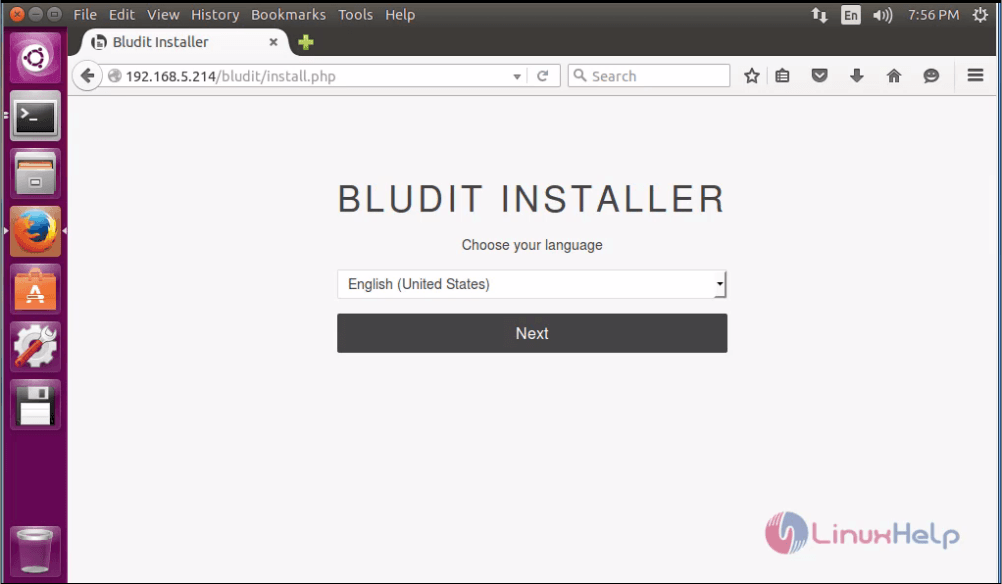
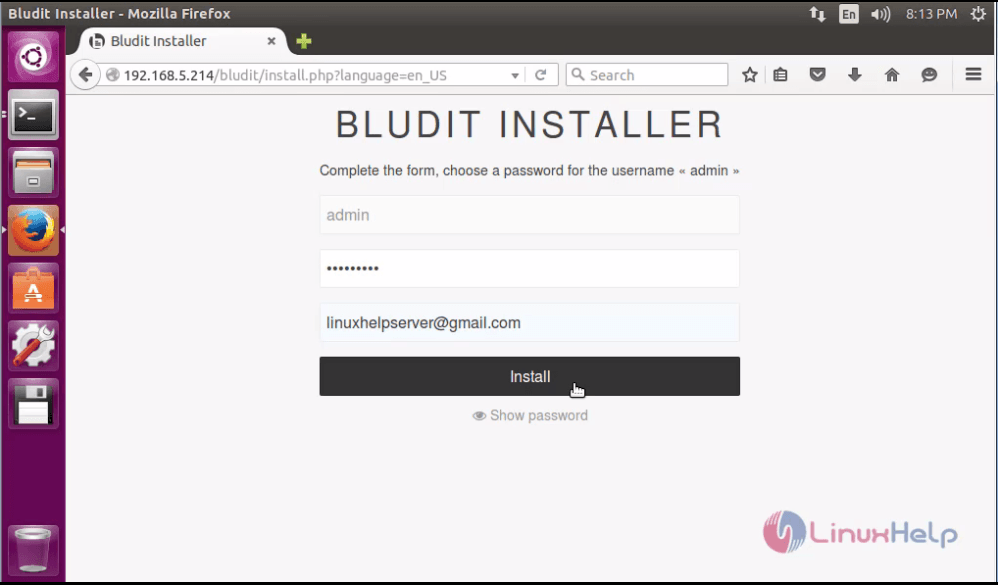
Open the Bludit installer through the default admin username and password.
If you are using a firewall then open the port 80 to enable access for the control panel.
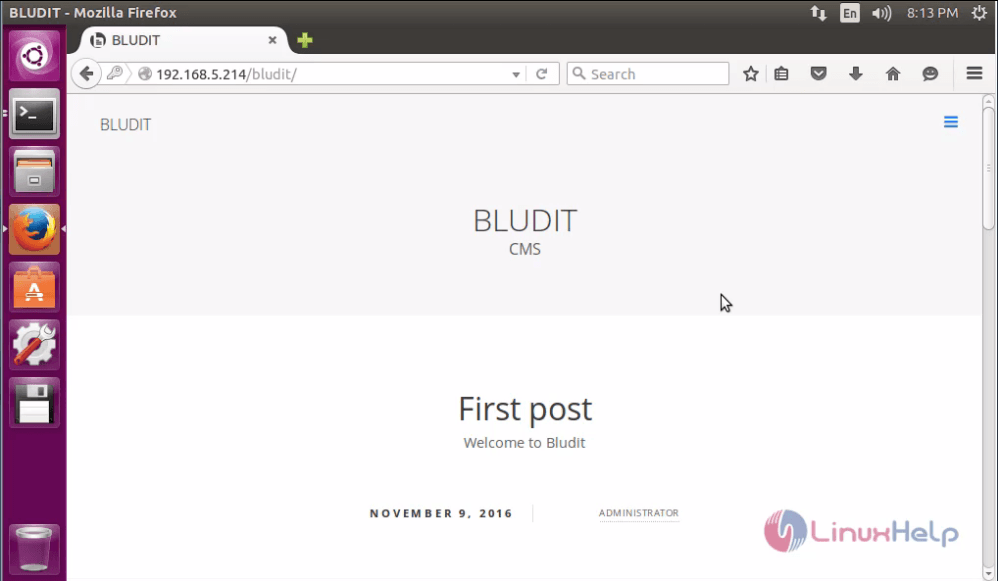
Now its ready to use, create your own website and blog.
Comments ( 0 )
No comments available