How to install Bluefish in Debian 8.3
How to install Bluefish in Debian 8.3
Bluefish is a free and open source software text editor with a variety of tools for programming and development of dynamic websites. It supports HTML, XHTML, CSS, XML, PHP, C, C++, JavaScript, Java, Ada, D, SQL, etc. It can also be used via integration with GNOME or as standalone application. This tutorial covers on how to install Bluefish in Debian 8.3.
To know more about the installation procedure of Bluefish on Ubuntu 17.04, visit
https://www.linuxhelp.com/how-to-install-bluefish-editor-2-2-10-on-ubuntu-17-04/
Installation procedure
To begin with the installation, use the nano command to open the sources.list file.
root@linuxhelp:~# nano /etc/apt/sources.list
The source file is opened and now add these lines at end of the file. Save and exit from the file.
deb http://ftp.debian.org/debian/ stable main contrib non-free
deb http://ftp.de.debian.org/debian jessie main
Next execute the apt-get update command to update the apt sources-list file in the target system.
root@linuxhelp:~# apt-get update
Get:1 http://ftp.debian.org jessie-updates InRelease [145 kB]
Ign http://ftp.de.debian.org jessie InRelease
Get:2 http://ftp.de.debian.org jessie Release.gpg [2,373 B]
Get:3 http://ftp.de.debian.org jessie Release [148 kB]
Ign http://ftp.debian.org stable InRelease
Get:4 http://ftp.debian.org jessie-updates/main Sources [15.5 kB]
Get:5 http://ftp.debian.org jessie-updates/contrib Sources [32 B]
Get:6 http://ftp.debian.org jessie-updates/main amd64 Packages/DiffIndex [7,900 B]
Get:7 http://ftp.debian.org jessie-updates/contrib amd64 Packages [32 B]
Get:8 http://ftp.debian.org jessie-updates/contrib Translation-en [14 B]
Get:9 http://ftp.debian.org jessie-updates/main Translation-en/DiffIndex [2,704 B]
Get:10 http://ftp.debian.org stable Release.gpg [2,373 B]
Get:11 http://ftp.debian.org jessie-updates/main amd64 2017-03-14-2025.02.pdiff [526 B]
Get:12 http://ftp.debian.org jessie-updates/main amd64 2017-04-15-2027.16.pdiff [528 B]
Get:13 http://ftp.debian.org jessie-updates/main amd64 2017-04-15-2027.16.pdiff [528 B]
Get:14 http://ftp.debian.org stable Release [148 kB]
.
.
Fetched 23.4 MB in 11min 6s (35.2 kB/s)
Reading package lists... Done
Install the Bluefish package using the apt-get install command and run the command in the terminal.
root@linuxhelp:~# apt-get install bluefish
Reading package lists... Done
Building dependency tree
Reading state information... Done
The following extra packages will be installed:
  bluefish-data bluefish-plugins
Suggested packages:
  csstidy dos2unix libxml2-utils php-codesniffer pylint weblint-perl weblint
The following NEW packages will be installed:
  bluefish bluefish-data bluefish-plugins
0 upgraded, 3 newly installed, 0 to remove and 264 not upgraded.
Need to get 2,639 kB of archives.
After this operation, 9,756 kB of additional disk space will be used.
Do you want to continue? [Y/n] y
Get:1 http://ftp.debian.org/debian/ stable/main bluefish-data all 2.2.6-2 [2,183 kB]
Get:2 http://ftp.debian.org/debian/ stable/main bluefish-plugins amd64 2.2.6-2 [188 kB]
Get:3 http://ftp.debian.org/debian/ stable/main bluefish amd64 2.2.6-2 [268 kB]
Fetched 2,639 kB in 1min 35s (27.7 kB/s)
Selecting previously unselected package bluefish-data.
(Reading database ... 137185 files and directories currently installed.)
Preparing to unpack .../bluefish-data_2.2.6-2_all.deb ...
Unpacking bluefish-data (2.2.6-2) ...
Selecting previously unselected package bluefish-plugins.
Preparing to unpack .../bluefish-plugins_2.2.6-2_amd64.deb ...
Unpacking bluefish-plugins (2.2.6-2) ...
Selecting previously unselected package bluefish.
Preparing to unpack .../bluefish_2.2.6-2_amd64.deb ...
Unpacking bluefish (2.2.6-2) ...
Processing triggers for hicolor-icon-theme (0.13-1) ...
Processing triggers for shared-mime-info (1.3-1) ...
Processing triggers for desktop-file-utils (0.22-1) ...
Processing triggers for gnome-menus (3.13.3-6) ...
Processing triggers for mime-support (3.58) ...
Processing triggers for man-db (2.7.0.2-5) ...
Setting up bluefish-data (2.2.6-2) ...
Setting up bluefish-plugins (2.2.6-2) ...
Setting up bluefish (2.2.6-2) ...
Once the package has been installed, open the activities window and type the Bluefish package name. Click on the icon to run the application. 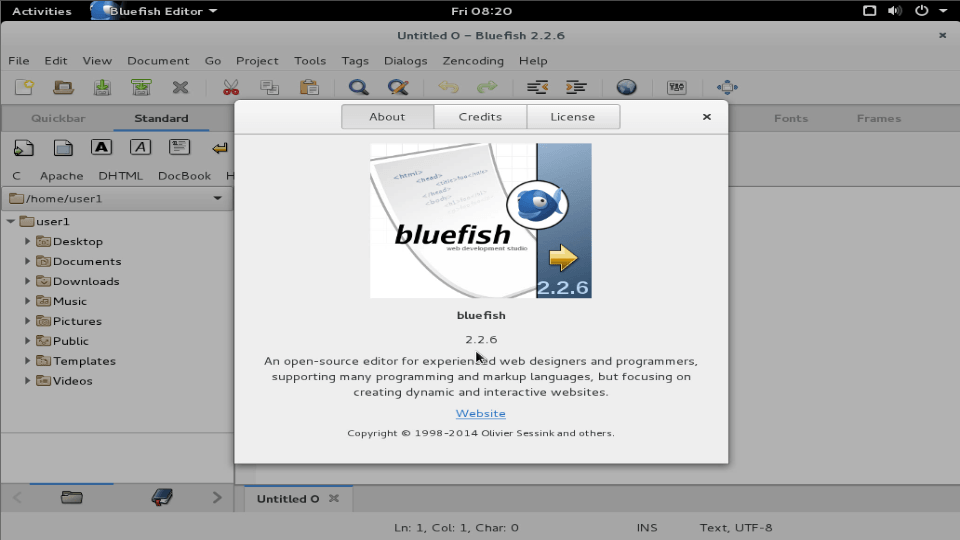
Wasn' t that an easy installation procedure? The Bluefish editor is relatively lightweight and easy to use while providing the intergrated development environment.
Comments ( 0 )
No comments available