• Categories
    Category
    {{ postCtrl.tags }}
    • {{ category.tag_type }}

      • {{tag.tag_name}}
      • View more
  • Categories
    Category
    {{ postCtrl.tags }}
    • {{ category.tag_type }}

      • {{tag.tag_name}}
      • View more
  • News
  • Tutorials
  • Forums
  • Tags
  • Users
Tutorial News Comments FAQ Related Articles

How to install Calligra on Ubuntu 16.04

{{postValue.id}}

To install Calligra on Ubuntu 16.04

Calligra is a set of applications that includes office applications such as a word processor, a spreadsheet, a presentation program, a database application, raster and vector graphics tools. It is similar to the popular LibreOffice application and provides users with a lot more attractive features for your daily office tasks. It is also available on Kubuntu and other KDE-based Linux systems. This tutorial covers the installation procedure of Calligra on Ubuntu 16.04.

Installation procedure

To proceed with the installation procedure, update the machine by executing the apt-get update command.

root@example:~# apt-get update
Hit:1 http://in.archive.ubuntu.com/ubuntu xenial InRelease
Get:2 http://in.archive.ubuntu.com/ubuntu xenial-updates InRelease [102 kB]
Get:3 http://security.ubuntu.com/ubuntu xenial-security InRelease [102 kB]
Get:4 http://in.archive.ubuntu.com/ubuntu xenial-backports InRelease [102 kB]
Fetched 306 kB in 1s (208 kB/s)    
Reading package lists... Done

The system is updated with the required repositories. Install the calligra application by running the following command.

root@example:~#  apt-get install calligra
Reading package lists... Done
Building dependency tree       
Reading state information... Done
The following packages were automatically installed and are no longer required:
  gnome-software-common libgtkspell3-3-0
.
.
.
Running hooks in /etc/ca-certificates/update.d...

done.
Done.

The calligra application is installed successfully. The tool bar contains the set of tools and the Calligra is running successfully without any glitches.
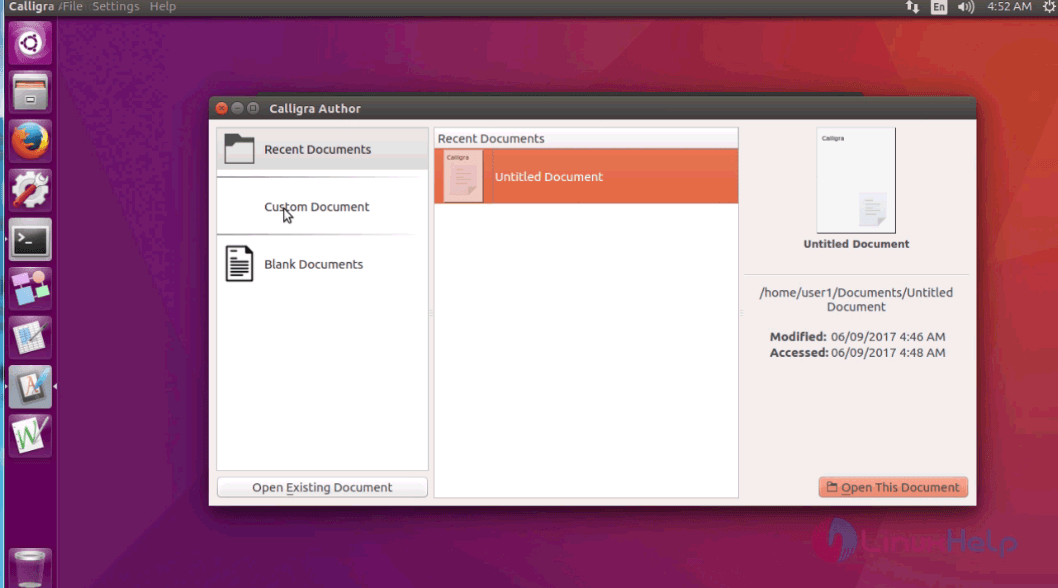
calligra

The installation procedure of Calligra on Ubuntu 16.04.

Tags:
sebastian
Author: 

Comments ( 0 )

No comments available

Add a comment
{{postCtrl.cmtErrMsg}}

Frequently asked questions ( 5 )

Q

what is the latest version released for this tool?

A

Calligra 3.1.0 has released on Feb 1 2018

Q

I need link for official page?

A

refer this link, https://www.calligra.org/

Q

Name some office softwares for Mac?

A

Google Suite, LibreOffice, iWork Suite, Quip

Q

what are the microsoft office like tools available for linux?

A

LibreOffice, Apache OpenOffice, Calligra Suite, WPS Office, GNOME Office

Q

What is the Calligra?

A

Calligra uses the OpenDocument format as its default file format for most applications and can import other format.

Back To Top!
Rank
User
Points

Top Contributers

userNamenaveelansari
135850

Top Contributers

userNameayanbhatti
92510

Top Contributers

userNamehamzaahmed
32150

Top Contributers

1
userNamelinuxhelp
31040

Top Contributers

userNamemuhammadali
24500
Can you help Jayce ?
What are the types of table used in IPtables

What are the various types of table used in IPtables and how to use that for my server security?

Networking
  • Routing
  • trunk
  • Netmask
  • Packet Capture
  • domain
  • HTTP Proxy
Server Setup
  • NFS
  • KVM
  • Memory
  • Sendmail
  • WebDAV
  • LXC
Shell Commands
  • Cloud commander
  • Command line archive tools
  • last command
  • Shell
  • terminal
  • Throttle
Desktop Application
  • Linux app
  • Pithos
  • Retrospect
  • Scribe
  • TortoiseHg
  • 4Images
Monitoring Tool
  • Monit
  • Apache Server Monitoring
  • EtherApe 
  • Arpwatch Tool
  • Auditd
  • Barman
Web Application
  • Nutch
  • Amazon VPC
  • FarmWarDeployer
  • Rukovoditel
  • Mirror site
  • Chef
Contact Us | Terms of Use| Privacy Policy| Disclaimer
© 2025 LinuxHelp.com All rights reserved. Linux™ is the registered trademark of Linus Torvalds. This site is not affiliated with linus torvalds in any way.