How to Install Claws Mail on Ubuntu 17.04
To Install Claws Mail on Ubuntu 17.04
Claws Mail is a fast, light-weight, and open source email client and a news reader built based on GTK+. It offers easy configuration and user friendly features. Although it is primarily built for Linux, it can also be used for Windows users through a port, with an experimental 64-bit version. It is really simple to install Claws Mail on Ubuntu 17.04.
Features
- Supports File attachments through ‘ |attach_output{sub_expr}’ or ‘ |A{sub_expr}’ options.
- Disables the hiding threads and messages in draft folders.
- Adds notification support for Ubuntu' s Unity Messaging Menu
- Doesn' t add the Message -ID to the drafted message
Installing Claws Mail
Before you start the installation process, make sure you add the necessary repository via ppa as shown in the following command.
root@linuxhelp11:~# add-apt-repository ppa:ubuntuhandbook1/claws-mail

 More info: https://launchpad.net/~ubuntuhandbook1/+archive/ubuntu/claws-mail
Press [ENTER] to continue or ctrl-c to cancel adding it

gpg: keybox ' /tmp/tmpu1uu6tgn/pubring.gpg'  created
gpg: /tmp/tmpu1uu6tgn/trustdb.gpg: trustdb created
gpg: key 4C1CBE14852541CB: public key " Launchpad PPA for Panda Jim"  imported
gpg: Total number processed: 1
gpg:               imported: 1
OK
Once the repository is added, you need to update the newly added repo. You shall use the following command for the same purpose.
root@linuxhelp11:~# apt-get update
Hit:1 http://us.archive.ubuntu.com/ubuntu zesty InRelease
Get:2 http://ppa.launchpad.net/ubuntuhandbook1/claws-mail/ubuntu zesty InRelease [15.4 kB]
Get:3 http://security.ubuntu.com/ubuntu zesty-security InRelease [89.2 kB]
Get:4 http://ppa.launchpad.net/ubuntuhandbook1/claws-mail/ubuntu zesty/main amd64 Packages [6,028 B]
Get:5 http://us.archive.ubuntu.com/ubuntu zesty-updates InRelease [89.2 kB]
Get:6 http://ppa.launchpad.net/ubuntuhandbook1/claws-mail/ubuntu zesty/main i386 Packages [6,020 B]
Get:7 http://ppa.launchpad.net/ubuntuhandbook1/claws-mail/ubuntu zesty/main Translation-en [4,964 B]
Get:8 http://us.archive.ubuntu.com/ubuntu zesty-backports InRelease [89.2 kB]
Fetched 300 kB in 2s (102 kB/s)

Reading package lists... Done
And then, you shall proceed with the installation of Claws Mail with the help of the following command which triggers the installation process.
root@linuxhelp11:~# apt-get install claws-mail -y
Reading package lists... Done
Building dependency tree
Reading state information... Done
The following additional packages will be installed:
  claws-mail-i18n
Suggested packages:
  claws-mail-doc claws-mail-tools
The following NEW packages will be installed:
  claws-mail claws-mail-i18n
0 upgraded, 2 newly installed, 0 to remove and 130 not upgraded.
Need to get 0 B/2,432 kB of archives.
After this operation, 12.1 MB of additional disk space will be used.
Selecting previously unselected package claws-mail.
(Reading database ... 205248 files and directories currently installed.)
Preparing to unpack .../claws-mail_3.15.1-0build1~ubuntu17.04_amd64.deb ...
Unpacking claws-mail (3.15.1-0build1~ubuntu17.04) ...
Selecting previously unselected package claws-mail-i18n.
Preparing to unpack .../claws-mail-i18n_3.15.1-0build1~ubuntu17.04_all.deb ...
Unpacking claws-mail-i18n (3.15.1-0build1~ubuntu17.04) ...
Setting up claws-mail (3.15.1-0build1~ubuntu17.04) ...
Processing triggers for mime-support (3.60ubuntu1) ...
Processing triggers for desktop-file-utils (0.23-1ubuntu2) ...
Processing triggers for bamfdaemon (0.5.3+17.04.20170406-0ubuntu1) ...
Rebuilding /usr/share/applications/bamf-2.index...
Processing triggers for man-db (2.7.6.1-2) ...
Processing triggers for gnome-menus (3.13.3-6ubuntu5) ...
Processing triggers for hicolor-icon-theme (0.15-1) ...
Setting up claws-mail-i18n (3.15.1-0build1~ubuntu17.04) ...
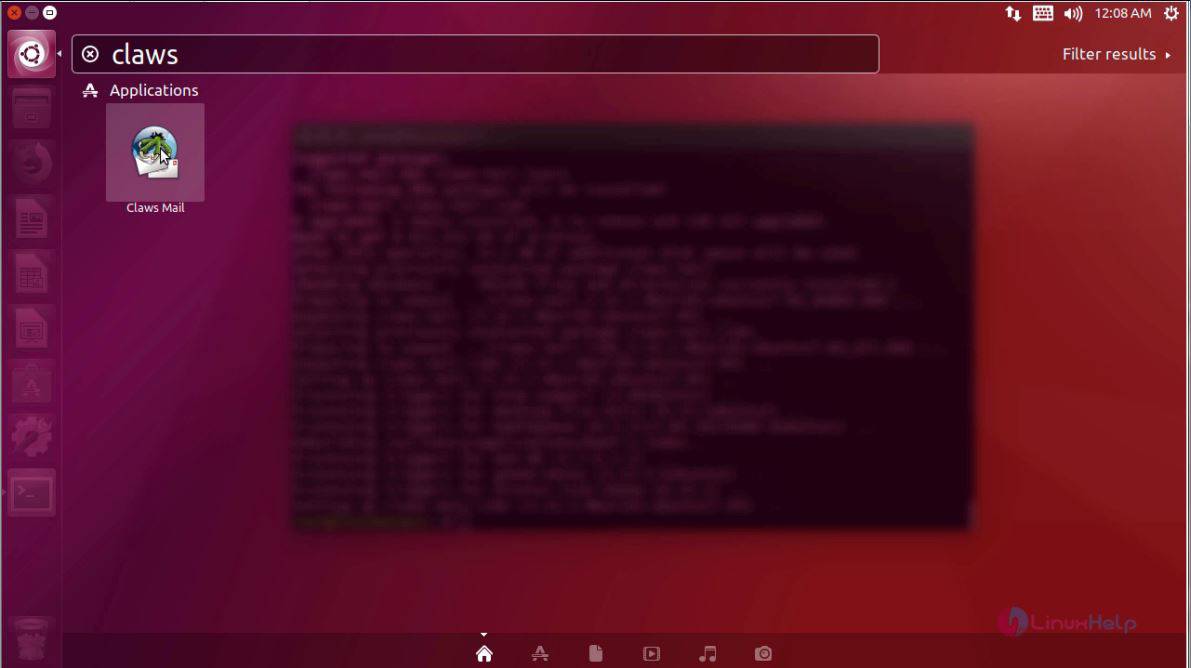
After the installation, go to ubuntu dashboard and type claws, the application icon gets displayed on your screen. Click on it to launch Claws Mail application.
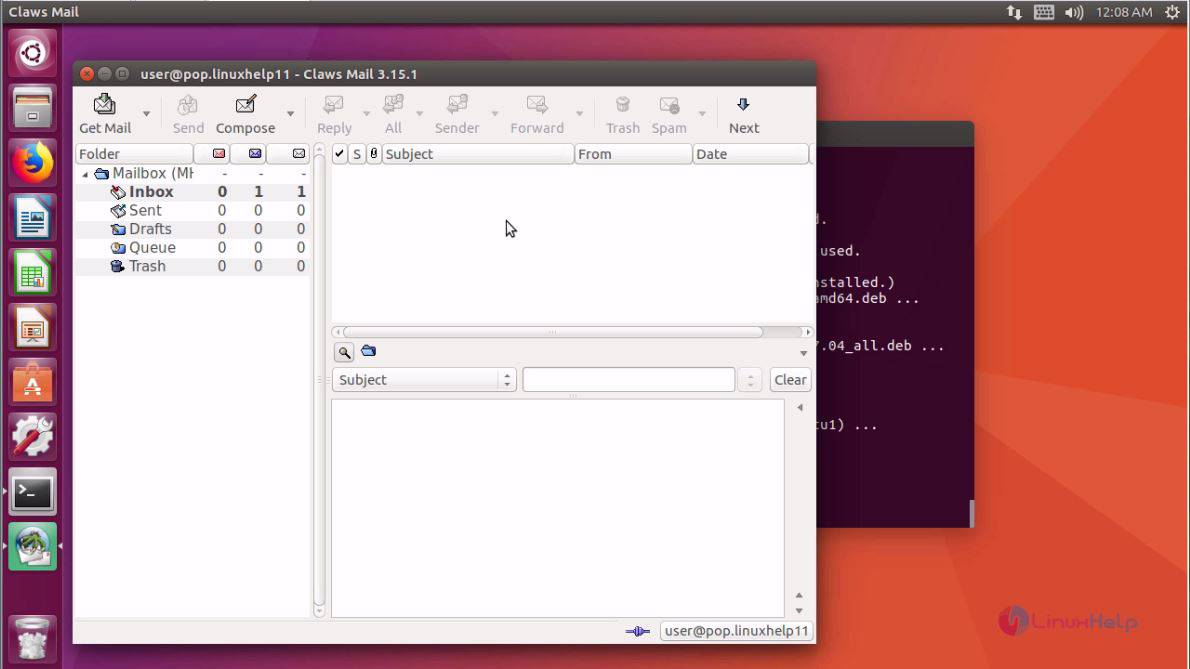
The application is now open. You can now send and check your mails using Claws Mail.
With this, the installation of claws mail on Ubuntu 17.04 comes to an end.
Comments ( 0 )
No comments available