How to Install Clementine 1.3.1 on Linux Mint 18.3
How to Install Clementine 1.3.1 on Linux Mint 18.3
Clementine Music Player has just reached the new stable 1.3 release. Official Linux binary adds support for Linux mint 18.3. The recent version of Clementine 1.3.1. It brings so many new features and a large number of bug-fixes. Some of the features of Clementine 1.3.1 is listed below.
Features
- Vk.com support
- Seafile support (server > = 4.4.1)
- Add Ampache compatibility (through Subsonic service)
- Add new analyzer “ Rainbow Dash”
- Answer to the ultimate question of life, the universe and everything
- Add “ Psychedelic Colour” mode to all analyzers
- It is so simple to install Clementine 1.3.1 on Linux Mint 18.3
Installing Clementine 1.3.1
First make sure you update the repository index by making use of the following command.
linuxhelp user # apt-get update
Hit:1 http://archive.canonical.com/ubuntu xenial InRelease
Hit:2 http://archive.ubuntu.com/ubuntu xenial InRelease
Ign:3 http://packages.linuxmint.com sylvia InRelease
Get:4 http://security.ubuntu.com/ubuntu xenial-security InRelease [102 kB]
Get:5 http://archive.ubuntu.com/ubuntu xenial-updates InRelease [102 kB]
Get:6 http://packages.linuxmint.com sylvia Release [24.2 kB]
Get:7 http://packages.linuxmint.com sylvia Release.gpg [819 B]
Get:8 http://archive.ubuntu.com/ubuntu xenial-backports InRelease [102 kB]
Get:9 http://packages.linuxmint.com sylvia/upstream amd64 Packages [45.5 kB]
.
.
Get:19 http://security.ubuntu.com/ubuntu xenial-security/universe Translation-en [105 kB]
Get:20 http://archive.ubuntu.com/ubuntu xenial-updates/universe amd64 Packages [587 kB]
Get:21 http://archive.ubuntu.com/ubuntu xenial-updates/universe i386 Packages [545 kB]
Get:22 http://archive.ubuntu.com/ubuntu xenial-updates/universe Translation-en [238 kB]
Get:23 http://archive.ubuntu.com/ubuntu xenial-backports/main amd64 Packages [4,836 B]
Get:24 http://archive.ubuntu.com/ubuntu xenial-backports/main i386 Packages [4,840 B]
Get:25 http://archive.ubuntu.com/ubuntu xenial-backports/universe amd64 Packages [6,628 B]
Get:26 http://archive.ubuntu.com/ubuntu xenial-backports/universe i386 Packages [6,620 B]
Fetched 5,024 kB in 8s (618 kB/s)
Reading package lists... Done
Once it is done, you need to add the necessary repository via ppa in the following manner.
linuxhelp user # add-apt-repository ppa:me-davidsansome/clementine
You are about to add the following PPA:
 More info: https://launchpad.net/~me-davidsansome/+archive/ubuntu/clementine
Press Enter to continue or Ctrl+C to cancel
Executing: /tmp/tmp.tlNyjVjAl0/gpg.1.sh --keyserver
hkp://keyserver.ubuntu.com:80
--recv-keys
044A3B98
gpg: requesting key 044A3B98 from hkp server keyserver.ubuntu.com
gpg: key 044A3B98: public key " Launchpad Clementine Stable"  imported
gpg: Total number processed: 1
gpg:               imported: 1  (RSA: 1)
Once it is done, you need to update the repository index again.
linuxhelp user # apt-get update
Hit:1 http://archive.ubuntu.com/ubuntu xenial InRelease
Ign:2 http://packages.linuxmint.com sylvia InRelease
Hit:3 http://archive.canonical.com/ubuntu xenial InRelease
Get:4 http://ppa.launchpad.net/me-davidsansome/clementine/ubuntu xenial InRelease [17.6 kB]
Hit:5 http://packages.linuxmint.com sylvia Release
.
.
Get:13 http://archive.ubuntu.com/ubuntu xenial-backports InRelease [102 kB]
Get:14 http://archive.ubuntu.com/ubuntu xenial-updates/main amd64 Packages [724 kB]
Get:15 http://archive.ubuntu.com/ubuntu xenial-updates/main i386 Packages [674 kB]
Get:16 http://archive.ubuntu.com/ubuntu xenial-updates/universe amd64 Packages [587 kB]
Get:17 http://archive.ubuntu.com/ubuntu xenial-updates/universe i386 Packages [545 kB]
Fetched 2,857 kB in 10s (283 kB/s)
Reading package lists... Done
Afterwards, you shall proceed with the installation of Clementine.
linuxhelp user # apt-get install clementine
Reading package lists... Done
Building dependency tree
Reading state information... Done
The following additional packages will be installed:
  libcrypto++9v5 liblastfm1 libqjson0 projectm-data
The following NEW packages will be installed:
  clementine libcrypto++9v5 liblastfm1 libqjson0 projectm-data
0 upgraded, 5 newly installed, 0 to remove and 201 not upgraded.
Need to get 6,695 kB of archives.
After this operation, 30.8 MB of additional disk space will be used.
Do you want to continue? [Y/n] y
.
.
Unpacking clementine (1.3.1-333-gf854bc5~xenial) ...
Processing triggers for libc-bin (2.23-0ubuntu9) ...
Processing triggers for desktop-file-utils (0.22+linuxmint1) ...
Processing triggers for mime-support (3.59ubuntu1) ...
Processing triggers for hicolor-icon-theme (0.15-0ubuntu1) ...
Processing triggers for gconf2 (3.2.6-3ubuntu6) ...
Setting up libqjson0:amd64 (0.8.1-3) ...
Setting up libcrypto++9v5 (5.6.1-9) ...
Setting up liblastfm1:amd64 (1.0.9-1) ...
Setting up projectm-data (2.1.0+dfsg-3build1) ...
Setting up clementine (1.3.1-333-gf854bc5~xenial) ...
Processing triggers for libc-bin (2.23-0ubuntu9) ...
Now that Clementine has been installed, you shall launch it from your terminal.
linuxhelp user # clementine
19:03:20.704 INFO  main:323                         Clementine 1.3.1-333-gf854bc5
19:03:20.881 INFO  Database:282                     Creating initial database schema
19:03:20.882 DEBUG Database:444                     Applying database schema update 0 from " :/schema/schema.sql"
19:03:20.897 DEBUG Database:444                     Applying database schema update 1 from " :/schema/schema-1.sql"
19:03:20.902 DEBUG Database:444                     Applying database schema update 2 from " :/schema/schema-2.sql"
19:03:20.904 DEBUG Database:444                     Applying database schema update 3 from " :/schema/schema-3.sql"
19:03:20.916 DEBUG Database:444                     Applying database schema update 4 from " :/schema/schema-4.sql"
19:03:20.931 DEBUG Database:444                     Applying database schema update 5 .
.
.
19:03:23.875 WARN  IconLoader:106                   Couldn' t load icon " edit-redo"
19:03:23.991 WARN  IconLoader:96                    Couldn' t recognize IconType " as_light"
19:03:23.992 WARN  IconLoader:106                   Couldn' t load icon " as_light"
19:03:23.992 WARN  IconLoader:96                    Couldn' t recognize IconType " as_light"
19:03:23.992 WARN  IconLoader:106                   Couldn' t load icon " as_light"
19:03:23.992 DEBUG MainWindow:958                   Loading settings
19:03:23.995 INFO  NetworkRemote:83                 Network Remote deactivated
19:03:24.082 WARN  unknown                          " sni-qt/5989"  WARN  19:03:24.082 void StatusNotifierItemFactory::connectToSnw() Invalid interface to SNW_SERVICE
19:03:24.987 DEBUG MainWindow:1044                  Started
The application now appears on your screen.
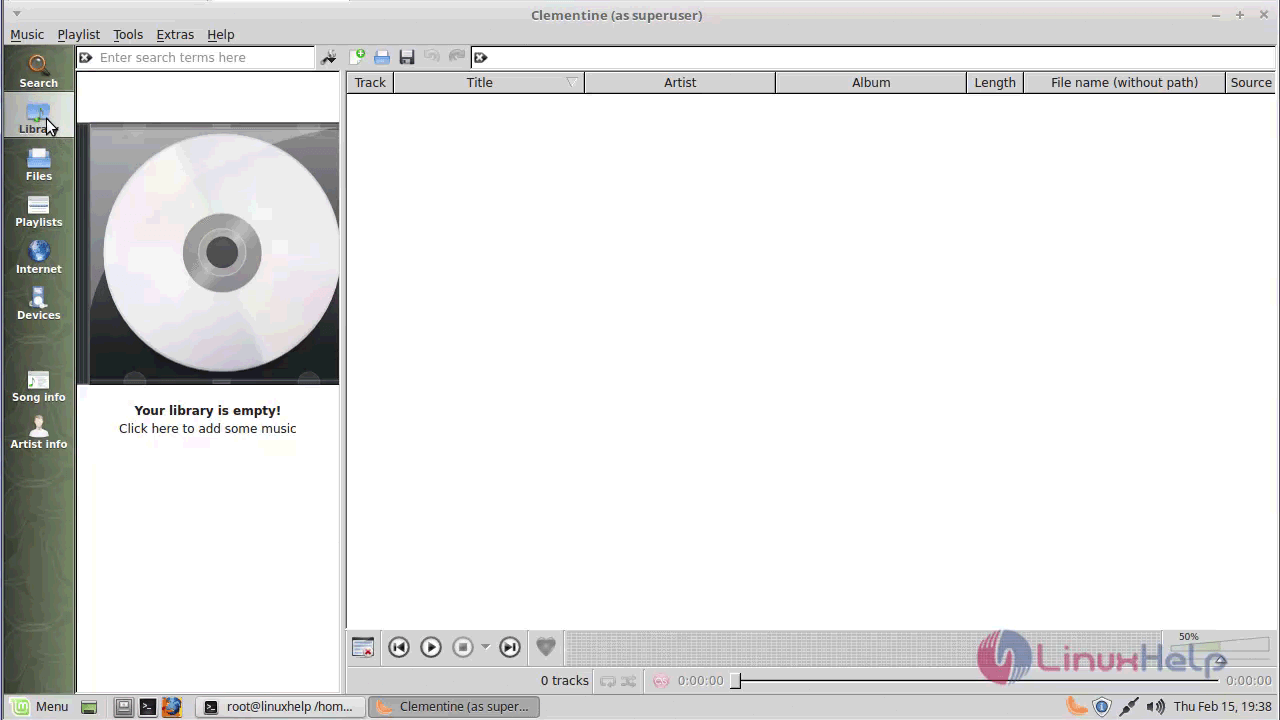
With this, the installation of Clementine on Linux Mint 18.3 comes to an end.
Comments ( 0 )
No comments available