• Categories
    Category
    {{ postCtrl.tags }}
    • {{ category.tag_type }}

      • {{tag.tag_name}}
      • View more
  • Categories
    Category
    {{ postCtrl.tags }}
    • {{ category.tag_type }}

      • {{tag.tag_name}}
      • View more
  • News
  • Tutorials
  • Forums
  • Tags
  • Users
Tutorial News Comments FAQ Related Articles

How to install Corebird Twitter client on Ubuntu 17.04

{{postValue.id}}

How to install Corebird Twitter client on Ubuntu 17.04

Corebird is a modern, lightweight and open-source desktop client developed in GTK 3.12, which can handle accounts and has all the main twitter features, including Tweets Streaming, Favorites, Lists, comprehensive tweet filters, integrated Search, Mentions/Notifications, timelines and supports multiple accounts. This article shows the installation procedure of Corebird Twitter client on Ubuntu 17.04.

Installation procedure

To start the installation procedure, add the dependency package into repository via ppa.

root@linuxhelp:~# add-apt-repository ppa:ubuntuhandbook1/corebird
 Corebird is a native Gtk+ twitter client for Linux desktop.
.
.
gpg: Total number processed: 1
gpg:               imported: 1
OK

Update the machine by executing the apt-get update command.

root@linuxhelp:~# apt-get update
Get:1 http://security.ubuntu.com/ubuntu zesty-security InRelease [89.2 kB]
Hit:2 http://in.archive.ubuntu.com/ubuntu zesty InRelease                      
Get:3 http://ppa.launchpad.net/ubuntuhandbook1/corebird/ubuntu zesty InRelease [15.4 kB]
.
.
Fetched 285 kB in 1s (221 kB/s)                           
Reading package lists... Done

The system has been updated with the required repositories and execute the following command to install Corebird application.

root@linuxhelp:~# apt-get install corebird
Reading package lists... Done
Building dependency tree       
Reading state information... Done
The following NEW packages will be installed:
  corebird
.
.
Processing triggers for gnome-menus (3.13.3-6ubuntu5) ...
Processing triggers for hicolor-icon-theme (0.15-1) ...

The Corebird application has been installed successfully in the system. To run the application, type the application name in Ubuntu dashboard and click on the icon to run the application.
Ubuntu dashboard

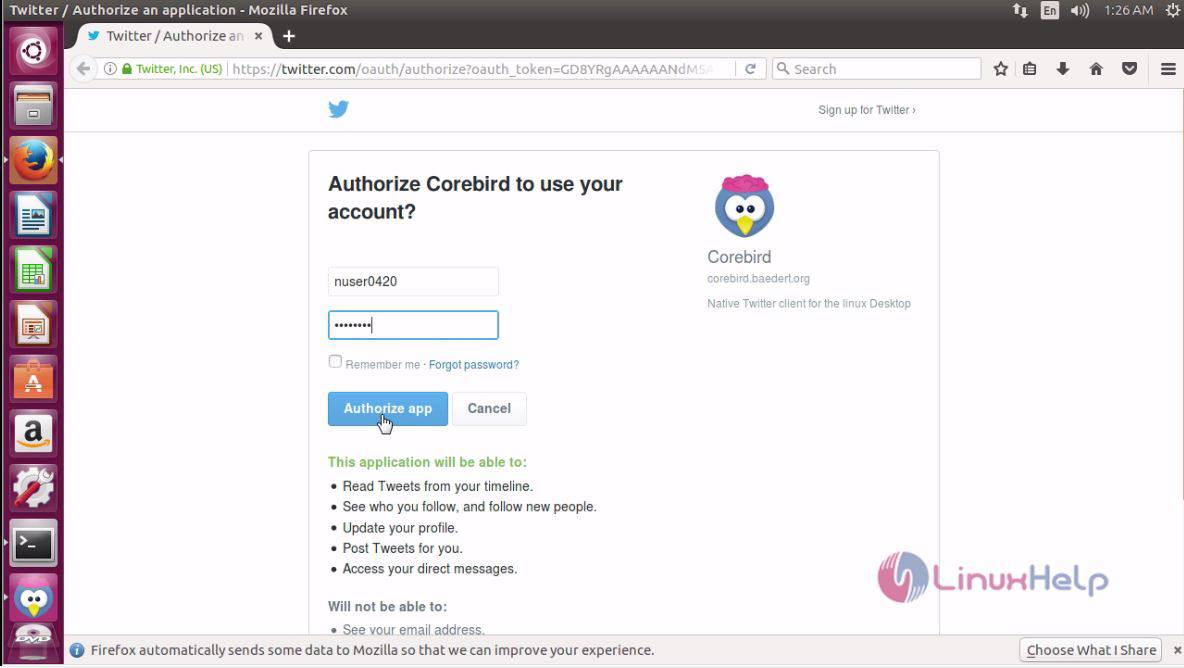
It automatically opens the browser and ask for the login details of twitter, fill the required details and click authorize app option.
details

The authorization page shows the generated PIN number to be copied and pasted on the Corebird application.
pin number

Paste the copied PIN in the application and click confirm option.
confirm pin

The created Twitter account is now open and running successfully.
twitter

The installation of Corebird application is done without any glitches.

Tags:
caden
Author: 

Comments ( 0 )

No comments available

Add a comment
{{postCtrl.cmtErrMsg}}

Frequently asked questions ( 5 )

Q

does they provide notifications provided from twitter for corebird?

A

Yes they do hav Integrated Search, Mentions/Notifications to get notification for corebird

Q

what is the next step of adding the repo for corebird?

A

run the below command installing the corebird package
# apt-get install corebird

Q

how to add repo for installing the corebird in ubuntu?

A

add the repository to the system by following command'
# add-apt-repository ppa:ubuntuhandbook1/corebird

Q

what is the purpose of installing the corebird in ubuntu?

A

Corebird is an open-source Twitter client developed in GTK 3.12, which can handle accounts and has all the main twitter features, including Tweets Streaming, Favorites, Lists, Filters, Integrated Search,

Q

What are some best alternatives for corebird?

A

best alternatives of corebird are Twidere and Choqok

Back To Top!
Rank
User
Points

Top Contributers

userNamenaveelansari
135850

Top Contributers

userNameayanbhatti
92510

Top Contributers

userNamehamzaahmed
32150

Top Contributers

1
userNamelinuxhelp
31040

Top Contributers

userNamemuhammadali
24500
Can you help Luk Van De Looverbosch ?
How to create a root ?

Hello,
How to create root@linuxhelp in Linux Mint 20.1 64-bit ?
Thanks in advance for your reply.
Best regards.

Networking
  • Routing
  • trunk
  • Netmask
  • Packet Capture
  • domain
  • HTTP Proxy
Server Setup
  • NFS
  • KVM
  • Memory
  • Sendmail
  • WebDAV
  • LXC
Shell Commands
  • Cloud commander
  • Command line archive tools
  • last command
  • Shell
  • terminal
  • Throttle
Desktop Application
  • Linux app
  • Pithos
  • Retrospect
  • Scribe
  • TortoiseHg
  • 4Images
Monitoring Tool
  • Monit
  • Apache Server Monitoring
  • EtherApe 
  • Arpwatch Tool
  • Auditd
  • Barman
Web Application
  • Nutch
  • Amazon VPC
  • FarmWarDeployer
  • Rukovoditel
  • Mirror site
  • Chef
Contact Us | Terms of Use| Privacy Policy| Disclaimer
© 2025 LinuxHelp.com All rights reserved. Linux™ is the registered trademark of Linus Torvalds. This site is not affiliated with linus torvalds in any way.