How to Install CPU-G on Ubuntu 16.04
{{postValue.id}}
How To Install CPU-G On Ubuntu 16.04
CPU-G is a free and open-source CPU-Z fork that collects and displays the information about the computer it is installed on, including CPU, RAM memory, motherboard type.
To Install CPU-G on Ubuntu
1. Add the repository for installing the cpu-g.
root@linuxhelp1:~# add-apt-repository ppa:atareao/atareao
Applications from atareao
More info: https://launchpad.net/~atareao/+archive/ubuntu/atareao
Press [ENTER] to continue or ctrl-c to cancel adding it
gpg: keyring `/tmp/tmp1fzs783i/secring.gpg'  created
gpg: keyring `/tmp/tmp1fzs783i/pubring.gpg'  created
gpg: requesting key 36FD5529 from hkp server keyserver.ubuntu.com
gpg: /tmp/tmp1fzs783i/trustdb.gpg: trustdb created
gpg: key 36FD5529: public key " Launchpad PPA for atareao"  imported
gpg: Total number processed: 1
gpg: imported :1 (RSA:  1)
OK
2. Update the newly added repository.
root@linuxhelp1:~# apt-get update
Hit:1 http://in.archive.ubuntu.com/ubuntu xenial InRelease
Get:2 http://ppa.launchpad.net/atareao/atareao/ubuntu xenial InRelease [17.5 kB]
Get:3 http://in.archive.ubuntu.com/ubuntu xenial-updates InRelease [102 kB]
Get:4 http://security.ubuntu.com/ubuntu xenial-security InRelease [102 kB]
Get:5 http://ppa.launchpad.net/atareao/atareao/ubuntu xenial/main amd64 Packages [5,180 B]
Get:6 http://ppa.launchpad.net/atareao/atareao/ubuntu xenial/main i386 Packages [5,176 B]
Get:7 http://ppa.launchpad.net/atareao/atareao/ubuntu xenial/main Translation-en [2,292 B]
Get:8 http://in.archive.ubuntu.com/ubuntu xenial-backports InRelease [102 kB]
Fetched 337 kB in 3s (98.2 kB/s)
Reading package lists... Done
3. Now install the cpu-g.
root@linuxhelp1:~# apt-get install cpu-g -y
Reading package lists... Done
Building dependency tree
Reading state information... Done
The following additional packages will be installed:
binutils blt cpp-5 fonts-lyx g++-5 gcc-5 gcc-5-base javascript-common libasan2 libatomic1 libblas-common libblas3 libcc1-0
libcilkrts5 libgcc-5-dev libgfortran3 libgomp1 libitm1 libjs-jquery libjs-jquery-ui liblapack3 liblsan0 libmpx0 libquadmath0
Suggested packages:
Need to get 44.4 MB/45.4 MB of archives.
After this operation, 46.1 MB of additional disk space will be used.
Get:1 http://in.archive.ubuntu.com/ubuntu xenial-updates/main amd64 cpp-5 amd64 5.4.0-6ubuntu1~16.04.4 [7,653 kB]
Get:2 http://ppa.launchpad.net/atareao/atareao/ubuntu xenial/main amd64 cpu-g all 0.15.0-1ubuntu0 [867 kB]
Get:3 http://in.archive.ubuntu.com/ubuntu xenial-updates/main amd64 libcc1-0 amd64 5.4.0-6ubuntu1~16.04.4 [38.8 kB]
Get:4 http://in.archive.ubuntu.com/ubuntu xenial-updates/main amd64 binutils amd64 2.26.1-1ubuntu1~16.04.3 [2,310 kB]
.
.
.
.
.
.

Setting up libgfortran3:amd64 (5.4.0-6ubuntu1~16.04.4) ...
Setting up libjs-jquery (1.11.3+dfsg-4) ...
Setting up libjs-jquery-ui (1.10.1+dfsg-1) ...
Setting up liblapack3 (3.6.0-2ubuntu2) ...
Setting up python3-numpy (1:1.11.0-1ubuntu1) ...
Setting up python3-matplotlib (1.5.1-1ubuntu1) ...
Setting up python3-psutil (3.4.2-1) ...
Setting up python3-tk (3.5.1-1) ...
Setting up python3-xcffib (0.3.6-1) ...
Setting up wmctrl (1.07-7) ...
Setting up mesa-utils (8.3.0-1) ...
Setting up cpu-g (0.15.0-1ubuntu0) ...
Processing triggers for libc-bin (2.23-0ubuntu3) ...
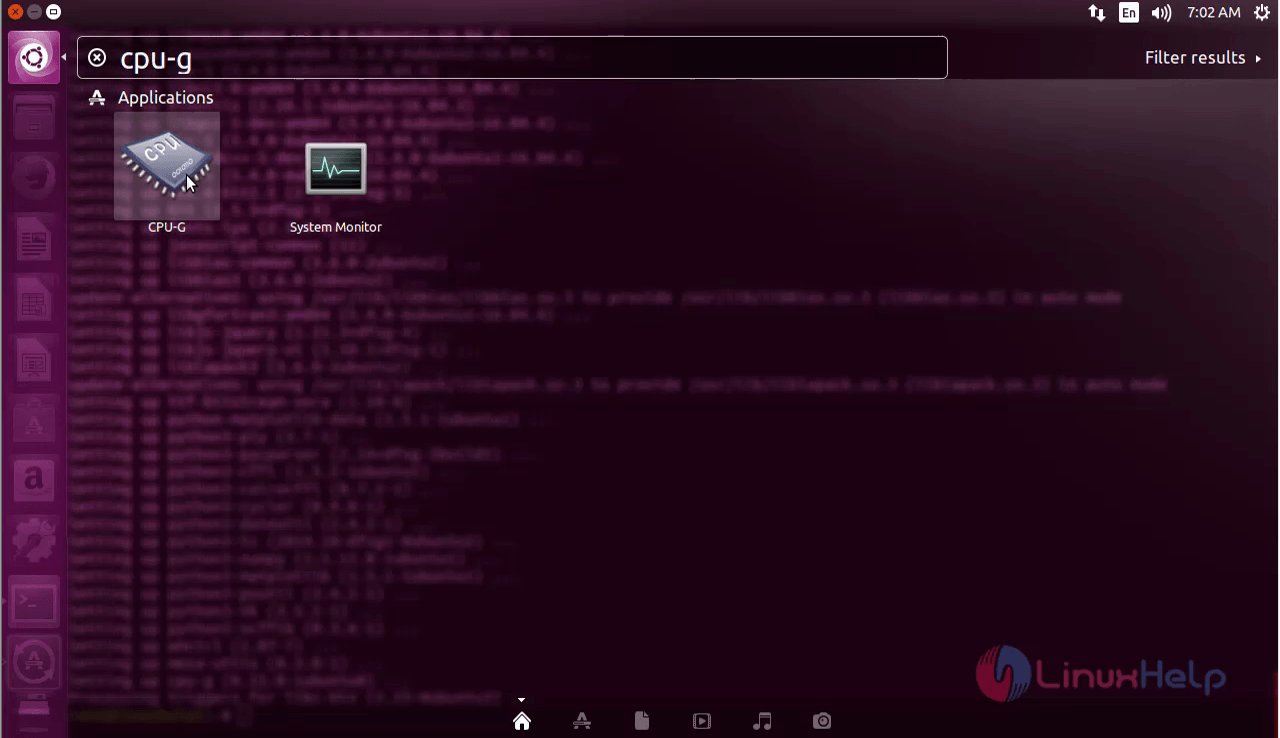
For opening the cpu-g, click on the search bar and type cpu-g and you can be able to see the icon, click on the icon to open the software.
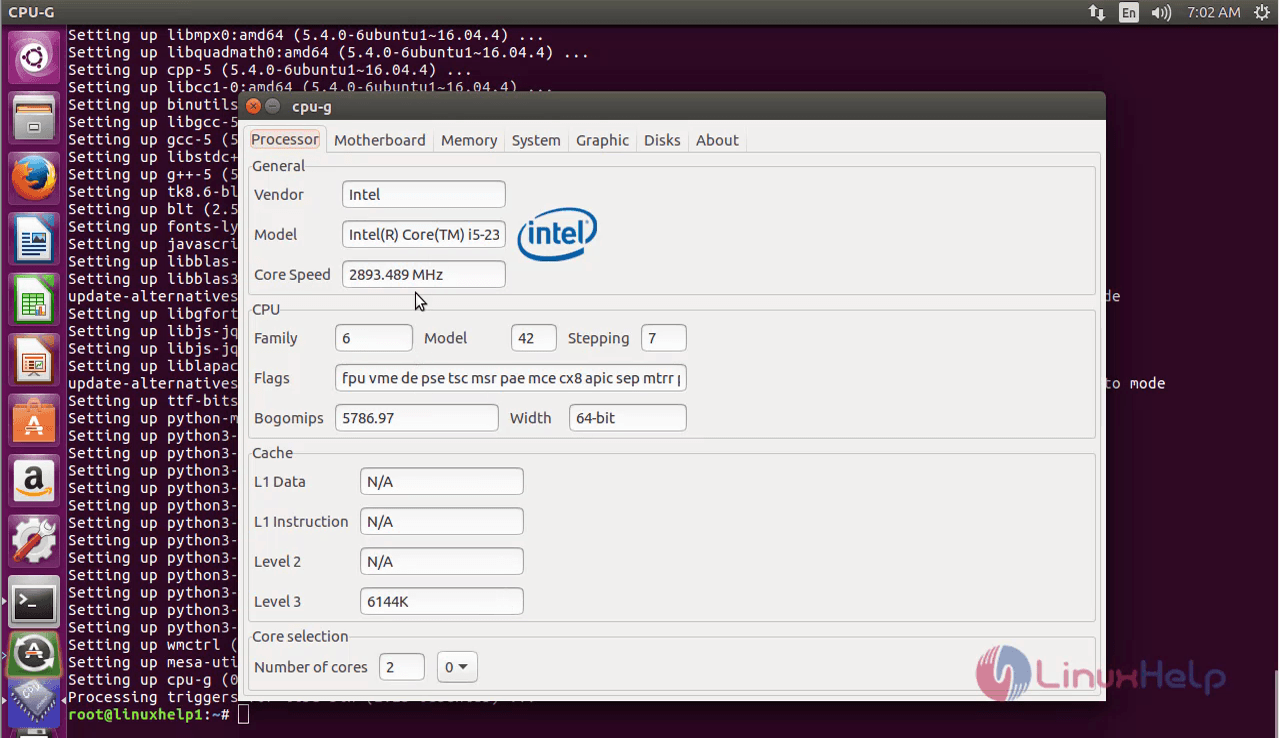
Now you can see the cpu-g software has been opened.
For removing the cpu-g
root@linuxhelp1:~# apt-get remove cpu-g -y
Reading package lists... Done
Building dependency tree
Reading state information... Done
The following packages were automatically installed and are no longer required:
blt javascript-common libblas-common libblas3 libgfortran3 libjs-jquery libjs-jquery-ui liblapack3 python-matplotlib-data
python3-cairocffi python3-cffi python3-cycler python3-dateutil python3-matplotlib python3-numpy python3-ply python3-psutil
python3-pycparser python3-tk python3-tz python3-xcffib tk8.6-blt2.5
Use ' sudo apt autoremove'  to remove them.
The following packages will be REMOVED:
cpu-g
0 upgraded, 0 newly installed, 1 to remove and 388 not upgraded.
After this operation, 1,073 kB disk space will be freed.
(Reading database ... 178440 files and directories currently installed.)
Removing cpu-g (0.15.0-1ubuntu0) ...
Processing triggers for gnome-menus (3.13.3-6ubuntu3) ...
Processing triggers for desktop-file-utils (0.22-1ubuntu5) ...
Processing triggers for bamfdaemon (0.5.3~bzr0+16.04.20160415-0ubuntu1) ...
Rebuilding /usr/share/applications/bamf-2.index...
Processing triggers for mime-support (3.59ubuntu1) ...
Comments ( 0 )
No comments available