• Categories
    Category
    {{ postCtrl.tags }}
    • {{ category.tag_type }}

      • {{tag.tag_name}}
      • View more
  • Categories
    Category
    {{ postCtrl.tags }}
    • {{ category.tag_type }}

      • {{tag.tag_name}}
      • View more
  • News
  • Tutorials
  • Forums
  • Tags
  • Users
Tutorial News Comments FAQ Related Articles

How To Install Cutegram 2.7.1 in Ubuntu 15.10

{{postValue.id}}

To Install Cutegram 2.7.1 in Ubuntu 15.10

Cutegram is a free Telegram application that uses the libqtelegram and the libappindicator libraries. It supports Emoji and allows the users to send data by dragging it in the message window. Installation of cutegram 2.7.1. in Ubuntu is explained in this article.

Features

  • Fix the map bugs, rendered blurry.
  • Add emojione to the emojis.
  • Improve window border on the OSX.
  • Fix mute/unmute problem.
  • Fix link and tag highlighter problems.


To install Cutegram

Add the cutegram repository into your repo by using the following command.

root@linuxhelp:~# add-apt-repository ppa:aseman/desktop-apps
 Desktop Applications of the Aseman Team
 More info: https://launchpad.net/~aseman/+archive/ubuntu/desktop-apps
Press [ENTER] to continue or ctrl-c to cancel adding it
.
.
.
gpg:               imported: 1  (RSA: 1)
OK

Update your machine by executing the following command.

root@linuxhelp:~# apt-get update
Hit http://in.archive.ubuntu.com wily InRelease
Get:1 http://security.ubuntu.com wily-security InRelease [65.9 kB]             
Get:2 http://in.archive.ubuntu.com wily-updates InRelease [65.9 kB]  
.
.
.
Hit http://in.archive.ubuntu.com wily-backports/universe Translation-en        
Fetched 1,717 kB in 15s (111 kB/s)                                             
Reading package lists... Done

Install the cutegram package.

root@linuxhelp:~# apt-get install cutegram
Reading package lists... Done
Building dependency tree       
Reading state information... Done
.
.
.
Setting up va-driver-all:amd64 (1.6.0-1) ...
Processing triggers for libc-bin (2.21-0ubuntu4) ...

Go to /opt directory and download the source file to install the cutegram.

root@linuxhelp:~# cd /opt/
root@linuxhelp:/opt# wget http://aseman.co/downloads/cutegram/2/cutegram-2.7.1-linux-x64-installer.run
--2016-07-12 03:17:08--  http://aseman.co/downloads/cutegram/2/cutegram-2.7.1-linux-x64-installer.run
.
.
2016-07-12 03:19:00 (440 KB/s) - ‘ cutegram-2.7.1-linux-x64-installer.run’  saved [50247738/50247738]

Now give the execute permission for the source file.

root@linuxhelp:/opt# chmod +x cutegram-2.7.1-linux-x64-installer.run

Run the installer package.

root@linuxhelp:/opt# ./cutegram-2.7.1-linux-x64-installer.run

Setup wizard will be opened, press forward
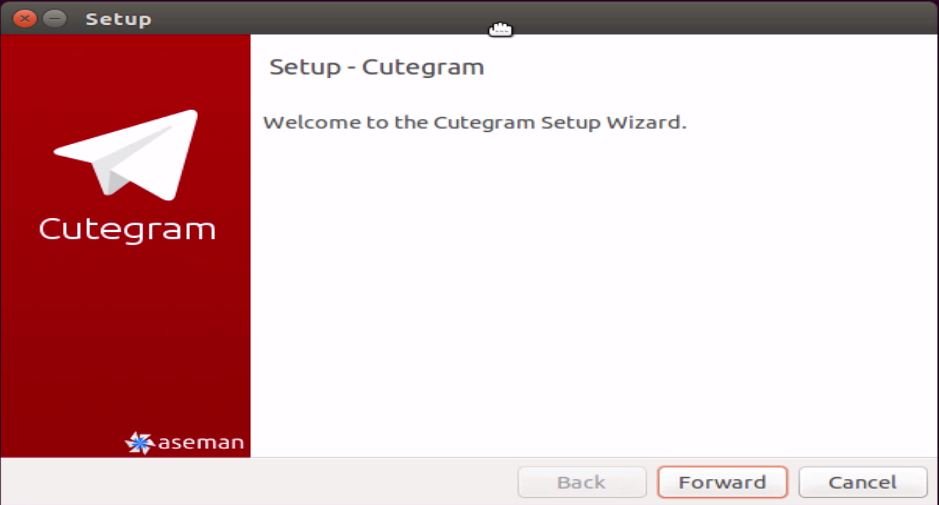
Installation-Cutegram2.7.1-Telegram-application-Ubuntu15.10-Setup-wizard
Click the agreement policy
Installation-Cutegram2.7.1-Telegram-application-Ubuntu15.10-gnu-agreement
Mention the location for installing cutegram.
Installation-Cutegram2.7.1-Telegram-application-Ubuntu15.10-location-installing-cutegram

Installation-Cutegram2.7.1-Telegram-application-Ubuntu15.10-ready-to-install
The installation will be started.
Installation-Cutegram2.7.1-Telegram-application-Ubuntu15.10-installation-started
Now the Installation is completed.
Installation-Cutegram2.7.1-Telegram-application-Ubuntu15.10-Installation-completed

To Launch Cutegram

Go to the installation path and run the following command to open the cutegram

root@linuxhelp:/opt# cd Aseman/cutegram-2.7.1/cutegram/
root@linuxhelp:/opt/Aseman/cutegram-2.7.1/cutegram# ./cutegram

Cutegram application is ready to start.
Installation-Cutegram2.7.1-Telegram-application-Ubuntu15.10-Launch
Select your country.
Installation-Cutegram2.7.1-Telegram-application-Ubuntu15.10-country
Enter your phone number for registration.
Installation-Cutegram2.7.1-Telegram-application-Ubuntu15.10-phone-number

Fill the signup field.

The code will generate through the configured mobile number
Installation-Cutegram2.7.1-Telegram-application-Ubuntu15.10-signup-field

Now the cutegram chat page appears.
Installation-Cutegram2.7.1-Telegram-application-Ubuntu15.10-cutegram-chat-page

Go to settings to change your profile.
Installation-Cutegram2.7.1-Telegram-application-Ubuntu15.10-change-profile

Now you can start your conversation.
Installation-Cutegram2.7.1-Telegram-application-Ubuntu15.10-start-conversation

Tags:
eli
Author: 

Comments ( 0 )

No comments available

Add a comment
{{postCtrl.cmtErrMsg}}

Frequently asked questions ( 5 )

Q

How to execute permission for the source file?

A

By this command, you can execute the permission
Syntax: "chmod +x cutegram-2.7.1-linux-x64-installer.run"

Q

What is the latest update in Cutegram?

A

Cutegram has recently released Cutegram 2.2.0 with some improvements and features.
Master color enabled again.
Search selected text on the web.

Q

Will this cutegram comes with default emojis available in telegram?

A

Yes, Cutegram also has support for Emoji and file sharing with just drag and drop style

Q

Are themes supported by Cutegram?

A

Yes, Themes will be supported and it can be changed.

Q

How to make an encrypted chat in Cutegram? It is available for cutegram?

A

Yes, Cutegram latest version has a Secret chat. It will be encrypted message these chats cannot be hacked.

Back To Top!
Rank
User
Points

Top Contributers

userNamenaveelansari
135850

Top Contributers

userNameayanbhatti
92510

Top Contributers

userNamehamzaahmed
32150

Top Contributers

1
userNamelinuxhelp
31040

Top Contributers

userNamemuhammadali
24500
Can you help Luke ?
workbench for debian

I am using workbench in CentOS whereas now I need to use Debian Operating system so could you please help to install and use in Debian?

Networking
  • Routing
  • trunk
  • Netmask
  • Packet Capture
  • domain
  • HTTP Proxy
Server Setup
  • NFS
  • KVM
  • Memory
  • Sendmail
  • WebDAV
  • LXC
Shell Commands
  • Cloud commander
  • Command line archive tools
  • last command
  • Shell
  • terminal
  • Throttle
Desktop Application
  • Linux app
  • Pithos
  • Retrospect
  • Scribe
  • TortoiseHg
  • 4Images
Monitoring Tool
  • Monit
  • Apache Server Monitoring
  • EtherApe 
  • Arpwatch Tool
  • Auditd
  • Barman
Web Application
  • Nutch
  • Amazon VPC
  • FarmWarDeployer
  • Rukovoditel
  • Mirror site
  • Chef
Contact Us | Terms of Use| Privacy Policy| Disclaimer
© 2025 LinuxHelp.com All rights reserved. Linux™ is the registered trademark of Linus Torvalds. This site is not affiliated with linus torvalds in any way.