• Categories
    Category
    {{ postCtrl.tags }}
    • {{ category.tag_type }}

      • {{tag.tag_name}}
      • View more
  • Categories
    Category
    {{ postCtrl.tags }}
    • {{ category.tag_type }}

      • {{tag.tag_name}}
      • View more
  • News
  • Tutorials
  • Forums
  • Tags
  • Users
Tutorial News Comments FAQ Related Articles

How to install Desktop Dimmer on Ubuntu 16.04

{{postValue.id}}

To install Desktop Dimmer on Ubuntu 16.04

Desktop Dimmer is a cross-platform desktop light app that allows you to dim or turn of desktop light when its too bright. This app is widely used by users who struggle with their eye vision while working on their desktop or laptop without any screen shade to protect them from too much light rays. Desktop Dimmer contains a darker-than-dark dimming feature for internal and external screens. This tutorial covers the installation procedure of Desktop Dimmer on Ubuntu 16.04.

Installation procedure

To proceed with the installation procedure, install the gdebi installer to install the required debian file. Execute the following command to install the gdebi.

root@example:~# apt install gdebi
Reading package lists... Done
Building dependency tree       
Reading state information... Done
The following packages were automatically installed and are no longer required:
  gnome-software-common libgtkspell3-3-0
.
.
Setting up gdebi (0.9.5.7ubuntu1) ...
Processing triggers for libc-bin (2.23-0ubuntu3) ...

The gdebi installer is installed successfully. Now download the desktop dimmer package by running the wget command followed by the download link.

root@example:~# wget https://github.com/sidneys/desktop-dimmer/releases/download/v2.9.0/desktop-dimmer-2.9.0-amd64.deb
--2017-09-05 06:05:51--  https://github.com/sidneys/desktop-dimmer/releases/download/v2.9.0/desktop-dimmer-2.9.0-amd64.deb
Resolving github.com (github.com)... 192.30.255.112, 192.30.255.113
Connecting to github.com (github.com)|192.30.255.112|:443... connected.
HTTP request sent, awaiting response... 302 Found

.
.
desktop-dimmer-2.9. 100%[===================> ]  36.75M   861KB/s    in 78s     

2017-09-05 06:07:11 (484 KB/s) - ‘ desktop-dimmer-2.9.0-amd64.deb’  saved [38539070/38539070]

The package has been downloaded. Now install the Desktop Dimmer package using gdebi installer and execute the following command.

root@example:~# gdebi desktop-dimmer-2.9.0-amd64.deb
Reading package lists... Done
Building dependency tree        
Reading state information... Done
Requires the installation of the following packages: libappindicator1 libindicator7 
.
.
Rebuilding /usr/share/applications/bamf-2.index...
Processing triggers for mime-support (3.59ubuntu1) ...
Processing triggers for hicolor-icon-theme (0.15-0ubuntu1) ...

After installing the desktop dimmer, go to Ubuntu dashboard and type desktop dimmer. Click on the icon to run the application.
ubuntu dashboard
The desktop application is open and running in tool bar on the top right corner. Click the icon to show some options in drop-down menu.
tool bar

A pop-up window will be displayed on the screen to adjust the brightness of the screen.
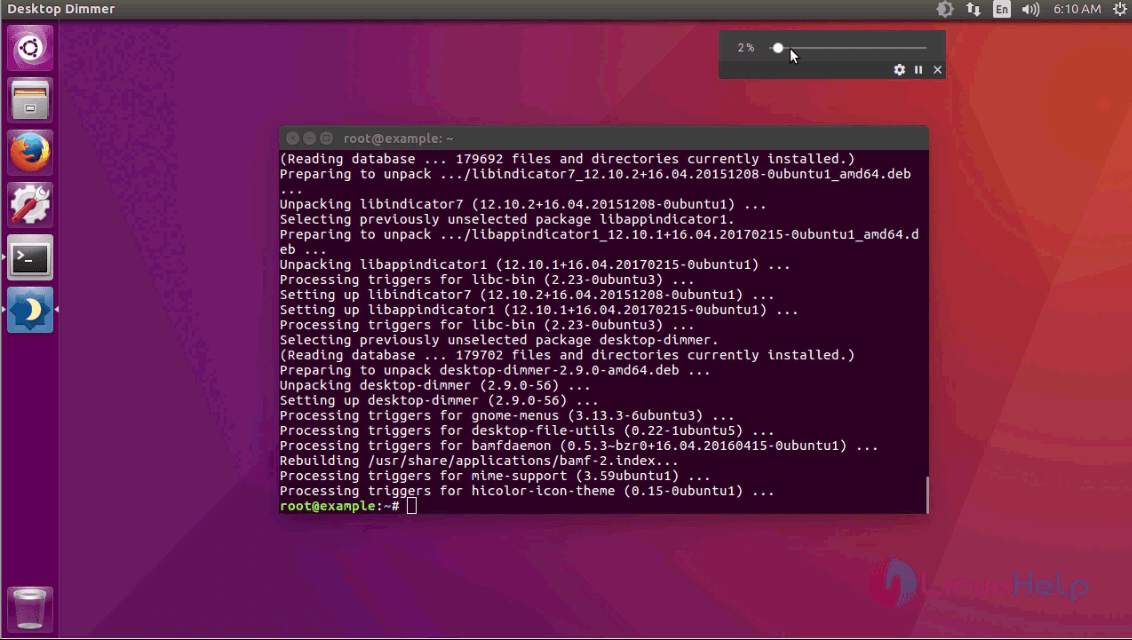
desktop dimmer

The installation procedure of Desktop Dimmer on Ubuntu 16.04.

Tags:
elijah
Author: 

Comments ( 0 )

No comments available

Add a comment
{{postCtrl.cmtErrMsg}}

Frequently asked questions ( 5 )

Q

Can I use a regular dimmer switch with just the light on a ceiling?

A

You can just use a dimmer switch to dim the light, however the speed of the fan will also be "dimmed". Make sure you use the right dimmer for your lamp, otherwise you can hear noise.

Q

Will a dimmer work without a ground?

A

New dimmers have either a green grounding wire or a green ground screw that you'll have to connect to a grounding source if one is available. ... If testing reveals your box isn't grounded, you can still install the dimmer, but you must use a plastic cover plate and make sure no bare metal parts are exposed.

Q

Do not use with dimmers?

A

No. The majority of CFL bulbs sold today are not dimmable. A CFL bulb that cannot be used on a dimmer will have the statement “not for use with dimmers” or “do not use with dimmers” marked directly on the bulb. ... Recently, dimmers have been introduced designed specifically for CFL (and LED) bulbs.

Q

Do you need special light bulbs for dimmer switches?

A

While most LED bulbs are now dimmable, not all of them are and not all of them dim in the same manner Since LEDs consume such a low wattage, many types of dimmers do not function with LED in the same way that they do with high wattage load

Q

Can a ceiling fan be wired to a dimmer switch?

A

Dimmer Switch On Ceiling Fan = Fire Hazard. ... The photo below right comes from a standard dimmer switch, which should not be used to control the motor on a ceiling fan. A safe repair can be as simple as replacing the dimmer switch with a standard toggle switch, but you also lose the ability to dim the light.

Back To Top!
Rank
User
Points

Top Contributers

userNamenaveelansari
135850

Top Contributers

userNameayanbhatti
92510

Top Contributers

userNamehamzaahmed
32150

Top Contributers

1
userNamelinuxhelp
31040

Top Contributers

userNamemuhammadali
24500
Can you help Jayce ?
What are the types of table used in IPtables

What are the various types of table used in IPtables and how to use that for my server security?

Networking
  • Routing
  • trunk
  • Netmask
  • Packet Capture
  • domain
  • HTTP Proxy
Server Setup
  • NFS
  • KVM
  • Memory
  • Sendmail
  • WebDAV
  • LXC
Shell Commands
  • Cloud commander
  • Command line archive tools
  • last command
  • Shell
  • terminal
  • Throttle
Desktop Application
  • Linux app
  • Pithos
  • Retrospect
  • Scribe
  • TortoiseHg
  • 4Images
Monitoring Tool
  • Monit
  • Apache Server Monitoring
  • EtherApe 
  • Arpwatch Tool
  • Auditd
  • Barman
Web Application
  • Nutch
  • Amazon VPC
  • FarmWarDeployer
  • Rukovoditel
  • Mirror site
  • Chef
Contact Us | Terms of Use| Privacy Policy| Disclaimer
© 2025 LinuxHelp.com All rights reserved. Linux™ is the registered trademark of Linus Torvalds. This site is not affiliated with linus torvalds in any way.