How to install Docky in Ubuntu
{{postValue.id}}
To install Docky in Ubuntu
Docky is an open source application used to open and manage files, folders and applications on the Linux systems. Docky is developed with advanced shortcut bar It also displays the applications which are currently running and holds the windows in the minimized state. Installation of Docky in Ubuntu is explained in this article.
Installation of Docky
First add the required repositories by using the following command .
user1@linuxhelp:~$ sudo add-apt-repository ppa:docky-core/stable
 [sudo] password for user1:
 This ppa is currently used for builds of release builds of docky and plank.
 More info: https://launchpad.net/~docky-core/+archive/ubuntu/stable
Press [ENTER] to continue or ctrl-c to cancel adding it

gpg: keyring `/tmp/tmpuxh6rroe/secring.gpg'  created
gpg: keyring `/tmp/tmpuxh6rroe/pubring.gpg'  created
gpg: requesting key 3528AE20 from hkp server keyserver.ubuntu.com
gpg: /tmp/tmpuxh6rroe/trustdb.gpg: trustdb created
gpg: key 3528AE20: public key " Launchpad Docky Development PPA"  imported
gpg: Total number processed: 1
gpg:               imported: 1  (RSA: 1)
OK
Then update the repository with the following command.
user1@linuxhelp:~$ sudo apt-get update
Hit:1 http://ppa.launchpad.net/deluge-team/ppa/ubuntu xenial InRelease
Hit:2 http://in.archive.ubuntu.com/ubuntu xenial InRelease
Get:3 http://security.ubuntu.com/ubuntu xenial-security InRelease [94.5 kB]
Get:4 http://in.archive.ubuntu.com/ubuntu xenial-updates InRelease [95.7 kB]
Get:5 http://ppa.launchpad.net/docky-core/stable/ubuntu xenial InRelease [17.5 kB]
Get:6 http://ppa.launchpad.net/docky-core/stable/ubuntu xenial/main amd64 Packages [2,752 B]
.
.
Done!
Run the following command to install the docky package.
user1@linuxhelp:~$ sudo apt-get install docky
Reading package lists... Done
Building dependency tree
Reading state information... Done
The following packages were automatically installed and are no longer required:
  libpango1.0-0 libpangox-1.0-0 linux-headers-4.4.0-21 linux-headers-4.4.0-21-generic
  linux-headers-4.4.0-28 linux-headers-4.4.0-28-generic linux-image-4.4.0-21-generic
  linux-image-4.4.0-28-generic linux-image-extra-4.4.0-21-generic
  linux-image-extra-4.4.0-28-generic
Use ' sudo apt autoremove'  to remove them.
The following additional packages will be installed:
  binfmt-support ca-certificates-mono cli-common libdbus-glib2.0-cil libdbus2.0-cil
  libgconf2.0-cil libgdiplus libgif7 libgkeyfile1.0-cil libglib2.0-cil
.
.
Certificate added: C=US, O=" thawte, Inc." , OU=Certification Services Division, OU=" (c) 2008 thawte, Inc. - For authorized use only" , CN=thawte Primary Root CA - G3
173 new root certificates were added to your trust store.
Import process completed.
Done
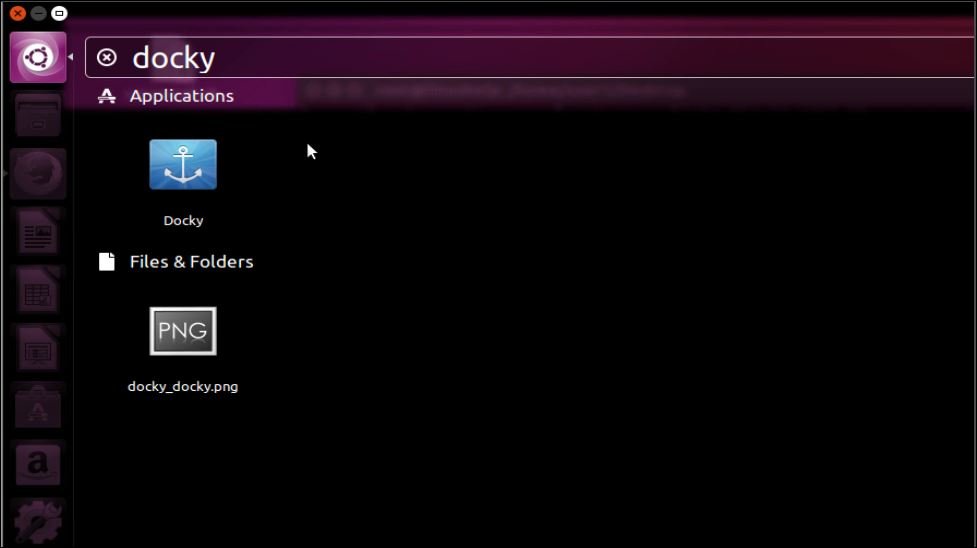
Once the Docky is successfully installed, open it from the Unity Dash as shown below.
To remove Docky package
Run the below command to uninstall the docky package.
user1@linuxhelp:~$ sudo apt-get remove docky
Reading package lists... Done
Building dependency tree
Reading state information... Done
The following packages were automatically installed and are no longer required:
  ca-certificates-mono cli-common libdbus-glib2.0-cil libdbus2.0-cil libgconf2.0-cil
  libgdiplus libgif7 libgkeyfile1.0-cil libglib2.0-cil libgnome-keyring1.0-cil
  libgtk2.0-cil libmono-accessibility4.0-cil libmono-addins0.2-cil
  libmono-cairo4.0-cil libmono-corlib4.5-cil libmono-data-tds4.0-cil
  libmono-i18n-west4.0-cil libmono-i18n4.0-cil libmono-ldap4.0-cil
  libmono-posix4.0-cil libmono-security4.0-cil libmono-sharpzip4.84-cil
  libmono-sqlite4.0-cil libmono-system-componentmodel-dataannotations4.0-cil
  libmono-system-configuration4.0-cil libmono-system-core4.0-cil
  libmono-system-data4.0-cil libmono-system-design4.0-cil
  libmono-system-drawing4.0-cil libmono-system-enterpriseservices4.0-cil
.
.
Processing triggers for gconf2 (3.2.6-3ubuntu6) ...
Processing triggers for hicolor-icon-theme (0.15-0ubuntu1) ...
Comments ( 0 )
No comments available