How to Install e107 CMS 2.1.9v on CentOS 7.6
Installation of e107 CMS 2.1.9 v On CentOS 7.6
Features:
A XML Sitemap Creator
File Download DAtabase and Management
Theme manager
Plugin manager
Cron Jobs
Mass mailing
RSS and Atom Feeds
Software Requirements:
Apache 2.4.34
MariaDB 10.1.29
PHP 7.2
PHP Modules:
php php-gd php-pdo php-mysql php-simplexml php-curl php-zip php-mbstring php-mcrypt
Download Link:
http://sourceforge.net/projects/e107/files/e107/e107%20v2.1.9/e107_2.1.9_full.zip/download
Installation
Start the process by configuring the MariaDB for e107 CMS using the root password.
[root@linuxhelp ~]# mysql -u root -p
Enter password:
Welcome to the MariaDB monitor.  Commands end with ; or \g.
Your MariaDB connection id is 19
Server version: 5.5.60-MariaDB MariaDB Server

Copyright (c) 2000, 2018, Oracle, MariaDB Corporation Ab and others.

Type 'help;' or '\h' for help. Type '\c' to clear the current input statement.

MariaDB [(none)]> create database e107 character set utf8mb4;
Query OK, 1 row affected (0.00 sec)

MariaDB [(none)]> use e107;
Database changed
MariaDB [e107]> create user euser@localhost identified by 'linuxc';
Query OK, 0 rows affected (0.00 sec)

MariaDB [e107]> grant all on e107.* to euser@localhost;
Query OK, 0 rows affected (0.00 sec)
MariaDB [e107]> flush privileges;
Query OK, 0 rows affected (0.00 sec)

MariaDB [e107]> exit
Bye
After that, change the directory to Apache’s Document root directory.
[root@linuxhelp ~]# cd /var/www
And then, create a directory for e107 CMS.
[root@linuxhelp www]# mkdir e107
Change the directory to e107.
[root@linuxhelp www]# cd e107
You can download the e107 CMs using wget command with the link given in the following command.
[root@linuxhelp e107]# wget http://sourceforge.net/projects/e107/files/e107/e107%20v2.1.9/e107_2.1.9_full.zip/download
--2019-05-03 14:11:38--  http://sourceforge.net/projects/e107/files/e107/e107%20v2.1.9/e107_2.1.9_full.zip/download
Resolving sourceforge.net (sourceforge.net)... 216.105.38.13
Connecting to sourceforge.net (sourceforge.net)|216.105.38.13|:80... connected.
HTTP request sent, awaiting response... 301 Moved Permanently
Location: https://sourceforge.net/projects/e107/files/e107/e107%20v2.1.9/e107_2.1.9_full.zip/download [following]
--2019-05-03 14:11:39--  https://sourceforge.net/projects/e107/files/e107/e107%20v2.1.9/e107_2.1.9_full.zip/download
Connecting to sourceforge.net (sourceforge.net)|216.105.38.13|:443... connected.
HTTP request sent, awaiting response... 302 Found
Location: https://downloads.sourceforge.net/project/e107/e107/e107%20v2.1.9/e107_2.1.9_full.zip?r=&ts=1556872866&use_mirror=excellmedia [following]
--2019-05-03 14:11:40--  https://downloads.sourceforge.net/project/e107/e107/e107%20v2.1.9/e107_2.1.9_full.zip?r=&ts=1556872866&use_mirror=excellmedia
Resolving downloads.sourceforge.net (downloads.sourceforge.net)... 216.105.38.13
Connecting to downloads.sourceforge.net (downloads.sourceforge.net)|216.105.38.13|:443... connected.
HTTP request sent, awaiting response... 302 Found
Location: https://excellmedia.dl.sourceforge.net/project/e107/e107/e107%20v2.1.9/e107_2.1.9_full.zip [following]
--2019-05-03 14:11:41--  https://excellmedia.dl.sourceforge.net/project/e107/e107/e107%20v2.1.9/e107_2.1.9_full.zip
Resolving excellmedia.dl.sourceforge.net (excellmedia.dl.sourceforge.net)... 202.153.32.19
Connecting to excellmedia.dl.sourceforge.net (excellmedia.dl.sourceforge.net)|202.153.32.19|:443... connected.
HTTP request sent, awaiting response... 200 OK
Length: 16046639 (15M) [application/octet-stream]
Saving to: ‘download’

100%[===================================================================================================>] 16,046,639   407KB/s   in 43s

2019-05-03 14:12:26 (368 KB/s) - ‘download’ saved [16046639/16046639]
List the contents to check the downloaded zip file
[root@linuxhelp e107]# ll
total 15672
-rw-r--r-- 1 root root 16046639 Aug 22  2018 download
After the download, extract the file using unzip command in the following manner.
[root@linuxhelp e107]# unzip download
Archive:  download
  inflating: CONTRIBUTING.md
  inflating: README.md
  inflating: banner.php
  inflating: class2.php
  inflating: comment.php
  inflating: contact.php
  inflating: cron.php
  inflating: download.php
  inflating: e107.htaccess
  inflating: e107.robots.txt
   creating: e107_admin/
.
.
.
.
.
inflating: top.php
  inflating: unsubscribe.php
  inflating: upload.php
  inflating: user.php
  inflating: userposts.php
  inflating: usersettings.php
And then, list the contents to check the extracted files.
[root@linuxhelp e107]# ll
total 16208
-rw-r--r--  1 root root      292 Aug 22  2018 banner.php
-rwxr-xr-x  1 root root    77588 Aug 22  2018 class2.php
-rw-r--r--  1 root root    16260 Aug 22  2018 comment.php
-rw-r--r--  1 root root     7438 Aug 22  2018 contact.php
-rw-r--r--  1 root root     6805 Aug 22  2018 CONTRIBUTING.md
-rwxr-xr-x  1 root root     1291 Aug 22  2018 cron.php
-rw-r--r--  1 root root 16046639 Aug 22  2018 download
-rw-r--r--  1 root root      701 Aug 22  2018 download.php
drwxr-xr-x  3 root root     4096 Aug 22  2018 e107_admin
-rw-r--r--  1 root root        0 Aug 22  2018 e107_config.php
drwxr-xr-x 11 root root      155 Aug 22  2018 e107_core
drwxr-xr-x  3 root root      114 Aug 22  2018 e107_docs
drwxr-xr-x  9 root root     4096 Aug 22  2018 e107_handlers
-rw-r--r--  1 root root     3766 Aug 22  2018 e107.htaccess
drwxr-xr-x 14 root root     4096 Aug 22  2018 e107_images
drwxr-xr-x  3 root root       39 Aug 22  2018 e107_languages
drwxr-xr-x  2 root root       24 Aug 22  2018 e107_media
drwxr-xr-x 34 root root     4096 Aug 22  2018 e107_plugins
-rw-r--r--  1 root root      383 Aug 22  2018 e107.robots.txt
drwxr-xr-x  2 root root       41 Aug 22  2018 e107_system
drwxr-xr-x  7 root root      105 Aug 22  2018 e107_themes
drwxr-xr-x  7 root root       86 Aug 22  2018 e107_web
-rw-r--r--  1 root root     5707 Aug 22  2018 email.php
-rw-r--r--  1 root root     1249 Aug 22  2018 error.php
-rw-r--r--  1 root root     5430 Aug 22  2018 favicon.ico
-rw-r--r--  1 root root    11548 Aug 22  2018 fpw.php
-rw-r--r--  1 root root     2599 Aug 22  2018 gsitemap.php
-rw-r--r--  1 root root     5062 Aug 22  2018 index.php
-rw-r--r--  1 root root    77569 Aug 22  2018 install.php
-rw-r--r--  1 root root     3430 Aug 22  2018 login.php
-rw-r--r--  1 root root     2227 Aug 22  2018 membersonly.php
-rw-r--r--  1 root root      568 Aug 22  2018 metaweblog.php
-rw-r--r--  1 root root      410 Aug 22  2018 news.php
-rw-r--r--  1 root root    10469 Aug 22  2018 online.php
-rw-r--r--  1 root root    32773 Aug 22  2018 page.php
-rw-r--r--  1 root root     4442 Aug 22  2018 print.php
-rw-r--r--  1 root root     2455 Aug 22  2018 rate.php
-rw-r--r--  1 root root     2856 Aug 22  2018 README.md
-rw-r--r--  1 root root     1546 Aug 22  2018 request.php
-rw-r--r--  1 root root    31570 Aug 22  2018 search.php
-rw-r--r--  1 root root    32809 Aug 22  2018 signup.php
-rw-r--r--  1 root root     1221 Aug 22  2018 sitedown.php
-rw-r--r--  1 root root    11594 Aug 22  2018 submitnews.php
-rwxr-xr-x  1 root root    14513 Aug 22  2018 thumb.php
-rw-r--r--  1 root root    11639 Aug 22  2018 top.php
-rw-r--r--  1 root root     2876 Aug 22  2018 unsubscribe.php
-rw-r--r--  1 root root    16073 Aug 22  2018 upload.php
-rw-r--r--  1 root root     7574 Aug 22  2018 user.php
-rw-r--r--  1 root root    10082 Aug 22  2018 userposts.php
-rw-r--r--  1 root root    33193 Aug 22  2018 usersettings.php
Later, assign the ownership permissions to the e107 directory by running the following command.
[root@linuxhelp e107]# chown -R apache. ./
Also, assign writable permissions to this e107 directory with the following command.
[root@linuxhelp e107]# chmod -R 775 ./
Create a virtual hosting for e107 CMS.
[root@linuxhelp e107]# vim /etc/httpd/conf.d/e.conf
<virtualhost *:80>
servername www.linuxhelp1.com
documentroot /var/www/e107/

<directory /var/www/e107/>
allowoverride all
allow from all
</directory>
</virtualhost>
Once all the setup is done, restart the Apache service.
[root@linuxhelp e107]# systemctl restart httpd
After that, open the browser and enter the servername and hit enter
 Select the language and click continue.
 Enter the database details that we have configured inside the MariaDB
 Database has been successfully connected and click continue.
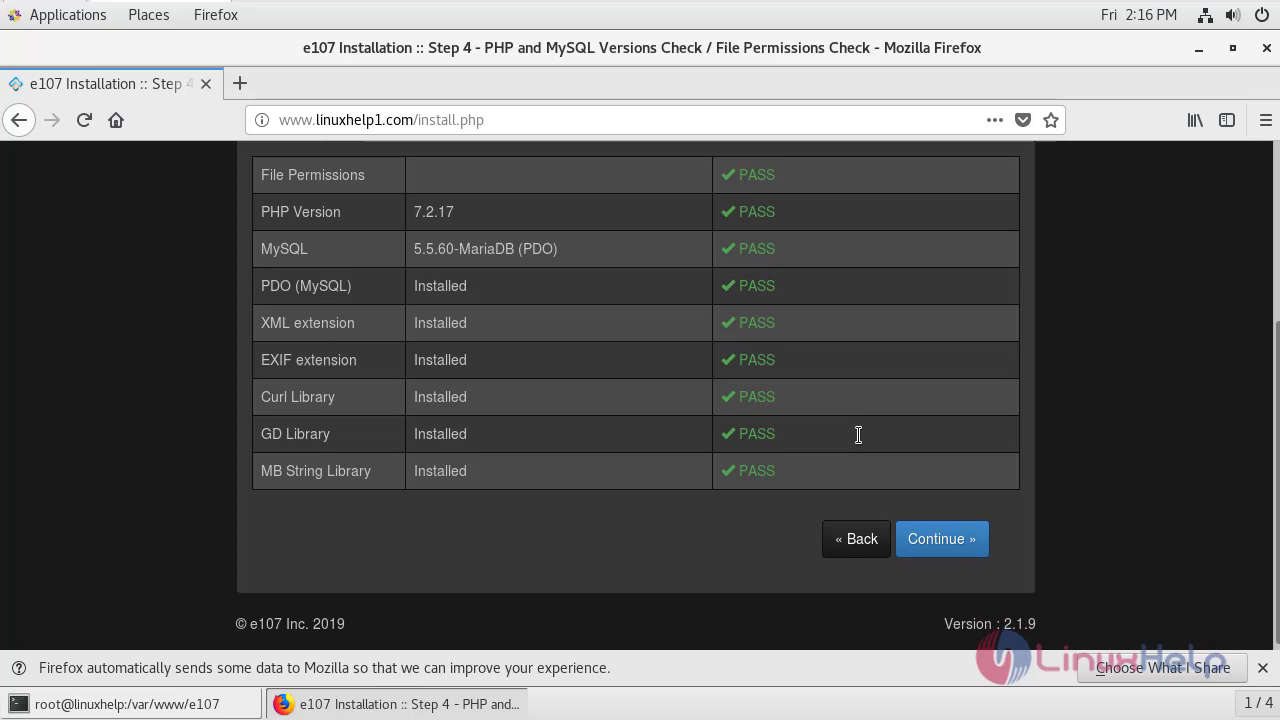
 After the PHP and MySQL versions and file permissions are checked, click continue.
Enroll the admin credentials and click continue after the selection of admin area skin.


 Here you need to enroll the website information and click continue.

 Click continue to save the database details.
 Login to the backend office of e107 CMS by clicking on Sign in option.
 Dashboard of e107 cms 2.1.9 v of admin’s account gets opened.
 Thus the installation of e107 CMS 2.1.9v on CentOS comes to end.
Comments ( 0 )
No comments available