• Categories
    Category
    {{ postCtrl.tags }}
    • {{ category.tag_type }}

      • {{tag.tag_name}}
      • View more
  • Categories
    Category
    {{ postCtrl.tags }}
    • {{ category.tag_type }}

      • {{tag.tag_name}}
      • View more
  • News
  • Tutorials
  • Forums
  • Tags
  • Users
Tutorial News Comments FAQ Related Articles

How to install eJabberd XMPP server in Ubuntu

{{postValue.id}}

To install eJabberd XMPP server in Ubuntu

In this article we will learn how to install eJabberd XMPP server in Ubuntu. It is an open source, fault tolerant server that is programmed in Erlang. eJabberd packages are available under default system repositories.

To install eJabberd XMPP server in Ubuntu

First update the repositories by running the following command.

root@server2:/home/user1# apt-get update 
Ign http://extras.ubuntu.com trusty InRelease
Ign http://in.archive.ubuntu.com trusty InRelease
Get:1 http://security.ubuntu.com trusty-security InRelease [65.9 kB]
Get:2 http://extras.ubuntu.com trusty Release.gpg [72 B]                       
Get:3 http://in.archive.ubuntu.com trusty-updates InRelease [65.9 kB]          
Get:4 http://extras.ubuntu.com trusty Release [11.9 kB]                        
Get:5 http://extras.ubuntu.com trusty/main Sources [14 B]                      
Get:6 http://extras.ubuntu.com trusty/main amd64 Packages [14 B]               
Get:7 http://security.ubuntu.com trusty-security/main Sources [120 kB]         
Get:8 http://extras.ubuntu.com trusty/main i386 Packages [14 B]              
Get:9 http://in.archive.ubuntu.com trusty-backports InRelease [65.9 kB]  
.
.
Ign http://in.archive.ubuntu.com trusty/universe Translation-en_IN             
Fetched 33.5 MB in 2min 34s (217 kB/s)                                         
Reading package lists... Done


Run the following command to install ejabberd.

root@server2:/home/user1# apt-get -y install ejabberd 
Reading package lists... Done
Building dependency tree       
Reading state information... Done
The following extra packages will be installed:
  erlang-asn1 erlang-base erlang-crypto erlang-inets erlang-mnesia erlang-odbc
  erlang-public-key erlang-runtime-tools erlang-ssl erlang-syntax-tools
  libodbc1 libsctp1 lksctp-tools
Suggested packages:
  libunix-syslog-perl imagemagick graphicsmagick-imagemagick-compat erlang
  erlang-manpages erlang-doc erlang-tools libmyodbc odbc-postgresql tdsodbc
  unixodbc-bin
The following NEW packages will be installed:
.
.
.
Starting jabber server: ejabberd.
Setting up lksctp-tools (1.0.15+dfsg-1) ...
Processing triggers for libc-bin (2.19-0ubuntu6.7) ...
Processing triggers for ureadahead (0.100.0-16) ...


Now you need to create admin accounts for your domain.

root@server2:/home/user1# ejabberdctl register admin localhost password 
User admin@localhost successfully registered


Open the configuration file and make the following changes into it.

%% Admin user
{acl, admin, {user, " admin" , " localhost" }}.

%% Hostname
{hosts, [" localhost" ]}.


Then restart eJabberd service to take effect.

root@server2:/home/user1# service ejabberd restart 
Restarting jabber server: ejabberd.


Open the browser and navigate to http://< IP_address> :5280/admin
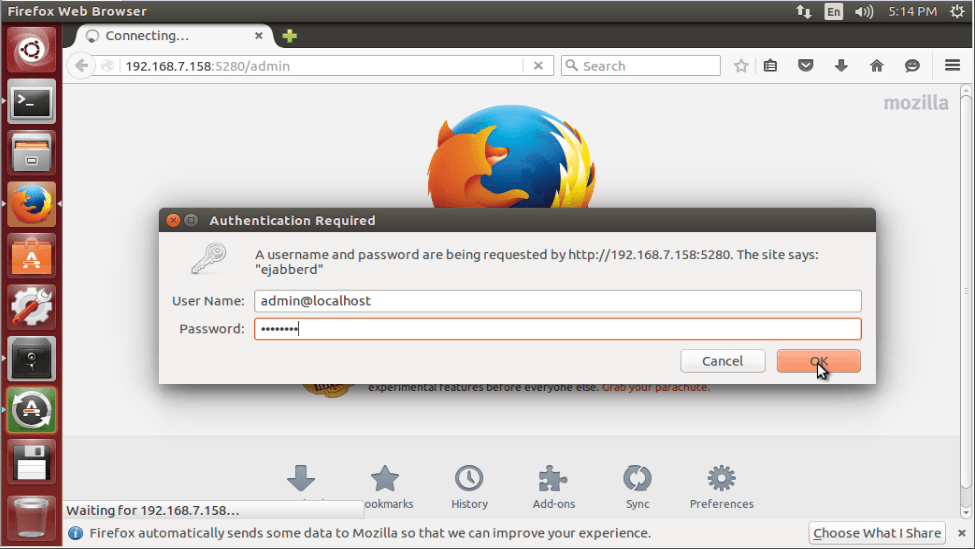
authentication_required

From the web admin interface, you can modify all the settings.
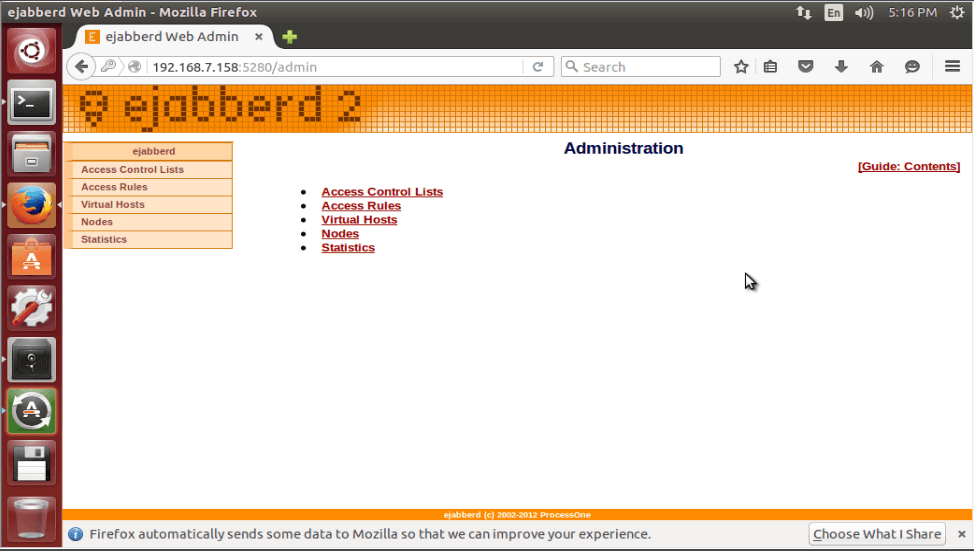
modify_settings

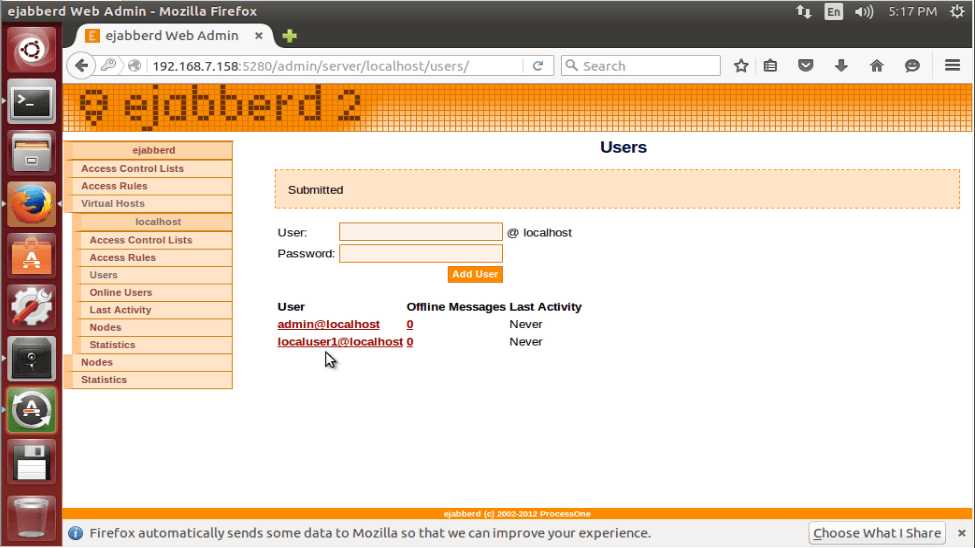
To add New Users, click Virtual Hosts -> localhost -> Users
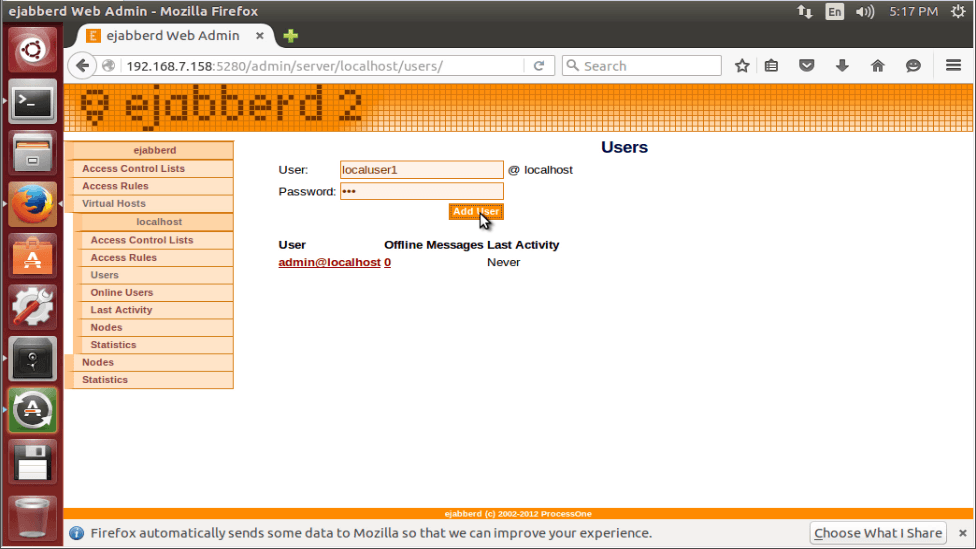
users
last_activity

Tags:
jackson
Author: 

Comments ( 0 )

No comments available

Add a comment
{{postCtrl.cmtErrMsg}}

Frequently asked questions ( 5 )

Q

How to change password in ejabberd?

A

Change "password" to your own value:
# ejabberdctl register admin localhost password

Q

Is ejabberd conform to the best Erlang practices?

A

Yes. Our build system is primarily based on rebar. However, as we are multiplatform and need to run in many various environments, we rely on a toolchain that can detect required library depen

Q

What are the tips to optimize performance?

A

Optimisation of XMPP servers performance, including ejabberd, is highly dependant on the use case. You really need to find your bottleneck by monitoring the process queues and finding out wha

Q

Is ejabberd conform to the best Erlang practices?

A

Yes. Our build system is primarily based on rebar. However, as we are multiplatform and need to run in many various environments, we rely on a toolchain that can detect required library dependencies using autotools.

Q

What are the tips to optimize performance?

A

Optimisation of XMPP servers performance, including ejabberd, is highly dependant on the use case. You really need to find your bottleneck by monitoring the process queues and finding out what is your limiting factor, and move to the next one.

Back To Top!
Rank
User
Points

Top Contributers

userNamenaveelansari
135850

Top Contributers

userNameayanbhatti
92510

Top Contributers

userNamehamzaahmed
32150

Top Contributers

1
userNamelinuxhelp
31040

Top Contributers

userNamemuhammadali
24500
Can you help Luke ?
workbench for debian

I am using workbench in CentOS whereas now I need to use Debian Operating system so could you please help to install and use in Debian?

Networking
  • Routing
  • trunk
  • Netmask
  • Packet Capture
  • domain
  • HTTP Proxy
Server Setup
  • NFS
  • KVM
  • Memory
  • Sendmail
  • WebDAV
  • LXC
Shell Commands
  • Cloud commander
  • Command line archive tools
  • last command
  • Shell
  • terminal
  • Throttle
Desktop Application
  • Linux app
  • Pithos
  • Retrospect
  • Scribe
  • TortoiseHg
  • 4Images
Monitoring Tool
  • Monit
  • Apache Server Monitoring
  • EtherApe 
  • Arpwatch Tool
  • Auditd
  • Barman
Web Application
  • Nutch
  • Amazon VPC
  • FarmWarDeployer
  • Rukovoditel
  • Mirror site
  • Chef
Contact Us | Terms of Use| Privacy Policy| Disclaimer
© 2025 LinuxHelp.com All rights reserved. Linux™ is the registered trademark of Linus Torvalds. This site is not affiliated with linus torvalds in any way.