• Categories
    Category
    {{ postCtrl.tags }}
    • {{ category.tag_type }}

      • {{tag.tag_name}}
      • View more
  • Categories
    Category
    {{ postCtrl.tags }}
    • {{ category.tag_type }}

      • {{tag.tag_name}}
      • View more
  • News
  • Tutorials
  • Forums
  • Tags
  • Users
Tutorial News Comments FAQ Related Articles

How to install Emacs 25.1.1 on Ubuntu 16.04

{{postValue.id}}

How to install Emacs 25.1.1 on Ubuntu 16.04

Emacs is one of the oldest and most versatile text editors available for Linux and UNIX-based systems. It is well known for its powerful and rich editing features. It can also be customized and extended with different " modes" , enabling it to be used like an Integrated Development Environment (IDE) for programming languages like Java, C or Python. This tutorial will explain on how to install Emacs 25.1.1 text editor on Ubuntu 16.04.

Features

  • Emacs can now load shared/dynamic libraries (modules)
  • Experimental support for Cairo drawing
  • Enhanced network security (TLS/SSL certificate validity and the like)
  • New minor mode ‘ electric-quote-mode’ for using curved quotes as you type
  • Character folding support in isearch.el
  • Xwidgets: a new feature for embedding native widgets inside Emacs buffers

Installation procedure

To begin with the installation procedure, add the Emacs package into repository via PPA.

root@linuxhelp1:~# add-apt-repository ppa:kelleyk/emacs
 This repository contains updated `emacs` packages
Press [ENTER] to continue or ctrl-c to cancel adding it
.
.
.
gpg: /tmp/tmpp8oc53ml/trustdb.gpg: trustdb created
gpg: key 3FF0E01EEAAFC9CD: public key " Launchpad PPA for Kevin Kelley"  imported
gpg: Total number processed: 1
gpg:               imported: 1
OK

The repositories are added to the target machine. Now update the machine by executing the apt-get update command.

root@linuxhelp1:~# apt-get update
Get:1 http://ppa.launchpad.net/kelleyk/emacs/ubuntu xenial InRelease [24.3 kB]
Hit:2 http://in.archive.ubuntu.com/ubuntu xenial InRelease                    
Get:3 http://in.archive.ubuntu.com/ubuntu xenial-updates InRelease [102 kB]   
Get:4 http://security.ubuntu.com/ubuntu xenial-security InRelease [102 kB]
.
.
.
Fetched 1,324 kB in 9s (142 kB/s)                                             
AppStream cache update completed, but some metadata was ignored due to errors.
Reading package lists... Done
Building dependency tree      
Reading state information... Done

The target machine is updated with the repositories. Install the emacs editor package by executing the following command.

root@linuxhelp1:~# apt install emacs25
Reading package lists... Done
Building dependency tree      
Reading state information... Done
The following additional packages will be installed:
  emacs25-common libgif7 liblockfile-bin liblockfile1 libm17n-0 libotf0
  m17n-db
.
.
.
update-alternatives: using /usr/bin/emacsclient25 to provide /usr/bin/emacsclient (emacsclient) in auto mode
update-alternatives: using /usr/bin/etags25 to provide /usr/bin/etags (etags) in auto mode
Processing triggers for libc-bin (2.23-0ubuntu7) ...

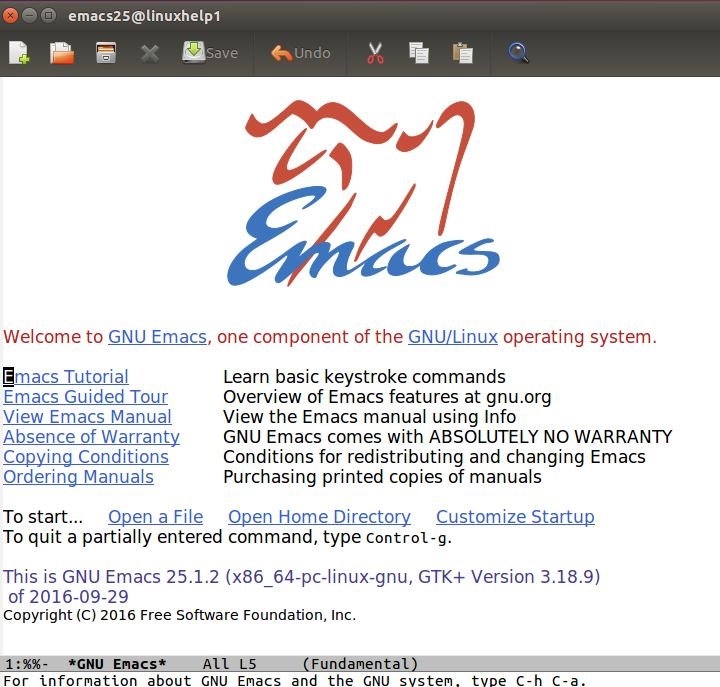
The emacs application is installed successfully in the target system. To launch the emacs text editor type the package name in the Ubuntu dashboard and click on the icon to run the application.

dashboard

emacs.

The application is running successfully. Now edit or create the text documents by using Emacs editor.

emacs editor.

Wasn' t that an easy installation process? The Emacs has over 2000 built-in commands and allows the user to combine these commands into macros.

Tags:
caden
Author: 

Comments ( 0 )

No comments available

Add a comment
{{postCtrl.cmtErrMsg}}

Frequently asked questions ( 5 )

Q

what is the use of Emacs in ubuntu?

A

Emacs is one of the oldest and most versatile text editors available for Linux and UNIX-based systems. It is well known for its powerful and rich editing features. It can also be customized and extended with different " modes" , enabling it to be used like an Integrated Development Environment (IDE) for programming languages like Java, C or Python.

Q

what are all the features of Emacs in ubuntu?

A

the features of Emacs are,
Emacs can now load shared/dynamic libraries (modules)
Experimental support for Cairo drawing
Enhanced network security (TLS/SSL certificate validity and the like)
New minor mode &lsquo electric-quote-mode&rsquo for using curved quotes as you type
Character folding support in isearch.el
Xwidgets: a new feature for embedding native widgets inside Emacs buffers

Q

how to add the repo for Emacs in terminal?

A

add the Emacs package into repository through PPA
# add-apt-repository ppa:kelleyk/emacs

Q

where to open the installed application of emacs in ubuntu?

A

The emacs application is installed successfully in the target system. To launch the emacs text editor type the package name in the Ubuntu dashboard and click on the icon to run the application.

Q

what is the command to install the Emacs after adding repo?

A

The target machine is updated with the repositories. Install the emacs editor package by executing the following command
# apt install emacs25

Back To Top!
Rank
User
Points

Top Contributers

userNamenaveelansari
135850

Top Contributers

userNameayanbhatti
92510

Top Contributers

userNamehamzaahmed
32150

Top Contributers

1
userNamelinuxhelp
31040

Top Contributers

userNamemuhammadali
24500
Can you help Isaac ?
How to run windows application in linux

I need to run the windows application in my Linux machine, instead of installing from yum repo or any other repos. How to do that..??

Networking
  • Routing
  • trunk
  • Netmask
  • Packet Capture
  • domain
  • HTTP Proxy
Server Setup
  • NFS
  • KVM
  • Memory
  • Sendmail
  • WebDAV
  • LXC
Shell Commands
  • Cloud commander
  • Command line archive tools
  • last command
  • Shell
  • terminal
  • Throttle
Desktop Application
  • Linux app
  • Pithos
  • Retrospect
  • Scribe
  • TortoiseHg
  • 4Images
Monitoring Tool
  • Monit
  • Apache Server Monitoring
  • EtherApe 
  • Arpwatch Tool
  • Auditd
  • Barman
Web Application
  • Nutch
  • Amazon VPC
  • FarmWarDeployer
  • Rukovoditel
  • Mirror site
  • Chef
Contact Us | Terms of Use| Privacy Policy| Disclaimer
© 2025 LinuxHelp.com All rights reserved. Linux™ is the registered trademark of Linus Torvalds. This site is not affiliated with linus torvalds in any way.