How to Install Emacs 25 Texteditor on Linux mint 18.03
{{postValue.id}}
To Install Emacs25 on Linux mint 18.03
Emacs is a customizable and real-time display editor. Emacs runs on several operating systems. It can also be customized and extended with different " modes" , enabling it to be used like an Integrated Development Environment (IDE) for programming languages like Java, C or Python. In this tutorial, we will cover the installation of Emacs25 on linuxmint 18.03.
Installation
Add the repository of Emacs by using PPA.
linuxhelp ~ # add-apt-repository ppa:kelleyk/emacs
You are about to add the following PPA:
 This repository contains updated `emacs` packages based on stable releases.

The following package series are available:
  - `emacs26`: based on 26.x-series releases.
  - `emacs25`: based on 25.x-series releases.

The `emacs26` packages have `mailutils` and `systemd` support (the two build-time options that are new in `emacs26`) enabled.  The `emacs26` packages for 14.04 have failed to build because not all of the dependencies that are required to enable these options are available.

The `emacs26` packages have xwidgets support.  The `emacs25` packages do not.  If you are interested in xwidgets support in `emacs25`, please send me a note  it would not be hard to update those packages.

On top of each series, I have applied the following patches:
  - A fix for an `xinput`-related bug that, when triggered, causes `emacs` to enter an infinite loop  the process will then be unresponsive and will consume 100% of a single CPU core until you kill it.
.
.
.
Executing: /tmp/tmp.idayOpwpTi/gpg.1.sh --keyserver
hkp://keyserver.ubuntu.com:80
--recv-keys
EAAFC9CD
gpg: requesting key EAAFC9CD from hkp server keyserver.ubuntu.com
gpg: key EAAFC9CD: public key " Launchpad PPA for Kevin Kelley"  imported
gpg: Total number processed: 1
gpg:               imported: 1  (RSA: 1)
Let' s first start with updating the system repositories
linuxhelp ~ # apt-get update
Hit:1 http://archive.ubuntu.com/ubuntu xenial InRelease
Get:2 http://archive.canonical.com/ubuntu xenial InRelease [11.5 kB]
Get:3 http://ppa.launchpad.net/kelleyk/emacs/ubuntu xenial InRelease [24.3 kB]
Ign:4 http://packages.linuxmint.com sylvia InRelease
Get:5 http://archive.canonical.com/ubuntu xenial/partner amd64 Packages [3,128 B]
Get:6 http://archive.canonical.com/ubuntu xenial/partner i386 Packages [3,124 B]
Get:7 http://security.ubuntu.com/ubuntu xenial-security InRelease [107 kB]
.
.
.
Get:46 http://archive.ubuntu.com/ubuntu xenial-backports/main Translation-en [4,180 B]
Get:47 http://archive.ubuntu.com/ubuntu xenial-backports/universe amd64 Packages [7,412 B]
Get:48 http://archive.ubuntu.com/ubuntu xenial-backports/universe i386 Packages [7,104 B]
Get:49 http://archive.ubuntu.com/ubuntu xenial-backports/universe Translation-en [3,996 B]
Fetched 5,996 kB in 10s (593 kB/s)
Reading package lists... Done
Finally, install the Emacs25 application.
linuxhelp ~ # apt-get install emacs25
Reading package lists... Done
Building dependency tree
Reading state information... Done
The following packages were automatically installed and are no longer required:
  emacs24 emacs24-bin-common emacs24-common emacs24-common-non-dfsg
Use ' sudo apt autoremove'  to remove them.
The following additional packages will be installed:
  emacs25-common
The following NEW packages will be installed:
  emacs25 emacs25-common
0 upgraded, 2 newly installed, 0 to remove and 399 not upgraded.
.
.
.
Processing triggers for mime-support (3.59ubuntu1) ...
Processing triggers for hicolor-icon-theme (0.15-0ubuntu1) ...
Processing triggers for man-db (2.7.5-1) ...
Processing triggers for install-info (6.1.0.dfsg.1-5) ...
Setting up emacs25-common (25.3~1.gite0284ab-kk1+16.04) ...
Setting up emacs25 (25.3~1.gite0284ab-kk1+16.04) ...
update-alternatives: using /usr/bin/emacs-25.325 to provide /usr/bin/emacs-25.3 (emacs-25.3) in auto mode
Once Installation is done you can access the application from the Menu as shown here
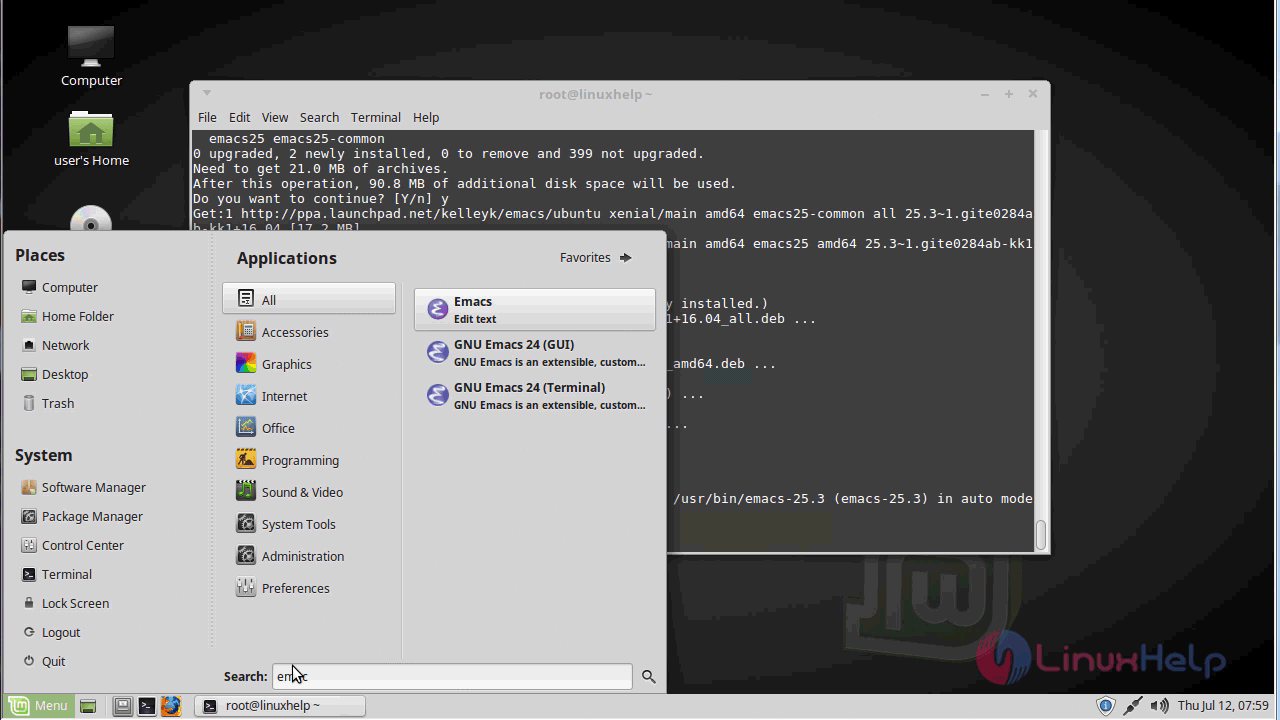
Emacs25 application.
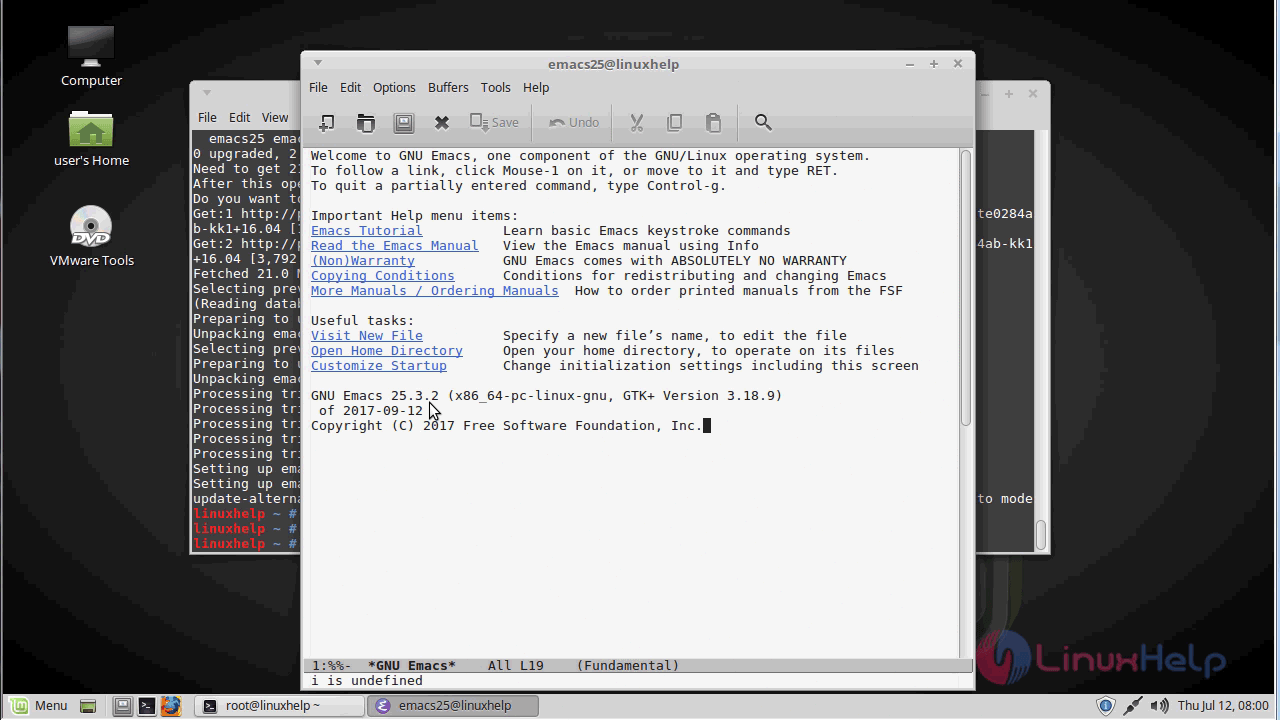
With this, the method to install Emacs on Linuxmint 18.03 comes to an end.
Comments ( 0 )
No comments available