How to Install Fish - Friendly Interactive Shell in Linux
To Install Fish - Friendly Interactive Shell in Linux
Fish stands for Friendly Interactive Shell for Unix like operating systems. It provides user friendly and very interactive environment for Linux users. The procedures to install Fish is explained in this manual.
Features
- Supports auto tab completion feature.
- User- friendly, Simple, Clean and Consistent Shell.
- Syntax independency
- Arrow key support to navigate to the previous commands.
- Syntax highlighting support with auto error correction.
To install Friendly Interactive Shell in Linux
Using Fish repositories, Fish packages will be installed on Linux distributions. Here, we have listed the commands to add the repo for various distributions.
On Debian Systems
---------------- On Debian 8 ----------------
# echo ' deb http://download.opensuse.org/repositories/shells:/fish:/release:/2/Debian_8.0/ /'  > >  /etc/apt/sources.list.d/fish.list
# apt-get update
# apt-get install fish
---------------- On Debian 7 ----------------
# echo ' deb http://download.opensuse.org/repositories/shells:/fish:/release:/2/Debian_7.0/ /'  > >  /etc/apt/sources.list.d/fish.list
# apt-get update
# apt-get install fish
On Ubuntu Systems
$ sudo add-apt-repository ppa:fish-shell/nightly-master
$ sudo apt-get update
$ sudo apt-get install python-software-properties
$ sudo add-apt-repository ppa:fish-shell/nightly-master
$ sudo apt-get update
$ sudo apt-get install fish
On Fedora Systems
---------------- On Fedora 23 ----------------
# cd /etc/yum.repos.d/
# wget http://download.opensuse.org/repositories/shells:fish:release:2/Fedora_23/shells:fish:release:2.repo
# yum install fish

---------------- On Fedora 22 ----------------
# cd /etc/yum.repos.d/
# wget http://download.opensuse.org/repositories/shells:fish:release:2/Fedora_22/shells:fish:release:2.repo
# yum install fish
On CentOS Systems
---------------- On CentOS 7 ----------------
# cd /etc/yum.repos.d/
# wget http://download.opensuse.org/repositories/shells:fish:release:2/CentOS_7/shells:fish:release:2.repo
# yum install fish
---------------- On CentOS 6 ----------------
# cd /etc/yum.repos.d/
# wget http://download.opensuse.org/repositories/shells:fish:release:2/CentOS_6/shells:fish:release:2.repo
# yum install fish
On RHEL Systems
---------------- On RHEL 7 ----------------
# cd /etc/yum.repos.d/
# wget http://download.opensuse.org/repositories/shells:fish:release:2/RHEL_7/shells:fish:release:2.repo
# yum install fish
---------------- On RHEL 6 ----------------
# cd /etc/yum.repos.d/
# wget http://download.opensuse.org/repositories/shells:fish:release:2/RedHat_RHEL-6/shells:fish:release:2.repo
# yum install fish
Now run the following command to download the repository file.
[root@linuxhelp ~]# cd /etc/yum.repos.d/
[root@linuxhelp yum.repos.d]# wget http://download.opensuse.org/repositories/shells:fish:release:2/CentOS_7/shells:fish:release:2.repo
--2016-05-31 12:18:51-- http://download.opensuse.org/repositories/shells:/fish:/release:/2/CentOS_7/shells:fish:release:2.repo
Reusing existing connection to download.opensuse.org:80.
HTTP request sent, awaiting response... 200 OK
Length: 298 [text/plain]
Saving to: ‘ shells:fish:release:2.repo’

100%[==================================================================================================> ] 298 --.-K/s in 0s

2016-05-31 12:18:52 (37.2 MB/s) - ‘ shells:fish:release:2.repo’  saved [298/298]
[root@linuxhelp yum.repos.d]# ls
CentOS-Base.repo CentOS-Debuginfo.repo CentOS-Sources.repo CentOS-Vault.repo shells:fish:release:2.repo
Once the repositories are appended, run the following command to install Fish.
[root@linuxhelp yum.repos.d]# yum install fish -y
Loaded plugins: fastestmirror, langpacks
Loading mirror speeds from cached hostfile
* base: centos.excellmedia.net
* extras: centos.excellmedia.net
* updates: centos.excellmedia.net
Resolving Dependencies
-->  Running transaction check
--->  Package fish.x86_64 0:2.3.0-2.1 will be installed
.
.
.
Installed:
fish.x86_64 0:2.3.0-2.1
Complete!
To Launch Fish Shell
To start fish shell, use the below command in the terminal.
[root@linuxhelp ~]# fish
Welcome to fish, the friendly interactive shell
Type help for instructions on how to use fish
Now we are into the fish shell.
To check the version of Fish
Execute the following command, to check the version of fish installed.
root@linuxhelp ~# echo $version
2.3.0
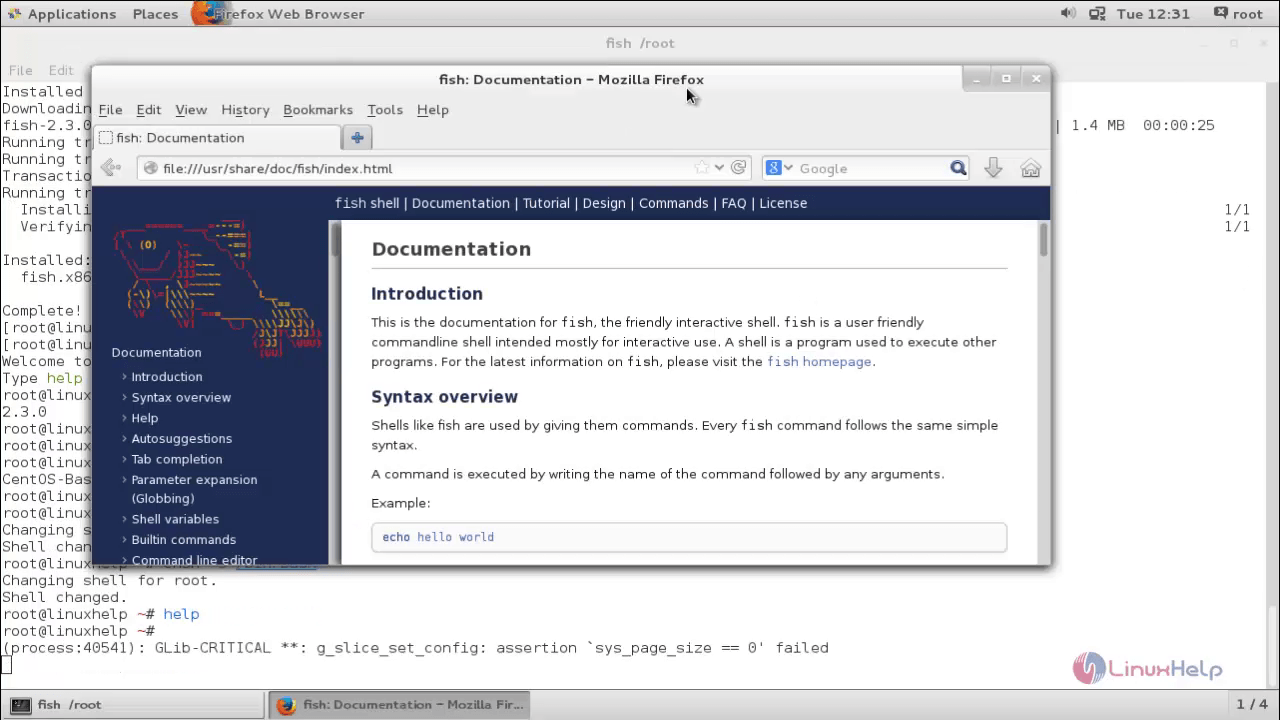
To know more about fish shell utilize the help command. This command will get into the default HTTP web browser.
root@linuxhelp ~# help
Run the following command to check the status of last execute command.
root@linuxhelp ~# echo $status
0
To make FISH your default shell
Execute the following command, to make FISH as your default shell.
root@linuxhelp ~# chsh -s /usr/bin/fish
Changing shell for root.
Shell changed.
Now to Switch back to your Previous shell, utilize the following command.
root@linuxhelp ~# chsh -s /bin/bash
Changing shell for root.
Shell changed.
Make sure that you enter into the correct path of the shell to avoid confusions.
To exit from Fish shell
Execute the following command to exit form fish shell.
root@linuxhelp ~# exit
[root@linuxhelp ~]#
Comments ( 0 )
No comments available