How to install Flacon on Ubuntu 17.04
How to install Flacon on Ubuntu 17.04
As of today, there are million audio tracks downloaded by users at any given time. Flacon extracts individual tracks from one big audio file containing the entire album of music and saves as separate audio files. Flacon makes it possible to revise and specify tags for individual tracks. This tutorial covers the installation procedure of Flacon on Ubuntu 17.04.
Features
- Supports input formats like WAV, FLACm APE, WavPack and TrueAudio (TTA).
- Supports output formats AAC, OGG and MP3.
- Replay Gain analysis.
- Automatic Character set detection for CUE files.
Installation procedure
Before starting the installation of Flacon, add the required repositories by executing the following command.
root@linuxhelp1:~# add-apt-repository ppa:flacon/ppa
 More info: https://launchpad.net/~flacon/+archive/ubuntu/ppa
Press [ENTER] to continue or ctrl-c to cancel adding it
gpg: keybox ' /tmp/tmpm_oskspv/pubring.gpg'  created
gpg: /tmp/tmpm_oskspv/trustdb.gpg: trustdb created
gpg: key D5790E4FF2A61FE5: public key " Launchpad Flacon PPA"  imported
gpg: Total number processed: 1
gpg:               imported: 1
OK
Next you can update the system repository by executing the apt-get update command.
root@linuxhelp1:~# apt-get update
Get:1 http://ppa.launchpad.net/flacon/ppa/ubuntu zesty InRelease [15.4 kB]
Get:2 http://security.ubuntu.com/ubuntu zesty-security InRelease [89.2 kB]
Hit:3 http://in.archive.ubuntu.com/ubuntu zesty InRelease
Get:4 http://in.archive.ubuntu.com/ubuntu zesty-updates InRelease [89.2 kB]
Get:5 http://ppa.launchpad.net/flacon/ppa/ubuntu zesty/main amd64 Packages [960 B]
Get:6 http://ppa.launchpad.net/flacon/ppa/ubuntu zesty/main i386 Packages [960 B]
Get:7 http://ppa.launchpad.net/flacon/ppa/ubuntu zesty/main Translation-en [528 B]
Get:8 http://in.archive.ubuntu.com/ubuntu zesty-backports InRelease [89.2 kB]
Fetched 285 kB in 2s (109 kB/s)
Reading package lists... Done
The system is updated with the required repositories. Now you can install the Flacon package by running the following install command.
root@linuxhelp1:~# apt-get install flacon
Reading package lists... Done
Building dependency tree
Reading state information... Done
The following additional packages will be installed:
  cuetools faac flac lame libfaac0 libmp3lame0 libuchardet0 mac opus-tools python-mutagen shntool ttaenc
  vorbis-tools vorbisgain wavpack
Suggested packages:
  python-mutagen-doc sox
Recommended packages:
  mp3gain
The following NEW packages will be installed:
  cuetools faac flac flacon lame libfaac0 libmp3lame0 libuchardet0 mac opus-tools python-mutagen shntool ttaenc
  vorbis-tools vorbisgain wavpack
0 upgraded, 16 newly installed, 0 to remove and 129 not upgraded.
Need to get 1,567 kB of archives.
After this operation, 6,517 kB of additional disk space will be used.
Do you want to continue? [Y/n] y
.
.
Setting up flacon (3.0.0-1zesty) ...
Setting up lame (3.99.5+repack1-9build1) ...
Once the package is installed, click the Ubuntu dashboard and type the flacon package name and hit enter. Click on the flacon icon to run the application.
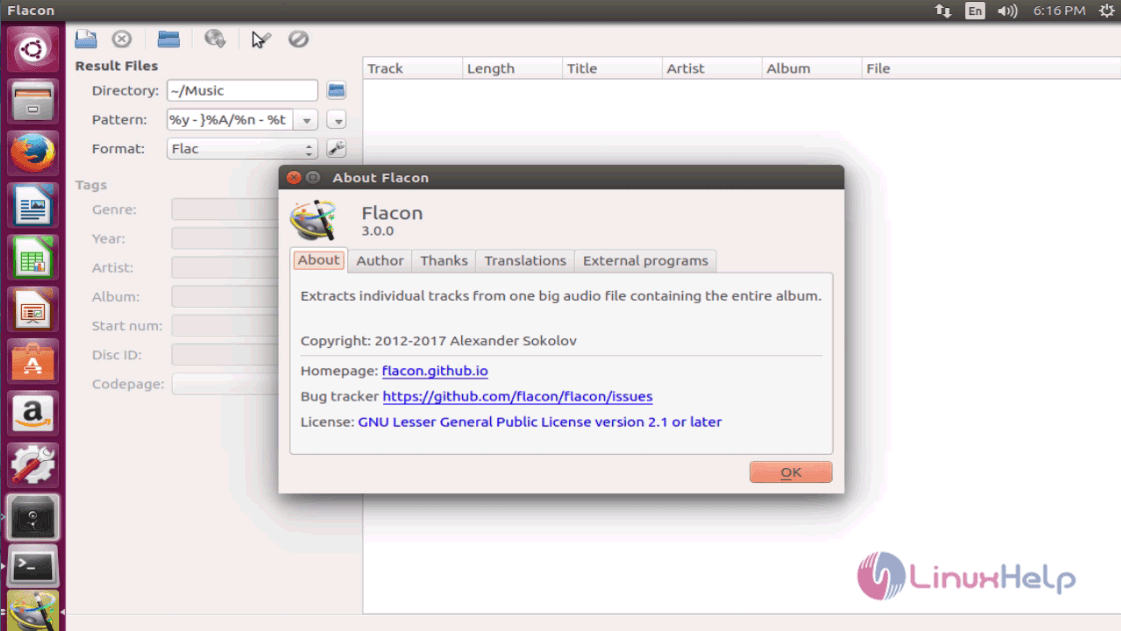
Cheers, you have successfully completed the installation procedure the Flacon application.
Comments ( 0 )
No comments available