How to install Font Manager in Debian 8.3
How to install Font Manager in Debian 8.3
Font Manager is an open-source application for managing fonts via a simple and intuitive interface, it allows the users to easily install new fonts or remove some of the installed fonts. It also supports the option to export the collections and easily activate or deactivate a group of fonts. This tutorial explains the installation procedure of Font Manager in Debian.
Installation procedure
To begin with the installation, use the nano command to open the sources.list configuration file.
root@linuxhelp:~# nano /etc/apt/sources.list
The sources.list file is opened and now add these lines at end of the file. Save and exit from the file.
deb http://ftp.debian.org/debian/ stable main contrib non-free
deb http://ftp.de.debian.org/debian jessie main
Next execute the apt-get update command to update the apt sources-list in the target system.
root@linuxhelp:~# apt-get update
Get:1 http://ftp.debian.org jessie-updates InRelease [145 kB]
Ign http://ftp.de.debian.org jessie InRelease
Get:2 http://ftp.de.debian.org jessie Release.gpg [2,373 B]
Get:3 http://ftp.de.debian.org jessie Release [148 kB]
Ign http://ftp.debian.org stable InRelease
Get:4 http://ftp.debian.org jessie-updates/main Sources [15.5 kB]
Get:5 http://ftp.de.debian.org jessie/main amd64 Packages [6,776 kB]
Get:6 http://ftp.debian.org jessie-updates/contrib Sources [32 B]
Get:7 http://ftp.debian.org jessie-updates/main amd64 Packages/DiffIndex [7,900 B]
Get:8 http://ftp.debian.org jessie-updates/contrib amd64 Packages [32 B]
Get:9 http://ftp.debian.org jessie-updates/contrib Translation-en [14 B]
Get:10 http://ftp.debian.org jessie-updates/main Translation-en/DiffIndex [2,704 B]
Get:11 http://ftp.debian.org stable Release.gpg [2,373 B]
Get:12 http://ftp.debian.org jessie-updates/main amd64 2017-03-14-2025.02.pdiff [526 B]
Get:13 http://ftp.debian.org jessie-updates/main amd64 2017-04-15-2027.16.pdiff [528 B]
Get:14 http://ftp.debian.org jessie-updates/main amd64 2017-04-15-2027.16.pdiff [528 B]
.
.
Fetched 23.4 MB in 5min 43s (68.3 kB/s)
Reading package lists... Done
Now install the Font Manager package by running the following command.
root@linuxhelp:~# apt-get install font-manager
Reading package lists... Done
Building dependency tree
Reading state information... Done
The following NEW packages will be installed:
  font-manager
0 upgraded, 1 newly installed, 0 to remove and 264 not upgraded.
Need to get 713 kB of archives.
After this operation, 1,372 kB of additional disk space will be used.
Get:1 http://ftp.debian.org/debian/ stable/main font-manager amd64 0.5.7-4 [713 kB]
Fetched 713 kB in 20s (34.8 kB/s)
Selecting previously unselected package font-manager.
(Reading database ... 136761 files and directories currently installed.)
Preparing to unpack .../font-manager_0.5.7-4_amd64.deb ...
Unpacking font-manager (0.5.7-4) ...
Processing triggers for desktop-file-utils (0.22-1) ...
Processing triggers for gnome-menus (3.13.3-6) ...
Processing triggers for mime-support (3.58) ...
Processing triggers for man-db (2.7.0.2-5) ...
Setting up font-manager (0.5.7-4) ...
Once the package is installed, type the package name in the activities window and click on the icon to run the application.
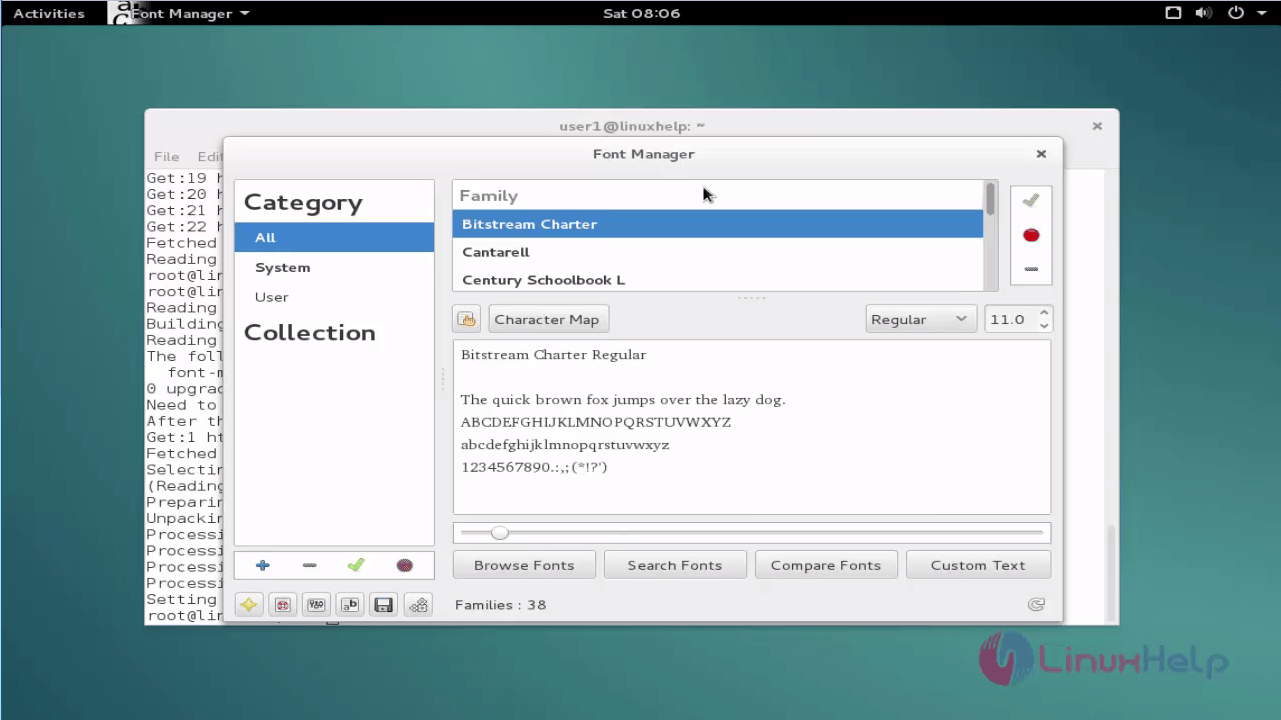
Wasn' t that an easy installation procedure? Font manager can specify different directories to search for fonts.
Comments ( 0 )
No comments available