• Categories
    Category
    {{ postCtrl.tags }}
    • {{ category.tag_type }}

      • {{tag.tag_name}}
      • View more
  • Categories
    Category
    {{ postCtrl.tags }}
    • {{ category.tag_type }}

      • {{tag.tag_name}}
      • View more
  • News
  • Tutorials
  • Forums
  • Tags
  • Users
Tutorial News Comments FAQ Related Articles

How to install Fotoxx on Ubuntu 17.04

{{postValue.id}}

To install Fotoxx on Ubuntu 17.04

Fotoxx 17.04 recently released is a functional photo editor software used to edit digital photos in Linux. It has several tools and also allows the users to work on artistic effects to convert a photo into a line drawing, sketch, painting and dot image. The image folder directories can be viewed as a scrolling gallery of thumbnail images. This tutorial explains the installation procedure of Fotoxx on Ubuntu 17.04.

Installation procedure

To start with the installation procedure, add the required repository via ppa.

root@linuxhelp11:~# apt-add-repository ppa:dhor/myway
 Every photographer needs some tools...

 More info: https://launchpad.net/~dhor/+archive/ubuntu/myway
Press [ENTER] to continue or ctrl-c to cancel adding it
.
.
gpg: Total number processed: 1
gpg:               imported: 1
OK

After adding the dependency packages. Update the machine by executing the apt-get update command.

root@linuxhelp11:~#  apt-get update 
Hit:1 http://security.ubuntu.com/ubuntu zesty-security InRelease
Get:2 http://ppa.launchpad.net/dhor/myway/ubuntu zesty InRelease [15.4 kB]     
Get:3 http://ppa.launchpad.net/dhor/myway/ubuntu zesty/main i386 Packages [5,540 B]
.
.
Hit:8 http://us.archive.ubuntu.com/ubuntu zesty-backports InRelease
Fetched 30.4 kB in 1s (15.5 kB/s)
Reading package lists... Done

The system has been updated with the required repositories. Install the fotoxx package by running the following command

root@linuxhelp11:~#  apt-get install fotoxx
Reading package lists... Done
Building dependency tree       
Reading state information... Done
The following additional packages will be installed:
.
.
Setting up ufraw (0.22-1) ...
Processing triggers for libc-bin (2.24-9ubuntu2.2) ...

After installing the Fotoxx package, go to Ubuntu dashboard and type fotoxx. It will display the application and click on the icon to run the application.
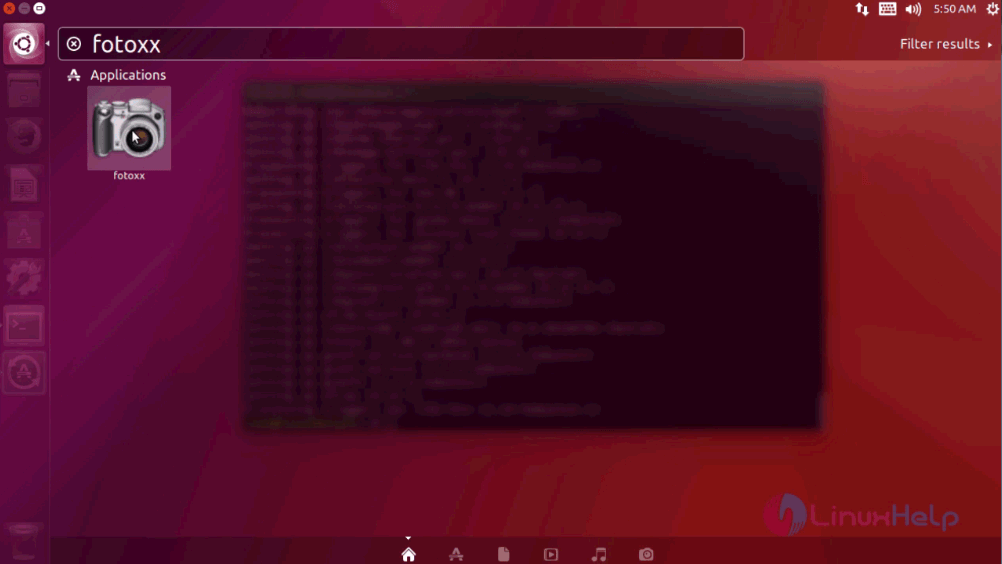
ubuntu dashboard

The Fotoxx package is running without any glitches.
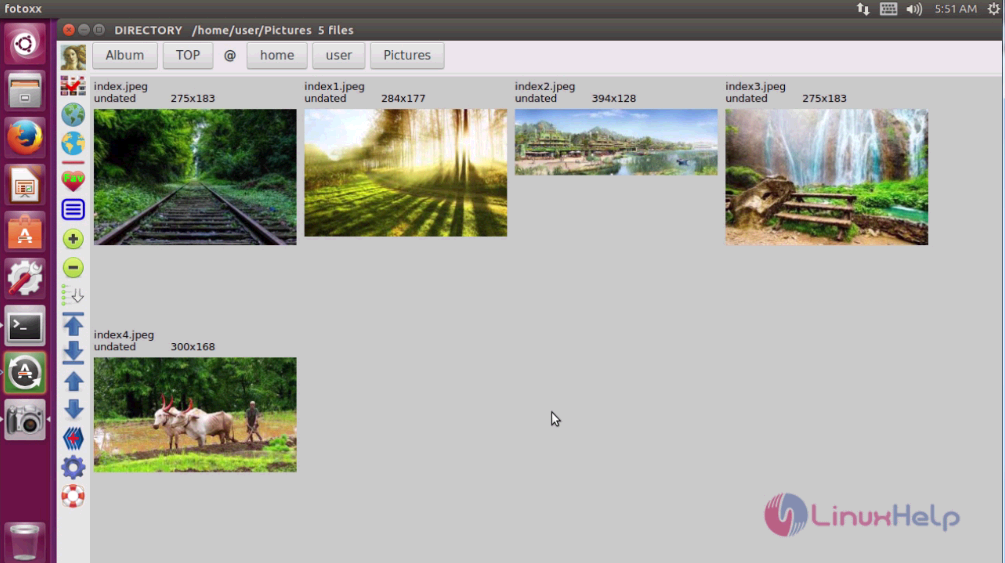
Fotoxx

The installation procedure of Fotoxx on Ubuntu 17.04.

Tags:
jacob
Author: 

Comments ( 0 )

No comments available

Add a comment
{{postCtrl.cmtErrMsg}}

Frequently asked questions ( 5 )

Q

can we export the output file as PNG format at fotoxx?

A

You can export the file in many image formats at Fotoxx

Q

What is the name of the repository of Fotoxx application?

A

The name of the repository of Fotoxx application is

ppa:dhor/myway

Q

Does Fotoxx have a pre loaded filters?

A

No. you have to manually Create or edit a Photo in Fotoxx

Q

What are the similar tools like Fotoxx?

A

try the following tools which are similar to fotoxx
RawTherapee,
LightZone,
UFRaw, etc.

Q

Is it possible to adjust Contrast settings in fotoxx?

A

Yes, you can adjust contrast, brightness and Temperature too. at fotoxx

Back To Top!
Rank
User
Points

Top Contributers

userNamenaveelansari
135850

Top Contributers

userNameayanbhatti
92510

Top Contributers

userNamehamzaahmed
32150

Top Contributers

1
userNamelinuxhelp
31040

Top Contributers

userNamemuhammadali
24500
Can you help Luk Van De Looverbosch ?
How to create a root ?

Hello,
How to create root@linuxhelp in Linux Mint 20.1 64-bit ?
Thanks in advance for your reply.
Best regards.

Networking
  • Routing
  • trunk
  • Netmask
  • Packet Capture
  • domain
  • HTTP Proxy
Server Setup
  • NFS
  • KVM
  • Memory
  • Sendmail
  • WebDAV
  • LXC
Shell Commands
  • Cloud commander
  • Command line archive tools
  • last command
  • Shell
  • terminal
  • Throttle
Desktop Application
  • Linux app
  • Pithos
  • Retrospect
  • Scribe
  • TortoiseHg
  • 4Images
Monitoring Tool
  • Monit
  • Apache Server Monitoring
  • EtherApe 
  • Arpwatch Tool
  • Auditd
  • Barman
Web Application
  • Nutch
  • Amazon VPC
  • FarmWarDeployer
  • Rukovoditel
  • Mirror site
  • Chef
Contact Us | Terms of Use| Privacy Policy| Disclaimer
© 2025 LinuxHelp.com All rights reserved. Linux™ is the registered trademark of Linus Torvalds. This site is not affiliated with linus torvalds in any way.