• Categories
    Category
    {{ postCtrl.tags }}
    • {{ category.tag_type }}

      • {{tag.tag_name}}
      • View more
  • Categories
    Category
    {{ postCtrl.tags }}
    • {{ category.tag_type }}

      • {{tag.tag_name}}
      • View more
  • News
  • Tutorials
  • Forums
  • Tags
  • Users
Tutorial News Comments FAQ Related Articles

How To Install Foxit reader On Linux Debian 11.3

  • 00:26 lsb_release -a
  • 00:36 apt update
  • 00:50 wget http://cdn01.foxitsoftware.com/pub/foxit/reader/desktop/linux/2.x/2.4/en_us/FoxitReader.enu.setup.2.4.4.0911.x64.run.tar.gz
  • 01:15 tar xzvf FoxitReader*.tar.gz
  • 01:39 sudo chmod a+x FoxitReader*.run
  • 01:50 ./FoxitReader*.run
{{postValue.id}}

To Install Foxit Reader On Linux Debian 11.3

Introduction:

Foxit PDF Reader is the second most popular PDF application in the world for viewing, creating, annotating, and printing PDF files that have more than 325 million users.

Installation procedure:

Step 1: Check the OS version by using the below command

root@linuxhelp:~# lsb_release -a
No LSB modules are available.
Distributor ID:	Debian
Description:	Debian GNU/Linux 11 (bullseye)
Release:	11
Codename:	bullseye

Step 2 : Update the packages by using the below command

root@linuxhelp:~# apt update
Hit:1 http://repo.mysql.com/apt/debian bullseye InRelease
Hit:2 http://deb.debian.org/debian bullseye InRelease
Hit:3 http://deb.debian.org/debian bullseye-updates InRelease
Hit:4 http://security.debian.org/debian-security bullseye-security InRelease
Hit:5 https://packages.sury.org/php bullseye InRelease
Reading package lists... Done                       
Building dependency tree... Done
Reading state information... Done
2 packages can be upgraded. Run 'apt list --upgradable' to see them.

Step 3: Download the Foxit reader file by using the wget command

root@linuxhelp:~# wget http://cdn01.foxitsoftware.com/pub/foxit/reader/desktop/linux/2.x/2.4/en_us/Foxit

Reader.enu.setup.2.4.4.0911.x64.run.tar.gz
--2022-06-23 02:08:41--  http://cdn01.foxitsoftware.com/pub/foxit/reader/desktop/linux/2.x/2.4.4/en_us/FoxitReader2.4.4.0805_Server_x64_enu_Setup.run.tar.gz
Resolving cdn01.foxitsoftware.com (cdn01.foxitsoftware.com)... 64.62.208.6, 184.105.233.248, 64.62.153.144, ...
Connecting to cdn01.foxitsoftware.com (cdn01.foxitsoftware.com)|64.62.208.6|:80... connected.
HTTP request sent, awaiting response... 200 OK
Length: 62547178 (60M) [application/x-gzip]
Saving to: ‘FoxitReader2.1.0805_Server_x64_enu_Setup.run.tar.gz’

FoxitReader2.4.4.0805 100%[===================>]  59.65M  4.05MB/s    in 40s     

2022-06-23 02:09:21 (1.51 MB/s) - ‘FoxitReader2.4.4.0911_Server_x64_enu_Setup.run.tar.gz’ saved [62547178/62547178]

Step 4: Extract the Foxit reader by using the below command

root@linuxhelp:~# tar xzvf FoxitReader*.tar.gz
FoxitReader.enu.setup.2.4.4.0911(r057d814).x64.run

Step 5: Set the file permission Extract file by using the below command

root@linuxhelp:~# sudo chmod a+x FoxitReader*.run

Step 6: Run the file by using the below command

root@linuxhelp:~#./FoxitReader*.run

Step 7: Installation Procedure
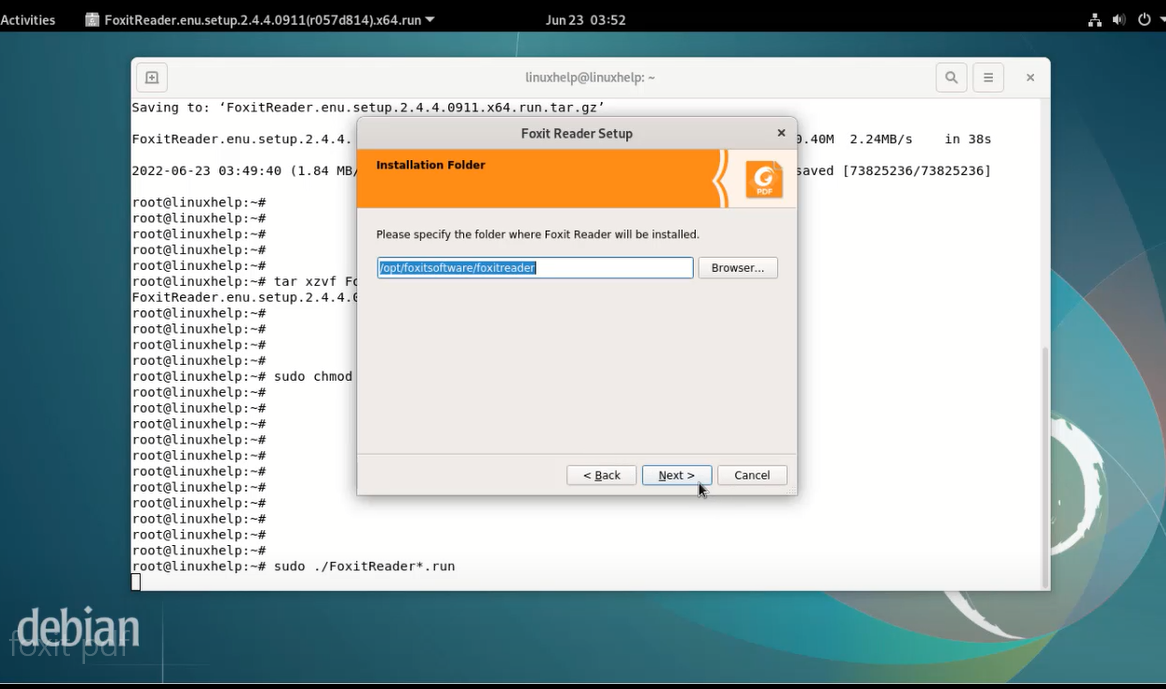
snap 1

Step 8: Once installed now open the menu bar and search Foxit reader
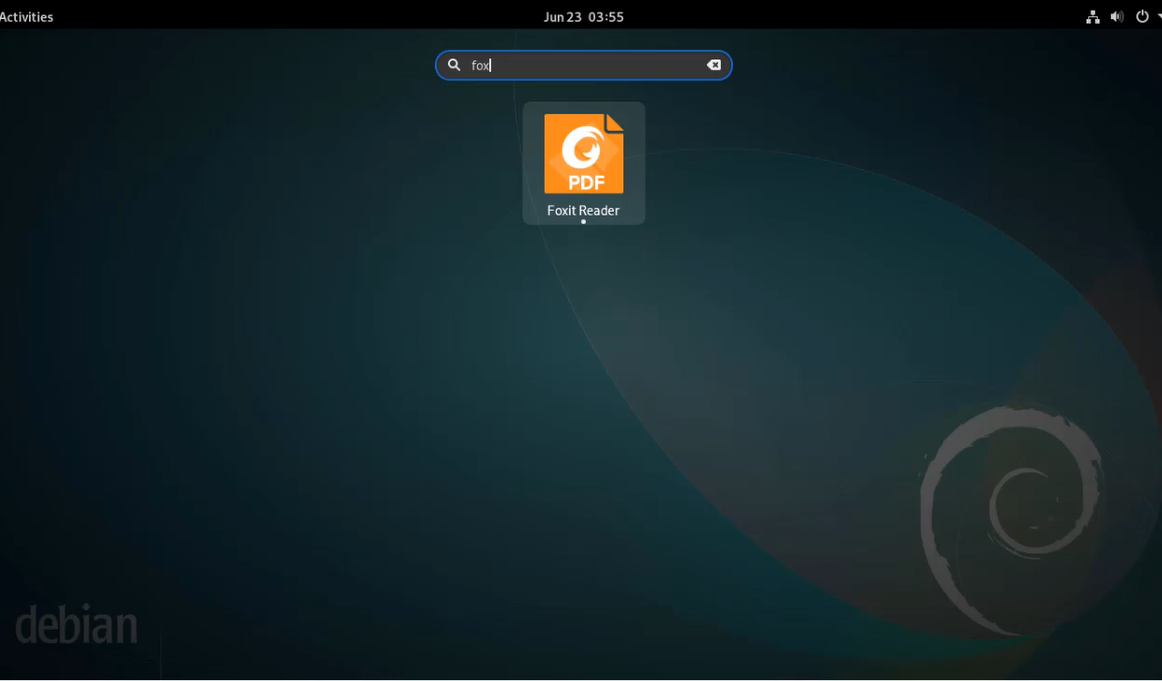
snap 2

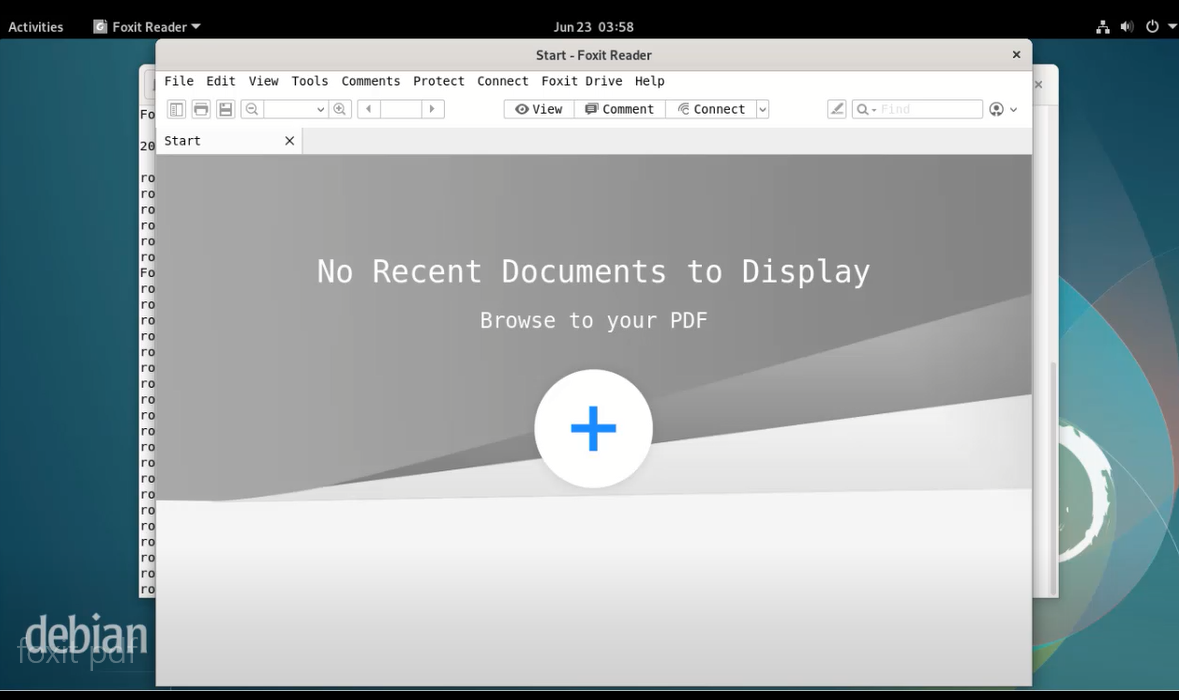
snap 3

Conclusion:

We have reached the end of this article. In this guide, we have walked you through the steps required to Install Foxit reader On Linux Debian 11.3. Your feedback is much welcome.

Tags:
samson
Author: 

Comments ( 0 )

No comments available

Add a comment
{{postCtrl.cmtErrMsg}}

Frequently asked questions ( 5 )

Q

What is Foxit PDF Reader?

A

Foxit PDF Reader (formerly Foxit Reader) is a multilingual freemium PDF (Portable Document Format) tool that can create, view, edit, digitally sign and print PDF files.

Q

What are the Foxit PDF Reader-supported Operating systems?

A

The Foxit PDF Reader-supported Operating systems include Windows 7, Windows 8, Windows 10, macOS, Linux, iOS, Android, and Citrix.

Q

What does Foxit cost?

A

Foxit PDF Editor costs around $150 to $200.

Q

What is the purpose of Foxit Reader?

A

Foxit PDF Reader is used to view, create, annotate, and print PDF files

Q

Where is Foxit headquartered?

A

Foxit is headquartered in Fremont, California, and was Founded in 2001.

Back To Top!
Rank
User
Points

Top Contributers

userNamenaveelansari
135850

Top Contributers

userNameayanbhatti
92510

Top Contributers

userNamehamzaahmed
32150

Top Contributers

1
userNamelinuxhelp
31040

Top Contributers

userNamemuhammadali
24500
Can you help David Lopez Guillen ?
Ayuda urgente instale SSL para servidor Opensuse y ahora no funciona tengo servicio web

hola segui este tutorial para tener un certificado ssl y ahora no se ve mi app en la red, espero alguien pueda ayudarme, tengo M9oodle en3.5 en un servidor open suse y ahora no funciona por favor ayuda.

https://www.linuxhelp.com/how-to-create-ssl-certificate-in-opensuse

Networking
  • Routing
  • trunk
  • Netmask
  • Packet Capture
  • domain
  • HTTP Proxy
Server Setup
  • NFS
  • KVM
  • Memory
  • Sendmail
  • WebDAV
  • LXC
Shell Commands
  • Cloud commander
  • Command line archive tools
  • last command
  • Shell
  • terminal
  • Throttle
Desktop Application
  • Linux app
  • Pithos
  • Retrospect
  • Scribe
  • TortoiseHg
  • 4Images
Monitoring Tool
  • Monit
  • Apache Server Monitoring
  • EtherApe 
  • Arpwatch Tool
  • Auditd
  • Barman
Web Application
  • Nutch
  • Amazon VPC
  • FarmWarDeployer
  • Rukovoditel
  • Mirror site
  • Chef
Contact Us | Terms of Use| Privacy Policy| Disclaimer
© 2025 LinuxHelp.com All rights reserved. Linux™ is the registered trademark of Linus Torvalds. This site is not affiliated with linus torvalds in any way.