How to Install Foxit Reader on OpenSuse15.1
- 00:29 cat /etc/os-release
- 00:52 wget http://cdn01.foxitsoftware.com/pub/foxit/reader/desktop/linux/2.x/2.1/en_us/FoxitReader2.1.0805_Server_x64_enu_Setup.run.tar.gz
- 01:22 tar -zxf FoxitReader2.1.0805_Server_x64_enu_Setup.run.tar.gz
- 01:24 ./FoxitReader.enu.setup.2.1.0805\(r225432\).x64.run
- 02:21 FoxitReader
{{postValue.id}}
How to Install Foxit Reader on OpenSUSE 15.1
Process:
To check the installed version of os
LinuxHelp:~ # cat /etc/os-release
NAME="openSUSE Leap"
VERSION="15.1 "
ID="opensuse-leap"
ID_LIKE="suse opensuse"
VERSION_ID="15.1"
PRETTY_NAME="openSUSE Leap 15.1"
ANSI_COLOR="0;32"
CPE_NAME="cpe:/o:opensuse:leap:15.1"
BUG_REPORT_URL="https://bugs.opensuse.org"
HOME_URL="https://www.opensuse.org/"
change Directory
LinuxHelp:~ # cd /mnt
Download the Foxit reader using the below link
LinuxHelp:/mnt # wget http://cdn01.foxitsoftware.com/pub/foxit/reader/desktop/linux/2.x/2.1/en_us/FoxitReader2.1.0805_Server_x64_enu_Setup.run.tar.gz
--2019-10-27 06:47:47--  http://cdn01.foxitsoftware.com/pub/foxit/reader/desktop/linux/2.x/2.1/en_us/FoxitReader2.1.0805_Server_x64_enu_Setup.run.tar.gz
Resolving cdn01.foxitsoftware.com (cdn01.foxitsoftware.com)... 64.62.194.29, 64.62.208.2, 64.62.208.4, ...
Connecting to cdn01.foxitsoftware.com (cdn01.foxitsoftware.com)|64.62.194.29|:80... connected.
HTTP request sent, awaiting response... 200 OK
Length: 62547178 (60M) [application/x-gzip]
Saving to: ‘FoxitReader2.1.0805_Server_x64_enu_Setup.run.tar.gz’

FoxitReader2.1.0805_Server_x64_enu_Setup.run.ta 100%[====================================================================================================>]  59.65M  1.42MB/s    in 58s

2019-10-27 06:48:46 (1.03 MB/s) - ‘FoxitReader2.1.0805_Server_x64_enu_Setup.run.tar.gz’ saved [62547178/62547178]
Extract the Downloaded file
LinuxHelp:/mnt # tar -zxf FoxitReader2.1.0805_Server_x64_enu_Setup.run.tar.gz
LinuxHelp:/mnt # ll
total 136680
-rwxr-xr-x 1  485 tftp 77409948 Aug  5  2016 FoxitReader.enu.setup.2.1.0805(r225432).x64.run
-rw-r--r-- 1 root root 62547178 Aug  8  2016 FoxitReader2.1.0805_Server_x64_enu_Setup.run.tar.gz
Next run the following command to start the setup process of Foxit Reader. Go through the steps and finish the wizard steps.
LinuxHelp:/mnt # ./FoxitReader.enu.setup.2.1.0805\(r225432\).x64.run
The installation wizard is completed and to start running the application, type the FoxitReader command in the terminal and hit enter.
LinuxHelp:/mnt # FoxitReader
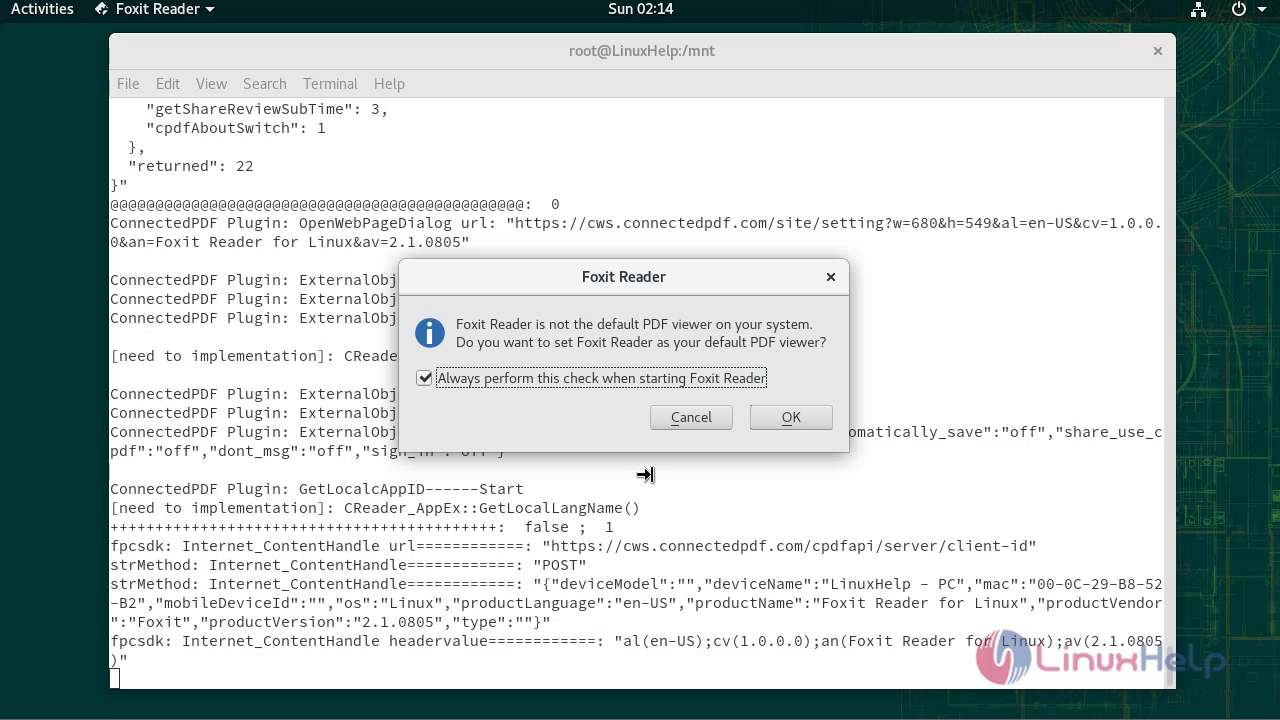

With this, the method to install Foxit Reader on OpenSUSE 15.1 comes to end
Comments ( 0 )
No comments available