• Categories
    Category
    {{ postCtrl.tags }}
    • {{ category.tag_type }}

      • {{tag.tag_name}}
      • View more
  • Categories
    Category
    {{ postCtrl.tags }}
    • {{ category.tag_type }}

      • {{tag.tag_name}}
      • View more
  • News
  • Tutorials
  • Forums
  • Tags
  • Users
Tutorial News Comments FAQ Related Articles

How to install GEdit on linuxmint-18.03

{{postValue.id}}

To install GEdit on linuxmint-18.03
Gedit is an open source default text editor of the GNOME desktop environment under the General Public License. It’ s supports for all major operating system such us Linux, micro soft windows and mac os.


Installation

Add the repository of gedit application using PPA

linuxhelp ~ # apt-add-repository ppa:mc3man/older
You are about to add the following PPA:
 Not for nothing but not for much
Best way to use -
*Remove current gedit plugins package*
Add ppa, update sources
(- sudo add-apt-repository ppa:mc3man/older
Upgrade gedit, gedit-common &  install ppa gedit-plugins package.
.
.
.
Executing: /tmp/tmp.RPDIxf1784/gpg.1.sh --keyserver
hkp://keyserver.ubuntu.com:80
--recv-keys
ED8E640A
gpg: requesting key ED8E640A from hkp server keyserver.ubuntu.com
gpg: key ED8E640A: " Launchpad PPA for Doug McMahon"  not changed
gpg: Total number processed: 1
gpg:              unchanged: 1

Update the system repository using the apt-get command.

linuxhelp ~ # apt-get update
Hit:1 http://security.ubuntu.com/ubuntu xenial-security InRelease
Hit:2 http://archive.ubuntu.com/ubuntu xenial InRelease                                              
Hit:3 http://ppa.launchpad.net/george-edison55/nitroshare/ubuntu xenial InRelease                    
Hit:4 http://archive.ubuntu.com/ubuntu xenial-updates InRelease                                      
Hit:5 http://archive.canonical.com/ubuntu xenial InRelease                                           
Ign:6 http://packages.linuxmint.com sylvia InRelease                                                 
Hit:7 http://archive.ubuntu.com/ubuntu xenial-backports InRelease                              
Hit:8 http://packages.linuxmint.com sylvia Release                                             
Get:9 http://ppa.launchpad.net/mc3man/older/ubuntu xenial InRelease [17.5 kB]
Hit:11 http://ppa.launchpad.net/ondrej/php/ubuntu xenial InRelease           
Get:12 http://ppa.launchpad.net/mc3man/older/ubuntu xenial/main Sources [1,648 B]
Get:13 http://ppa.launchpad.net/mc3man/older/ubuntu xenial/main amd64 Packages [1,456 B]
Get:14 http://ppa.launchpad.net/mc3man/older/ubuntu xenial/main i386 Packages [1,452 B]
Get:15 http://ppa.launchpad.net/mc3man/older/ubuntu xenial/main Translation-en [1,292 B]
Fetched 23.4 kB in 2s (9,015 B/s) 
Reading package lists... Done

Install the gedit application using the following command.

linuxhelp ~ # apt-get install gedit -y
Reading package lists... Done
Building dependency tree      
Reading state information... Done

The following additional packages will be installed:

  gedit-common
Suggested packages:
  gedit-plugins
.
.
.
Processing triggers for mime-support (3.59ubuntu1) ...
Setting up gedit-common (3.18.3.is.really.3.10.4-0ubuntu13) ...
Setting up gedit (3.18.3.is.really.3.10.4-0ubuntu13) ...
update-alternatives: using /usr/bin/gedit to provide /usr/bin/gnome-text-editor (gnome-text-editor) in auto mode
Processing triggers for libc-bin (2.23-0ubuntu9) ...

Once Installation is done you can access the application from the Menu as shown here
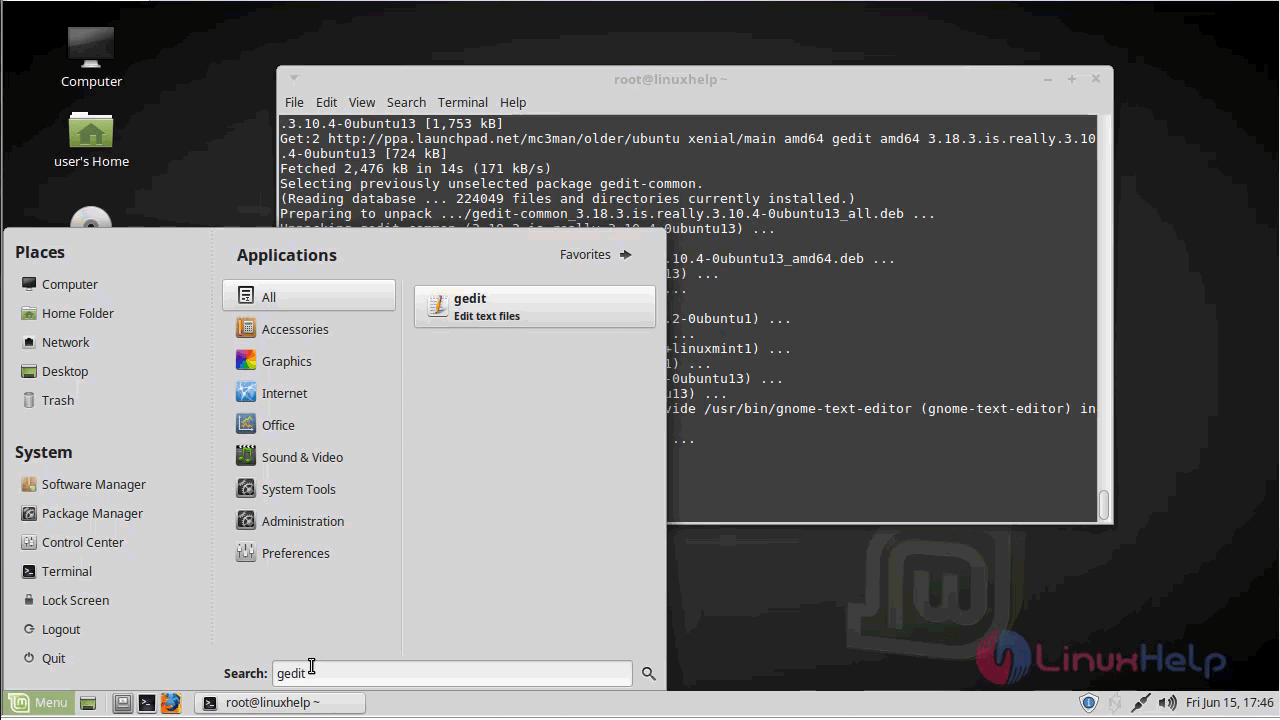
Menu

Gedit application
application

The version of Gedit is available on the Help menu.
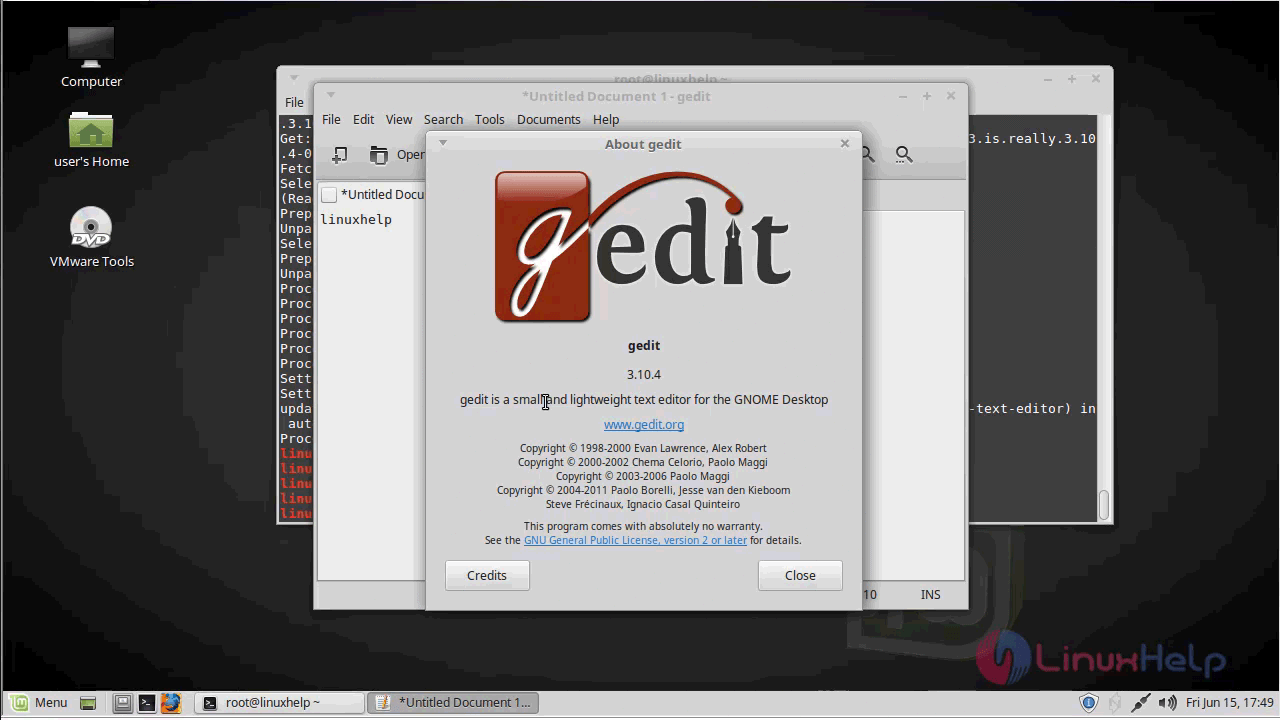
version

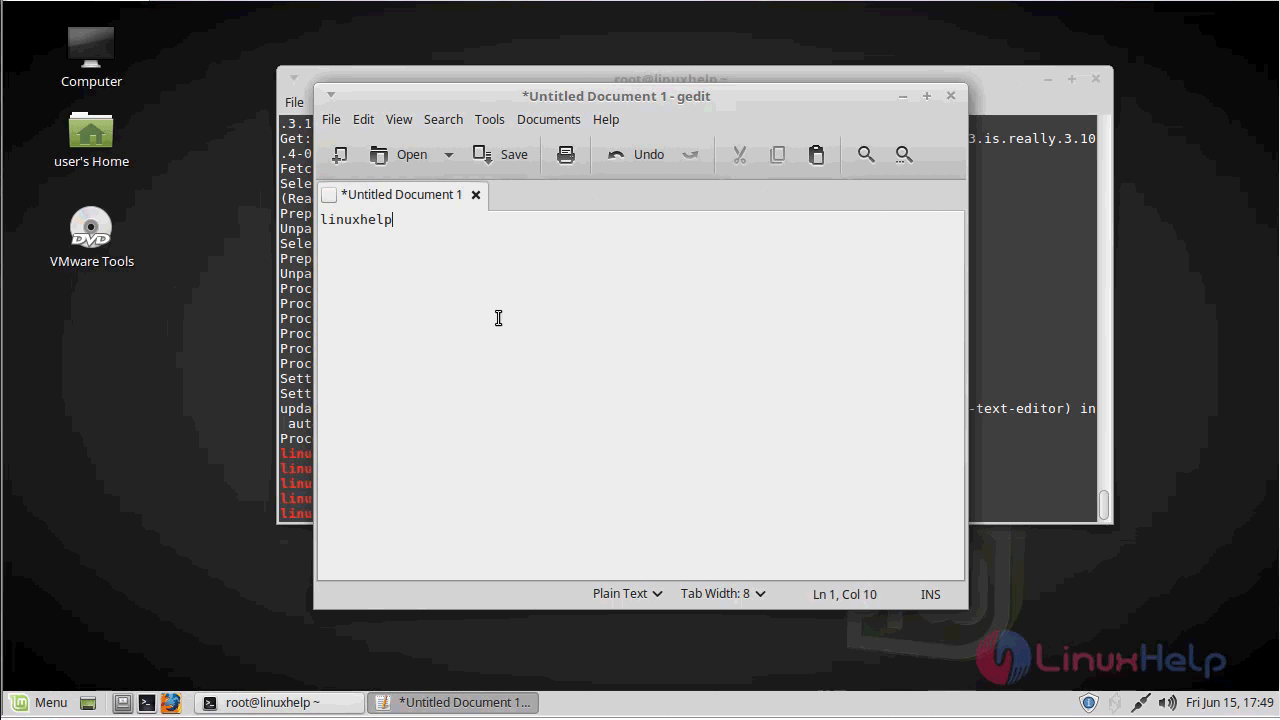
With this, the method to install GEdit on linuxmint-18.03 comes to an end.

Tags:
jackson
Author: 

Comments ( 0 )

No comments available

Add a comment
{{postCtrl.cmtErrMsg}}

Frequently asked questions ( 5 )

Q

What are the features available in GEdit?

A

What are the features available in GEdit,
Full support for internationalized text (UTF-8)
Configurable syntax highlighting for various languages (C, C++, Java, HTML, XML, Python, Perl and many others)
Undo/Redo
Editing files from remote locations
File reverting
Print and print preview support
Clipboard support (cut/copy/paste)
Search and replace with the support of regular expressions
Go to a specific line

Q

How to download the Gdeit source package?

A

For download the GEdit, use the following link as given below "http://ftp.gnome.org/pub/GNOME/sources/gedit/"

Q

What are alternative tools available for GEdit?

A

The following alternative tools for GEdit,
Atom,
Sublime Text,
Visual Studio Code,
Vim,
Brackets

Q

How to get the Github repository of the GEdit?

A

Get the Github repository of the gEdit, use the following link as given below "https://github.com/GNOME/gedit"

Q

What are shortcuts available in GEdit?

A

The shortcut of the GEdit as given below,
https://help.gnome.org/users/gedit/stable/gedit-shortcut-keys.html.en

Back To Top!
Rank
User
Points

Top Contributers

userNamenaveelansari
135850

Top Contributers

userNameayanbhatti
92510

Top Contributers

userNamehamzaahmed
32150

Top Contributers

1
userNamelinuxhelp
31040

Top Contributers

userNamemuhammadali
24500
Can you help David Lopez Guillen ?
Ayuda urgente instale SSL para servidor Opensuse y ahora no funciona tengo servicio web

hola segui este tutorial para tener un certificado ssl y ahora no se ve mi app en la red, espero alguien pueda ayudarme, tengo M9oodle en3.5 en un servidor open suse y ahora no funciona por favor ayuda.

https://www.linuxhelp.com/how-to-create-ssl-certificate-in-opensuse

Networking
  • Routing
  • trunk
  • Netmask
  • Packet Capture
  • domain
  • HTTP Proxy
Server Setup
  • NFS
  • KVM
  • Memory
  • Sendmail
  • WebDAV
  • LXC
Shell Commands
  • Cloud commander
  • Command line archive tools
  • last command
  • Shell
  • terminal
  • Throttle
Desktop Application
  • Linux app
  • Pithos
  • Retrospect
  • Scribe
  • TortoiseHg
  • 4Images
Monitoring Tool
  • Monit
  • Apache Server Monitoring
  • EtherApe 
  • Arpwatch Tool
  • Auditd
  • Barman
Web Application
  • Nutch
  • Amazon VPC
  • FarmWarDeployer
  • Rukovoditel
  • Mirror site
  • Chef
Contact Us | Terms of Use| Privacy Policy| Disclaimer
© 2025 LinuxHelp.com All rights reserved. Linux™ is the registered trademark of Linus Torvalds. This site is not affiliated with linus torvalds in any way.