How to install gFTP on Ubuntu
To install gFTP in Ubuntu
gFTP is an open source FTP Client application used to connect with FTP Server’ s. It provides a GUI for the user’ s to access the files and directories of the FTP Server in the Linux systems. Users can connect to the FTP server with the following information like FTP Server IP address, Port Number, Username and Password for the FTP user. The gFTP application supports the protocols like FTP, HTTP, SSH and FSP to transfer the file between client and server. Installation of gFTP in Ubuntu is explained in this article.
Installation of gFTP
First add the repository files for installing gFTP client application.
root@linuxhelp:~# add-apt-repository ppa:klaus-vormweg/ppa
 up to date version of software I use - Awesome, Bluefish, Sylpheed - for current stable Ubuntu. Some are bleeding edge versions, others are backported from Debian Unstable.

This PPA is just used for testing.

Please see for
- Sylpheed: https://launchpad.net/~klaus-vormweg/+archive/sylpheed
- Pan: https://launchpad.net/~klaus-vormweg/+archive/pan
- Awesome: https://launchpad.net/~klaus-vormweg/+archive/awesome
.
.
.
gpg: keyring `/tmp/tmpqqkcxlgj/secring.gpg'  created
gpg: keyring `/tmp/tmpqqkcxlgj/pubring.gpg'  created
gpg: requesting key D36FE61D from hkp server keyserver.ubuntu.com
gpg: /tmp/tmpqqkcxlgj/trustdb.gpg: trustdb created
gpg: key D36FE61D: public key " Launchpad PPA for Klaus Vormweg"  imported
gpg: Total number processed: 1
gpg:               imported: 1  (RSA: 1)
OK
Then update your system repositories with the following command.
root@linuxhelp:~# apt-get update
Hit http://in.archive.ubuntu.com wily InRelease
Hit http://security.ubuntu.com wily-security InRelease
Get:1 http://ppa.launchpad.net wily InRelease [15.4 kB]
Hit http://in.archive.ubuntu.com wily-updates InRelease
Hit http://in.archive.ubuntu.com wily-backports InRelease
Hit http://in.archive.ubuntu.com wily/main Sources
Hit http://security.ubuntu.com wily-security/main Sources
Get:2 http://ppa.launchpad.net wily/main amd64 Packages [1,352 B]
Hit http://in.archive.ubuntu.com wily/restricted Sources
Hit http://security.ubuntu.com wily-security/restricted Sources
Hit http://in.archive.ubuntu.com wily/universe Sources
Hit http://in.archive.ubuntu.com wily/multiverse Sources
Get:3 http://ppa.launchpad.net wily/main i386 Packages [1,350 B]
Hit http://security.ubuntu.com wily-security/universe Sources
Hit http://in.archive.ubuntu.com wily/main amd64 Packages
.
.
.
Hit http://in.archive.ubuntu.com wily-backports/multiverse i386 Packages
Hit http://in.archive.ubuntu.com wily-backports/main Translation-en
Hit http://in.archive.ubuntu.com wily-backports/multiverse Translation-en
Hit http://in.archive.ubuntu.com wily-backports/restricted Translation-en
Hit http://in.archive.ubuntu.com wily-backports/universe Translation-en
Fetched 19.0 kB in 42s (451 B/s)
Reading package lists... Done
Now run the below command to install the gFTP interface.
root@linuxhelp:~# apt-get install gftp -y
Reading package lists... Done
Building dependency tree
Reading state information... Done
The following extra packages will be installed:
  gftp-common gftp-gtk gftp-text
The following NEW packages will be installed:
  gftp gftp-common gftp-gtk gftp-text
0 upgraded, 4 newly installed, 0 to remove and 252 not upgraded.
Need to get 636 kB of archives.
After this operation, 4,035 kB of additional disk space will be used.
Get:1 http://in.archive.ubuntu.com/ubuntu/ wily/universe gftp-common amd64 2.0.19-4ubuntu2 [409 kB]
Get:2 http://in.archive.ubuntu.com/ubuntu/ wily/universe gftp-gtk amd64 2.0.19-4ubuntu2 [149 kB]
Get:3 http://in.archive.ubuntu.com/ubuntu/ wily/universe gftp-text amd64 2.0.19-4ubuntu2 [75.9 kB]
Get:4 http://in.archive.ubuntu.com/ubuntu/ wily/universe gftp all 2.0.19-4ubuntu2 [1,846 B]
Fetched 636 kB in 4s (138 kB/s)
Selecting previously unselected package gftp-common.
(Reading database ... 176941 files and directories currently installed.)
Preparing to unpack .../gftp-common_2.0.19-4ubuntu2_amd64.deb ...
Unpacking gftp-common (2.0.19-4ubuntu2) ...
Selecting previously unselected package gftp-gtk.
Preparing to unpack .../gftp-gtk_2.0.19-4ubuntu2_amd64.deb ...
.
.
.
Processing triggers for mime-support (3.58ubuntu1) ...
Setting up gftp-common (2.0.19-4ubuntu2) ...
Setting up gftp-gtk (2.0.19-4ubuntu2) ...
Setting up gftp-text (2.0.19-4ubuntu2) ...
Setting up gftp (2.0.19-4ubuntu2) ...
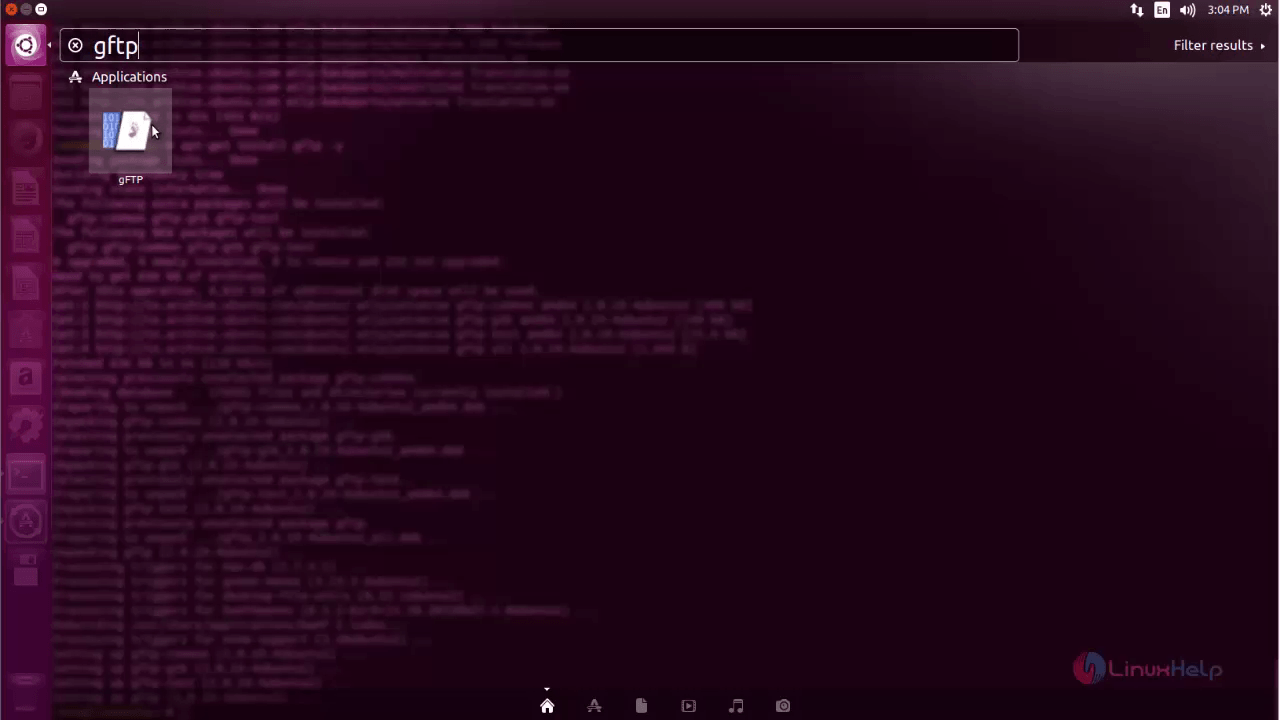
Open the Unity Dash and type gFTP in search bar to open the installed application.
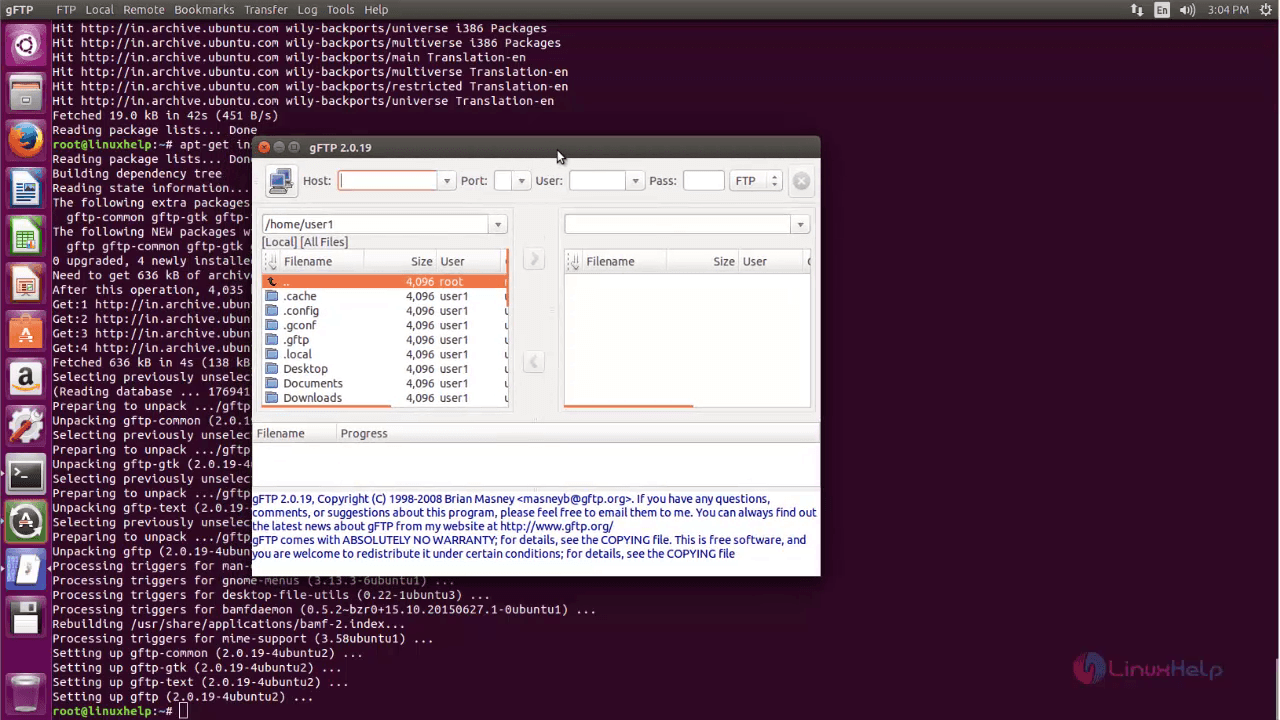
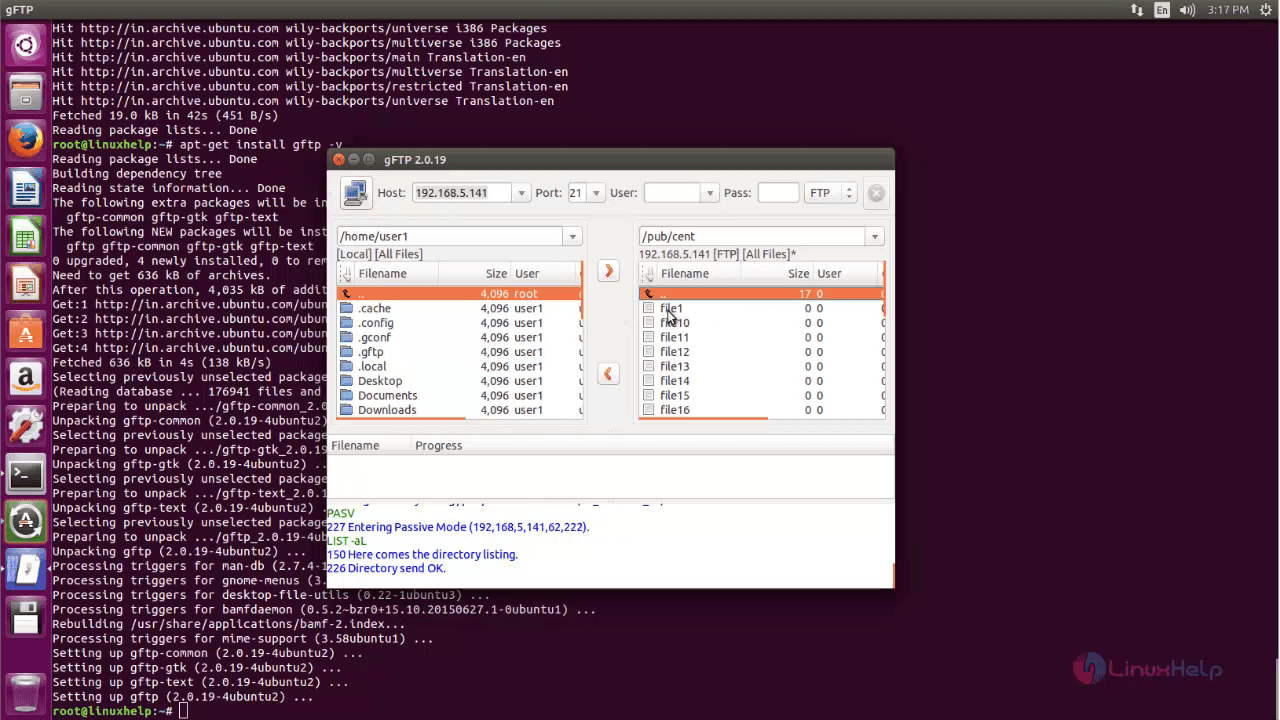
gFTP page will appear on the screen as shown below.
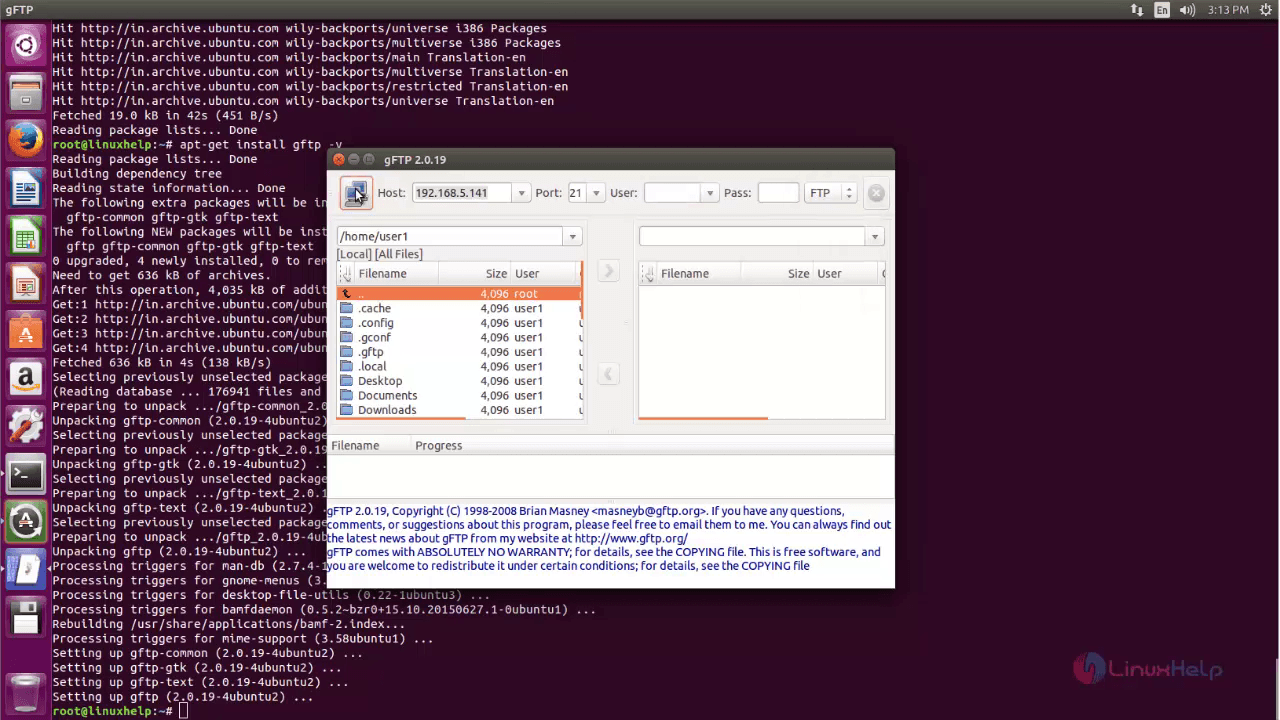
Now enter the following details of your FTP server to connect with your FTP Server.
After selecting the FTP, you can enter into the FTP server.
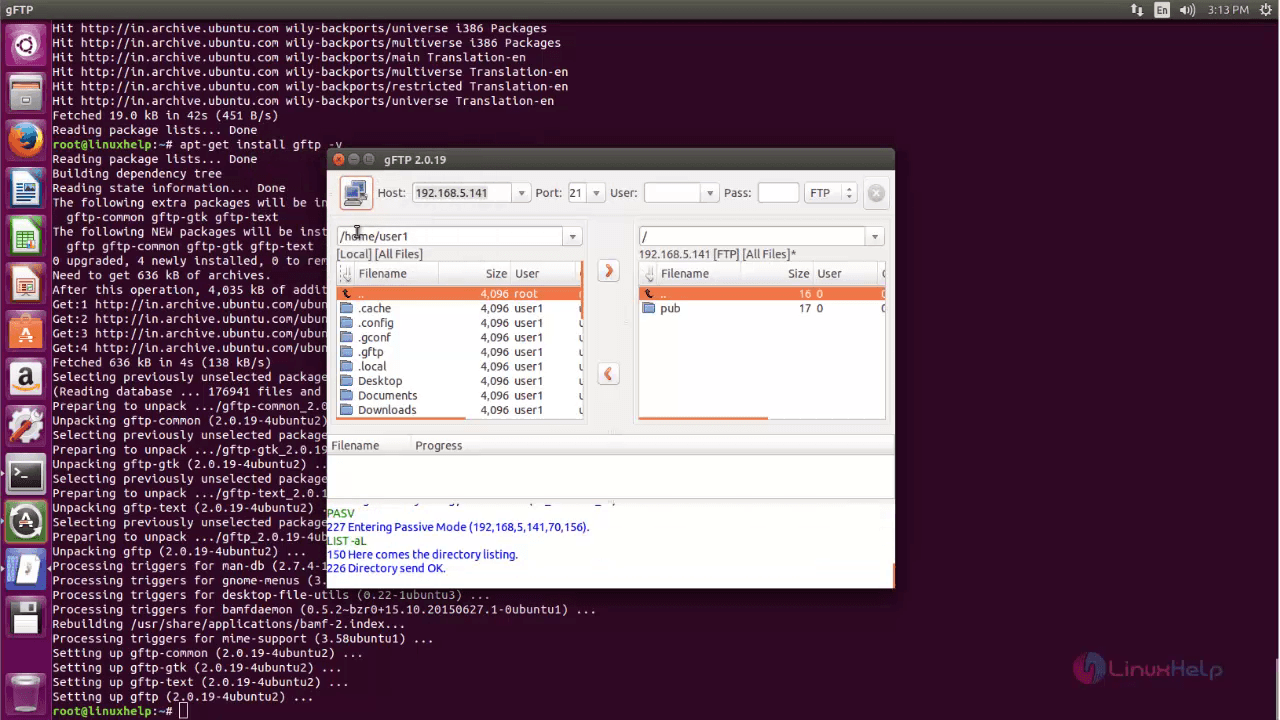
Here you can also access the files and directories of FTP server.
Comments ( 0 )
No comments available