How to install ghost in centos 7
{{postValue.id}}
To install ghost in centos 7
Ghost is a simple and powerful blogging platform. It is an alternative to WordPress, used by a large number of webmasters to publish their internet content. The procedures to install Ghost in Linux distributions is explained in this article.
To install Ghost
Install nodejs and npm by using following command.
[root@linuxhelp ~]# yum install nodejs npm --enablerepo=epel
Loading mirror speeds from cached hostfile
 * base: centos.webwerks.com
 * epel: epel.mirror.net.in
 * extras: centos.webwerks.com
 * updates: centos.webwerks.com
Resolving Dependencies
-->  Running transaction check
--->  Package nodejs.x86_64 0:0.10.46-1nodesource.el7.centos will be installed
.
.
.
  nodejs-tar.noarch 0:0.1.18-1.el7
  nodejs-tunnel-agent.noarch 0:0.3.0-1.el7
  nodejs-uid-number.noarch 0:0.0.3-7.el7
  nodejs-which.noarch 0:1.0.5-8.el7
  openssl-devel.x86_64 1:1.0.1e-51.el7_2.5
  perl-srpm-macros.noarch 0:1-8.el7
  redhat-rpm-config.noarch 0:9.1.0-68.el7.centos
  v8.x86_64 1:3.14.5.10-17.el7
  v8-devel.x86_64 1:3.14.5.10-17.el7

Complete!
Next move to “ /var/www/html/” directory.
[root@linuxhelp Desktop]# cd /var/www/html/
[root@linuxhelp html]#
Download the latest zip file by using “ wget” command as shown below..
[root@linuxhelp html]# wget https://ghost.org/zip/ghost-latest.zip
--2016-07-11 14:16:29--  https://ghost.org/zip/ghost-latest.zip
Resolving ghost.org (ghost.org)... 104.16.81.186, 104.16.82.186, 104.16.85.186, ...
Connecting to ghost.org (ghost.org)|104.16.81.186|:443... connected.
HTTP request sent, awaiting response... 302 Found
Location: http://d36u7lo2kegj1p.cloudfront.net/archives/ghost-0.8.0.zip [following]
--2016-07-11 14:16:30--  http://d36u7lo2kegj1p.cloudfront.net/archives/ghost-0.8.0.zip
Resolving d36u7lo2kegj1p.cloudfront.net (d36u7lo2kegj1p.cloudfront.net)... 54.230.14.127, 54.230.14.26, 54.230.14.231, ...
Connecting to d36u7lo2kegj1p.cloudfront.net (d36u7lo2kegj1p.cloudfront.net)|54.230.14.127|:80... connected.
HTTP request sent, awaiting response... 301 Moved Permanently
Location: https://ghost.org/archives/ghost-0.8.0.zip [following]
--2016-07-11 14:16:31--  https://ghost.org/archives/ghost-0.8.0.zip
Connecting to ghost.org (ghost.org)|104.16.81.186|:443... connected.
HTTP request sent, awaiting response... 200 OK
Length: 4062292 (3.9M) [application/zip]
Saving to: ‘ ghost-latest.zip’

100%[============================================> ] 40,62,292    355KB/s   in 10s

2016-07-11 14:16:41 (379 KB/s) - ‘ ghost-latest.zip’  saved [4062292/4062292]
[root@linuxhelp html]#
Then list the files using “ ls” command.
root@linuxhelp html]# ls
config.example.js  ghost-latest.zip  LICENSE              PRIVACY.md
content            Gruntfile.js      npm-shrinkwrap.json  README.md
core               index.js          package.json
Copy the configuration file “ config.example.js" to " config.js” .
[root@linuxhelp html]# cp config.example.js config.js
Run the following command to complete the installation.
[root@linuxhelp html]# npm install
npm WARN cannot run in wd ghost@0.8.0 npm install semver & &  node -e " require(' ./core/server/utils/startup-check.js' ).nodeVersion()"  (wd=/var/www/html)
npm http GET https://registry.npmjs.org/bower/1.4.1
npm http GET https://registry.npmjs.org/csscomb/3.1.8
npm http GET https://registry.npmjs.org/grunt/1.0.1
npm http GET https://registry.npmjs.org/grunt-bg-shell/2.3.3
npm http GET https://registry.npmjs.org/grunt-cli/1.2.0
npm http GET https://registry.npmjs.org/grunt-contrib-clean/1.0.0
npm http GET https://registry.npmjs.org/grunt-contrib-compress/1.2.0
.
.
.
.
??? request@2.53.0 (tunnel-agent@0.4.3, caseless@0.9.0, aws-sign2@0.5.0, forever-agent@0.5.2, stringstream@0.0.5, oauth-sign@0.6.0, isstream@0.1.2, json-stringify-safe@5.0.1, qs@2.3.3, form-data@0.2.0, bl@0.9.5, combined-stream@0.0.7, hawk@2.3.1, mime-types@2.0.14, http-signature@0.10.1)
??? bower-registry-client@0.3.0 (graceful-fs@2.0.3, request-replay@0.2.0, rimraf@2.2.8, lru-cache@2.3.1, async@0.2.10, mkdirp@0.3.5, request@2.51.0)
??? update-notifier@0.3.2 (is-npm@1.0.0, string-length@1.0.1, semver-diff@2.1.0, latest-version@1.0.1)
??? handlebars@2.0.0 (optimist@0.3.7, uglify-js@2.3.6)
??? bower-config@0.6.1 (osenv@0.0.3, graceful-fs@2.0.3, mout@0.9.1)
??? inquirer@0.8.0 (ansi-regex@1.1.1, mute-stream@0.0.4, through@2.3.8, figures@1.7.0, readline2@0.1.1, chalk@0.5.1, lodash@2.4.2, rx@2.5.3, cli-color@0.3.3)

intl@1.1.0 node_modules/intl

grunt-jscs@2.8.0 node_modules/grunt-jscs
??? vow@0.4.12
??? hooker@0.2.3
??? lodash@4.6.1
??? jscs@2.11.0 (to-double-quotes@2.0.0, to-single-quotes@2.0.1, strip-json-comments@1.0.4, reserved-words@0.1.1, natural-compare@1.2.2, pathval@0.1.1, jscs-preset-wikimedia@1.0.0, estraverse@4.2.0, strip-bom@2.0.0, xmlbuilder@3.1.0, exit@0.1.2, minimatch@3.0.2, esprima@2.7.2, resolve@1.1.7, cli-table@0.3.1, js-yaml@3.4.6, vow-fs@0.3.5, jscs-jsdoc@1.3.2, lodash@3.10.1, prompt@0.2.14, jsonlint@1.6.2, escope@3.6.0, babel-jscs@2.0.5)
[root@linuxhelp html]#
Start the “ npm” by using following command.
[root@linuxhelp html]# npm start

>  ghost@0.8.0 start /var/www/html
>  node index

WARNING: Ghost is attempting to use a direct method to send email.
It is recommended that you explicitly configure an email service.
Help and documentation can be found at http://support.ghost.org/mail.

Migrations: Database initialisation required for version 005
Migrations: Creating tables...
Migrations: Creating table: posts
Migrations: Creating table: users
Migrations: Creating table: roles
Migrations: Creating table: roles_users
Migrations: Creating table: permissions
Migrations: Creating table: permissions_users
Migrations: Creating table: permissions_roles
Migrations: Creating table: permissions_apps
Migrations: Creating table: settings
Migrations: Creating table: tags
Migrations: Creating table: posts_tags
Migrations: Creating table: apps
Migrations: Creating table: app_settings
Migrations: Creating table: app_fields
Migrations: Creating table: clients
Migrations: Creating table: client_trusted_domains
Migrations: Creating table: accesstokens
Migrations: Creating table: refreshtokens
Migrations: Creating table: subscribers
Migrations: Running fixture populations
Migrations: Creating owner
Migrations: Ensuring default settings
Ghost is running in development...
Listening on 127.0.0.1:2368
Url configured as: http://localhost:2368
Ctrl+C to shut down
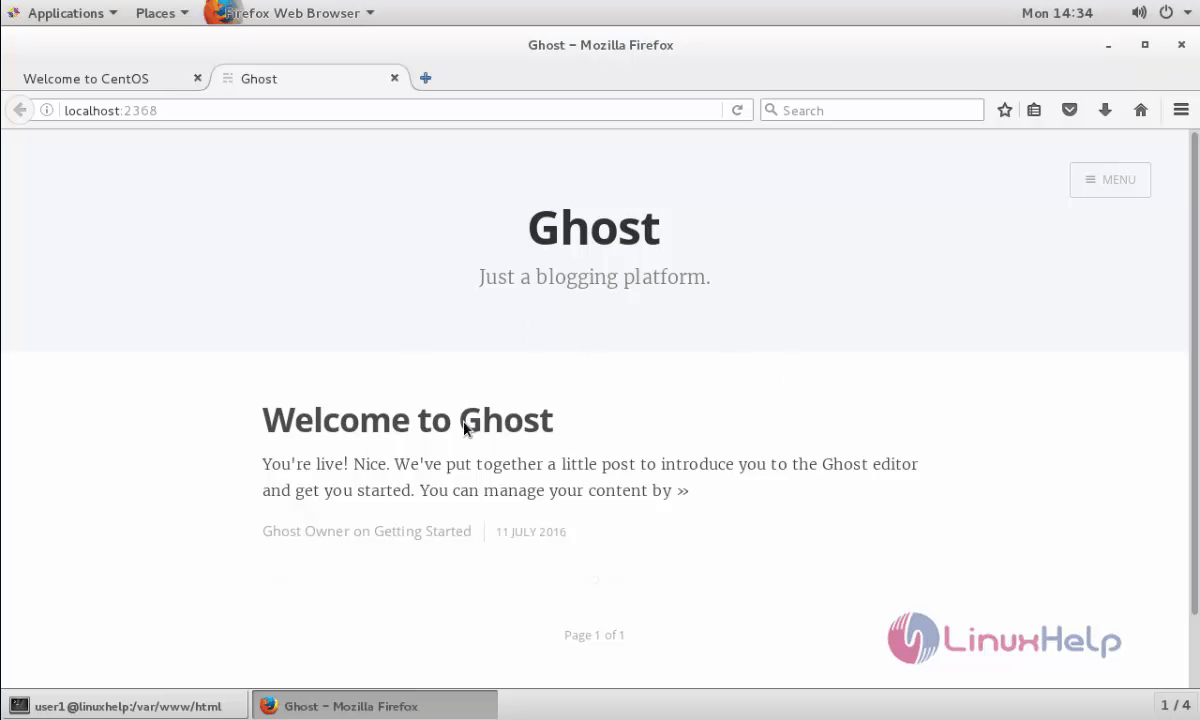
Open the browser and navigate to http://< localhost> :2368
The welcome page of ghost appears.
Comments ( 0 )
No comments available