• Categories
    Category
    {{ postCtrl.tags }}
    • {{ category.tag_type }}

      • {{tag.tag_name}}
      • View more
  • Categories
    Category
    {{ postCtrl.tags }}
    • {{ category.tag_type }}

      • {{tag.tag_name}}
      • View more
  • News
  • Tutorials
  • Forums
  • Tags
  • Users
Tutorial News Comments FAQ Related Articles

How to install Gibbon on CentOS 7

{{postValue.id}}

To install Gibbon on CentOS 7

Gibbon is a free, Open Source, and highly flexible web based school management system that can be used to solve real time problems of teachers, students, parents, and educators in different kind of schools. Gibbon is useful for seamless planing, teaching, and assessment for both teachers and students. Apart from this, Gibbon also has many more features, such as planner, external assessment, online application forms, messenger etc.

Pre requirements

  • Lamp service enabled in it
  • Create a database and user for Gibbon in mysql

Installing Gibbon

Before you begin with the installation of Gibbon in your system, make sure you make appropriate changes in the php configuration file.

[root@linuxhelp Desktop]# vim /etc/php.ini
In the file search and modify following lines
.
max_input_vars = 5000
.
.
error_reporting = E_ALL &  ~E_NOTICE
.

Once it is made, download gibbon package by executing the following command.

[root@linuxhelp Desktop]# wget https://github.com/GibbonEdu/core/archive/v9.1.00.zip
--2017-08-08 15:37:08--  https://github.com/GibbonEdu/core/archive/v9.1.00.zip
Resolving github.com (github.com)... 192.30.255.112, 192.30.255.113
Connecting to github.com (github.com)|192.30.255.112|:443... connected.
HTTP request sent, awaiting response... 302 Found
.
.
Saving to: ‘ v9.1.00.zip’ 
2017-08-08 15:38:36 (162 KB/s) - ‘ v9.1.00.zip’  saved [14120731]

Once the file is downloaded, unzip it as follows.

[root@linuxhelp Desktop]# unzip v9.1.00.zip 
Archive:  v9.1.00.zip
a0c4eeeba4b5ec169ffcd05ad6ac15e2f5876a9d
   creating: core-9.1.00/
 extracting: core-9.1.00/.gitignore  
  inflating: core-9.1.00/.htaccess   
.
.
inflating: core-9.1.00/update.php  
  inflating: core-9.1.00/version.php  


Move the extracted file to html location now.

[root@linuxhelp Desktop]# mv core-9.1.00/ /var/www/html/gibbon

Over here, you need to change ownership of the file.

[root@linuxhelp Desktop]# chown apache:apache -R /var/www/html/gibbon/

Change the permission of the file by executing the following command.

[root@linuxhelp Desktop]# chmod 777 /var/www/html/gibbon/

Once it is done, restart the Apache server.

[root@linuxhelp Desktop]# systemctl restart httpd

After the Apache service is restart, go to browser and give url as http://serverip/gibbon. It opens the installation page of gibbon.
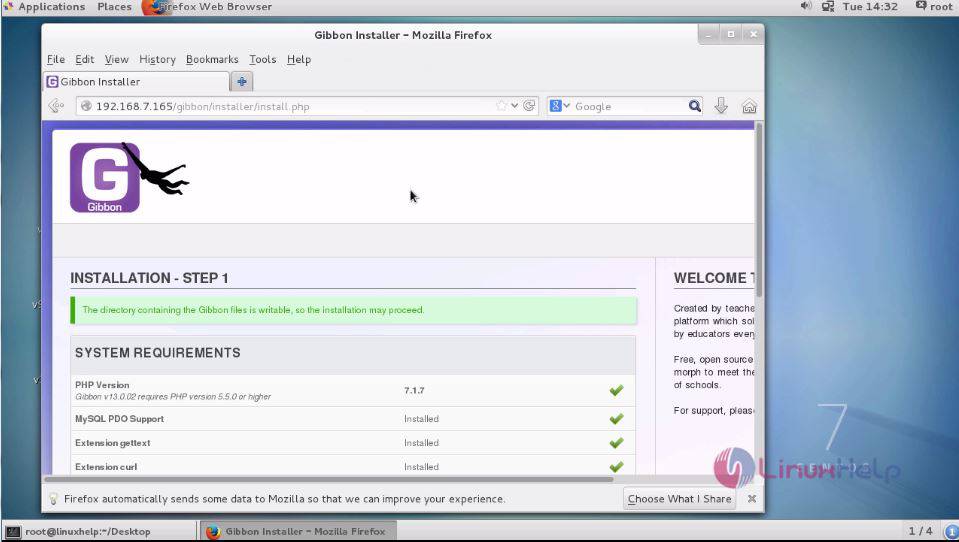
Installation
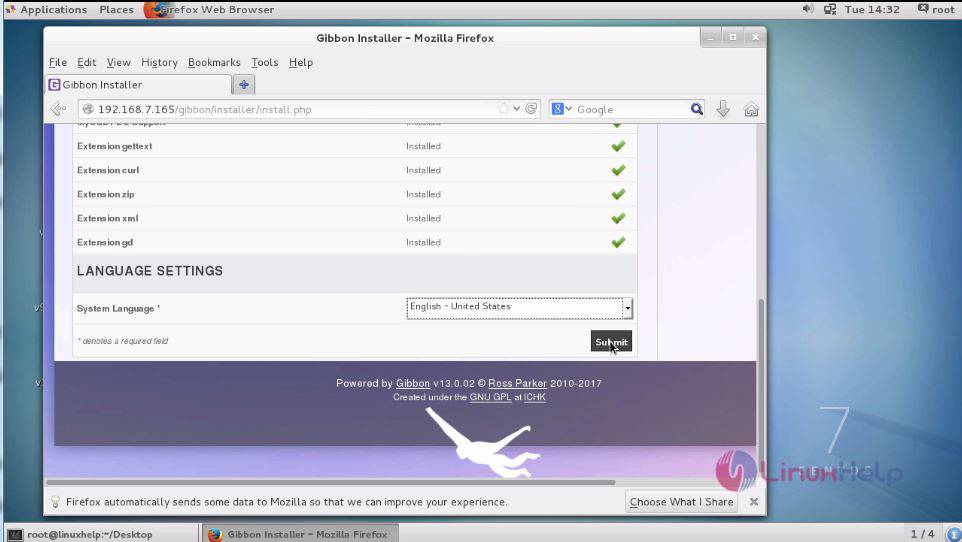
Select language and click on submit.
language
Fill the database information and click submit.
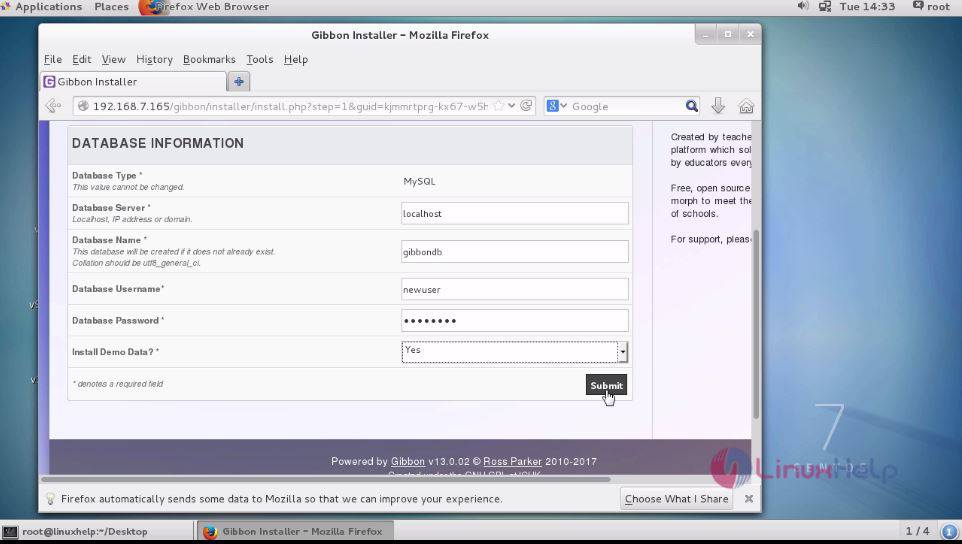
information
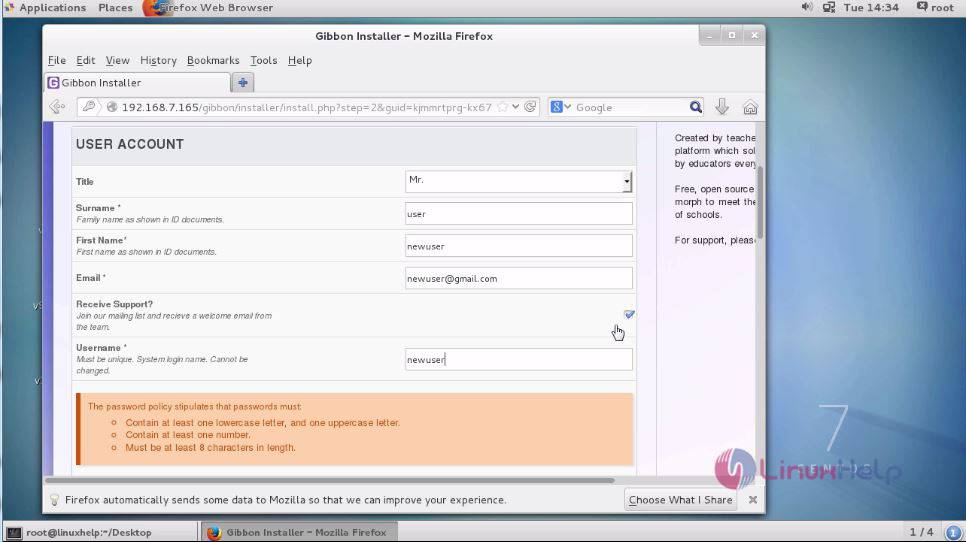
Fill the user account details.
account details
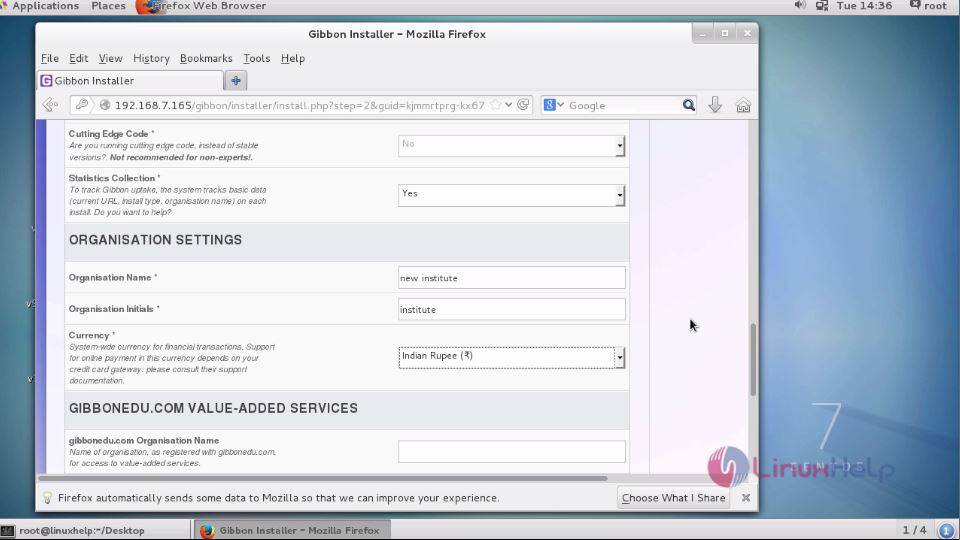
Fill the organization setting
organization
Fill the miscellaneous and click submit
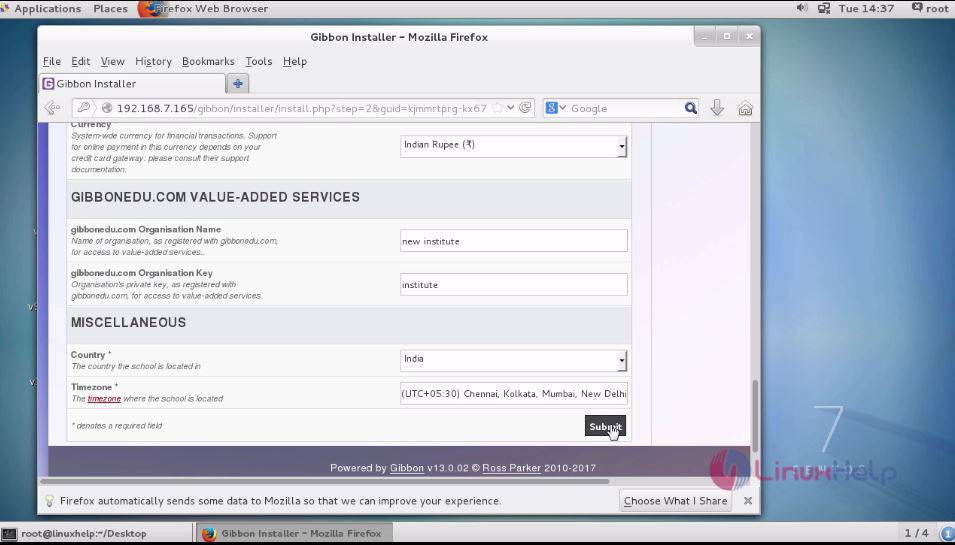
miscellaneous

Finally the completion page appears. Click on go to your Gibbon homepage.
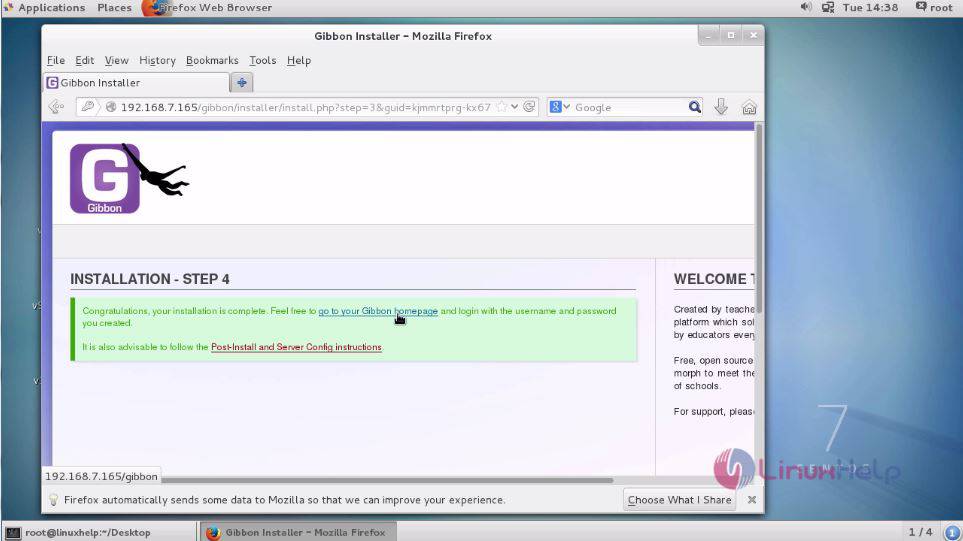
completion

The welcome page appears, enter your login details and click login.
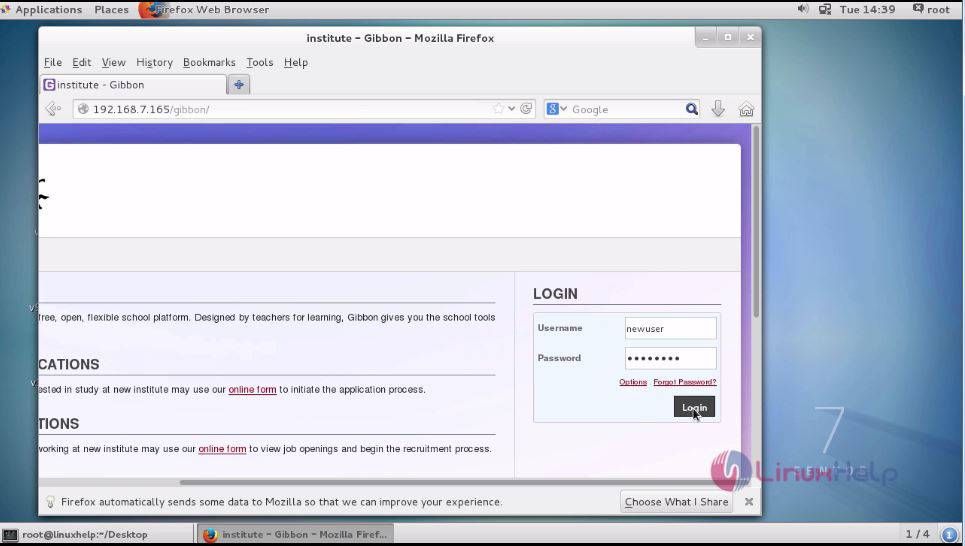
login

The home page of gibbon appears on your screen.
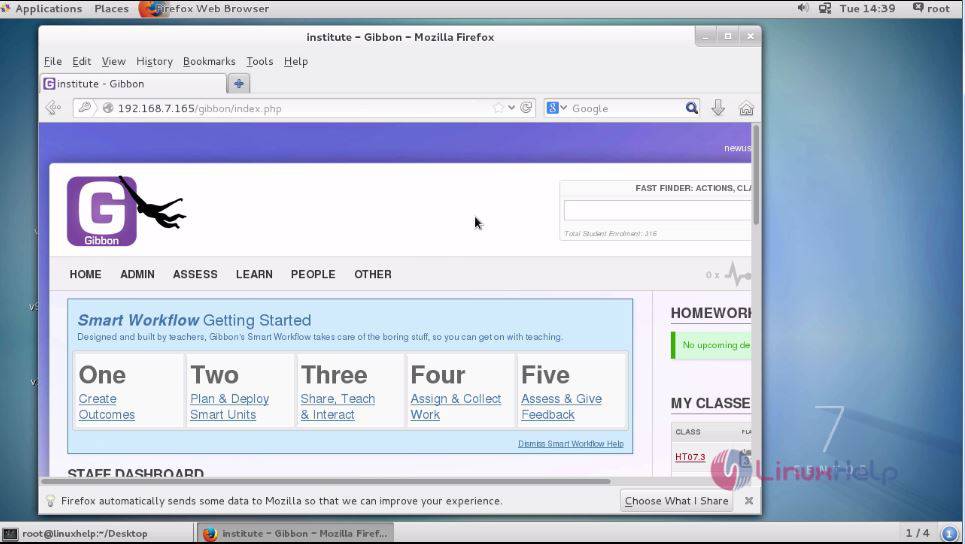
gibbon

With this, the installation of Gibbon is complete.

Tags:
grayson
Author: 

Comments ( 0 )

No comments available

Add a comment
{{postCtrl.cmtErrMsg}}

Frequently asked questions ( 5 )

Q

What are the pre requirements ?

A

Lamp service enabled in it
Create a database and user for Gibbon in mysql.

Q

Where have you downloaded the latest release from ?

A

Please refer the link as follow "https://github.com/GibbonEdu/core/".

Q

How to resolve the 403 forbidden error ?

A

Make sure you have given Executable permission for apache document root.

Q

where should i go if i have a warranty claim with my GIBBON protect?

A

For all waranty claims please refer back to the point of purchase first, all retailers are responsible for processing warranty claims. They will evaluate the warranty claim and communicate with us about any disputes.

Q

what is the different between the Gibbon tube line and the gibbon flow line?

A

The GIBBON TUBE Line is our 1inch webbing that is woven as a tube, the GIBBON FLOW Line

Back To Top!
Rank
User
Points

Top Contributers

userNamenaveelansari
135850

Top Contributers

userNameayanbhatti
92510

Top Contributers

userNamehamzaahmed
32150

Top Contributers

1
userNamelinuxhelp
31040

Top Contributers

userNamemuhammadali
24500
Can you help David Lopez Guillen ?
Ayuda urgente instale SSL para servidor Opensuse y ahora no funciona tengo servicio web

hola segui este tutorial para tener un certificado ssl y ahora no se ve mi app en la red, espero alguien pueda ayudarme, tengo M9oodle en3.5 en un servidor open suse y ahora no funciona por favor ayuda.

https://www.linuxhelp.com/how-to-create-ssl-certificate-in-opensuse

Networking
  • Routing
  • trunk
  • Netmask
  • Packet Capture
  • domain
  • HTTP Proxy
Server Setup
  • NFS
  • KVM
  • Memory
  • Sendmail
  • WebDAV
  • LXC
Shell Commands
  • Cloud commander
  • Command line archive tools
  • last command
  • Shell
  • terminal
  • Throttle
Desktop Application
  • Linux app
  • Pithos
  • Retrospect
  • Scribe
  • TortoiseHg
  • 4Images
Monitoring Tool
  • Monit
  • Apache Server Monitoring
  • EtherApe 
  • Arpwatch Tool
  • Auditd
  • Barman
Web Application
  • Nutch
  • Amazon VPC
  • FarmWarDeployer
  • Rukovoditel
  • Mirror site
  • Chef
Contact Us | Terms of Use| Privacy Policy| Disclaimer
© 2025 LinuxHelp.com All rights reserved. Linux™ is the registered trademark of Linus Torvalds. This site is not affiliated with linus torvalds in any way.