• Categories
    Category
    {{ postCtrl.tags }}
    • {{ category.tag_type }}

      • {{tag.tag_name}}
      • View more
  • Categories
    Category
    {{ postCtrl.tags }}
    • {{ category.tag_type }}

      • {{tag.tag_name}}
      • View more
  • News
  • Tutorials
  • Forums
  • Tags
  • Users
Tutorial News Comments FAQ Related Articles

How to install Gimp 2.8.22 on CentOS 7

{{postValue.id}}

To install Gimp 2.8.22 on CentOS 7
GIMP is a free and open-source image editor which can be used for retouching and editing images. The latest version of GIMP comes with a new revamped UI and usability changes. Although the latest version includes new themes by Benoit Touchette in various shades of gray: Lighter, Light, Gray, Dark, Darker, the system theme is retained for users who prefer a completely consistent look of user interfaces across all desktop applications.

Installation

As Gimp is available in default repo you can install it as follows

[root@linuxhelp11 ~]# yum install gimp -y
Loaded plugins: fastestmirror, langpacks
base                                                                                                                                             | 3.6 kB  00:00:00     
extras                                                                                                                                           | 3.4 kB  00:00:00     
updates                                                                                                                                          | 3.4 kB  00:00:00     
updates/7/x86_64/primary_db                                                                                                                      | 2.7 MB  00:00:05     
Loading mirror speeds from cached hostfile
 * base: centos.mirror.snu.edu.in
 * extras: centos.mirror.snu.edu.in
 * updates: centos.mirror.snu.edu.in
Resolving Dependencies
-->  Running transaction check
--->  Package gimp.x86_64 2:2.8.22-1.el7 will be installed
.
.
  Verifying  : babl-0.1.10-10.el7.x86_64                                                                                                                          15/16 
  Verifying  : libmng-1.0.10-14.el7.x86_64        
Installed 16/16
 gimp.x86_64 2:2.8.22-1.el7                                                                                                                                            
Dependency Installed:
  OpenEXR-libs.x86_64 0:1.7.1-7.el7            SDL.x86_64 0:1.2.15-14.el7               atlas.x86_64 0:3.10.1-12.el7             babl.x86_64 0:0.1.10-10.el7            
  dcraw.x86_64 0:9.19-6.el7                    gegl.x86_64 0:0.2.0-19.el7               gimp-libs.x86_64 2:2.8.22-1.el7          ilmbase.x86_64 0:1.0.3-7.el7           
  libmng.x86_64 0:1.0.10-14.el7                libopenraw.x86_64 0:0.0.9-7.el7          libspiro.x86_64 0:20071029-12.el7        libwmf.x86_64 0:0.2.8.4-41.el7_1       
  libwmf-lite.x86_64 0:0.2.8.4-41.el7_1        suitesparse.x86_64 0:4.0.2-10.el7        tbb.x86_64 0:4.1-9.20130314.el7         
Complete!

After the installation, you can access the application from the menu as follows
menu

Gimp application
gimp_application

Version of Gimp application
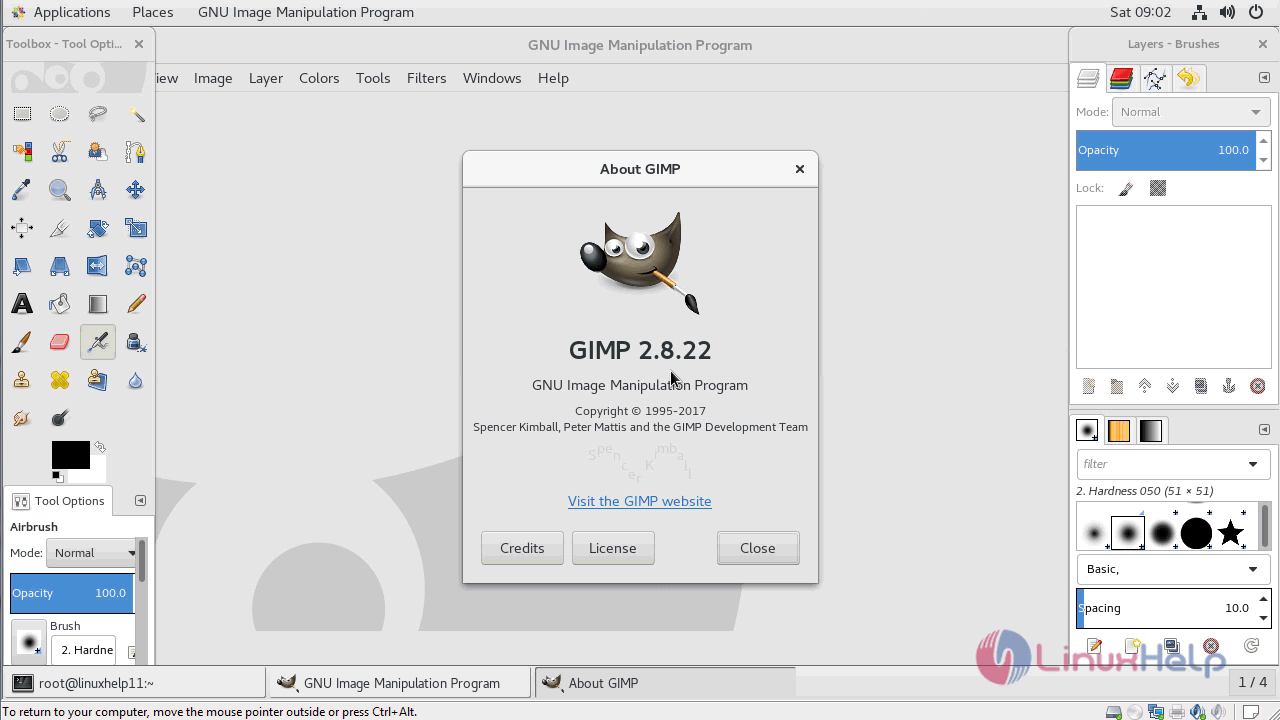
gimp_version

With this, the method to install Gimp 2.8.22 on CentOS 7 comes to an end.

Tags:
gabriel
Author: 

Comments ( 1 )

Jesse
thanks for this!
Add a comment
{{postCtrl.cmtErrMsg}}

Frequently asked questions ( 5 )

Q

What is the best picture compression Gimp 2.8.22 on CentOS 7?

A

They are,
gimp,pngcrush , optipng, trimage

Q

What is the Purpose of Gimp?

A

Gimp is an image editor used by graphic designer, illustrator, photographer or scientist.

Q

Can I make the installation of GIMP on Fedora?

A

Yes, you can follow the link:
"https://www.linuxhelp.com/how-to-install-gimp-2-8-22-on-fedora-28/"

Q

What is Gimp in CentOS?

A

GIMP is a free and open-source image editor which can be used for retouching and editing images. The latest version of GIMP comes with a new revamped UI and usability changes. Although the latest version includes new themes by Benoit Touchette in various shades of gray: Lighter, Light, Gray, Dark, Darker, the system theme is retained for users who prefer a completely consistent look of user interfaces across all desktop applications.

Q

How to install Gimp on CentOS 7?

A

Execute the following command:
# yum install gimp

Back To Top!
Rank
User
Points

Top Contributers

userNamenaveelansari
135850

Top Contributers

userNameayanbhatti
92510

Top Contributers

userNamehamzaahmed
32150

Top Contributers

1
userNamelinuxhelp
31040

Top Contributers

userNamemuhammadali
24500
Can you help Gibbson ?
How do i run both nginx and apache in same instance on centos

Hi...,

my server is based centos operating system and my webserver is already running on Apache.... i need to run both apache and nginx on same instance ... please help me to implement this concept...

Networking
  • Routing
  • trunk
  • Netmask
  • Packet Capture
  • domain
  • HTTP Proxy
Server Setup
  • NFS
  • KVM
  • Memory
  • Sendmail
  • WebDAV
  • LXC
Shell Commands
  • Cloud commander
  • Command line archive tools
  • last command
  • Shell
  • terminal
  • Throttle
Desktop Application
  • Linux app
  • Pithos
  • Retrospect
  • Scribe
  • TortoiseHg
  • 4Images
Monitoring Tool
  • Monit
  • Apache Server Monitoring
  • EtherApe 
  • Arpwatch Tool
  • Auditd
  • Barman
Web Application
  • Nutch
  • Amazon VPC
  • FarmWarDeployer
  • Rukovoditel
  • Mirror site
  • Chef
Contact Us | Terms of Use| Privacy Policy| Disclaimer
© 2025 LinuxHelp.com All rights reserved. Linux™ is the registered trademark of Linus Torvalds. This site is not affiliated with linus torvalds in any way.