How To Install Gmusicbrowser on linuxmint 18.03
{{postValue.id}}
To Install Gmusicbrowser on linuxmint-18.03
GMusicBrowser is a customizable and open-source graphics browser. It is a powerful graphical browser which supports libraries with a very large number of songs. It can use multiple inputs and has support for mp3, Ogg, and Flac files.
Installation
Add the repository of the gmusic browser using PPA
linuxhelp ~ # add-apt-repository ppa:andreas-boettger/gmusicbrowser-daily
You are about to add the following PPA:
 Daily builds for gmusicbrowser (https://github.com/squentin/gmusicbrowser)

For some time gmusicbrowser is also included in the official repositories. Nevertheless, to install the version offered here, the priority of the installation must be changed (apt pinning).

Create a file: " /etc/apt/preferences.d/andreas-boettger_gmusicbrowser-daily-ppa-pin"

With the following content:

Package: *
Pin: release o=LP-PPA-andreas-boettger-gmusicbrowser-daily
Pin-Priority: 1001
 More info: https://launchpad.net/~andreas-boettger/+archive/ubuntu/gmusicbrowser-daily
Press Enter to continue or Ctrl+C to cancel

Executing: /tmp/tmp.k06XWTfrcz/gpg.1.sh --keyserver
hkp://keyserver.ubuntu.com:80
--recv-keys
46C4E33F
gpg: requesting key 46C4E33F from hkp server keyserver.ubuntu.com
gpg: key 46C4E33F: public key " Launchpad mounttruecrypt"  imported
gpg: Total number processed: 1
gpg:               imported: 1  (RSA: 1)
Update the system repository
linuxhelp ~ # apt-get update
Hit:1 http://archive.ubuntu.com/ubuntu xenial InRelease
Get:2 http://ppa.launchpad.net/andreas-boettger/gmusicbrowser-daily/ubuntu xenial InRelease [17.6 kB]
Get:3 http://archive.canonical.com/ubuntu xenial InRelease [11.5 kB]
Ign:4 http://packages.linuxmint.com sylvia InRelease
Get:5 http://archive.canonical.com/ubuntu xenial/partner amd64 Packages [3,128 B]
Get:6 http://ppa.launchpad.net/ondrej/php/ubuntu xenial InRelease [23.9 kB]
Get:7 http://packages.linuxmint.com sylvia Release [24.2 kB]
Get:8 http://archive.ubuntu.com/ubuntu xenial-updates InRelease [109 kB]
.
.
.
Get:48 http://archive.ubuntu.com/ubuntu xenial-backports/main amd64 Packages [4,844 B]
Get:49 http://archive.ubuntu.com/ubuntu xenial-backports/main i386 Packages [4,836 B]
Get:50 http://archive.ubuntu.com/ubuntu xenial-backports/universe amd64 Packages [7,400 B]
Get:51 http://archive.ubuntu.com/ubuntu xenial-backports/universe i386 Packages [7,080 B]
Get:52 http://archive.ubuntu.com/ubuntu xenial-backports/universe Translation-en [3,996 B]
Fetched 6,012 kB in 2min 1s (49.3 kB/s)
Reading package lists... Done
Install the gmusic browser using following commands
linuxhelp ~ # apt-get install gmusicbrowser -y
Reading package lists... Done
Building dependency tree
Reading state information... Done
The following packages were automatically installed and are no longer required:
  libcurl3 libmcrypt4
Use ' sudo apt autoremove'  to remove them.
Suggested packages:
  mpv mplayer mpg123 vorbis-tools libgtk2-mozembed-perl libgstreamer-perl libgtk2-notify-perl
  libgnome2-wnck-perl
Recommended packages:
.
.
.
Preparing to unpack .../gmusicbrowser_1.1.15+1418~ubuntu16.04.1_all.deb ...
Unpacking gmusicbrowser (1.1.15+1418~ubuntu16.04.1) ...
Processing triggers for man-db (2.7.5-1) ...
Processing triggers for hicolor-icon-theme (0.15-0ubuntu1) ...
Processing triggers for desktop-file-utils (0.22+linuxmint1) ...
Processing triggers for mime-support (3.59ubuntu1) ...
Setting up gmusicbrowser (1.1.15+1418~ubuntu16.04.1) ...
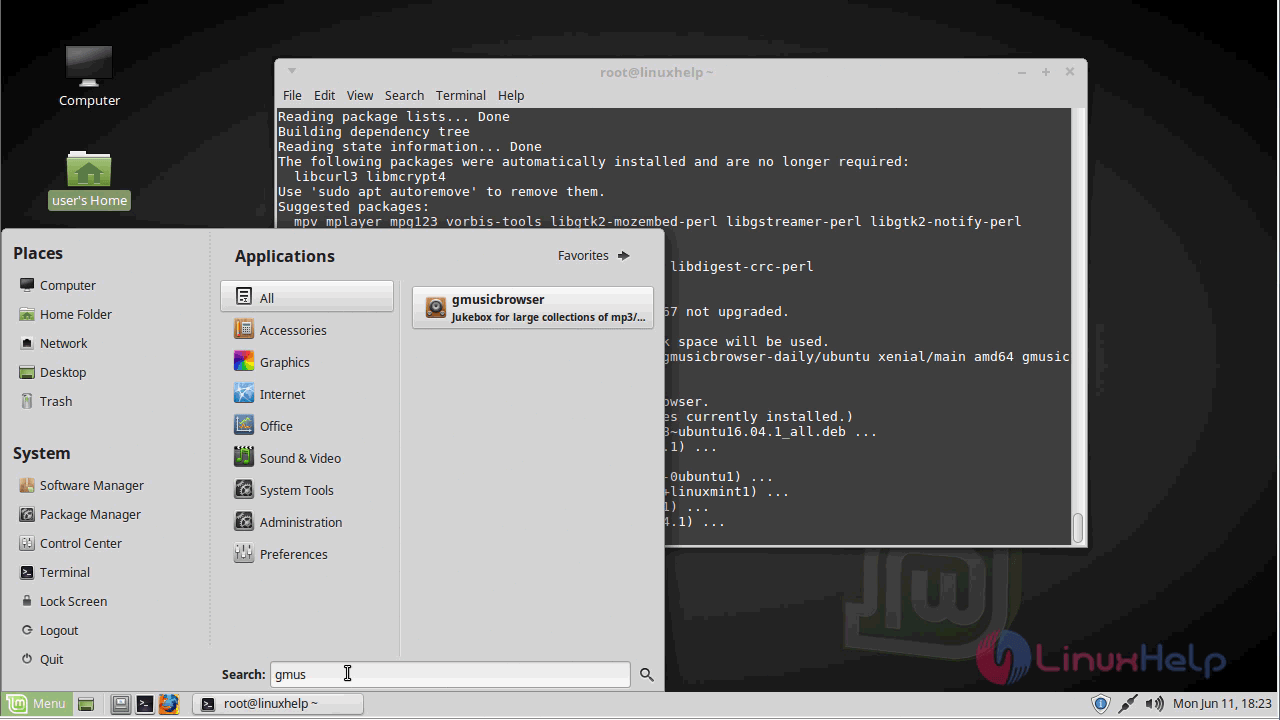
After the installation, you can access the application from the menu as shown here.
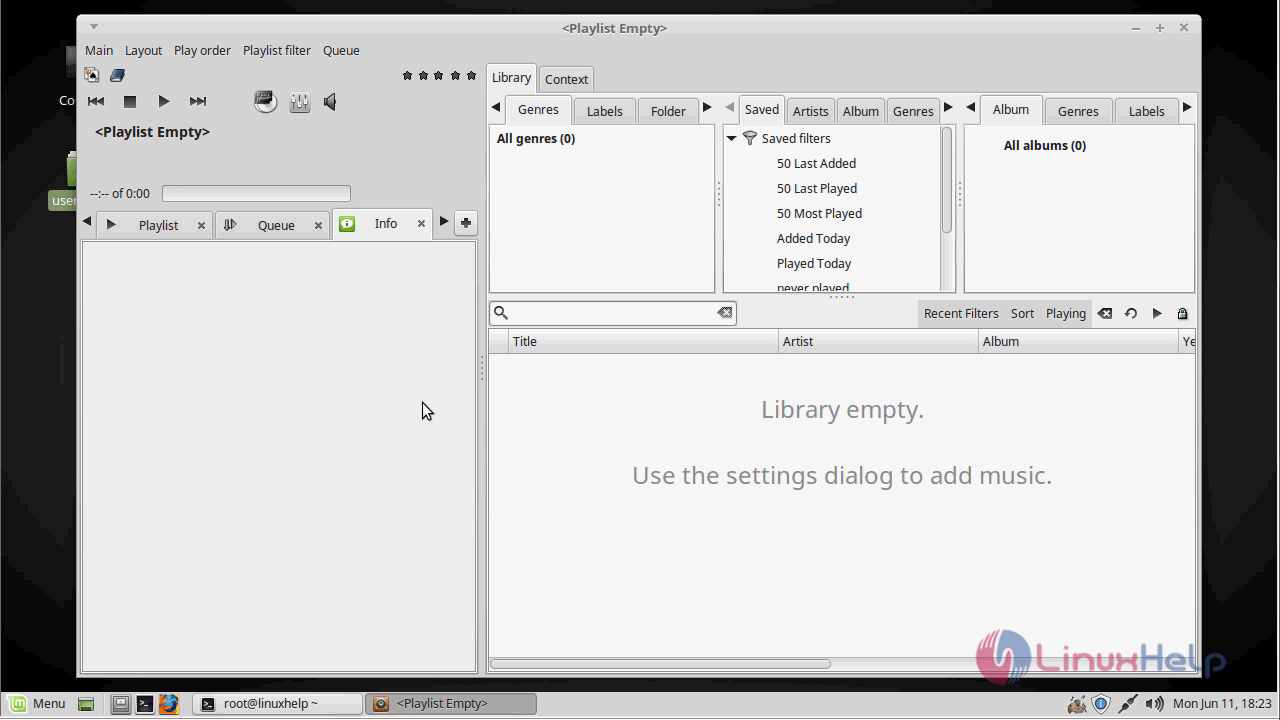
with this, the method to Install Gmusicbrowser on linuxmint-18.03 comes to an end.
Comments ( 0 )
No comments available