• Categories
    Category
    {{ postCtrl.tags }}
    • {{ category.tag_type }}

      • {{tag.tag_name}}
      • View more
  • Categories
    Category
    {{ postCtrl.tags }}
    • {{ category.tag_type }}

      • {{tag.tag_name}}
      • View more
  • News
  • Tutorials
  • Forums
  • Tags
  • Users
Tutorial News Comments FAQ Related Articles

How to install Gnome System Monitor 3.18.2-1 on Ubuntu-16.04

{{postValue.id}}

To install Gnome System Monitor 3.18.2-1 on Ubuntu-16.04

The first tool that you can use to get an overview of the use of your system' s resources is GNOME' s system monitoring utility. With it you can determine the CPU load, RAM use, Swap file use, Hard Disk size and available space, and finally the Network activity (sent/received). You can easily have it installed in your Ubuntu machine, and this tutorial covers the ground on the same process.


Installing Gnome System Monitor

First, you need to update the system by making use of the following command.

root@localhost:~# apt-get update
Get:1 http://security.ubuntu.com/ubuntu xenial-security InRelease [102 kB]
.
.
Fetched 1,454 kB in 9s (159 kB/s)                                                             
Reading package lists... Done


Once it is done, you shall proceed with the installation of Gnome System Monitor Tool.

root@localhost:~# apt-get install gnome-system-monitor -y
Reading package lists... Done
.
.
Processing triggers for mime-support (3.59ubuntu1) ...
Setting up gnome-system-monitor (3.18.2-1ubuntu1) ...

After the installation, you can open your Gnome System Monitor tool by making use of the following command.

root@localhost:~# gnome-system-monitor 

And then, you can check the process detail.
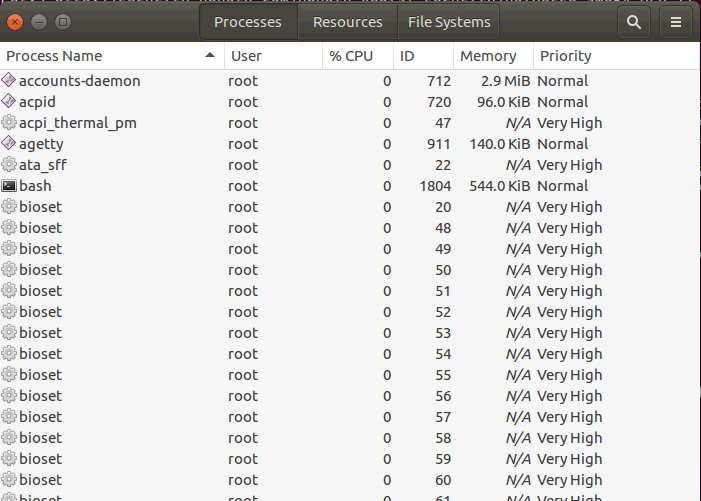
details


You can also check the resource statistics.
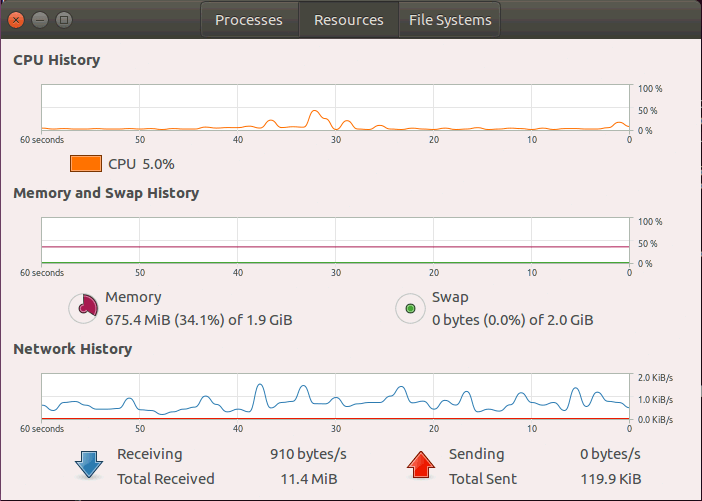
Statistics

Also, you can view the Harddisk information.
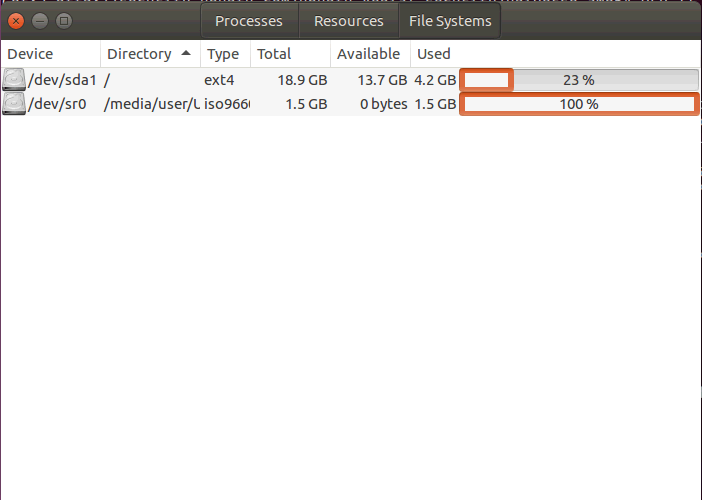
hardisk

With this, the installation of Gnome System Monitor tool comes to end.

Tags:
jackson
Author: 

Comments ( 0 )

No comments available

Add a comment
{{postCtrl.cmtErrMsg}}

Frequently asked questions ( 5 )

Q

what was some of its alternative?

A

htop,glances are some of its alternatives

Q

Is this be installed in linux mint?

A

Yes this can be installed in linuxmint

Q

Package name used for debain based systems?

A

use the following gnome-system-monitor

Q

How can I update Gnome system monitor?

A

On my Xenial system gnome-system-monitor is fairly straightforward to build from source. First allow access to source code:

Dash > Software & Updates > Ubuntu Software > Source Code

Q

Unanswered

Why all gnome extensions showing outdated?

A

I know this thread is a bit dated now, but I thought it worth mentioning that I had a similar problem to Raf, and in summary I think it has been solved by the following:

Purge the testing repositories (ricotz and gnome3-team)
Purge gnome-shell
Purge gnome-shell-common (this was my biggest problem)
Reinstall gnome-shell (after apt-get update)
Credit belongs to, and more detailed information ca

Back To Top!
Rank
User
Points

Top Contributers

userNamenaveelansari
135850

Top Contributers

userNameayanbhatti
92510

Top Contributers

userNamehamzaahmed
32150

Top Contributers

1
userNamelinuxhelp
31040

Top Contributers

userNamemuhammadali
24500
Can you help Isaiah ?
What is the use of SUID & SGID commands

How to set the special permissions to the files and folders using SUID and SGID commands...

Networking
  • Routing
  • trunk
  • Netmask
  • Packet Capture
  • domain
  • HTTP Proxy
Server Setup
  • NFS
  • KVM
  • Memory
  • Sendmail
  • WebDAV
  • LXC
Shell Commands
  • Cloud commander
  • Command line archive tools
  • last command
  • Shell
  • terminal
  • Throttle
Desktop Application
  • Linux app
  • Pithos
  • Retrospect
  • Scribe
  • TortoiseHg
  • 4Images
Monitoring Tool
  • Monit
  • Apache Server Monitoring
  • EtherApe 
  • Arpwatch Tool
  • Auditd
  • Barman
Web Application
  • Nutch
  • Amazon VPC
  • FarmWarDeployer
  • Rukovoditel
  • Mirror site
  • Chef
Contact Us | Terms of Use| Privacy Policy| Disclaimer
© 2025 LinuxHelp.com All rights reserved. Linux™ is the registered trademark of Linus Torvalds. This site is not affiliated with linus torvalds in any way.