• Categories
    Category
    {{ postCtrl.tags }}
    • {{ category.tag_type }}

      • {{tag.tag_name}}
      • View more
  • Categories
    Category
    {{ postCtrl.tags }}
    • {{ category.tag_type }}

      • {{tag.tag_name}}
      • View more
  • News
  • Tutorials
  • Forums
  • Tags
  • Users
Tutorial News Comments FAQ Related Articles

How to install Green Screen Recorder on Ubuntu 16.04

{{postValue.id}}

To install Green Recorder on Ubuntu

Green Recorder is a desktop recorder for Linux, and is developed using Python and GTK+3. Although it is a newly released tool, Green Recorder is very simple to install. In this tutorial, you will be briefed about the installation of Green Recorder on Ubuntu.

To install Green Recorder

In order to install Green Screen Recorder, make sure you have added the repository as follows.

root@linuxhelp1:~# add-apt-repository ppa:mhsabbagh/greenproject
 A repository which contains the latest programs and packages produced by the Green Project.
 More info: https://launchpad.net/~mhsabbagh/+archive/ubuntu/greenproject
Press [ENTER] to continue or ctrl-c to cancel adding it
.
.
.
gpg: key 52C2F659: public key " Launchpad PPA for M.Hanny Sabbagh"  imported
gpg: Total number processed: 1
gpg:               imported: 1  (RSA: 1)
OK

Once it is done, update the machine as follows.

root@linuxhelp1:~# apt-get update
Get:1 http://ppa.launchpad.net/mhsabbagh/greenproject/ubuntu xenial InRelease [18.1 kB]
Hit:2 http://security.ubuntu.com/ubuntu xenial-security InRelease              
Hit:3 http://in.archive.ubuntu.com/ubuntu xenial InRelease                          
.
.
.
Hit:5 http://in.archive.ubuntu.com/ubuntu xenial-backports InRelease
Reading package lists... Done

Now is the time to install Green Recorder, use the following command for the same purpose.

root@linuxhelp1:~# apt-get install green-recorder
Reading package lists... Done
Building dependency tree       
Reading state information... Done
The following additional packages will be installed:
  ffmpeg gawk i965-va-driver libaacs0 libass5 libavcodec-ffmpeg56 libavcodec57
  libavdevice57 libavfilter6 libavformat57 libavresample3 libavutil-ffmpeg54
.
.
.
Setting up va-driver-all:amd64 (1.7.0-2~ubuntu14.04.1york1) ...
Setting up vdpau-driver-all:amd64 (1.1.1-3ubuntu1) ...
Processing triggers for libc-bin (2.23-0ubuntu3) ...

Launch the Green Recorder from Ubuntu dashboard.
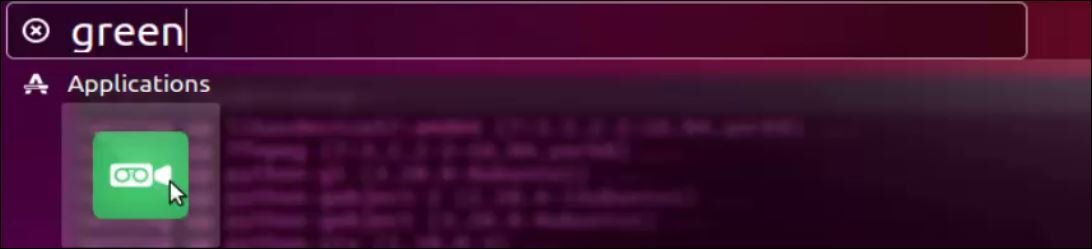
search

Record the screen by using Green Recorder.
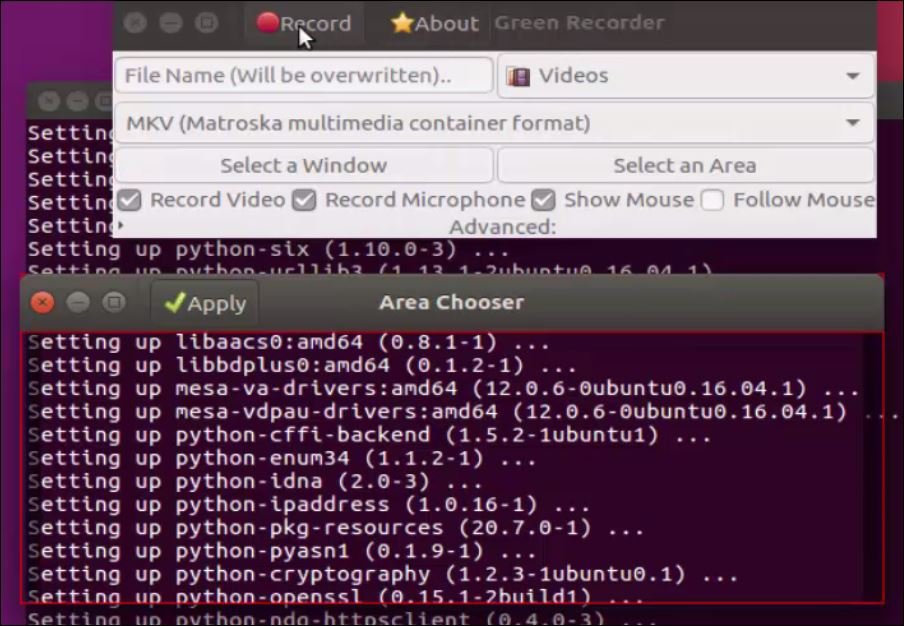
Record
Simple to install, isn' t it? It is also easy to record all your computer activities using Green Recorder. It works well on almost all of Linux interfaces. Green Recorder supports formats such as mkv, avi, mp4, wmv and nut for now, and may extent its supporting formats. Hope, you enjoy recording your desktop activities with Green Recorder.

Tags:
elijah
Author: 

Comments ( 0 )

No comments available

Add a comment
{{postCtrl.cmtErrMsg}}

Frequently asked questions ( 5 )

Q

"I have this issue with this green screen that comes up in my boot process. Any suggestions?

"

A

"Check if you enabled Framebuffer support in the kernel. If so, disable that, then try to boot again.

"

Q

"Chromakey (green screen) editing program for Ubuntu?

"

A

"I have been looking around but have not been able to find anything that can do chroma-key/green / blue screen etc. in Linux.

"

Q

"
Is there any alternative of green screen recorder?


"

A

"try following RecordMyDesktop Vokoscreen Open Broadcaster Software (OBS) Peek ScreenStudio

"

Q

What can I use as an inexpensive Green Screen?

A

"Dollar Store plastic green tablecloths
Ikea Green Shower curtain
Green File folders from Staples"

Q

Any recommendations for video backgrounds for Newscasts?

A

There are several to chose from at Free Virtual Sets on YouTube

Back To Top!
Rank
User
Points

Top Contributers

userNamenaveelansari
135850

Top Contributers

userNameayanbhatti
92510

Top Contributers

userNamehamzaahmed
32150

Top Contributers

1
userNamelinuxhelp
31040

Top Contributers

userNamemuhammadali
24500
Can you help Ganesh Konka ?
Zentya 6.1 http proxy configuration

please send link for creating zentyal 6.1 for http proxy and firewall as gateway.

Networking
  • Routing
  • trunk
  • Netmask
  • Packet Capture
  • domain
  • HTTP Proxy
Server Setup
  • NFS
  • KVM
  • Memory
  • Sendmail
  • WebDAV
  • LXC
Shell Commands
  • Cloud commander
  • Command line archive tools
  • last command
  • Shell
  • terminal
  • Throttle
Desktop Application
  • Linux app
  • Pithos
  • Retrospect
  • Scribe
  • TortoiseHg
  • 4Images
Monitoring Tool
  • Monit
  • Apache Server Monitoring
  • EtherApe 
  • Arpwatch Tool
  • Auditd
  • Barman
Web Application
  • Nutch
  • Amazon VPC
  • FarmWarDeployer
  • Rukovoditel
  • Mirror site
  • Chef
Contact Us | Terms of Use| Privacy Policy| Disclaimer
© 2025 LinuxHelp.com All rights reserved. Linux™ is the registered trademark of Linus Torvalds. This site is not affiliated with linus torvalds in any way.